Bug #10166
OE Bug: Unpredictable Sorting of Equal Items in Sorted Selection Lists and Combo Boxes
0%
History
#1 Updated by Vladimir Tsichevski over 1 year ago
- File 10166-combo-pairs-oe.png added
- File 10166-combo-items-oe.png added
- File 10166-selection-list-oe.png added
Warning: This task is for documentation purposes only and outlines the OE behavior, which is unpredictable and should not be replicated in FWD!
Consider this demo example:
CURRENT-WINDOW:WIDTH-CHARS = 100.
DEFINE VARIABLE slSortedPairs AS CHARACTER FORMAT "x(30)" VIEW-AS SELECTION-LIST
    SORT
    INNER-LINES 20
    INNER-CHARS 30
    LIST-ITEM-PAIRS "a",1,"A",2,"a",3,"A",4,"a",5,"A",6
    .

DEFINE VARIABLE slSortedItems AS CHARACTER FORMAT "x(30)" VIEW-AS SELECTION-LIST
    SORT
    INNER-LINES 20
    INNER-CHARS 30
    LIST-ITEMS "a","A","a","A","a","A"
    .

DEFINE FRAME f slSortedItems slSortedPairs WITH SIDE-LABELS SIZE 90 BY 20.

ENABLE ALL WITH FRAME f.
ON VALUE-CHANGED OF slSortedPairs DO:
  MESSAGE slSortedPairs:SCREEN-VALUE.
END.

WAIT-FOR CLOSE OF CURRENT-WINDOW.
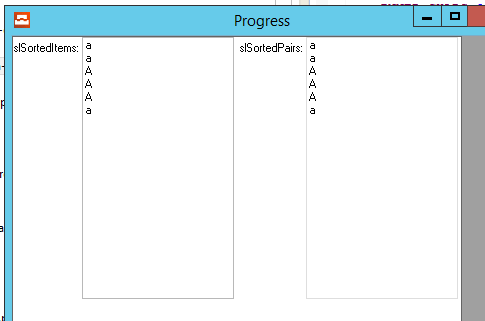
This example sets up two sorted selection lists: one with LIST-ITEM-PAIRS and another with LIST-ITEMS. Both contain items (a and A) that the sorting algorithm treats as equal due to case-insensitive comparison. After sorting, the items appear in reverse order of their initial sequence, which this demo confirms.
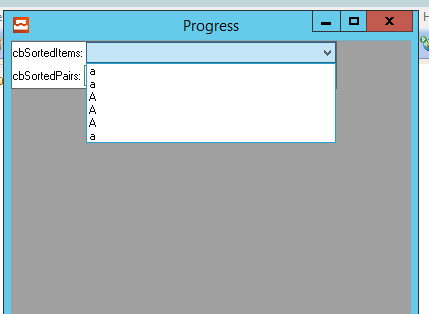
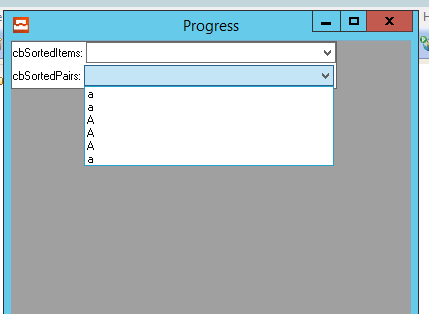
However, the displayed item labels don’t match the expected order. We’d expect A, a, A, a, A, a, but the screen shows a, a, A, A, A, a instead. Other users have reported different orders, suggesting this behavior is unreliable.
The same issue pops up with COMBO-BOX widgets, as seen in this demo:
DEFINE VARIABLE cbSortedPairs AS CHARACTER FORMAT "x(30)" VIEW-AS COMBO-BOX
    SORT
    INNER-LINES 30
    LIST-ITEM-PAIRS "a",1,"A",2,"a",3,"A",4,"a",5,"A",6
    DROP-DOWN-LIST SIZE 50 BY 1.

DEFINE VARIABLE cbSortedItems AS CHARACTER FORMAT "x(30)" VIEW-AS COMBO-BOX
    SORT
    INNER-LINES 30
    LIST-ITEMS "a","A","a","A","a","A"
    DROP-DOWN-LIST SIZE 50 BY 1.

DEFINE FRAME f cbSortedItems cbSortedPairs WITH SIDE-LABELS.

ENABLE ALL WITH FRAME f.
ON VALUE-CHANGED OF cbSortedItems DO:
  MESSAGE cbSortedItems:SCREEN-VALUE.
END.

ON VALUE-CHANGED OF cbSortedPairs DO:
  MESSAGE cbSortedPairs:SCREEN-VALUE.
END.

WAIT-FOR CLOSE OF CURRENT-WINDOW.