Bug #10266
Incorrect Input Handling in Grouped CHARACTER FILL-INs
80%
10266_tests.ods (21.2 KB)
10266_tests.ods (21.6 KB)
vvt-refactorings.diff  - proposed refactorings
(8.16 KB)
- proposed refactorings
(8.16 KB)
10266-48-FWD.png (5.69 KB)
10266-48-OE.png (5.02 KB)
10266-48-FWD-with-text.png (5.95 KB)
Related issues
History
#1 Updated by Vladimir Tsichevski about 1 year ago
In OE, multiple FILL-IN widgets of CHARACTER type can be grouped, allowing text entered into one FILL-IN to wrap into the next in the group when it exceeds the allotted space.
This issue addresses problems in FWD's implementation of this feature.
To illustrate the discrepancies, consider the following example in GUI mode:
DEFINE VARIABLE txt1 AS CHARACTER NO-UNDO FORMAT "X(4)".
DEFINE VARIABLE txt2 AS CHARACTER NO-UNDO FORMAT "X(4)".
SET TEXT(txt1 txt2).
DEFINE FRAME f txt1 txt2.
ENABLE ALL WITH FRAME f.

WAIT-FOR CLOSE OF FRAME f.
Issue 1
- Enter a single printable character, such as
a, into the firsttxt1. - Move the caret to position 0.
- Begin typing spaces before the
a.
In OE, upon entering the 4th space, the a shifts to txt2, the focus remains in txt1, and the caret moves to position 0.
In FWD, upon entering the 4th space, the a is removed, the focus shifts to txt2, and the caret moves to position 4.
Issue 2
- Input four printable characters, such as
abcd, into the firsttxt1. - Use the mouse to set focus to
txt2. - Press
Backspace.
In OE, the focus returns to txt1, the last character (d) is deleted, resulting in a displayed value of abc, and the caret moves to position 3.
In FWD, the focus returns to txt1 (as expected), but the first character (a) is deleted, resulting in a displayed value of bcd, and the caret moves to position 0.
#2 Updated by Vladimir Tsichevski about 1 year ago
- Related to Bug #8365: FILL-IN: editing character issues added
#3 Updated by Ionut-Mihai Simioniuc about 1 year ago
- Assignee set to Ionut-Mihai Simioniuc
#4 Updated by Ionut-Mihai Simioniuc about 1 year ago
- Status changed from New to WIP
Vladimir, could you provide some information about the area where the issue might occur?
#5 Updated by Vladimir Tsichevski about 1 year ago
Ionut-Mihai Simioniuc wrote:
Vladimir, could you provide some information about the area where the issue might occur?
Grouped FILL-IN widgets are used within our ChUI testing framework. It appears they were employed prior to the availability of the EDITOR widget in OE.
#6 Updated by Ionut-Mihai Simioniuc about 1 year ago
Grouped FILL-IN widgets are used within our ChUI testing framework. It appears they were employed prior to the availability of the EDITOR widget in OE.
Hmm, I'm looking for methods, classes, or any information related to the communication between text1 and text2 through SET TEXT. I tried inspecting processKeyEvent from FillIn but nothing helpful until now. I believe I need to identify the exact location where text1, or something else, sends a value to text2, or triggers the update.
Thank you!
#7 Updated by Șerban Bursuc about 1 year ago
Ionut, look into GenericFrame.setWorker, GenericFrame.promptForWorker from the server and ThinClient.promptFor on the client, on the client especially there are some focus related calls:
         if (focus != null)
         {
            highlight(focus, false);
         }

         // if in trigger nesting mode, save previous focus
         if (triggerNesting > 0)
         {
            pendingFocus = focus;
         }

         BufferSizeManager.getInstance().notifyBlockingOperation(BlockingOperation.PROMPT_FOR);

         // old focus has to be undefined
         wnd.setFocus(null);

         result = waitFor(el, focusWidgetId, millis, sb, BlockingOperation.PROMPT_FOR, true, windowId);
this is for sure the area with an issue.
#8 Updated by Vladimir Tsichevski about 1 year ago
Ionut-Mihai Simioniuc wrote:
Grouped FILL-IN widgets are used within our ChUI testing framework. It appears they were employed prior to the availability of the EDITOR widget in OE.
Hmm, I'm looking for methods, classes, or any information related to the communication between
text1andtext2throughSET TEXT. I tried inspectingprocessKeyEventfromFillInbut nothing helpful until now. I believe I need to identify the exact location where text1, or something else, sends a value to text2, or triggers the update.Thank you!
The SET TEXT statement groups two FILL-IN widgets together.
The boolean FillIn.groupMode serves as a flag indicating whether a FILL-IN belongs to a group.
The private boolean FillIn.refill(boolean insert, int key) method is responsible for propagating changes within a FILL-IN to subsequent group widgets.
#9 Updated by Ionut-Mihai Simioniuc about 1 year ago
- % Done changed from 0 to 80
I have fixed Issue 1.
Committed on 10266a at revision 16049.
To fix the second issue, I need to rewrite the logic in the FillIn.insertWord method. That method should handle the cyclic rotation of words across all grouped fill-ins.
Another issue occurs when inserting a word into the next fill-in: the current value is always hardcoded with a leading space, and the cursor is consistently moved to position 1. Vladimir, if you know more about that modification, it would be helpful for me to understand where exactly the issue is happening.
In the FillInGuiImpl.processKeyEvent method, I changed the following :
if (!(dispFormat instanceof NumberFormat)            &&
          !(dispFormat instanceof DateFormat)              &&
 --->      (offset >= dispFormat.getScreenWidth())          &&
          Keyboard.isPrintableKey(ke))
to
if (!(dispFormat instanceof NumberFormat)            &&
          !(dispFormat instanceof DateFormat)              &&
 --->      (offset > dispFormat.getScreenWidth())          &&
          Keyboard.isPrintableKey(ke))
because this condition prevents handling
case 2 from handleKeySpaceInputGroupedFillIn,I want to know if this change might affect anything else.I considered another approach, but it didn't really exist, because I need to get my execution flow to that method to handle it correctly within that method.
Additionally, when solving issue 1, I avoided modifying the existing code in FillIn.refill(boolean insert, int key) as it appears fragile and I want to prevent potential regressions.
#10 Updated by Ionut-Mihai Simioniuc about 1 year ago
Vladimir, could you give me more information about this override parameter? And the logic behind of this parameter?
private void insertWord(String word, boolean override)
Also if you could provide more information about insert and non-insert mode from refill method.
#11 Updated by Ionut-Mihai Simioniuc about 1 year ago
- % Done changed from 80 to 90
Fixed propagation of full words and partial words to the next fill-in. Addressed several insertion bugs. Revised the propagation cycling logic, including handling numerous strange/specific 4GL behaviors.
I also made some refactorization for a better readability.
Committed on 10266a at revision 16051.
Now I just had to manage the character removal scenario.
#12 Updated by Hynek Cihlar about 1 year ago
- reviewer Vladimir Tsichevski added
Vladimir, can you please review this one?
Ionut, is there any more work needed?
#13 Updated by Ionut-Mihai Simioniuc about 1 year ago
- % Done changed from 90 to 100
- File 10266_tests.ods added
- Status changed from WIP to Review
Ionut, is there any more work needed?
I fixed the deletion mechanics. Also I fixed some cursor offset, insertion and propagation words issues.
I made a suite of tests which cover a lot of related cases, for deletion, insertion, full fill-in insertion and Last fill-in special cases.
Committed on 10266a at revision 16052.
Vladimir, could you review?
I also discovered other issues unrelated to "Handling in Grouped CHARACTER FILL-INs". Could I open another task with these issues?
1). In OE, if you have: "a|" and press right arrow, then another space is appended. :"a' '|". In FWE this doesn't happen.
2). Even I'm updating correctly the cursor after propagation, in handleInsertMode
            FocusManager.tryFocusChange(getNextInGroup());

            // Update the cursor.
            int newCursorOffet = currentPosition - newCurrentFillInContent.length();
            getNextInGroup().setCursorOffset(newCursorOffet);
            getNextInGroup().updateCursorOffsetValue();
in the end, the cursor position is changed, somewhere else in the code. The cursor is always moved at the end + 1 of content length.
3). When I select more than one character and delete, everything behind the focused Fill-in is deleted. This is not correct for all cases.
Now, I think I need to do a refactoring for better readability and add entry point history.
#14 Updated by Vladimir Tsichevski about 1 year ago
It does not compile with Java 8.
[ant:javac] /mnt/sdb1/p2j/10266a/src/com/goldencode/p2j/ui/client/FillIn.java:2219: error: cannot find symbol
[ant:javac]                   ptr.setCursorOffset(ptr.getText().stripTrailing().length() - 1);
[ant:javac]                                                    ^
[ant:javac]   symbol:   method stripTrailing()
[ant:javac]   location: class String
[ant:javac] /mnt/sdb1/p2j/10266a/src/com/goldencode/p2j/ui/client/FillIn.java:3988: error: cannot find symbol
[ant:javac]          String newTextAfterShifting = (newTextAfterDeletion.stripTrailing().length() == 0) ?
[ant:javac]                                                             ^
[ant:javac]   symbol:   method stripTrailing()
[ant:javac]   location: variable newTextAfterDeletion of type String
[ant:javac] /mnt/sdb1/p2j/10266a/src/com/goldencode/p2j/ui/client/FillIn.java:3989: error: cannot find symbol
[ant:javac]                newTextAfterDeletion + getNextInGroup().getText().stripTrailing() :
[ant:javac]                                                                 ^
[ant:javac]   symbol:   method stripTrailing()
[ant:javac]   location: class String
#15 Updated by Ionut-Mihai Simioniuc about 1 year ago
I changed the stripTrailing() method to the StringHelper.safeTrimTrailing() method.
Committed on 10266a at revision 16053.
#16 Updated by Vladimir Tsichevski about 1 year ago
Vladimir Tsichevski wrote:
It does not compile with Java 8.
[...]
Now it compiles with Java 8.
Testing results:
The original two issues have been resolved.
New Issue Discovered
- Enter 3 characters
a binto the firsttxt1. - Move the caret to position 0.
- Type two spaces before the
a b.
In OE, upon entering the second space, the b shifts to txt2, the focus remains in txt1, the text in txt1 becomes a (two spaces followed by a), and the caret moves to position 2 before a.
In FWD, upon entering the second space, the text in txt1 becomes empty, while the text in txt2 becomes a b (noting one trailing space).
#17 Updated by Ionut-Mihai Simioniuc about 1 year ago
- File 10266_tests.ods added
I've found 4 more testcases, which I added to the tests file.
I fixed all issues, now all the test cases pass.
Committed on 10266a at revision 16054.
Please review, Vladimir !
#18 Updated by Vladimir Tsichevski about 1 year ago
Ionut-Mihai Simioniuc wrote:
I've found 4 more testcases, which I added to the tests file.
I fixed all issues, now all the test cases pass.Committed on 10266a at revision 16054.
Please review, Vladimir !
New issues discovered (tested with the 10266a revision 16054):
Spaces in CHARACTER Mode
Run this program in CHARACTER mode.
Issue 1
- In
txt1, pressSPACEfour or more times. - Upon entering the fourth space, the caret moves to
txt2.
Note: This behavior applies consistently in both INSERT mode on and off, with no noticeable difference.
In FWD, pressing SPACE for the fourth time resets the caret to position 0 in txt1 instead.
Issue 2
- Shift focus to
txt2and pressSPACEfour or more times. - Starting with the fourth space and for all subsequent spaces, no action occurs; the caret remains at the rightmost position in
txt2.
Note: This behavior applies consistently in both INSERT mode on and off, with no noticeable difference.
In FWD, pressing SPACE for the fourth time incorrectly resets the caret to position 0 in txt2 instead.
#19 Updated by Vladimir Tsichevski about 1 year ago
Caret Position and Selection Issue in GUI Mode
Run this program in GUI mode.
Steps to Reproduce
- Enter some text into
txt1. - Move the caret to any position or select any portion of the text.
- Use the mouse to shift focus to
txt2. - Use the
TABkey to return focus totxt1.
In OE, the caret position and/or selection in txt1 are restored when focus is regained in this manner.
In FWD, the entire text is selected, and the caret is positioned at the end of the selection instead.
Note: This caret position and selection restoration behavior is specific to grouped FILL-IN widgets.
#20 Updated by Ionut-Mihai Simioniuc about 1 year ago
So I’m not sure if I fully understand, are these two issues related to grouped FILL-IN behavior?
In 4GL, using the following test case:
DEFINE VARIABLE txt1 AS CHARACTER NO-UNDO FORMAT "X(4)".
DEFINE VARIABLE txt2 AS CHARACTER NO-UNDO FORMAT "X(4)".
SET TEXT(txt1 txt2).
DEFINE FRAME f txt1 txt2.
ENABLE ALL WITH FRAME f.

WAIT-FOR CLOSE OF FRAME f.
the behavior seems the same as the one I’ve implemented. Perhaps I don’t quite understand what you mean by 'CHARACTER MODE'? Is there maybe a specific property that changes the behavior of fill-ins when used in grouped mode?
#21 Updated by Ionut-Mihai Simioniuc about 1 year ago
- Status changed from Review to WIP
#22 Updated by Vladimir Tsichevski about 1 year ago
Ionut-Mihai Simioniuc wrote:
So I’m not sure if I fully understand, are these two issues related to grouped FILL-IN behavior?
All issues I reported here are for grouped FILL-IN widgets,
In 4GL, using the following test case:
[...]
the behavior seems the same as the one I’ve implemented. Perhaps I don’t quite understand what you mean by 'CHARACTER MODE'? Is there maybe a specific property that changes the behavior of fill-ins when used in grouped mode?
In OE, CHARACTER mode is designed for clients operating within a character-based terminal environment (e.g., physical character terminals, Windows CMD, or Unix terminal windows), in contrast to GUI mode, which is used when the client runs in a graphical environment (e.g., Windows).
#23 Updated by Ionut-Mihai Simioniuc about 1 year ago
I have fixed the tab cursor offset issue.
Committed on 10266a at revision 16055.
    Enter some text into txt1.
    Move the caret to any position or select any portion of the text.
    Use the mouse to shift focus to txt2.
    Use the TAB key to return focus to txt1.

In OE, the caret position and/or selection in txt1 are restored when focus is regained in this manner.
In FWD, the entire text is selected, and the caret is positioned at the end of the selection instead.
However, there's still an issue. If I reproduce it a second time, the cursor offset gets reset, while in 4GL, the caret remains in its original position.
Here is why it gets reset the second time :
In FillIn.activate()
// reset the cursor position
            if (!skipCursorActivation)
            {
               config.appDataPres.activate();
            }
            else
            {
               skipCursorActivation = false;
            }
skipCursorActivation becomes false, and on the second focus gain, config.appDataPres.activate(); is called, which resets the cursor offset.#24 Updated by Ionut-Mihai Simioniuc about 1 year ago
- Status changed from WIP to Review
Vladimir Tsichevski wrote:
New issues discovered (tested with the 10266a revision 16054):
Spaces in CHARACTER Mode
Run this program in CHARACTER mode.
Issue 1
- In
txt1, pressSPACEfour or more times.- Upon entering the fourth space, the caret moves to
txt2.Note: This behavior applies consistently in both
INSERTmode on and off, with no noticeable difference.In FWD, pressing
SPACEfor the fourth time resets the caret to position 0 intxt1instead.Issue 2
- Shift focus to
txt2and pressSPACEfour or more times.- Starting with the fourth space and for all subsequent spaces, no action occurs; the caret remains at the rightmost position in
txt2.Note: This behavior applies consistently in both
INSERTmode on and off, with no noticeable difference.In FWD, pressing
SPACEfor the fourth time incorrectly resets the caret to position 0 intxt2instead.
Vladimir, I tested in CHUI mode, and the behavior is completely different in many scenarios.
So far, my implementation has only addressed GUI mode. CHUI will need to be handled separately, and I’ll have to make several changes to support it properly.
Would it be okay to open a separate task for CHUI and keep this one focused solely on GUI mode?
#25 Updated by Vladimir Tsichevski about 1 year ago
Ionut-Mihai Simioniuc wrote:
Vladimir, I tested in CHUI mode, and the behavior is completely different in many scenarios.
So far, my implementation has only addressed GUI mode. CHUI will need to be handled separately, and I’ll have to make several changes to support it properly.
Would it be okay to open a separate task for CHUI and keep this one focused solely on GUI mode?
I’d prefer to keep this task focused exclusively on the CHARACTER (ChUI) mode issue, as it explicitly stated in the task title: "Incorrect Input Handling in Grouped CHARACTER FILL-INs."
Instead of opening a separate task, I suggest we review the changes made so far and consider committing revision 10266a. Any remaining unaddressed issues can be summarized in this task for future resolution by your or another assignee.
Hynek, Constantin, what do you think?
#26 Updated by Ionut-Mihai Simioniuc about 1 year ago
OKay, then I'm now trying to fix the CHUI's behavior.
#27 Updated by Vladimir Tsichevski about 1 year ago
Ionut-Mihai Simioniuc wrote:
However, there's still an issue. If I reproduce it a second time, the cursor offset gets reset, while in 4GL, the caret remains in its original position.
Confirmed. Also the selection issue is not resolved still.
#28 Updated by Ionut-Mihai Simioniuc about 1 year ago
Confirmed. Also the selection issue is not resolved still.
Hmm, what do you mean it's not resolved? For me, when I press Tab, the focus moves back to the previous fill-in at its initial position, without any selection. If you're still experiencing the issue, could you share the scenario?
#29 Updated by Hynek Cihlar about 1 year ago
Vladimir Tsichevski wrote:
I’d prefer to keep this task focused exclusively on the CHARACTER (ChUI) mode issue, as it explicitly stated in the task title: "Incorrect Input Handling in Grouped CHARACTER FILL-INs."
Instead of opening a separate task, I suggest we review the changes made so far and consider committing revision 10266a. Any remaining unaddressed issues can be summarized in this task for future resolution by your or another assignee.Hynek, Constantin, what do you think?
Yes, let's not extend the scope of the issue, unless we have a customer reported case or a regression.
#30 Updated by Vladimir Tsichevski about 1 year ago
Ionut-Mihai Simioniuc wrote:
Confirmed. Also the selection issue is not resolved still.
Hmm, what do you mean it's not resolved? For me, when I press Tab, the focus moves back to the previous fill-in at its initial position, without any selection.
And this is not the correct behavior. The selection is expected to be restored.
#31 Updated by Vladimir Tsichevski about 1 year ago
Text Field Overflow Handling Discrepancy
Run the program in either GUI or CHARACTER mode.
- Enter a 4-character text into
txt1, e.g.,asdf. - Enter one additional printable character. This character is not inserted, as the resulting text is intended to shift to
txt2but exceeds its capacity.
In OE, the error message Text field `asdf` doesn't fit in next text field (4136) is displayed.
In FWD, no error is reported.
#32 Updated by Ionut-Mihai Simioniuc about 1 year ago
Vladimir Tsichevski wrote:
Text Field Overflow Handling Discrepancy
Run the program in either GUI or CHARACTER mode.
- Enter a 4-character text into
txt1, e.g.,asdf.- Enter one additional printable character. This character is not inserted, as the resulting text is intended to shift to
txt2but exceeds its capacity.In OE, the error message
Text field `asdf` doesn't fit in next text field (4136)is displayed.
In FWD, no error is reported.
Yes, I handled this case, but I didn’t throw an explicit error, I simply left it without any action.
So, do you want an exception to be thrown in this case?
#33 Updated by Vladimir Tsichevski about 1 year ago
Ionut-Mihai Simioniuc wrote:
Vladimir Tsichevski wrote:
Text Field Overflow Handling Discrepancy
Run the program in either GUI or CHARACTER mode.
- Enter a 4-character text into
txt1, e.g.,asdf.- Enter one additional printable character. This character is not inserted, as the resulting text is intended to shift to
txt2but exceeds its capacity.In OE, the error message
Text field `asdf` doesn't fit in next text field (4136)is displayed.
In FWD, no error is reported.Yes, I handled this case, but I didn’t throw an explicit error, I simply left it without any action.
So, do you want an exception to be thrown in this case?
The action taken must match that in OE.
#34 Updated by Ionut-Mihai Simioniuc about 1 year ago
The action taken must match that in OE.
But I don't know yet how to open an new frame that showed the error message, like in OE.
If you have any tips in this regard.
#35 Updated by Vladimir Tsichevski about 1 year ago
Ionut-Mihai Simioniuc wrote:
The action taken must match that in OE.
But I don't know yet how to open an new frame that showed the error message, like in OE.
If you have any tips in this regard.
I am not sure whether we should raise an error or just pop up an error message box in the client here.
Hynek, Constantin, can you help us with this?
#36 Updated by Hynek Cihlar about 1 year ago
Vladimir Tsichevski wrote:
Ionut-Mihai Simioniuc wrote:
The action taken must match that in OE.
But I don't know yet how to open an new frame that showed the error message, like in OE.
If you have any tips in this regard.I am not sure whether we should raise an error or just pop up an error message box in the client here.
Hynek, Constantin, can you help us with this?
The behavior should match OE.
#37 Updated by Ionut-Mihai Simioniuc about 1 year ago
I've fixed the CHUI issue.
Committed on 10266a at revision 16056.
The cursor now moves to the next fill in when the spacebar is pressed. Also I fixed an insertion issue.
#38 Updated by Ionut-Mihai Simioniuc about 1 year ago
And this is not the correct behavior. The selection is expected to be restored.
I fixed this.
Committed on 10266a at revision 16057.
Please review, Vladimir!
#39 Updated by Vladimir Tsichevski about 1 year ago
Hynek Cihlar wrote:
I am not sure whether we should raise an error or just pop up an error message box in the client here.
Hynek, Constantin, can you help us with this?
The behavior should match OE.
I’ve already mentioned this in the two messages above :-(. The key question is how to experimentally determine which of the two approaches OE employs.
#40 Updated by Vladimir Tsichevski about 1 year ago
- File vvt-refactorings.diff added
Testing 10266a rev. 16057
Consider this code example (note the format now allows 8 characters):
DEFINE VARIABLE txt1 AS CHARACTER NO-UNDO FORMAT "X(8)".
DEFINE VARIABLE txt2 AS CHARACTER NO-UNDO FORMAT "X(8)".
SET TEXT(txt1 txt2).
Run this example in OE and type "a b c d e".
In OE, all characters except the last (e) are inserted, so the screen shows "a b c d " (note the trailing space).
In FWD, when the last character (e) is typed, it is not inserted as expected, but the trailing space is also removed, which is not intended.
Code Review 10266a rev. 16057
ThinClient
- Missing history entry.
- This code:
         FillIn fillin = (FillIn) widget;
         if (fillin.groupMode)
         {
            // Don't change the cursor offset.
         }
         // fill-in's always reset the cursor on the first position, after the
         // widget is left
         else if (!fillin.isPendingNoZap() && !((FillInConfig) fillin.config()).disableAutoZap)
         {
            ((FillIn) widget).setCursorOffset(0);
         }
can be simplified to:// fill-in's always reset the cursor on the first position, after the // widget is left FillIn fillin = (FillIn) widget; if (!fillin.groupMode && !fillin.isPendingNoZap() && !((FillInConfig) fillin.config()).disableAutoZap) { fillin.setCursorOffset(0); }
FillIn
- Missing history entry.
refill()method: lacks a tag for theisChuiparameter. I suggest rewriting it as:private boolean refill(boolean insert, int key, boolean isChui) { return insert ? isChui ? handleCHUIInsertMode(key) : handleGUIInsertMode(key) : handleRemoveMode(); }handleRemoveMode:newTextAfterDeletionandcurrentPositionare used conditionally, so they should be moved inside the condition block.StringHelper.safeTrimTrailing(getNextInGroup().getText())is computed twice; it should be inlined.XXX.length() == 0for strings should be replaced withisEmpty().- This private method always returns
true, so its return type might be better asvoid.
canAppendContentFromNextFillInToCurrentFillIn:StringHelper.safeTrimTrailing(newTextAfterDeletion).length()is calculated twice; consider optimizing.- The return line exceeds 120 characters in length.
shiftToLeftAllFillInContents:currentFillIn.getNextInGroup()is evaluated three times; optimize by storing the result.- The
elsebranch effectively serves as a loop break.
handleCHUIInsertMode:- Lacks Javadoc comments.
originalTextLengthTrimmedis defined but unused.
Please review other methods you’ve created for similar issues.
I’ve attached the vvt-refactorings.diff file with the proposed refactorings.
#41 Updated by Ionut-Mihai Simioniuc about 1 year ago
Done!
Committed on 10266a at revision 16058.
#42 Updated by Vladimir Tsichevski about 1 year ago
Ionut-Mihai Simioniuc wrote:
Done!
Committed on 10266a at revision 16058.
Could you rebase 10266a to the latest trunk, please.
#43 Updated by Ionut-Mihai Simioniuc about 1 year ago
Could you rebase 10266a to the latest trunk, please.
Sure. Done!
#44 Updated by Vladimir Tsichevski about 1 year ago
Testing 10266a rev. 16134.
I've entered "a b" into the first FILL-IN (format "X(8)"). The last character "b" was not entered due to ArrayIndexOutOfBoundsException here:
java.lang.ArrayIndexOutOfBoundsException
    at java.lang.System.arraycopy(Native Method)
    at java.lang.AbstractStringBuilder.insert(AbstractStringBuilder.java:1215)
    at java.lang.StringBuilder.insert(StringBuilder.java:343)
    at com.goldencode.p2j.ui.client.FillIn.insertCharAtIndex(FillIn.java:4308)
    at com.goldencode.p2j.ui.client.FillIn.handleSimpleInsert(FillIn.java:4129)
    at com.goldencode.p2j.ui.client.FillIn.handleGUIInsertMode(FillIn.java:4067)
    at com.goldencode.p2j.ui.client.FillIn.refill(FillIn.java:3937)
    at com.goldencode.p2j.ui.client.FillIn.processKeyEvent(FillIn.java:1559)
    at com.goldencode.p2j.ui.client.gui.FillInGuiImpl.processKeyEvent(FillInGuiImpl.java:1385)
    ...
The exception was ignored in ThinClient here:
         catch (Exception e)
         {
            LOG.severe("", e);
            continue;
            // throw new RuntimeException("")
         }
#45 Updated by Vladimir Tsichevski about 1 year ago
- Status changed from Review to WIP
#46 Updated by Vladimir Tsichevski about 1 year ago
Similar situation when I am entering two spaces into an empty txt1 FILL-IN, the character is not added due to:
Thread [main] (Suspended (exception ArrayIndexOutOfBoundsException))
    StringBuilder(AbstractStringBuilder).insert(int, char) line: 1215
    StringBuilder.insert(int, char) line: 343
    FillInGuiImpl(FillIn<O,C>).insertCharAtIndex(String, int, char) line: 4308
    FillInGuiImpl(FillIn<O,C>).handleSimpleInsert(String, int, int, int) line: 4129
    FillInGuiImpl(FillIn<O,C>).handleGUIInsertMode(int) line: 4067
    FillInGuiImpl(FillIn<O,C>).refill(boolean, int, boolean) line: 3937
    FillInGuiImpl(FillIn<O,C>).processKeyEvent(KeyInput) line: 1559
    FillInGuiImpl.processKeyEvent(KeyInput) line: 1385
#47 Updated by Vladimir Tsichevski about 1 year ago
Issue
- Run the program in GUI mode.
- Enter text into all
FILL-INwidgets within the group. - In any grouped
FILL-INwidget, select all text usingCtrl-Aand delete it with theDeletekey.
In OE, only the text within the selected FILL-IN widget is deleted.
In FWD, the text in the selected FILL-IN widget and all subsequent grouped FILL-IN widgets is deleted.
#48 Updated by Vladimir Tsichevski about 1 year ago
- File 10266-48-OE.png added
- File 10266-48-FWD.png added
- File 10266-48-FWD-with-text.png added
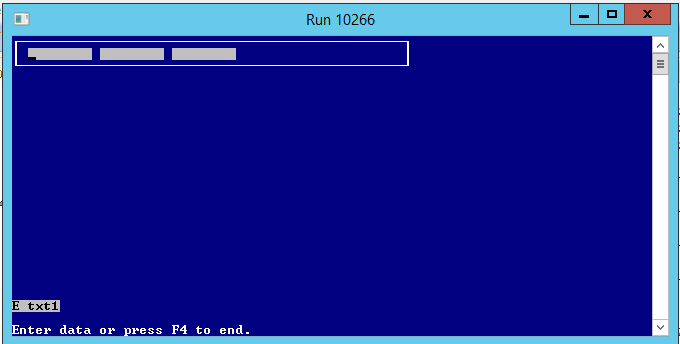
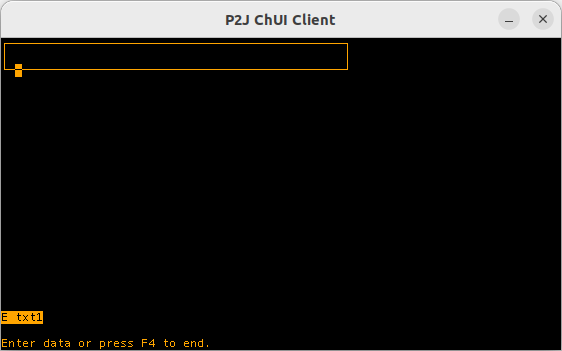
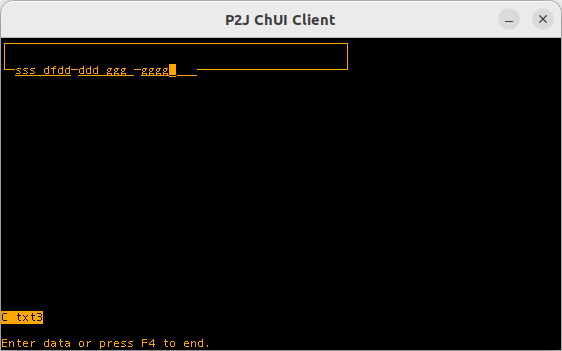
ChUI Rendering Issue
Run this program in CHARACTER (ChUI) mode:
DEFINE VARIABLE txt1 AS CHARACTER NO-UNDO FORMAT "X(8)".
DEFINE VARIABLE txt2 AS CHARACTER NO-UNDO FORMAT "X(8)".
DEFINE VARIABLE txt3 AS CHARACTER NO-UNDO FORMAT "X(8)".

DEFINE FRAME f txt1 txt2 txt3 WITH SIZE 50 BY 3.

ON VALUE-CHANGED OF txt1 IN FRAME f
   MESSAGE "C txt1".
ON VALUE-CHANGED OF txt2 IN FRAME f
   MESSAGE "C txt2".
ON VALUE-CHANGED OF txt3 IN FRAME f
   MESSAGE "C txt3".

ON ENTRY OF txt1 IN FRAME f
   MESSAGE "E txt1".
ON ENTRY OF txt2 IN FRAME f
   MESSAGE "E txt2".
ON ENTRY OF txt3 IN FRAME f
   MESSAGE "E txt3".

ON LEAVE OF txt1 IN FRAME f
   MESSAGE "L txt1".
ON LEAVE OF txt2 IN FRAME f
   MESSAGE "L txt2".
ON LEAVE OF txt3 IN FRAME f
   MESSAGE "L txt3".

SET TEXT(txt1 NO-LABEL AT ROW 1.5 COL 2 FONT 1 txt2 NO-LABEL FONT 1 txt3 NO-LABEL FONT 1) WITH FRAME f.
This program defines three grouped FILL-IN widgets with NO-LABEL and explicit positioning.
In OE, the demo screen is displayed as follows:
In FWD, the rendering differs:
If text is entered into all FILL-IN widgets, the FWD window appears as follows:
#50 Updated by Hynek Cihlar 8 months ago
- % Done changed from 100 to 80
This issue will need to be re-assigned and Vladimir's points addressed.