Bug #9204
SWING GUI: Tooltip activation issue with incorrect widget absolute coordinates
0%
History
#2 Updated by Eugenie Lyzenko almost 2 years ago
- File tooltip_coords.jpg added
In certain conditions the widget absolute coordinates are calculating incorrectly. This leads to tooltip show failing.
The sample for KVM session:
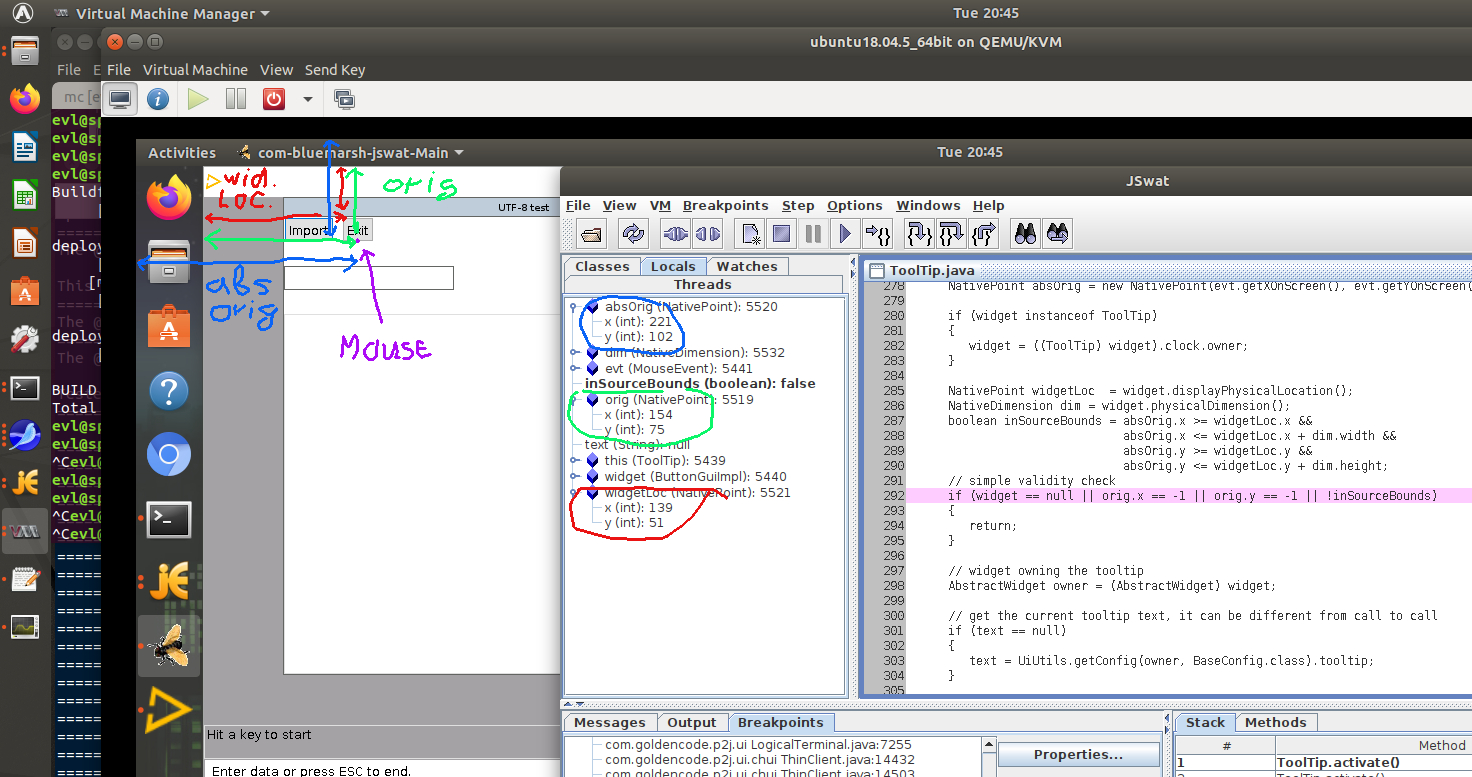
Note the FWD main window is at (0,0) (x,y) position. The moving window to other location can fix the issue. So the bug is not stable in recreation.
This is the Swing client only issue.
#3 Updated by Hynek Cihlar almost 2 years ago
- Subject changed from Tooltip activation issue with incorrect widget absolute coordinates to SWING GUI: Tooltip activation issue with incorrect widget absolute coordinates
#4 Updated by Hynek Cihlar almost 2 years ago
The solution is to translate the mouse event coordinates returned by MouseEvent.getXOnScreen and getYOnScreen to only consider the work area (i.e. the area without toolbars and other similar desktop ui elements). To abstract out the translation a new method should be introduced in GuiDriver class. Use Toolkit.getScreenInsets to figure out the work area.
While this issue is tooltip specific, note that the mouse event on-screen coordinates are used on multiple places. All these places must be checked and eventually fixed, too. Look for the references of MouseEvent.getXOnScreen and MouseEvent.getyOnScreen.
#5 Updated by Eugenie Lyzenko almost 2 years ago
I still do not understand one point here. Consider the ToolTip.activate():
   public void activate(Widget<?> widget, String text, MouseEvent evt)
   {
      // deactivate timer/hide old tooltip if any visible
      deactivate();

      NativePoint orig = new NativePoint(evt.getX(), evt.getY());

      NativePoint absOrig = new NativePoint(evt.getXOnScreen(), evt.getYOnScreen());

      if (widget instanceof ToolTip)
      {
         widget = ((ToolTip) widget).clock.owner;
      }

      NativePoint widgetLoc  = widget.displayPhysicalLocation();
      NativeDimension dim = widget.physicalDimension();
      boolean inSourceBounds = absOrig.x >= widgetLoc.x &&
                               absOrig.x <= widgetLoc.x + dim.width &&
                               absOrig.y >= widgetLoc.y &&
                               absOrig.y <= widgetLoc.y + dim.height;
      // simple validity check
      if (widget == null || orig.x == -1 || orig.y == -1 || !inSourceBounds)
      {
         return;
      }

      // widget owning the tooltip
      AbstractWidget owner = (AbstractWidget) widget;
...
My point is:
1. This handler is called only when user moves mouse over widget.
2. This handler is not called when user moves mouse outside the widget.
3. This means in turn the mouse coordinates are always inside widget area.
The question is: why we need to additionally check the current mouse absolute position to be inside widget?
Am I missing for something?
#6 Updated by Paula Păstrăguș almost 2 years ago
In certain cases, JS doesn't generate a MOUSE_EXITED event, which prevents the tooltip from deactivating when the cursor moves outside the widget. The inSourceBounds check should only be applied to web clients, as SWING handles mouse events correctly, making the check unnecessary for it.