Bug #10910
tree control arrow keys don't work
0%
History
#1 Updated by Greg Shah 10 months ago
- File add_rooms_dialog.png added
This is a regression that can be seen in Hotel GUI. It can be recreated in Virtual Desktop Mode, Embedded Mode and in Swing.
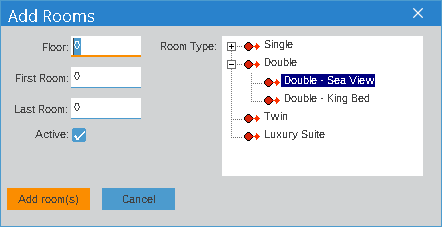
From the rooms tab, click the "Add Rooms" button. In the dialog, click into the tree control to give it focus. From there, you should be able to use the up and down arrow keys to navigate. That arrow key navigation does not work.
#3 Updated by Vladimir Tsichevski 10 months ago
The TREE-VIEW widget does not receive focus on mouse click. Pressing LEFT or RIGHT moves the caret in the currently focused (Floor:) FILL-IN.
You can still shift focus to the TREE-VIEW widget with the TAB key. After this is done, tree navigation works as expected.
#5 Updated by Eugenie Lyzenko 10 months ago
Vladimir Tsichevski wrote:
I tested trunk versions up to 15891, and the issue persists. Therefore, if this is a regression, it must be quite old. I cannot test older versions because the trunk is broken there.
I can confirm the trunk 15735 is also affected. Digging deeper is problematic due to trunk compatibility with Hotel GUI. I think we need to just debug the current trunk.
#6 Updated by Eugenie Lyzenko 10 months ago
And this is a not a regular TREE-VIEW widget. It is a set of TEXT widgets in a FRAME simulation of the TREE-VIEW. See common/ftreefr0.w.
#7 Updated by Eugenie Lyzenko 10 months ago
The suggested fix can be to add focus enabling method to TextGuiImpl.java:
...
   @Override
   public boolean focusTraversable()
   {
      // GUI implementation of the widget may receive focus when the focus
      // is forced to the widget through a Win32 system call
      // TODO that's not always true, certain (unknown) conditions should be met
      // in order to receive focus using Win32 system call
      return true;
   }
...
This logic is the same as we used for adding isFocusable() method.
#8 Updated by Șerban Bursuc 10 months ago
Eugenie Lyzenko wrote:
The suggested fix can be to add focus enabling method to
TextGuiImpl.java:[...]
This logic is the same as we used for adding
isFocusable()method.
In #10273 we discovered a bug that put the focus on a text widget when tab cycling which was wrong. In fact we never found OE code to make the focus handle be on a text widget, even with system calls. So it doesn't sound correct to give focus to text widgets here as a solution, or maybe we have the answer for the added TODO.
#9 Updated by Hynek Cihlar 10 months ago
Șerban Bursuc wrote:
In #10273 we discovered a bug that put the focus on a text widget when tab cycling which was wrong. In fact we never found OE code to make the focus handle be on a text widget, even with system calls. So it doesn't sound correct to give focus to text widgets here as a solution, or maybe we have the answer for the added
TODO.
AFAIR this tree control uses a "shadow" editable widget to track focus. The "shadow" widget is a button with size of 1 pixel. Every node has its own frame, the key triggers are defined on the node frames.
So the task is not about focusing TEXT, but figuring out what widget should receive focus and when.