Bug #9985
Incorrect text width calculation when metrics are not cached
10%
History
#2 Updated by Paula Păstrăguș over 1 year ago
If the actual text metrics are not cached, the code falls back to using a scale factor scaleX computed from a sample text (even if the webscale is not present). This approach leads to inaccurate width calculations, especially when the current text has different characteristics (length, spaces, special characters, etc.) compared to the sample.
#5 Updated by Paula Păstrăguș over 1 year ago
To move forward with this issue, I have a few questions in mind:
1. If the customer’s application includes a text-metrics.xml file, we should precompute the text metrics at client startup. While this ensures correct behavior once precomputation is complete, it introduces a significant startup delay: I’ve already tried this for a customer, and the delay was around 14 minutes.
The question is: should we cache metrics for all texts and fonts specified in the XML file? There are 27 fonts listed (actually 4 unique fonts with different specifications). Perhaps we could limit caching to MS Sans Serif in this case, since it accounts for 13 specifications. This would reduce the delay by half (around 7 minutes), but even that is far from ideal.
Another idea is to use multiple threads to parallelize metric computation at startup. Could this help reduce the delay to a more acceptable level?
What is the maximum admitted delay?
2. The goal of this task is to adjust or remove the scale-related code from GuiWebDriver.getTextWidth, as it relies on an incorrect assumption.
However, let's approach this step by step and observe the behavior when webscale is not used (i.e., set to 0), the text isn’t cached, and we call getTextWidth to obtain an accurate width. In this scenario, the code still falls into the scale section and applies a scaling factor: calculated based on the SAMPLE TEXT to the Swing metrics for the given text:
wRes = (int)Math.ceil(super.getTextWidth(text, fd) * scaleX);
3. Suppose we remove the scale-related code, could this negatively impact other scenarios? I’m not entirely sure whether this part of the code is still actively solving any relevant cases. It’s also quite old, so it’s understandable if you don’t recall the specifics. However, if you have any insights or ideas on what to include during the testing phase (when will be the case) to cover potential side effects, that would be helpful.
4. If we don’t have a text-metrics.xml file, the initial performance won’t be great, but as we navigate through the application, things will improve since metrics start being retrieved from the cache.
The question is: should we still keep the Swing metrics as a fallback? And if webscale is present, how should we handle this? We know that when webscale is absent, the web client’s computed width is generally more accurate than the Swing metrics.
#6 Updated by Alexandru Lungu over 1 year ago
If the customer’s application includes a text-metrics.xml file, we should precompute the text metrics at client startup. While this ensures correct behavior once precomputation is complete, it introduces a significant startup delay: I’ve already tried this for a customer, and the delay was around 14 minutes.
The experiment done was driven by the incorrect presumption that the screen has a lot of static labels. I don't think that was the case ... most of them were dynamically computed from a browse. Maybe it makes sense to rather check if this is actually required. I will drop the idea of sending text-metrics.xml on client side and precomute. I don't think we will ever get a good time with that.
3. Suppose we remove the scale-related code, could this negatively impact other scenarios? I’m not entirely sure whether this part of the code is still actively solving any relevant cases. It’s also quite old, so it’s understandable if you don’t recall the specifics. However, if you have any insights or ideas on what to include during the testing phase (when will be the case) to cover potential side effects, that would be helpful.
Eugenie is a watcher.
From my POV, this scaling was done exactly to avoid the enormous over-head to compute the width of every text.
I don't think we should touch webscale for this task. If the font is webscaled, everything should be driven by Swing (metrics + drawing). We simply ignore any JS input. Though ... #9842 is still on the table here.The question is: should we still keep the Swing metrics as a fallback? And if webscale is present, how should we handle this? We know that when webscale is absent, the web client’s computed width is generally more accurate than the Swing metrics.
For non-webscaled texts:
- please create a very small example in which the approximation fails. Maybe we are misunderstanding something or there is a bug. You can create an example in Java / JS just to prove that the algorithm there provides bad results.
PS: I also take into consideration that we may want to fine-tune the algorithm. Instead of sending one SAMPLE TEXT, maybe we can send a list and get more insight (based on length?). Maybe we can use a ratio for texts < 5 characters, < 10 characters, < 20 characters, etc.
Also, I think we came to the conclusion that white-space is a deal-breaker in this algorithm (#9842).
#7 Updated by Paula Păstrăguș over 1 year ago
- Assignee set to Paula Păstrăguș
- File font20-modified.png added
- File font20-clean.png added
- Status changed from New to WIP
I’ve created a short test case (a .w file) with 3 fill-ins:
Because of the current flawed scaling logic, this is the output using the latest trunk version:
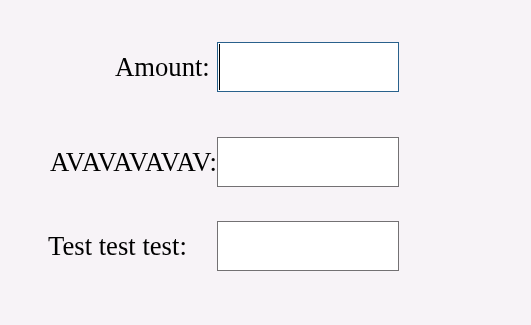
And here’s the output when we 'force' the label width to be calculated based on the web client metrics:
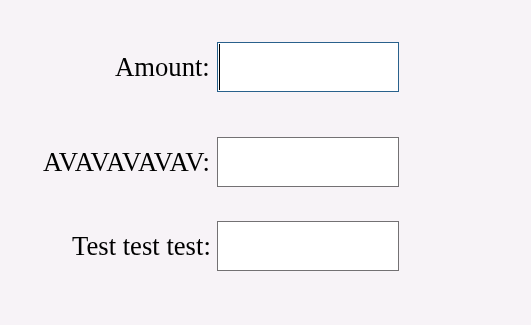
Note that the font used here is MS Sans Serif, size=20 (no webscale).
#8 Updated by Paula Păstrăguș over 1 year ago
The labels from my previous note illustrate three scenarios:
- When
getTextWidthroughly matches the client’s calculated width: as seen with theAmount:label, whereswing width × scale(0.8384 in this case) aligns closely with the actual width. - When
getTextWidthoverestimates the required width — for theTest test test:label, the method calculates161pixels, but the label actually requires only about136pixels. This causes the label to appear too far from the text input field. - When
getTextWidthunderestimates the required width — for theAVAVAVAVAV:label, it returns158pixels, but the label actually needs around165pixels to render properly. As a result, it appears too close to the fill-in input field.
#9 Updated by Paula Păstrăguș over 1 year ago
- % Done changed from 0 to 10
- File mss-10pt-swing2.png added
- File mss-10pt-js2.png added
In the current implementation of FWD, we rely on Java Swing to measure the text width, while the actual rendering happens in the browser using JavaScript Canvas. Because querying the browser for actual rendered widths would introduce performance penalties, we use a scale factor computed from a fixed sample string:
private static final String TEXT_SAMPLE = "QqWwEeRrTtYyUuIiOoPp[{}]|AaSsDdFfGgHhJjKkLl:;'ZzXxCcVvBbNnMn<,>.?/ 1234567890!@#$%^&*()_-+=~`";
[...]
scaleX = (double)websock.getTextWidth(TEXT_SAMPLE, fd.font) /
         (double)super.getTextWidth(TEXT_SAMPLE, fd);
This method gives results that are visually acceptable and in many cases match the JS rendering well. But.. despite the general accuracy of this scaling approach, we’ve observed cases where the computed widths are slightly off, the scale factor can underestimate or overestimate the true width of strings in the browser.
- min width
- max width
- avg width
in both Js and Swing, using Microsoft Sans Serif, and anti-aliasing off for Swing, and compare them visually through charts.
- String length
- Font
- Rendering backend
- Text variability
- A per-font/per-size correction
- A smarter normalization method
- Or maybe even heuristics based on the type of string (all caps, digits, etc.)
Sample comparison charts:
1. JavaScript analysis: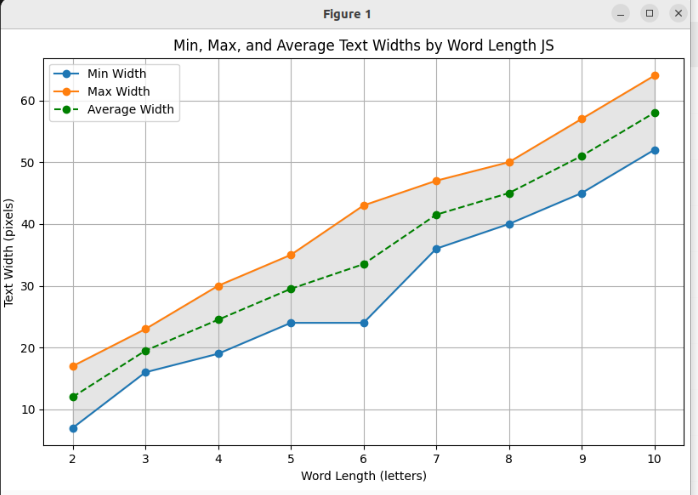
2. Swing analysis: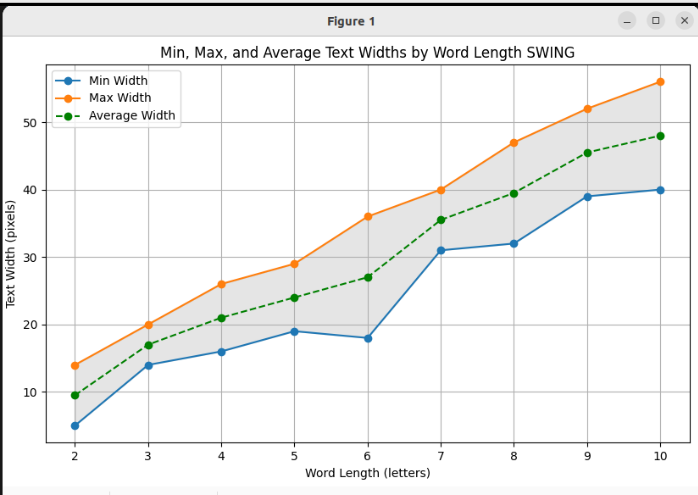
You can already see some divergence, which is precisely what we're trying to quantify and eventually correct.
#10 Updated by Alexandru Lungu over 1 year ago
I think the best kind of visualization would be by comparing JS to Swing (non-antialiased). What we do now is to compute a ratio and the goal is to show that that ratio is not consistent.
So, I think it is better to take the same word, compute the metric on JS and Swing then compute a ratio. That ratio should have a min/avg/max per text size.
I would expect to see a similar graphic as in #9985-9, but the Y axis is the ratio (Swing / JS). If the ratio method we have in FWD is right, then the graphics should look like a completely vertical line (min completely vertical, max completely vertical, avg completely vertical) and a single line (aka, the min should equal max and should equal avg).
- If the lines are not vertical, then different number of letters suggest different ratios
- If the lines are not identical (min=max=avg), then same number of letters, but different texts suggest different ratios.
#11 Updated by Paula Păstrăguș over 1 year ago
- File ratio-chart.png added
Here's the chart you suggested where:
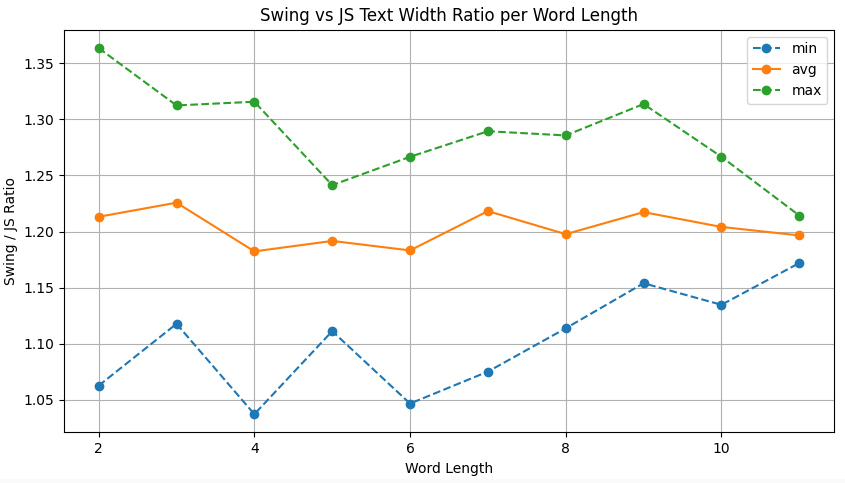
- min: is the lowest ratio observed among words of the same length
- avg: is the average ratio for that word length
- max: is the highest ratio observed
What we can clearly see is that the ratios vary across word lengths, the average line is not flat, which means the scaling factor is not consistent across different lengths. This suggests that using a single global scaling factor is inaccurate.
Moreover, the variation within the same word length (seen as the vertical gap between min and max) shows that even words with the same number of characters can have significantly different Swing/JS ratios. This indicates that the character composition of the word strongly influences the ratio.
#12 Updated by Paula Păstrăguș over 1 year ago
I also noticed that changing RenderingHints between VALUE_TEXT_ANTIALIAS_ON and VALUE_TEXT_ANTIALIAS_OFF does not affect the width values returned by Swing metrics. I initially expected the width to increase when anti-aliasing is enabled, but it turns out this setting only influences how the text is visually rendered, not how its width is computed.
#13 Updated by Paula Păstrăguș over 1 year ago
- File pixel-diff.png added
I also compared how much FWD is off compared to JS for that particular batch of words (lowercase only words).
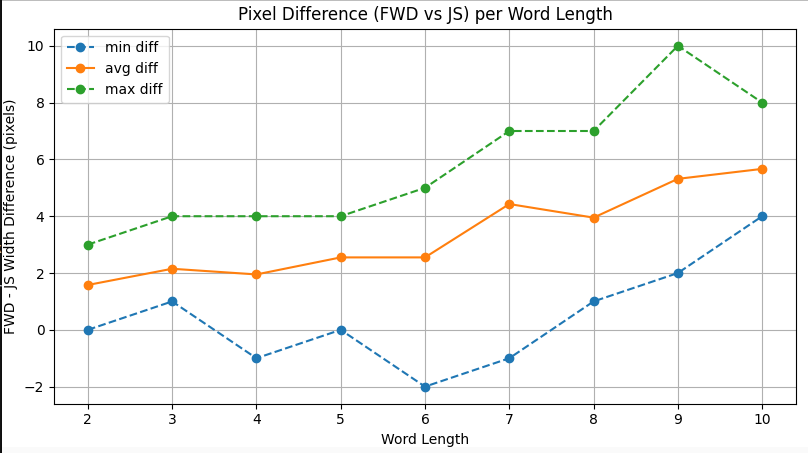
The pixel difference clearly increases with word length, suggesting that FWD may overestimate the width progressively as words get longer. This likely explains why, in the Counteract app, we observe growing visual gaps between the fill-in label and the text box, especially for longer words. This can be seen in #9985-7, where the word "Test test test" exhibits a noticeable mismatch, with the label drifting further from the expected alignment. However, this issue does not appear when the word is all uppercase, like "AVAVAVAVAV" (but here we can see an underestimate err). This suggest that lowercase only words are more likely to cause overestimate errors, than underestimate errors.
#14 Updated by Paula Păstrăguș over 1 year ago
- File pixel-diff-uppercase.png added
And yes, my assumption was correct: FWD tends to underestimate the width of words written entirely in uppercase. The chart below shows the same set of data, but this time using only uppercase letters, clearly illustrating a reversed behavior compared to lowercase, where FWD typically overestimates.
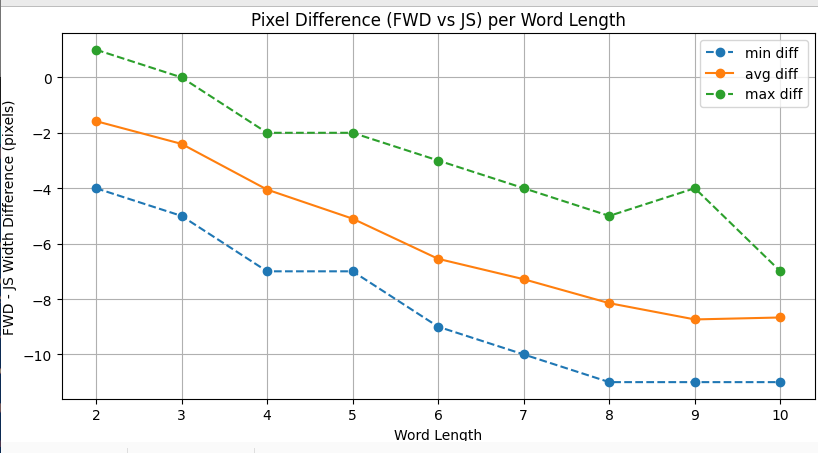
#15 Updated by Alexandru Lungu over 1 year ago
Paula, can you redo #9985-11, but also include texts till ~50 length? Some fill-ins and editors allow the input of names/addressed/etc. which tend to be longer than 10 characters.
#16 Updated by Paula Păstrăguș over 1 year ago
Sure, do you want me to include only lowercase words, only uppercase or mixed ones?
#17 Updated by Paula Păstrăguș over 1 year ago
- File ratio2.png added
I regenerated the chart, and here’s the updated version using lengths up to 45 characters:
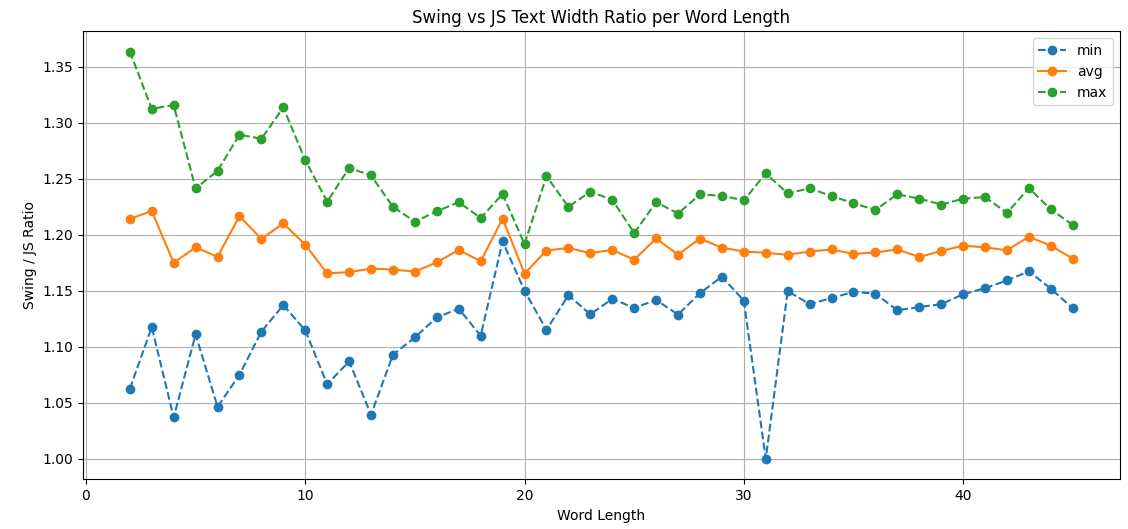
Below is the number of entries (words or phrases) grouped by their total character count: Show
Of course, there's a rare exception for length = 31, namely the phrase You are capable of great things, where the Swing width exactly matched the JS width, quite the anomaly! 😄
However, the overall trend is clear:
As the number of characters increases (especially starting around 20 characters), the Swing/JS ratio stabilizes in the range of approximately [1.12 – 1.25]
Alex, let me know if you'd like the chart extended beyond 45 characters
#18 Updated by Alexandru Lungu over 1 year ago
Alex, let me know if you'd like the chart extended beyond 45 characters
Not really, I wanted to know if there is a trend in which longer texts tend to be more closer to the average than smaller texts ... it seems like so.
#19 Updated by Alexandru Lungu over 1 year ago
Paula, mind that FWD trunk has now a change for high dpi screens (#4135). The change is in trunk, but the task is in I.T. due to a small regression, quite unrelated. AFAIK, the changes are to the CSS to acknowledge high-dpi screen and improve text rendering (see #9800). Can you check out that changes and apply them to your tests? I wonder if the statistics change with that - aka anti-aliasing on high dpi screens is more accurate.
Eugenie, do you have other suggestions on how to improve the performance/correctness of GET-TEXT-WIDTH-PIXELS? In #7629 there was a partial letter being displayed because GET-TEXT-WIDTH-PIXELS returned a smaller size then the actually rendered text - resulting is a cut-off letter.
The problem was that the approximation of the JS text width had a smaller ratio and so it missed the actual size with 1/2 pixels.
Paula analyzed the approximation routine and it seems like texts <10 letters are prone to a big error margin. Some texts need 1.1 ratio while other need 1.3 ratio - same font, size and style!
The approximation for texts >10 letters have a smaller margin of 1.12-1.25, but this is considerable as well. If FWD appreciates that the avg. is 1.2, then some texts will be rendered with 0.08 ratio bigger and other with 0.05 ratio smaller.
I personally am quite satisfied with the approximation per se as it reduces a lot the communication between Java and JS, but #7629 seems to be quite pretentious. In that case, the fix was to bypass caching for that specific widget, but this is not a general fix.
#20 Updated by Paula Păstrăguș over 1 year ago
Alex, I redid #9985-17, but is exactly the same with the one posted here.
#23 Updated by Paula Păstrăguș about 1 year ago
I’ve been thinking about improving the way we handle text width measurements.
Right now we rely on Swing metrics plus a general scale factor, which is not very accurate.
We already have caching logic in place (if a width is obtained from the JS client, we mark it as "legacy" and reuse it for subsequent texts).
My proposal is to create a dedicated websocket for text measurement:
- The JS client would perform the actual measurement using the browser rendering context and return the exact widths.
- The dedicated connection avoids contention with the main application socket, so width requests won’t introduce visible loading or block other UI messages.
- With caching already implemented, only the first measurement for a given font/text would require a round trip, subsequent requests would be served from cache with no performance hit.
- This way we eliminate the unreliable scale factor approach and ensure no overestimate / underestimate will be present anymore.
But every improvement comes with a cost. As Alex mentioned, we might encounter a scenario where a window is initially rendered with the fallback implementation (like now), meaning labels could appear too far or too close to their text boxes because the metrics haven’t been computed yet. Once the improved measurements arrive, the layout would snap into place.
The question is: can this actually happen? If yes, how should we handle it, can we prevent it, or do we simply accept it as a trade-off? Also, would creating a dedicated socket solely for text measurements be a good approach to minimize this risk?
Any thoughts on this will be very appreciated.
#24 Updated by James Berry 4 months ago
Is there any further update since comment 23? I note the non-closed related items are also probably in need of an update too.
#25 Updated by Paula Păstrăguș 4 months ago
Unfortunately, no. A sketch solution was proposed, but other priorities took precedence, so we didn't move forward with it.
#26 Updated by Șerban Bursuc 4 months ago
Paula, can you re-test this? #9842 was merged into trunk.
#27 Updated by Paula Păstrăguș 4 months ago
I'll retest #9933 and #10122.
#28 Updated by Paula Păstrăguș 4 months ago
#9933 isn't resolved.
#29 Updated by Paula Păstrăguș 4 months ago
#10122, neither.
#30 Updated by Șerban Bursuc 4 months ago
Oh well 🤷 I saw this task related to #9842 so I said it's worth a shot.