Multi-Tenancy
- Multi-Tenancy
In FWD, multi-tenancy follows a model where each tenant has its own database instances. Each instance is named for a specific tenant and has the same schema as the database from which it was derived. In addition, there are REST APIs via the admin console that can handle tenant management. The tenants are stored in an internal database, called "landlord", which can have its URL customizable.
The work on this feature was implemented in #6229.
Configuration
In order to enable the multi-tenancy support in FWD, the following things need to be configured:
Enable Multitenancy
Multitenancy is enabled by defining the URL of the landlord database.
The landlord database is the place where all tenant information is stored. This includes among other things the name of the tenants, their database instances, the status of each tenant. This information is processed at server's startup and used to populate the _Tenant meta table, which is volatile.
In the directory, under the /server/standard/persistence tag, add the landlord database URL node, and change the value of the URL according to your needs:
          <node class="string" name="landlord_database_url">
            <node-attribute name="value" value="jdbc:h2:~/landlord"/>
          </node>
          <node class="string" name="landlord_database_user">
            <node-attribute name="value" value="landlord_admin"/>
          </node>
          <node class="string" name="landlord_database_password">
            <node-attribute name="value" value="landlord_password"/>
          </node>
Although not recommended, the last two entries are optional. On the other hand, to simplify the settings, the user/password for the tenant administrator can be merged into the first node value. For example, a landlord database running on PostgreSQL can be configured as:
<node class="string" name="landlord_database_url">
<node-attribute name="value" value="jdbc:postgresql://localhost:5432/landlord?user=landlord_admin&password=landlord_password"/>
</node>- if the
landlord_password(orlandlord_admin, less probable) contains special symbols, they need to be URL encoded. Evidently, the&must stay as it is; - the name of the database (
landlord) is not mandatory. You can name it at your will BUT the database must be created BEFORE starting the server (with the exception of H2 dialect). For a guide how this dialect-specific is done, please check the instructions below. The database should be empty, the server will add the necessary schema (tables, indexes) automatically at the first connection. - (optional)
5432is the default PostgreSQL port, please use the one specific to your environment, if any; - FWD will automatically detect the dialect as being the sub-protocol of the URL. Currently we have the support for following dialects:
mariadb: MariaDb: see step 7 (Creating a database with specific collation and character set) from Database_Server_Setup_for_MariaDb_on_Linuxpostgresql: PostgreSQL; To create the empty database check Database_Server_Setup_for_PostgreSQL_on_Linux or Database_Server_Setup_for_PostgreSQL_on_Windows. TLDR: after creating the cluster (if it was not already done for the main database(s)) use:createdb -U fwd_admin -h localhost -p 5432 landlord
sqlserver: Microsoft SQL Server. Unlike the other, this dialect was NOT properly tested;h2: H2. This is mainly used in non-production scenarios. FWD will create the database (a file, actually) automatically. Using~/may not be the best solution since this will make different projects collide. Instead, a project specific path should be used, like:jdbc:h2:~/projects/<my-project>/deploy/landlord.
Security
In addition to these settings, in the landlord database settings the admin can set a specific encryption for the password of the user configured for accessing the databases so it won't appear in plain text when the table is inspected. Starting with FWD 4.0.15868, the following entries can be used in this regard:
          <node class="string" name="landlord_encryption_algorithm">
            <node-attribute name="value" value="AES_CBC_128"/>
          </node>
          <node class="string" name="landlord_encryption_key">
            <node-attribute name="value" value="tenant"/>
          </node>
          <node class="string" name="landlord_encryption_iv">
            <node-attribute name="value" value="tenant-iv"/>
</node>- the
passwordis not returned by the Tenant Administration API (see below); - the algorithm can be one of:
DES3_CBC_168,DES3_ECB_168,DES3_CFB_168,DES3_OFB_168,DES_CBC_56,DES_ECB_56,DES_CFB_56,DES_OFB_56,AES_CBC_128,AES_CBC_192,AES_CBC_256,AES_ECB_128,AES_ECB_192,AES_ECB_256,AES_CFB_128,AES_CFB_192,AES_CFB_256,AES_OFB_128,AES_OFB_192,AES_OFB_256,RC4_ECB_128. Their name should be suggestive and an exhaustive description is out of the scope of this document; - the encryption key (password) can be any string, but only the first
kbits are used.kdepends on the selected algorithm. If the key is longer it is trimmed automatically, therefore two keys having the same k-bit prefix are treated as identical. If the key is shorter, it is automatically padded to match the algorithm fixed key size; - the iv (initialisation vector) is used for adding some entropy. It also has a fixed length, and obeys the same rules as for the key.
- authenticate using
GET https://localhost:7443/admin/loginand obtain a token used by all following requests; - if needed, use
GET https://localhost:7443/admin/tenants/to get the full list of the tenant databases. Note that the passwords will not be returned; - drop the old database(s) by
DELETE https://localhost:7443/admin/tenants/<tenant-name>/dbwith payload:{ "databaseName": "<db-name>"} - for each physical database, re-write the configuration using, for example:
POST https://localhost:7443/admin/tenants/<tenant-name>/dbwith the content from the response obtained at step 2, adding the password as well to JSON payload. - logout
GET https://localhost:7443/admin/logout.
Repeat the steps 3 (delete) and 4 (create) for each tenant database.
Enable the Tenant Administration API
The tenant API handles all the tenant administration. This includes inserting, updating, deleting database instances for specific tenants, or even whole tenants. This is a sub-module of the Administration REST API so you need to make sure it is enabled first. This is done as described in REST API Setup / Configuration.
Next, the tenant manager must be active or else there is nothing to access. The configuration of the landlord database is therefore mandatory. See above how to Enable Multitenancy.
Add Permissions for the Tenant Administration API
In order to have access to the tenant administration API, you need to add permissions. This is done via ACLs in the following manner:
In the directory, under the acl/webservice node, add the following nodes:
       <node class="container" name="000100">
         <node class="resource" name="resource-instance">
              <node-attribute name="reference" value="ADMIN:GET:/admin/tenants"/>
           <node-attribute name="reftype" value="FALSE"/>
         </node>
         <node class="webServiceRights" name="rights">
           <node-attribute name="allow" value="true"/>
         </node>
         <node class="strings" name="subjects">
           <node-attribute name="values" value="admin-rest"/>
         </node>
       </node>
       <node class="container" name="000200">
         <node class="resource" name="resource-instance">
              <node-attribute name="reference" value="ADMIN:GET:/admin/tenants/.*"/>
           <node-attribute name="reftype" value="FALSE"/>
         </node>
         <node class="webServiceRights" name="rights">
           <node-attribute name="allow" value="true"/>
         </node>
         <node class="strings" name="subjects">
           <node-attribute name="values" value="admin-rest"/>
         </node>
       </node>
       <node class="container" name="000300">
         <node class="resource" name="resource-instance">
              <node-attribute name="reference" value="ADMIN:GET:/admin/tenants/.*/status"/>
           <node-attribute name="reftype" value="FALSE"/>
         </node>
         <node class="webServiceRights" name="rights">
           <node-attribute name="allow" value="true"/>
         </node>
         <node class="strings" name="subjects">
           <node-attribute name="values" value="admin-rest"/>
         </node>
       </node>
       <node class="container" name="000400">
         <node class="resource" name="resource-instance">
              <node-attribute name="reference" value="ADMIN:POST:/admin/tenants"/>
              <node-attribute name="reftype" value="FALSE"/>
         </node>
         <node class="webServiceRights" name="rights">
           <node-attribute name="allow" value="true"/>
         </node>
         <node class="strings" name="subjects">
           <node-attribute name="values" value="admin-rest"/>
         </node>
       </node>
       <node class="container" name="000500">
         <node class="resource" name="resource-instance">
              <node-attribute name="reference" value="ADMIN:POST:/admin/tenants/.*/db"/>
           <node-attribute name="reftype" value="FALSE"/>
         </node>
         <node class="webServiceRights" name="rights">
           <node-attribute name="allow" value="true"/>
         </node>
         <node class="strings" name="subjects">
           <node-attribute name="values" value="admin-rest"/>
         </node>
       </node>
       <node class="container" name="000600">
         <node class="resource" name="resource-instance">
              <node-attribute name="reference" value="ADMIN:PUT:/admin/tenants/.*"/>
           <node-attribute name="reftype" value="FALSE"/>
         </node>
         <node class="webServiceRights" name="rights">
           <node-attribute name="allow" value="true"/>
         </node>
         <node class="strings" name="subjects">
           <node-attribute name="values" value="admin-rest"/>
         </node>
       </node>
       <node class="container" name="000700">
         <node class="resource" name="resource-instance">
              <node-attribute name="reference" value="ADMIN:PUT:/admin/tenants/.*/status"/>
           <node-attribute name="reftype" value="FALSE"/>
         </node>
         <node class="webServiceRights" name="rights">
           <node-attribute name="allow" value="true"/>
         </node>
         <node class="strings" name="subjects">
           <node-attribute name="values" value="admin-rest"/>
         </node>
       </node>
       <node class="container" name="000800">
         <node class="resource" name="resource-instance">
              <node-attribute name="reference" value="ADMIN:DELETE:/admin/tenants/.*"/>
           <node-attribute name="reftype" value="FALSE"/>
         </node>
         <node class="webServiceRights" name="rights">
           <node-attribute name="allow" value="true"/>
         </node>
         <node class="strings" name="subjects">
           <node-attribute name="values" value="admin-rest"/>
         </node>
       </node>
       <node class="container" name="000900">
         <node class="resource" name="resource-instance">
              <node-attribute name="reference" value="ADMIN:DELETE:/admin/tenants/.*/db"/>
           <node-attribute name="reftype" value="FALSE"/>
         </node>
         <node class="webServiceRights" name="rights">
           <node-attribute name="allow" value="true"/>
         </node>
         <node class="strings" name="subjects">
           <node-attribute name="values" value="admin-rest"/>
         </node>
       </node>
For the definition of admin-rest FWD user, please see the REST API Setup/Configuration.
By setting these, you will allow requests of the following types at the following paths:
- GET at
/admin/tenants, which is used for listing all the currently available tenants and their database instances. - GET at
/admin/tenants/<tenant_name>, for listing the information of the given tenant. - GET at
/admin/tenants/<tenant_name>/status, which is used for checking the status of a given tenant. - POST at
/admin/tenants, which is used for inserting a new tenant in the landlord database. - POST at
/admin/tenants/<tenant_name>/db, which is used for inserting a database instance to a given tenant. - PUT at
/admin/tenants/<tenant_name>, which is used for updating some information of a given tenant. - PUT at
/admin/tenants/<tenant_name>/status, which is used for updating the status of a given tenant. - DELETE at
/admin/tenants/<tenant_name>, which is used for deleting a tenant and all the database instances that the tenant was using. - DELETE at
/admin/tenants/<tenant_name>/db, which is used for deleting a database instance of a given tenant.
Note that by deleting a tenant database instance means deleting the reference of that database from the landlord database, and not the actual database.
How to Connect a Tenant to a Database
Connecting tenants to specific databases is done implicitly by setting the tenant's security context via this 4GL code:
DEF VAR hcp1 AS HANDLE.
CREATE CLIENT-PRINCIPAL hcp1.
hcp1:INITIALIZE("userid@domain", "sid", ?, "passphrase") no-error.
hcp1:SEAL("acc-code") no-error.
SET-DB-CLIENT(hcp1, "a").
After setting this up, any queries or other processes will be executed by the specified tenant over the specified database.
In here, you need to set the following things:
- During
hcp1:INITIALIZE, only the first parameter is mandatory, the other ones are left to the user's decision:- First parameter is a user ID that must respect the pattern
<user_name>@<domain_name>.user_namereferences the user that is performing the operation, equivalent toCLIENT-PRINCIPAL:USER-IDattribute, anddomain_namereferences a domain name from thesec_authentication_domaintable. - Second parameter is a user login session ID for the user represented by the client-principal object. It is equivalent to the
CLIENT-PRINCIPAL:SESSION-IDattribute and it cannot be an unknown or empty string value. - Third parameter is a
DATETIME-TZthat can be used to specify the expiration date of the client-principal handle. If marked with unknown, the handle will not expire. - Fourth parameter is the user's passphrase, which can have a default value of empty string if no password is required for authentication.
- First parameter is a user ID that must respect the pattern
- During
hcp1:SEAL, the given parameter must be an access code that is used to validate the identity of the client-principal handle. The value needs to match the access code that has been set up for the specified domain from the_sec_authentication_domain. - During
SET-DB-CLIENT:- First parameter needs to be the handle of the client-principal.
- Second parameter needs to be the logical name of the database to which the tenant is trying to connect. For example, if the database
ais set up in the application, and there is a tenant that uses databasea_1(which is derived froma), then the parameter value should bea, so only the logical name.
TODO: double-check the parameter values from the example
A Word on Conversion
For the conversion part, you do not need to do any changes to the project, just for the processed files (.df and .p). A bit of theory: in MT, there are 3 types of tables, which are stored either in the shared (default) database or in private one. Because of this, the queries which in ST are executed in a normal query will have to be executed in a cross-database fashion IF at least two tables of a query are actually stored in different locations.
So: if you have simple queries, there will be no difference in generated code. That's evident. Also if all the tables of the query are stored in same database.
Also, in the compound queries, when each component is generated with an addComponent() and processed at runtime, there is no difference in the code, since the runtime will automatically detect the databases of the tables are different and will NOT attempt to create a join out of them. The problems occur only when the conversion is trying to optimize the queries, not having the information about table actual storage at runtime.
Note that, if a tenant is NOT authenticated, all tables will work with the default database, so the ST query will be used as up to now. So the same 4GL code will change behaviour in FWD at runtime when the tenant authenticates.
Now, how FWD knows the type of the tables and where to get their data from? That's simple: there are a couple of keywords newly implemented in FWD for parsing the .df.
Here is an example of definition of each table type tenant-wise
In this case:test tablewill be stored only in the share/default databasemt_with_defaulttable will be stored in both share/default database and each tenant-specific database andmt_no_defaulttable will be stored on in each tenant-specific database
Hint: that is the PoV from 4GL. In FWD, you will have to have the definition of all tables in each database because, even if there are no records, the queries on these tables ARE LEGAL (either in simple queries or OUTER joins) in 4GL and FWD will only honour them them only if the tables are defined. OTOH, writing to 'non-existing' tables is an error condition in 4GL, but FWD will intercept these attempts and should act accordingly.
Using the above definitions, you can have the following simple queries executed cross-database when MT is on (all of them require at least one setMultiTenantAlternative()):
    FOR EACH test WHERE test.f1 GT 0 AND
          CAN-FIND(LAST mt_with_default WHERE test.f1 + 1010 EQ mt_with_default.f1):
             MESSAGE test.f1 test.f2 test.f3.
    END.

    FOR EACH mt_with_default WHERE mt_with_default.f1 GT 10 AND
          CAN-FIND(FIRST test WHERE test.f1 EQ mt_with_default.f1):
             MESSAGE mt_with_default.f1 mt_with_default.f2.
    END.

    FIND FIRST mt_with_default WHERE mt_with_default.f1 GT 10 AND
          CAN-FIND(test WHERE test.f1 EQ mt_with_default.f1) NO-ERROR.
    MESSAGE mt_with_default.f1 mt_with_default.f2.

    FIND FIRST test WHERE test.f1 GT 0 AND
          CAN-FIND(mt_with_default WHERE test.f1 EQ mt_with_default.f1) NO-ERROR.
    MESSAGE test.f1 test.f2 test.f3.

    FIND FIRST mt_no_default.
    FOR FIRST mt_with_default WHERE mt_with_default.f1 EQ mt_no_default.f1 AND
             CAN-FIND(FIRST test WHERE test.f1 EQ mt_with_default.f1):
       MESSAGE mt_with_default.f1 mt_with_default.f2.
    END.

    FOR EACH mt_no_default WHERE mt_no_default.f1 GT 0 AND
             CAN-FIND(FIRST test WHERE test.f1 EQ mt_no_default.f1),
        FIRST mt_with_default WHERE mt_with_default.f1 EQ mt_no_default.f1 AND
             CAN-FIND(FIRST test WHERE test.f1 EQ mt_with_default.f1):
       MESSAGE mt_with_default.f1 mt_with_default.f2.
    END.
The FWD conversion will detect the cases when the the cross-database queries are possible and inject setMultiTenantAlternative() as needed.
Tenant Administration API
The Tenant Administration API has the following capabilities:- Login: the login and logout operations are provided by the main module. For an example of how this is achieved, take a look at REST Admin Authentication.
- List all tenants: by performing a
GETrequest at/admin/tenants. The header must contain theFwdSessionIdtoken. No body is required.- The response body will be a JSON containing all the tenants and their databases that are registered in the landlord database.
- Example: Show
- List a single tenant: by performing a
GETrequest at/admin/tenants/<tenant_name>. The header must contain theFwdSessionIdtoken. No body is required.- The response body will be a JSON containing the information of the given tenant, or an empty JSON if the tenant does not exist.
- Example: Show
- Retrieve a tenant's status: by performing a
GETrequest at/admin/tenants/<tenant_name>/status. The header must contain theFwdSessionIdtoken. No body is required.- The response body will be a JSON containing the status of the given tenant.
- If
enabledistrue, this means that the given tenant is active/enabled. - If
enabledisfalse, this means that the given tenant is not active/disabled. - If
enabledisnull, then the operation could not be performed. Possible reasons: the given tenant does not exist, an error occurred in the process.
- If
- Example: Show
- The response body will be a JSON containing the status of the given tenant.
- Add a tenant: by performing a
POSTrequest at/admin/tenants. The header must contain theFwdSessionIdtoken. The body must be a JSON that follows the pattern:{ "tenantName": "tenant_name", "tenantDescription": "tenant_description", "tenantInfo": "tenant_info", "databases": [ { "physicalName": "physical_db_name", "logicalName": "logical_db_name", "url": "db_url", "username": "db_username", "password": "db_password", "maxStatementsPerConnection": 10, "minPoolSize": 2, "maxPoolSize": 8, "acquireIncrement": 3, "maxIdleTime": 100 }, { ... } ] }- The response body will be a JSON containing a boolean which denotes if the operation was performed successfully or not.
- Note that when a tenant is added, its status is automatically set to
disabled. In order to perform other operations, the tenant needs to be activated. - Example: Show
- Add a database instance to a tenant: by performing a
POSTrequest at/admin/tenants/<tenant_name>/db. The header must contain theFwdSessionIdtoken. The body must be a JSON that follows the pattern:{ "physicalName": "physical_db_name", "logicalName": "logical_db_name", "url": "db_url", "username": "db_username", "password": "db_password" "maxStatementsPerConnection": <c3p0_maxStatementsPerConnection>, "minPoolSize": <c3p0_minPoolSize>, "maxPoolSize": <c3p0_maxPoolSize>, "acquireIncrement": <c3p0_acquireIncrement>, "maxIdleTime": <c3p0_maxIdleTime> }- The response body will be a JSON containing a boolean which denotes if the operation was performed successfully or not.
- The
c3p0_*values are used by C3P0 to configure a pool of connections to database. All of them are optional. If a value is not set, or set tonullthen the value from the logical (and shared) database is used. - For more details on supported
c3p0options please see the dedicated section in ORM-Section manual. - Example: Show
- Update a tenant: by performing a
PUTrequest at/admin/tenants/<tenant_name>. The header must contain theFwdSessionIdtoken. The body must be a JSON that follows the pattern:{ "databaseName": "physical_db_name", "updateList": { "field": "new_value" } }- The response body will be a JSON containing a boolean which denotes if the operation was performed successfully or not.
- Example: Show
- Change a tenant's status: by performing a
PUTrequest at/admin/tenants/<tenant_name>/status. With this, the tenant can either become enabled or disabled. The header must contain theFwdSessionIdtoken. The body must be a JSON that follows the pattern:{ "status": true/false }- The response body will be a JSON containing a boolean which denotes if the operation was performed successfully or not.
- Example: Show
- Delete a tenant: by performing a
DELETErequest at/admin/tenants/<tenant_name>. The header must contain theFwdSessionIdtoken. No body is required.- The response body will be a JSON containing a boolean which denotes if the operation was performed successfully or not.
- Example: Show
- Delete a tenant's database: by performing a
DELETErequest at/admin/tenants/<tenant_name>/db. The header must contain theFwdSessionIdtoken. The body must be a JSON that follows the pattern:{ "databaseName": "physical_db_name" }- The response body will be a JSON containing a boolean which denotes if the operation was performed successfully or not.
- Example: Show
Other points of interest regarding the Tenant Administration API can be found: from #6229-213 to #6229-231, #6229-256 for listTenants, some points about tenant delete/disable in #6229-290 and #6229-291, discussion of multi-database cases in #6229-300 and #6229-302).
Import Considerations
Requirements
1. All tenant databases must exist before interacting with them. For example, adding a database instance that does not physically exist to a tenant will result in an error being thrown.
2. Apart from the tenant databases, a default tenant database must exist. This can be specified either in the directory or via theCONNECT statement in the code. The default tenant database plays two roles:
- When the default tenant is selected, the queries will be executed against this database. Also, the default tenant database is the place that stores shared table data.
- It acts as a template for the tenant databases. By linking the default tenant database with a tenant database via the logical name (i.e. the logical names of these two databases must match), the tenant database is able to retrieve the schema from the default tenant one.
- This is where the "derived" concept comes into play. A tenant database, although it is a physical object, does not have its standalone schema. Instead, it grabs the schema of the default tenant database and uses that (i.e. the tenant database is derived from the default tenant database).
3. The _sec-authentication-domain and _sec-authentication-system tables must exist in the default tenant database and have valid data (e.g. each domain must be assigned to a tenant). When a switch between tenants happens, the program will search into the authentication tables the correct tenant information.
4. The shared across tenants tables must also be imported into the default tenant database. That is the place where the shared data can be found.
5. The default tenant name is Default, the same as in Progress.
Import Process
TheImportWorker can be used to import data into a tenant database. An example of an import run configuration for a PostgreSQL database from the IDE:
- Main class:
com.goldencode.p2j.pattern.PatternEngine - VM arguments:
-Djava.system.class.loader=com.goldencode.p2j.classloader.MultiClassLoader - Program arguments:
-d 2 "dbName=\"<physical_db_name>\"" "targetDb=\"postgresql\"" "url=\"<jdbc_url>\"" "uid=\"<username>\"" "pw=\"<password>\"" "maxThreads=1" schema/import cvt/data <p2o file>. In here, replace the following according to your needs:<physical_db_name>with the physical name of the database you want to import data into.<jdbc_url>with the JDBC URL to the database.<username>with the username used to access the database.<password>with the password used to access the database.<p2o file>with the.p2ofile of the default tenant database.
Other points of interest regarding the Import Process can be found in #6229-209 (Ovidiu's configuration example).
TODO: Did I miss anything?
Design/Implementation
Design
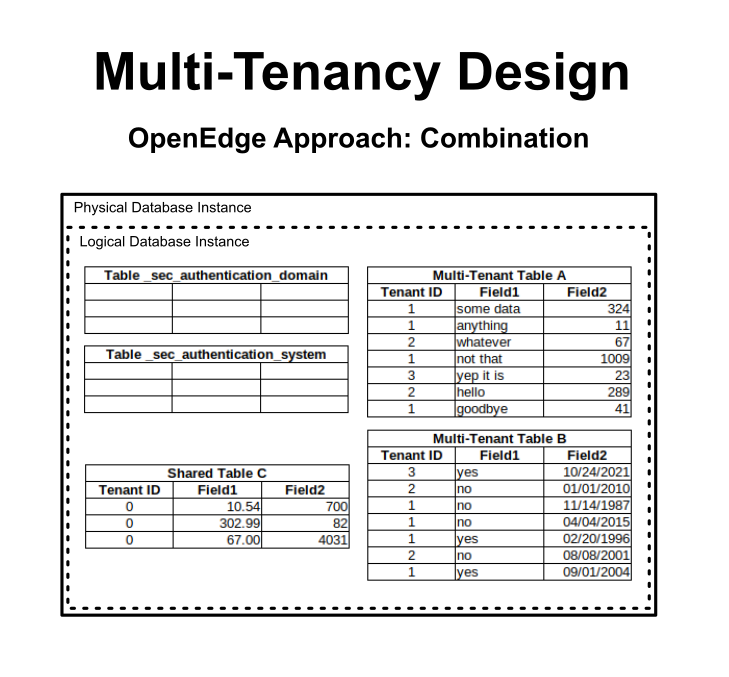
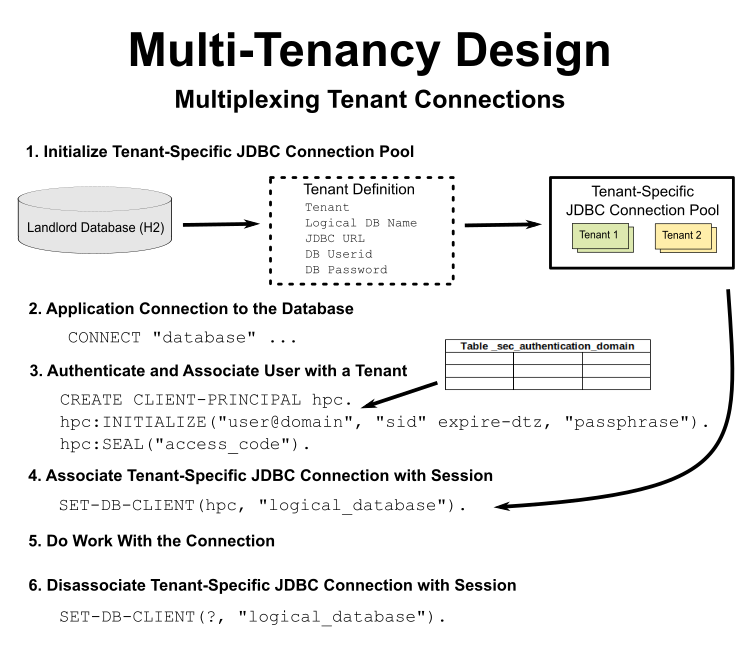
Whereas OpenEdge combines multiple tenants into the same physical database, FWD uses a concept of JDBC connection multiplexing. The idea is to keep each tenant's data isolated in its own physical database instance which shares the same logical database design as all other tenants (at least on a given FWD server). The normal 4GL code that sets the tenant into the database connection (SET-DB-CLIENT()) is used to swap a tenant-specific JDBC connection into use for the current session.
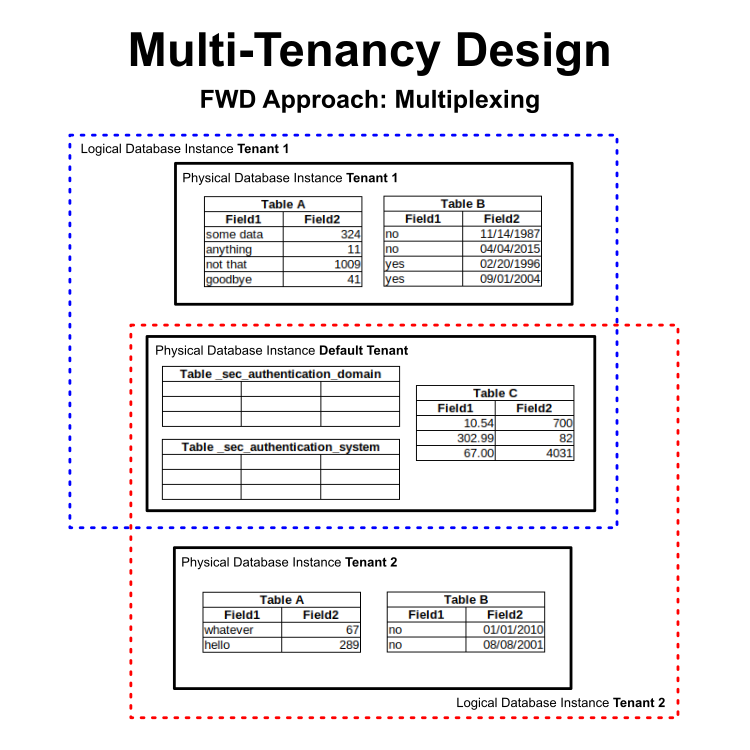
Here is the flow for the multiplexing:
Advantages/Disadvantages Compared with OpenEdge
The FWD approach has the following advantages:
- Security - It is more secure because tenants only access their own physical database, no other tenant data is co-mingled.
- Reliability - The database for any single tenant is not a point of failure for any other tenants. Thus, the system is more resilient overall.
- Scalability - The database instances can be spread over any number of physical systems.
- Performance
- Only Operate on Relevant Data - Large tables only have the data for a single tenant, this should make them faster to access.
- Eliminates the Noisy Neighbor Problem - A tenant-specific database will only be processing for that tenant's work, other tenants won't affect that database instance's performance.
- Compatible - The move from multi-tenant to single tenant and back should be much easier because the core database structure is the same.
FWD approach disadvantages:
- More Administration - Multiple database instances must be created/imported/managed where OE only has one instance.
Implementation Details
TBD, see #6229, #8863, #8976, #8989, #9002, #9036, #9057.
Limitations
The following are some current limitations:
- There is no SUPER TENANT support. This is both a statement of a lack of 4GL language features such as
SET-EFFECTIVE-TENANTand also in terms of the runtime support which is not yet written. - Migration/management of the
_sec_authentication_*tables must happen in the "default tenant" database instance. Any migration to or from a single tenant environment must handle the tenant-specific records in these tables.
TBD