SESSION NEW-SESSION Method and Web Session Forking
Web session forking is a feature specific to the FWD framework, available in web clients. It allows opening a new client session in a new browser tab without additional authentication. The new client (child) session duplicates the security of the original (parent) session, by starting the new process under the same operating system user and the same FWD account (having the same permissions), but the child session can have different configurations by specifying cfgOverrides that override the default bootstrap configuration, and specifying authBlob.
This implementation was created in tasks #4856 and #7813.
A session can be forked in two ways:
Via the UI: In Virtual Desktop the web client has a taskbar at the bottom with a menu item "New Session" that on being clicked opens a new tab with a new child session. This approach duplicates the original state of the parent session and doesn't allow for changes in the original configurations.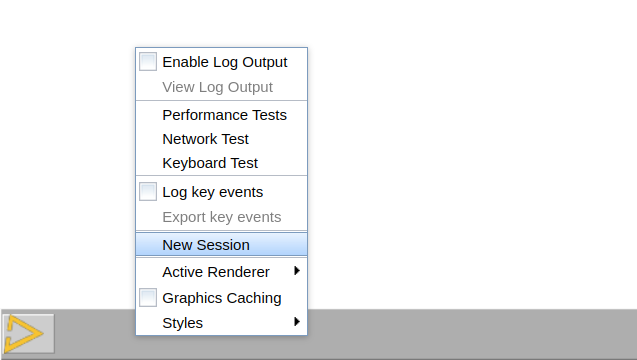
Programmatically from the 4GL code using the custom FWD method SESSION:NEW-SESSION(cfgOverrides, authBlob).
NEW-SESSION is a custom FWD extension to the 4GL handle SESSION. The method does not return any value and accepts two parameters of type CHARACTER that can be also unknown (?):
- cfgOverrides: A text with bootstrap configurations and their values separated by spaces in the format
client:cmd-line-option:startup-procedure=procedure.p client:cmd-line-option:debugalert=false; - authBlob: A free form text, see SESSION AUTH-BLOB Attribute.
Each session has its unique id SESSION:SESSION-ID, while each child (forked) session has also a reference to the parent (original) session in SESSION:RELATED-SESSION-ID. In a forked child session, SESSION:RELATED-SESSION-ID will be the parent's SESSION:SESSION-ID. In a session that was not forked, the SESSION:RELATED-SESSION-ID will be the unknown value.
Other specifics:
The core functionality of this feature relies on a one-time token generated by the server that expires in 30 seconds after being created. In that time range the client process needs to run successfully and notify the server of its successful launch. Sometimes the browser can block the new tab as an unwanted pop-up and the 30 sec can expire. If the page is open after the token expires, it will open the login page and if auto-login is enabled by SSO, this can lead to the unexpected outcome of starting a new session that is not reflecting the configurations specified programmatically.
Web Session Forking can be used together with webClient/oneBrowserPolicy, because the forked sessions get opened as tabs in the same browser.
Web Session Forking bypasses the calls to the SsoAuthenticator, and in the general case there is no limit to the number of concurrent sessions running in the same browser. If SSO is enabled and the different login credentials are associated with different FWD accounts, then the config /security/config/maxusersessions can be used to limit the concurrent number of sessions for this particular account. See Session Management for details.
© 2025 Golden Code Development Corporation. ALL RIGHTS RESERVED.