Bug #10914
clicking browse hyperlinked cells does not load its content into a browser tab
50%
Related issues
History
#1 Updated by Greg Shah 12 months ago
- File hotel_gui_embedded_mode_guests_tab_browser_hyperlinks.png added
- Subject changed from loading PDF, XLS and HTML resources mostly does not work to clicking browse hyperlinked cells does not load its content into a browser tab
- Assignee set to Stanislav Lomany
- Priority changed from Normal to Urgent
- version_reported set to trunk 16287
Hotel GUI is designed to showcase a range of techniques to display generated output like PDFs. The intention was always to have this content seamlessly load in a browser tab. All of our customer applications expect that behavior. At one point it was working, but currently, if you click on a hyperlinked browse cell, it will not load its content. I am running Chrome as the browser.
This is high priority because I have a demo on Monday and this is an important thing we would want to demo.
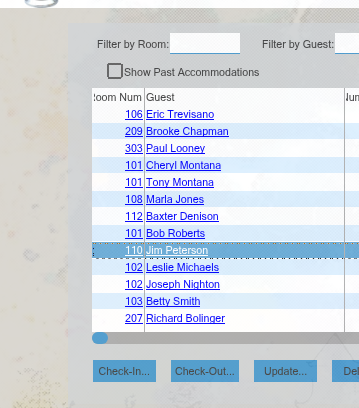
Bug 1:
The recreate is to open embedded mode, select the Guests tab and try to click on any of the NAME hyperlinks. There is no response or result.
Bug 2:
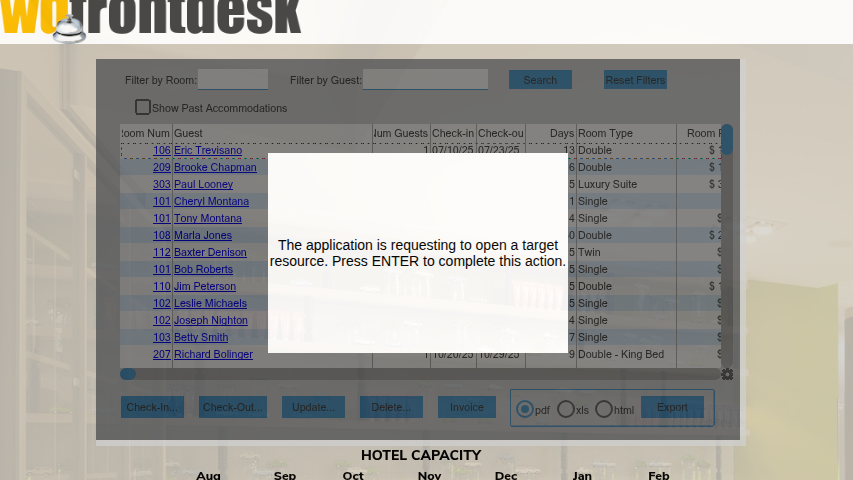
You CAN get a response when you click on the room num hyperlink, but the response is not nice. The behavior is "broken" in 2 ways:
- The content tries to download instead of loading directly into a tab. I have to manually open that PDF in another tab to see it.
- Sometimes, that is all that happens. Other times, immediately after the download, we get the prompt. If I then press ENTER (see below), I get the file downloaded a second time but it still isn't loaded into the browser tab.
#3 Updated by Sergey Ivanovskiy 12 months ago
- File ChromePDFDefaultAction.png added
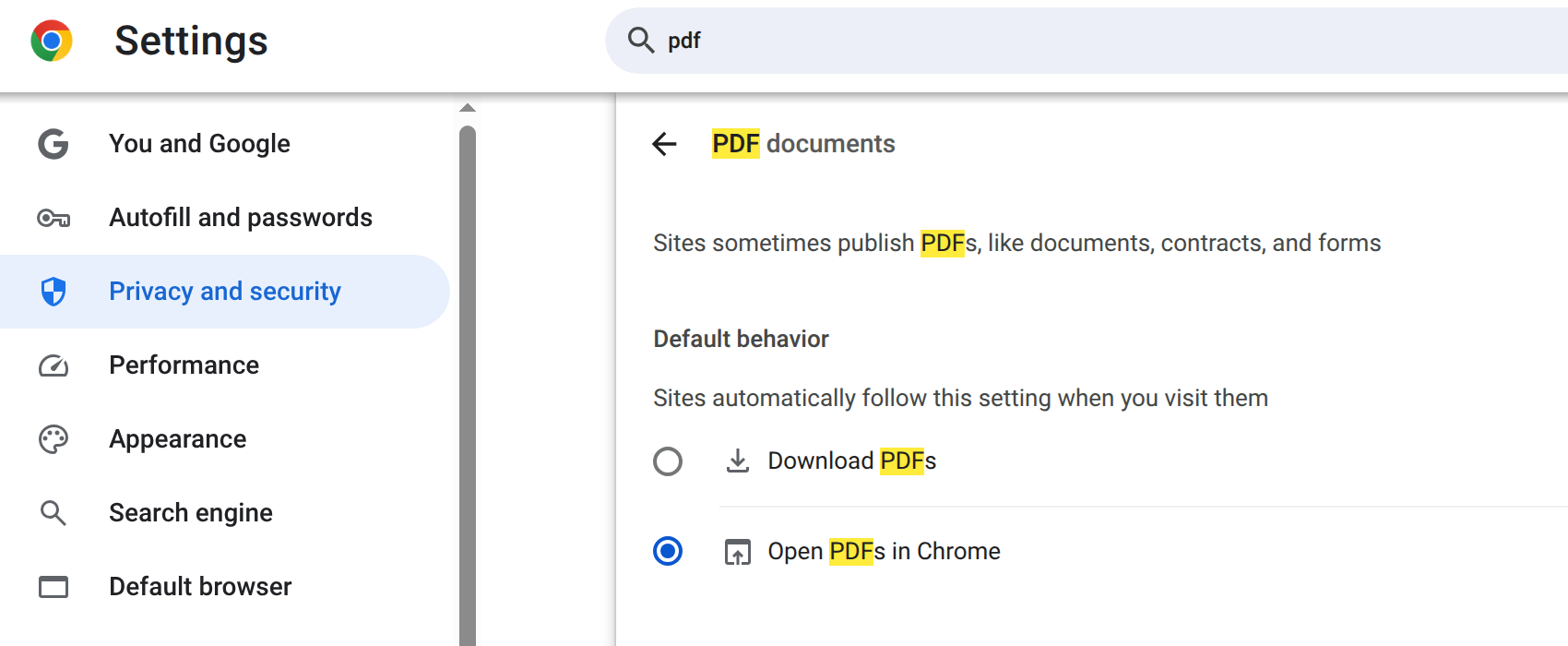
Greg, could you result depend on Chrome settings?
#5 Updated by Sergey Ivanovskiy 12 months ago
I debugged the case when clicking on the first column with room numbers. The web client follows this way
            if (url != null)
            {
               var fetch;
               if (helperApplications && helperApplications["fetch"] && !!mimeType)
               {
                  fetch = helperApplications["fetch"].filter(
                        function(element)
                        {
                           return element.toLowerCase() == mimeType.toLowerCase();
                        }).length > 0;
               }
               p2j.openMimeResource(url, mimeType, !fetch);
            }
where
helperApplications["fetch"] is not defined by the directory, so this url is opened in new tab by window.open
   function openNewWindow(url)
   {
      var newWindow;

      try
      {
         newWindow = window.open(url, "_blank");
      }
      catch(ex)
      {
         console.error(ex);
      }

      if (newWindow && !newWindow.closed)
      {
         return newWindow;
      }

      return null;
   }
that opens a modal dialog once in some cases.
We can try to set something like this
          <node class="container" name="helper-applications">
            <node class="entry" name="entry1">
              <node-attribute name="key" value="fetch"/>
              <node-attribute name="value" value="application/pdf"/>
            </node>
            <node class="entry" name="entry2">
              <node-attribute name="key" value="window.open"/>
              <node-attribute name="value" value="application/pdf,text/plain"/>
            </node>
          </node>
#6 Updated by Stanislav Lomany 12 months ago
It's very-very late for me, so I'll take a look into it tomorrow. I checked that clicking hyperlinks should create a file and then run
PROCEDURE printFile EXTERNAL "xPrint.dll" PERSISTENT :
    DEF INPUT PARAMETER A AS CHAR.
END.
Not sure how this is supposed to work.
#7 Updated by Eugenie Lyzenko 12 months ago
Stanislav Lomany wrote:
It's very-very late for me, so I'll take a look into it tomorrow. I checked that clicking hyperlinks should create a file and then run
[...]
Not sure how this is supposed to work.
This call should be converted to:
...
         XprHelper.printPdf(xprName);
...
The source usage is (abl/guest-frame.w):
PROCEDURE guest-invoice-xprint :
...
  RUN printFile (xprName).
...
This is the case when we port win32 native library calls to Java using XprHelper class.
#8 Updated by Eugenie Lyzenko 12 months ago
And the problem here is not in HYPERLINK implementation. It works and properly calls procedure xprint-guest:
...
PROCEDURE xprint-guest :
/*------------------------------------------------------------------------------
  Purpose:
  Parameters:  <none>
  Notes:
------------------------------------------------------------------------------*/
  def input param xguest-full-name as char.

  for each xrpt-stay where xrpt-stay.checked-out = false no-lock,
      each xrpt-room of xrpt-stay no-lock,
      each xrpt-room-type of xrpt-room no-lock,
      each xrpt-guest of xrpt-stay where (xrpt-guest.first-name + " " + xrpt-guest.last-name) = xguest-full-name and xrpt-guest.order = 1 no-lock:
    run guest-invoice-xprint.
  end.

  release xrpt-stay.
  release xrpt-room.
  release xrpt-room-type.
  release xrpt-guest.
END PROCEDURE.
...
The problem here is the for each ... conditions set is never matching, so the guest-invoice-xprint is never calling for any guest record.
Probably there are no guests in this hotel staying at current time?
#9 Updated by Sergey Ivanovskiy 12 months ago
The first column, the room number, has a hyper link. Clicking on this link should open reports in new window popups but actually pdf reports are downloaded. These new window popups are blocked by the browser. So the Press Enter dialog is opened in order to open new window on this user action. It still work but there are issues with custom ModalDialog dialog triggers p2j.createOpenPopupDialog and modality itself if the same dialog is already opened. This logic I added at some moment in the past and it will be fixed in #10915.
The large customer project has special helper application settings in the directory that can switch to use fetch method to eliminate custom modal dialogs
          <node class="container" name="helper-applications">
            <node class="entry" name="entry1">
              <node-attribute name="key" value="fetch"/>
              <node-attribute name="value" value="application/pdf,text/plain"/>
            </node>
          </node>
Please try these settings in the directory under
clientConfig node.#10 Updated by Eugenie Lyzenko 12 months ago
Sergey Ivanovskiy wrote:
The first column, the room number, has a hyper link. Clicking on this link should open reports in new window popups but actually pdf reports are downloaded. These new window popups are blocked by the browser. So the Press Enter dialog is opened in order to open new window on this user action. It still work but there are issues with custom
ModalDialogdialog triggersp2j.createOpenPopupDialogand modality itself if the same dialog is already opened. This logic I added at some moment in the past and it will be fixed in #10915.The large customer project has special helper application settings in the directory that can switch to use
fetchmethod to eliminate custom modal dialogs
[...]
Please try these settings in the directory underclientConfignode.
This will not work. Because as I noted in #10914-8 the MIME document is not even generated. So nothing to fetch into browser.
#11 Updated by Sergey Ivanovskiy 12 months ago
- File 10914-2025-11-22_13.57.05.mkv added
Eugenie, I meant when clicking on the first column hyper link of Guests but the second column hyper link does not work. Please look at this video 10914-2025-11-22_13.57.05.mkv.
#12 Updated by Sergey Ivanovskiy 12 months ago
I observed that mouse dragging does not move the thumb of the vertical scroll bar on this Guest screen in the embedded mode but left mouse clicking on the vertical scroll bar moves its thumb. I do not know this is expected or not but just reported here.
#13 Updated by Eugenie Lyzenko 12 months ago
Sergey Ivanovskiy wrote:
Eugenie, I meant when clicking on the first column hyper link of Guests but the second column hyper link does not work. Please look at this video 10914-2025-11-22_13.57.05.mkv.
Yes, agreed, for first column your approach should work.
#14 Updated by Sergey Ivanovskiy 12 months ago
For a mouse click I counted up to six MSG_OPEN_MIME_RESOURCE messages that hold the same content but with different urls :)
#15 Updated by Stanislav Lomany 12 months ago
- I don't have problems clicking on the first column - clicking on a room number produces multiple PDFs to download.
- As Sergey mentioned in #10914-8, no reaction when clicking on the second column is a data issue. Or a persistence issue, I'm checking it.
- I don't have the issue "mouse dragging does not move the thumb of the vertical scroll bar" Sergey mentioned in #10914-12.
Not sure how I can help, except figuring out why clicking on the second column doesn't work.
#16 Updated by Sergey Ivanovskiy 12 months ago
1. I don't have problems clicking on the first column - clicking on a room number produces multiple PDFs to download.
Stanislav, did you mean that it is expected that multiple PDFs (the same PDF file) files should be downloaded?
2. I don't have the issue "mouse dragging does not move the thumb of the vertical scroll bar" Sergey mentioned in #10914-12.
This is not an issue because the thumb can be moved as soon it becomes highlighted. Thus, it is not an issue for me too.
#17 Updated by Stanislav Lomany 12 months ago
Stanislav, did you mean that it is expected that multiple PDFs (the same PDF file) files should be downloaded?
Yes, several "Customer Invoices" for each room:
for each xrpt-stay ...:
   run guest-invoice-xprint.
end.
#18 Updated by Sergey Ivanovskiy 12 months ago
- File 10914_1-2025-11-22_18.43.18.mkv added
Thank you, so these MSG_OPEN_MIME_RESOURCE messages come asynchronously. (updated)
I observed that mouse clicking on row produces some kind of trace effect when the old selected row changes its background color but becomes dotted and new selected row highlights its background color and then the dotted outline appears for the new selected row. Is it expected? Can you observe the same effect? Please look at this video 10914_1-2025-11-22_18.43.18.mkv.
#19 Updated by Sergey Ivanovskiy 12 months ago
Sorry, I meant so these MSG_OPEN_MIME_RESOURCE messages come asynchronously.
#20 Updated by Stanislav Lomany 12 months ago
- Status changed from New to WIP
- File guest.d added
Unfortunately clicking on the second column doesn't produce output because we have a persistence issue - this condition doesn't work.
(xrpt-guest.first-name + " " + xrpt-guest.last-name) = xguest-full-name
I don't think we'll be able to fix it by Monday, so I made a workaround:
--- old/abl/guests-frame.w    2024-09-30 19:37:47 +0000
+++ new/abl/guests-frame.w    2025-11-22 20:25:31 +0000
@@ -1060,11 +1060,11 @@
   Notes:
 ------------------------------------------------------------------------------*/
   def input param xguest-full-name as char.
-
+
   for each xrpt-stay where xrpt-stay.checked-out = false no-lock,
       each xrpt-room of xrpt-stay no-lock,
       each xrpt-room-type of xrpt-room no-lock,
-      each xrpt-guest of xrpt-stay where (xrpt-guest.first-name + " " + xrpt-guest.last-name) = xguest-full-name and xrpt-guest.order = 1 no-lock:
+      each xrpt-guest of xrpt-stay where xrpt-guest.first-name = ENTRY(1, xguest-full-name, " ") and xrpt-guest.order = 1 no-lock:
     run guest-invoice-xprint.
   end.
And attached a dump file where all guest names are unique to make the magic trick reliable.
#21 Updated by Stanislav Lomany 12 months ago
- Status changed from WIP to Review
I guess I'm done here. I mean I don't know what to do with the browser issue - it works both in Chrome and Firefox for me.
#22 Updated by Stanislav Lomany 12 months ago
- Related to Bug #10920: String concatenation doesn't work in WHERE clause for permanent databases added
#23 Updated by Stanislav Lomany 29 days ago
Greg, should we close this?
#25 Updated by Stanislav Lomany 28 days ago
We still need the fix for the 2nd column issue.
There's a blocking persistence issue, but Alexandru may have a solution: #10920-10
But I thought about a different thing: HYPERLINK passes the cell text to the specified event handler. But the cell text may not allow us to uniquely identify the row. Like in our case, where the 2nd column contains guest name, while actually we need to get "stay ID". So I suggest a parameter HYPERLINK-MAPPING which works similar to enhanced filtering/sorting mapping and allows to specify another field of the browse backing query which will be passed to the event handler. In out case:
DEFINE BROWSE staysBrowse
...
      stay.room-num HYPERLINK "xprint-stay"
                    HYPERLINK-MAPPING "stay.stay-id"
                    COLUMN-LABEL "Room Num"
      guest.first-name + " " + guest.last-name HYPERLINK "xprint-stay"
                                               HYPERLINK-MAPPING "stay.stay-id"
                                               COLUMN-LABEL "Guest"
The only thing is that we'll have to keep the value of the field specified in HYPERLINK-MAPPING for each row (in BrowseRow).
Greg, what do you think?