Bug #11329
Stateless FWD server clustering setup questions
0%
Related issues
History
#1 Updated by Eduard Soltan 7 months ago
I have the https://proj.goldencode.com/projects/p2j/wiki/Stateless_Server_Clustering documentation and tried to follow the steps.
As I understand the docker build command should be run from the project root (hotel/dataset in my case) using the Dockerfile provided in the documentation. But it has a few problems:
1) spawner folder does not exists in app_root by default. Also @directory_docker.xml is also something that does not exist by default. It is not provided and does not exist in any of the customer projects. Perhaps something docker folder could be used to create the image!?
2) Secondly, and more importantly I don't understand to which database does each container connect? Does it connect to database cluster running on my local env?
#2 Updated by Eduard Soltan 7 months ago
- Related to Feature #4369: implement stateless FWD server clustering added
#3 Updated by Eduard Soltan 7 months ago
- File Serverless_Arhitecture.png added
I would like to create a script that would easily create a serverless docker architecture. I think it should have the following architecture.
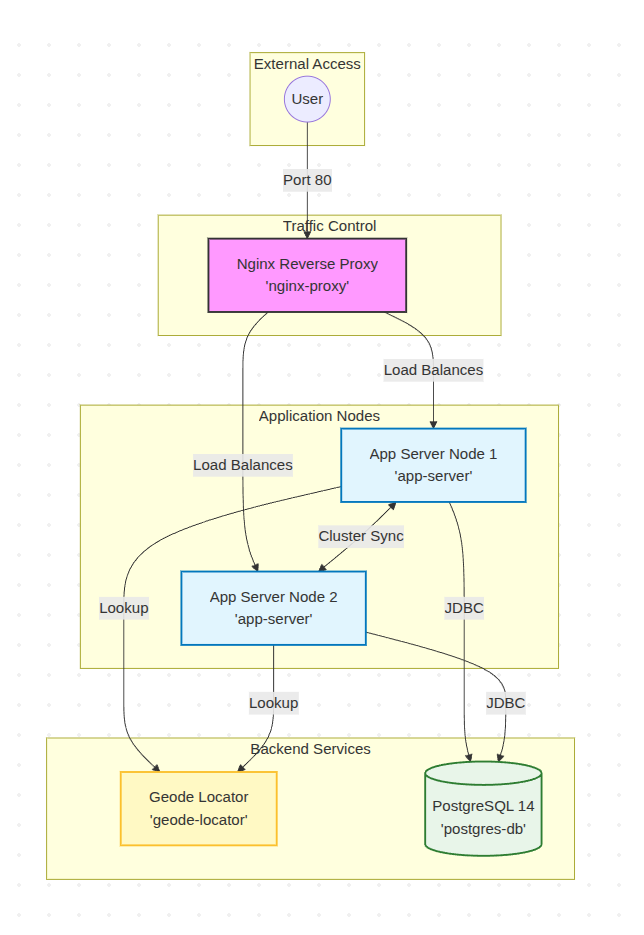
If we were to setup this architecture in docker, we would need 2 images, one for actual application server (from which we could instantiate as many server as we need) and one for the database which will contain the data needed by application.
If we would need other database connections required by user, another database image would be required (this should be configurable). The server nodes should connect to the database nodes, and to Geode Locator to share data application data between nodes.
#5 Updated by Eduard Soltan 7 months ago
I have analysed the scripts in docker folder of HotelGui project.
build_docker.sh script uses goldencode/fwd_4.0_ubuntu_22.04_jdk17:latest image to convert the project and to using the conversion it create a project (hotel_gui in my case) docker image, using goldencode/fwd_4.0_ubuntu_22.04_jdk17:latest image if using H2 or goldencode/base_ubuntu_22.04_pg14_jdk17:latest image if postgres is used.
I made some changes (basically striped out some things that were unnecessary (reports)), and left only the build of Hotel image with H2 database.
I guess for import we could use docker_import.sh, since the data is actually persisted into a volume and could be used at subsequent runs.
#6 Updated by Roger Borrello 7 months ago
Eduard Soltan wrote:
I have analysed the scripts in
dockerfolder of HotelGui project.
build_docker.shscript usesgoldencode/fwd_4.0_ubuntu_22.04_jdk17:latestimage to convert the project and to using the conversion it create a project (hotel_guiin my case) docker image, usinggoldencode/fwd_4.0_ubuntu_22.04_jdk17:latestimage if using H2 orgoldencode/base_ubuntu_22.04_pg14_jdk17:latestimage if postgres is used.I made some changes (basically striped out some things that were unnecessary (
reports)), and left only the build of Hotel image with H2 database.I guess for import we could use
docker_import.sh, since the data is actually persisted into a volume and could be used at subsequent runs.
Please take a look at the scripts in tools/docker/ in fwd so as to get more comfortable with the 24.04 Docker images. These are much more sophisticated. The Hotel scripts do work with the 24.04 images, but it is better to use dbash.sh to actually build the application, then the docker/build_docker.sh in Hotel to create the Docker image. Sorry I didn't get to you sooner. The dbash.sh Development image will also let you work with the Postgres database image you create as a container. I often use it for my Postgres server in detached mode.