Feature #6319
IntelliJ plugin
0%
Related issues
History
#1 Updated by Greg Shah over 4 years ago
IntelliJ plugin for integration with syntax check and running conversion (et al). This must also provide the full support for 4GL editor coloring, syntax expansion, source debugging and so forth). A developer must be able to continue 4GL development using FWD only (no Progress Developer Studio which is a licensed product).
This is meant to be functionally equivalent to the Eclipse plugin (#3883). The results may be limited by the capabilities of each platform. We should use common code as much as possible, but if an IDE-native approach yields a significantly better result we will consider using that.
IntelliJ Platform SDK
IntelliJ LSP Support (Language Server Protocol, also see the IntelliJ LSP Github Project)
Simple IntelliJ Plugin Tutorial
#2 Updated by Greg Shah over 4 years ago
- Related to Feature #3883: eclipse plug for developing 4GL code using FWD including editing, syntax checks, running conversion added
#5 Updated by Greg Shah almost 4 years ago
The long term roadmap for IntelliJ is not clear, I can't find it published anywhere. If anyone can point me to something I've missed, I'll be happy to review it.
I'm especially interested in:
- Is there a long term path to more natively use the language server protocol? There is a 3rd party plugin that provides some support but it is not clear if IntelliJ is going to support it directly.
- What is the long term plan for writing IntelliJ plugins? Other platforms are moving to the web, is that in plan? Or should we keep writing a Swing based UI?
#6 Updated by Greg Shah over 3 years ago
- Related to Feature #1757: update ANTLR to latest version added
#7 Updated by Greg Shah over 3 years ago
See #1757-9 for some analysis of how auto-completion may require a move to ANTLRv4.
#8 Updated by Florin Eugen Rotaru over 1 year ago
I see that the IntelliJ LSP support isn't maintained anymore. Also, according to jetbrains:
The integration with the Language Server Protocol is created as an extension to the commercial IntelliJ-based IDEs. Therefore, plugins using Language Server integration are not available in JetBrains products like IntelliJ IDEA Community Edition and Android Studio from Google.
Among the lternatives for the client I found
1. lsp4intellij, which was forked from the one above.
2. LSP4ij, a client compatible with IntelliJ.It also has debug Adapter Protocol support with Debug Adapter Protocol Run/Debug configuration.
#9 Updated by Florin Eugen Rotaru about 1 year ago
So far I have investigated the following areas of the IntelliJ Plugin Devkit.
1. Extension Points - these can be used for specifying various events or interface implementatations. We specify the class in the plugin.xml. For example, here is how we can define an event to take place after the project is opened:
plugin.xml:
    <extensions defaultExtensionNs="com.intellij">
        <postStartupActivity implementation="fer.plugindemox2.MyPostStartupActivity"/>
    </extensions>
fer.plugindemox2.MyPostStartupActivity class:
public class MyPostStartupActivity implements ProjectActivity {

   @Override
   public @Nullable Object execute(@NotNull Project project, @NotNull Continuation<? super Unit> continuation) {
      System.out.println("Post-startup for project: " + project.getName());
      return null;
   }
}
2. We can register custom languages and specific file types. We need a Language, a FileType and for example and icon:
public class ProgressLanguage extends Language {

   public static final ProgressLanguage INSTANCE = new ProgressLanguage();

   private ProgressLanguage()
   {
      super("Progress");
   }
}
public final class ProgressFileType extends LanguageFileType {

   public static final ProgressFileType INSTANCE = new ProgressFileType();

   private ProgressFileType() {
      super(ProgressLanguage.INSTANCE);
   }

   @NotNull
   @Override
   public String getName() {
      return "Progress File";
   }

   @NotNull
   @Override
   public String getDescription() {
      return "Progress language file";
   }

   @NotNull
   @Override
   public String getDefaultExtension() {
      return "p";
   }

   @Override
   public Icon getIcon() {
      return ProgressIcon.FILE;
   }
}
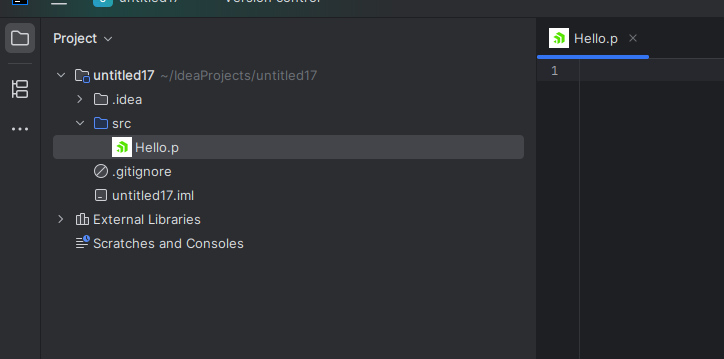
This helps treating the files of a certain type in a specific way. For example, when handling some project events:
public class FileOpenListenerImpl
implements FileEditorManagerListener
{
   @Override
   public void selectionChanged(@NotNull FileEditorManagerEvent event)
   {
      VirtualFile newFile = event.getNewFile();
      if (newFile.getFileType() instanceof ProgressFileType)
      {
         // todo do something
      }
   }
}
3. An useful feature for our future Plugin could be the TextEditorWithPreview class (some details in this thread)
For them, we need to separately implement the editor and the preview, and pass both to the TextEditorWithPreview object. This is achieved by a custom FileEditorPreview which does not necessarily cover all file types. In other words we can provide the preview for our progress files only. The custom editor provider is also specified in the plugin.xml. We can also toggle this preview by a key combination:
public class ToggleableTextEditorWithPreview extends TextEditorWithPreview {

   public ToggleableTextEditorWithPreview(TextEditor editor, FileEditor preview) {
      super(editor, preview, "Preview", Layout.SHOW_EDITOR);

      // Register action in code
      registerToggleAction();
   }

   private void registerToggleAction() {
      AnAction toggleAction = new AnAction("Toggle Preview") {
         @Override
         public void actionPerformed(@NotNull AnActionEvent e) {
            VirtualFile file = e.getData(CommonDataKeys.VIRTUAL_FILE);

            if (getLayout() == Layout.SHOW_EDITOR) {
               setLayout(Layout.SHOW_EDITOR_AND_PREVIEW);
            } else {
               setLayout(Layout.SHOW_EDITOR);
            }
         }
      };

      // Add shortcut Alt+Shift+P
      ShortcutSet shortcutSet = new CustomShortcutSet(
              new KeyboardShortcut(KeyStroke.getKeyStroke("alt shift P"), null)
      );
      toggleAction.registerCustomShortcutSet(shortcutSet, getComponent());
   }
}
This can be used, for example to preview the preprocessed code or the generated java code.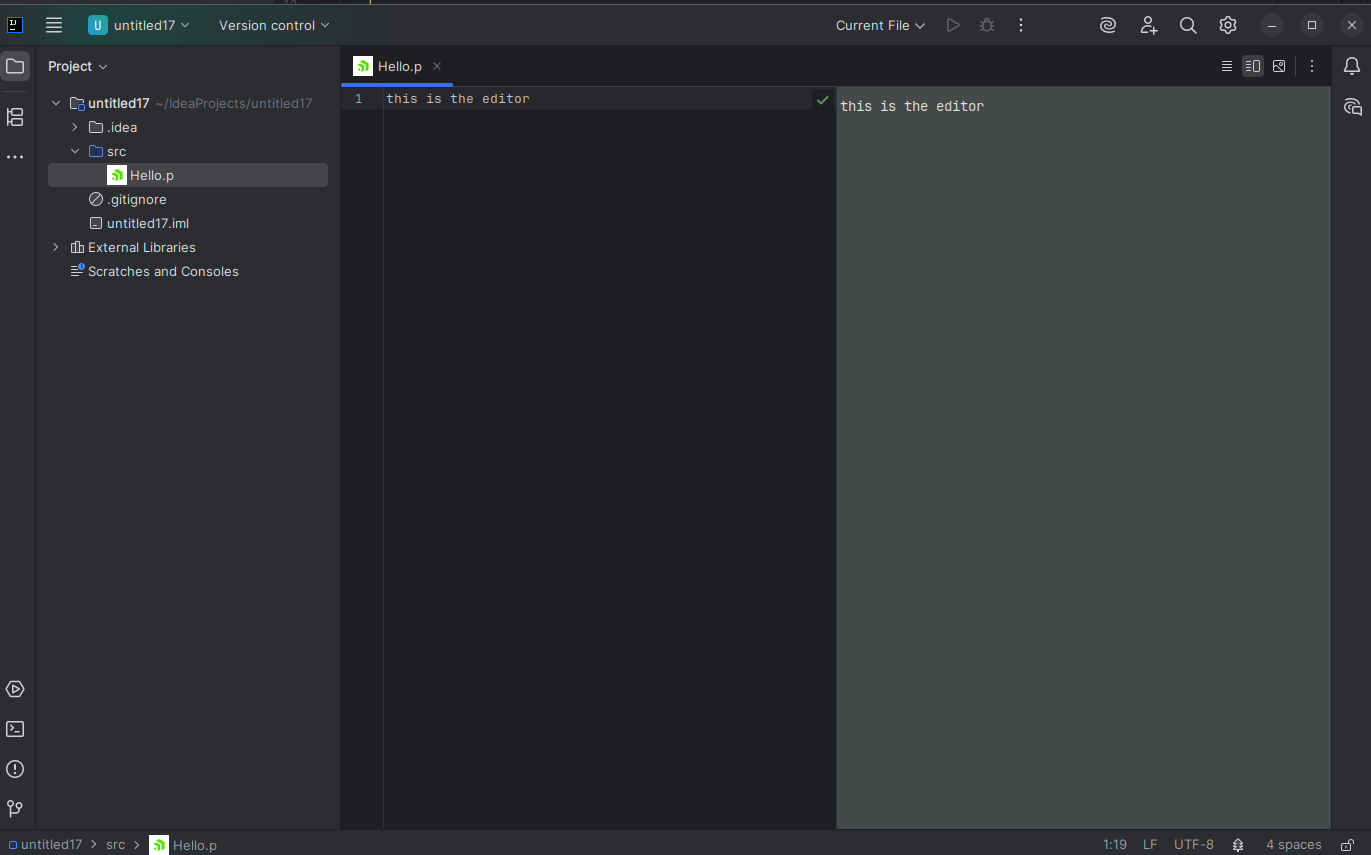
#10 Updated by Florin Eugen Rotaru about 1 year ago
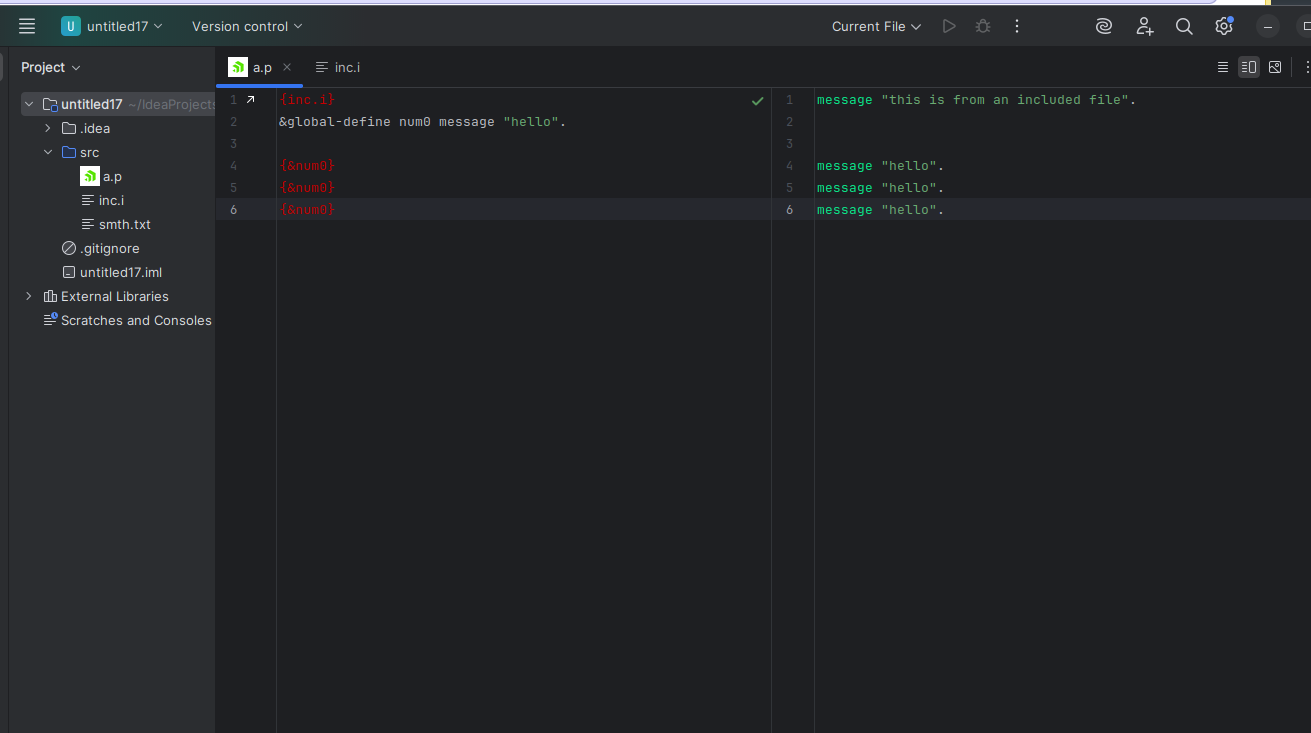
I managed to implement the idea above and created a real-time side-by-side preview of the preporcessed 4GL code (using P2J as a dependency):
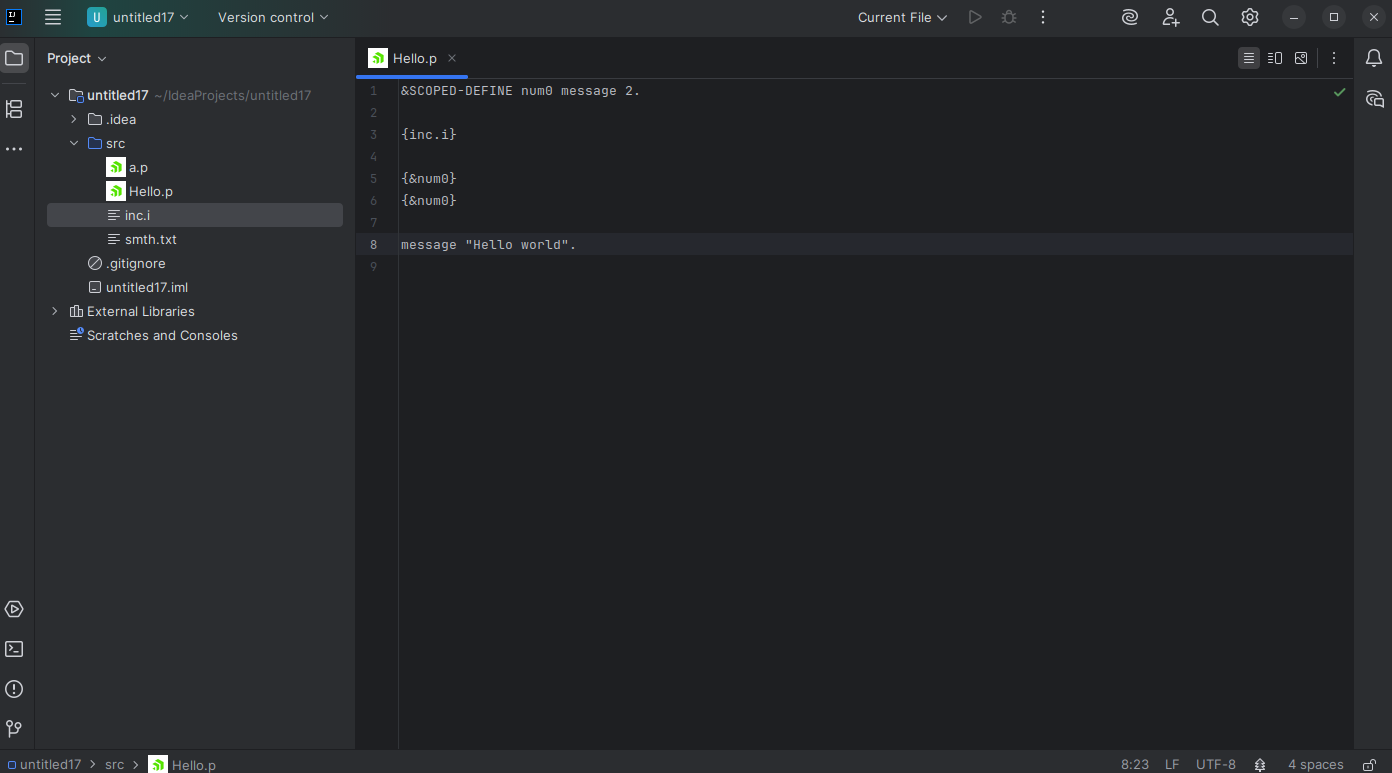
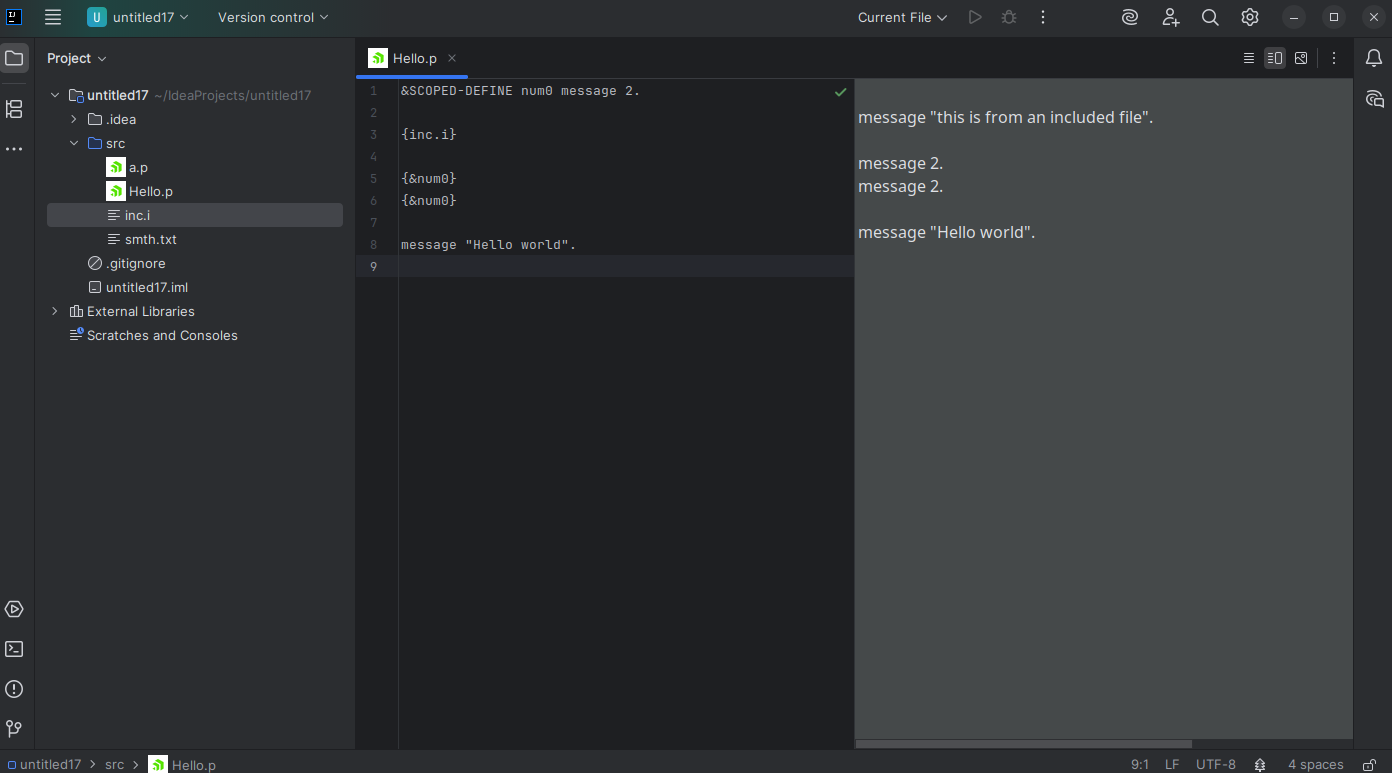
I will continue investigating the UI support, and also the syntax highlighting and possible navigation features.
#11 Updated by Florin Eugen Rotaru about 1 year ago
The IntelliJ platform is Swing-based and we can think of the UI components as wrappers over Swing JComponents. For example, this is the code for my code preview:
It wraps an intellij Editor which exposes editor.getComponent(). For example, if we wanted to register a key event for this editor, we would have something like this:
The KeyboardSHortcut is another wrapper over Swing KeyStroke class, which is bound to the editor’s Swing JComponent when calling registerCustomShortcutSet.
For different scenarios, we may have different FileEditorProvider implementations (that is an intellij interface). Each such interface has to be registered in the plugin.xml.
For example, for Progress files I have MyPreviewProvider, which, as the name suggests, will provide a special kind of editor - one that has two sides (an editor and a preview).
The sourceEditor and preview are both imlementations of TextEditor and FileEditor interfaces which have to wrap a an Editor implementation.
#13 Updated by Florin Eugen Rotaru about 1 year ago
The IntelliJ plugin deals with the syntax tree of a language using PsiElement abstractions. These provide information about structure and semantics of a language, so each language needs an own such structure.
We can inspect the PSI structure of the current file by Tools > View PSI structure of current file, for a Java file one would see eleements like PsiJavaFile(the root), PsiMethod, PsiAnnotation, etc.
How A Custom PSI Structure Is Created
Essentially, this structure is constructed by first designing a grammar for the code. Even if we use an LSP responsible for the lexing and parsing, we would still need a client PSI focused only on editor responsiveness and incremental updates.
Instead of using the standard IntelliJ lexer support, I wrote a small grammar in ANTLR4 and integrated it with IntelliJ API:
lexer grammar ProgressLexer;

MESSAGE : 'message' | 'MESSAGE';
DEFINE : 'scoped-define' | 'global-define' ;
TEXT : (~[ {}&"\r\n])+ ;
LCURLY : '{' ;
AMP : '&' ;
RCURLY : '}' ;
DQUOTE : '"' ;
DOT : '.' ;
STRING_LITERAL : DQUOTE (TEXT | ' ')* DQUOTE ;
WS : [ \t\r\n]+;
This required an adapter that wraps the ProgressLexer and uses it to extend the abstract com.intellij.lexer.Lexer class.
Next, the flow goes like this:
PsiBuilder
     │
     ▼
PsiParser.parse() → AST tree (ASTNodes with types & offsets)
     │
     ▼
ParserDefinition.createElement() → PSI tree (PsiElements wrapping ASTNodes)
     │
     ▼
Register the grammar definition in the PLUGIN.XML.
PsiBuilder - automatical wrapping of the lexer into an
PsiBuilder class.
PsiParser.parse() - If we had a ProgressParser as well, we'd just adapt the PsiParser too. In absence of a parser, we can iterate manually through the tokens produced by our PsiBuilder. Here we parse the file includes and the 4GL reference calls, and also the global-defines and scoped defines:
ParseDefiniton.createElement() - here we convert the AST elements into PSI elements that can interact with the IntelliJ API: ProgressParserDefinition
Now, we can inspect a .p file and view the @PsiElements: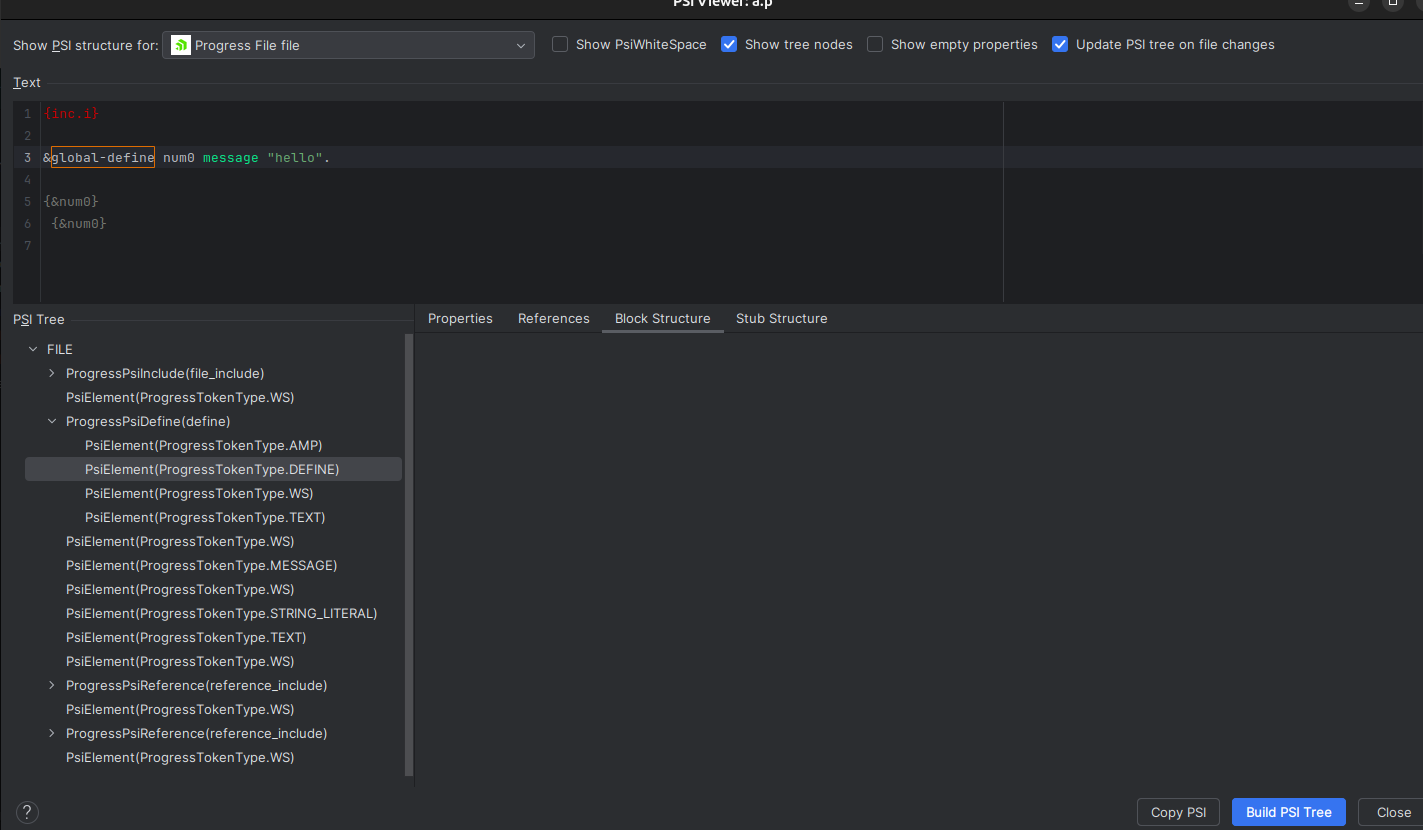
#14 Updated by Florin Eugen Rotaru about 1 year ago
- File ss4.png added
#15 Updated by Florin Eugen Rotaru about 1 year ago
ParserDefiniton.createElement() - here we convert the AST elements into PSI elements that can interact with the IntelliJ API
Instead of using a JavaParserDefinition, which is deprecated, the IntelliJ Java Plugin now uses a JavaSyntaxDefinition
1. Since in the previous approach the ParserDefinition was repsonsible for creating the PsiElements, I tried understanding where this is taking place now. In other words, the mapping between IElementTypes to PsiElemenets. My guess is that the composite elements, such as statements, expressions, etc., each know how to create an own Psi element, which is done implicitly. I will post more about this once I form a clear understanding.
2. With that out of the way, I'm curious about how the PsiElements are annotated (highlighted). It's clear for me that simple tokens are highlighted in the JavaFileHighlighter, using a hash map that stores the colors and the method:
  @Override
  public TextAttributesKey @NotNull [] getTokenHighlights(IElementType tokenType) {
    while (tokenType instanceof ParentProviderElementType parentProviderElementType) {
      if (parentProviderElementType.getParents().size() == 1) {
        tokenType = parentProviderElementType.getParents().iterator().next();
      }
    }
    return pack(ourMap1.get(tokenType), ourMap2.get(tokenType));
  }
#16 Updated by Florin Eugen Rotaru about 1 year ago
I tried understanding where this is taking place now. In other words, the mapping between IElementTypes to PsiElemenets.
From what I've investigated and debugged, there are two scenarios when PsiElements are created:
- When the file is parsed - this happens when IntelliJ actually parses the source code and builds the AST. Some use cases are retyping, just opening the file, or other operations that change the AST. For this, the Java plugin creates the
PsiElementsvery similarly to our approach for the small Progress Demo - in theParserDefinition.createElement - Called via the stub-factory. Here the PSIs are build from stubs using a factory class. The factory classes are defined in JavaStubRegistryExtension. Of course, this class has to be registered in the
plugin.xml. Probably, stubbing is an optimization (https://plugins.jetbrains.com/docs/intellij/stub-indexes.html#serializing-data).
#17 Updated by Florin Eugen Rotaru about 1 year ago
With the last IntelliJ update (2025.2), the LSP API is now available to all IDEA users. In other words, we can now use the ultimate platform-specific dependencies such as the com.intellij.platform.lsp.api.
This means we no longer need a third party framework for the IJ client, we can use the bundled support.
For configuration details please also refer to these:
https://blog.jetbrains.com/platform/2025/09/the-lsp-api-is-now-available-to-all-intellij-idea-users-and-plugin-developers/
https://platform.jetbrains.com/t/lsp-api-available-in-intellij-idea-ultimate-2025-2-without-paid-subscription/2284/11
I have experimented today with this and managed to integrate an IJ client with the same LSP server used for a VSCode client. I will post more details once I manage to structure the code better and get rid of some configuration errors.
#18 Updated by Florin Eugen Rotaru about 1 year ago
Florin Eugen Rotaru wrote:
With the last IntelliJ update (2025.2), the LSP API is now available to all IDEA users. In other words, we can now use the ultimate platform-specific dependencies such as the com.intellij.platform.lsp.api.
This means we no longer need a third party framework for the IJ client, we can use the bundled support.For configuration details please also refer to these:
https://blog.jetbrains.com/platform/2025/09/the-lsp-api-is-now-available-to-all-intellij-idea-users-and-plugin-developers/
https://platform.jetbrains.com/t/lsp-api-available-in-intellij-idea-ultimate-2025-2-without-paid-subscription/2284/11I have experimented today with this and managed to integrate an IJ client with the same LSP server used for a VSCode client. I will post more details once I manage to structure the code better and get rid of some configuration errors.
As a follow-up, I have noticed that the IntelliJ integration with the Language Server Protocol does not implement all of the LSP features:
https://plugins.jetbrains.com/docs/intellij/language-server-protocol.html#supported-features
For example, the textDocument/foldingRange request is missing, unlike in VSCode (which seems to be more complete).
#19 Updated by Greg Shah about 1 year ago
With the last IntelliJ update (2025.2), the LSP API is now available to all IDEA users. In other words, we can now use the ultimate platform-specific dependencies such as the com.intellij.platform.lsp.api.
This means we no longer need a third party framework for the IJ client, we can use the bundled support.
The Supported IDEs section states that the community edition is NOT supported. That is a problem for us, we can't assume that a commercial version is in use.
#20 Updated by Florin Eugen Rotaru about 1 year ago
Greg Shah wrote:
With the last IntelliJ update (2025.2), the LSP API is now available to all IDEA users. In other words, we can now use the ultimate platform-specific dependencies such as the com.intellij.platform.lsp.api.
This means we no longer need a third party framework for the IJ client, we can use the bundled support.The Supported IDEs section states that the community edition is NOT supported. That is a problem for us, we can't assume that a commercial version is in use.
Greg, does this answer your question?
Future changes (2025.3): With the new unified distribution, the traditional Community Edition will be sunset. All users will download a single IntelliJ IDEA installer, with IntelliJ IDEA Ultimate features requiring a subscription to be unlocked, but LSP support will remain available to everyone.

The LSP implementation itself stays closed-source and commercial, but we’ll keep it fully accessible for third-party plugins at no charge. This means plugin developers can now target a much broader user base without requiring their users to purchase the IntelliJ IDEA license.
#21 Updated by Greg Shah about 1 year ago
Greg, does this answer your question?
Yes, it does.
Some remaining questions:
- What are the functional limitations of using LSP for IntelliJ? (What IDE features cannot be accessed using LSP alone?)
- Can one write a plugin that accesses both the native/PSI approach and the LSP model? Or do we need to choose one or the other?
#22 Updated by Florin Eugen Rotaru about 1 year ago
- File LspIJClient.zip added
- File NativeIJClient.zip added
Features that can be leveraged with the LSP alone are listed here https://plugins.jetbrains.com/docs/intellij/language-server-protocol.html#supported-features
We can have both the PSI native approach and the LSP support for the same plugin, but they cannot 'interact' with each other. This is because of two reasons:
1. The LSP transport layer is not publicly available. In other words, we don't have access to the sources that actually send the requests and process their results, so if we wanted, for example, to send tokens to the client and wrap them in PSI elements from them, we just couldn't do that.
2. Even if we had more access to the sources, the PSI elements require some sense of hierarchy between elements, but the LSP semanticTokens/* sends flat tokens:
{ line: 2, startChar:  5, length: 3, tokenType: "property",
    tokenModifiers: ["private", "static"]
},
{ line: 2, startChar: 10, length: 4, tokenType: "type", tokenModifiers: [] },
{ line: 5, startChar:  2, length: 7, tokenType: "class", tokenModifiers: [] }
What we can do is have some features provided by the server and some by the client, for example some small adjustments can be done by a parsing on the client. The client could in theory have the same ANTLR4 parser as the server, or a smaller one for specific features.
Another approach is to have an own LSP client implementation, so we can control when and how the requests are sent, and which requests to send. One such attempt is this community LSP (incomplete) implementation: https://github.com/ballerina-platform/lsp4intellij.
I am attaching the two client plugins I have implemented.
1. NativeIJClient is a plugin which demonstrates native PSI functionalities. The demo uses some FWD dependencies for preprocessing, so adding the p2j.jar and the antlr jars to the build is necessary.
1. LspIJClient which makes use of the LSP from #9919-15. IntelliJ IDEA >= 2025.2 needed!
For both of them, please start from a IntelliJ Project of the PLUGIN type and use the configuration from the corresponding build.gradle.kts files.
#23 Updated by Florin Eugen Rotaru about 1 year ago
- File deleted (
NativeIJClient.zip)
#24 Updated by Florin Eugen Rotaru about 1 year ago
- File deleted (
LspIJClient.zip)
#25 Updated by Florin Eugen Rotaru about 1 year ago
- File NativeIJClient.zip added
- File LspIJCLient.zip added
#26 Updated by Florin Eugen Rotaru about 1 year ago
JetBrains have a new IDE which is similar to VSCode. It has a smart mode in which it can support many standard languages like Java, Ruby, C++, etc.
However, as this link suggests (https://fleet-asupport.jetbrains.com/hc/en-us/community/posts/26819633205778-Language-Server-Protocol-support) there are no intentions to make it support custom LSP servers.
As for IntelliJ plans to extend their LSP support to more features, I have posted a question on their forum, hopefully we get an answer:
https://platform.jetbrains.com/t/intellij-lsp-features-road-map/2736
#27 Updated by Greg Shah 7 months ago
- Related to Feature #11355: VSCode extension added
#28 Updated by Greg Shah 7 months ago
My assessment is that it does not make sense to invest in an IntelliJ plugin. Their direction is closed/proprietary and they are the gatekeepers on whether you can add features or not. The inability to implement a custom LSP in their latest codebase is a prime example. At a time when the entire world is implementing an LSP approach, why would you limit yourself to only those LSPs that are provided as part of the IDE. It is a death sentence to the platform, IMO.
Our plan at this time is to move on with a VSCode extension and that support will replace this task.
Hyenk: You've been watching this space as well. What are your thoughts?
#29 Updated by Hynek Cihlar 7 months ago
Greg, I share your concerns. IntelliJ is indeed a superior Java IDE - the debugger alone is light years ahead of VSCode. But superior tooling doesn't help if the platform limits what we can build on top of it.
Btw. a similar story plays out with AI assistants. JetBrains controls which AI providers are available in IntelliJ, and while they allow some third parties, the selection is curated and those integrations are not first-class citizens in terms of features or UX. JetBrains AI Assistant gets deeper hooks into the editor, better inline placement, tighter PSI (Program Structure Interface - JetBrains' proprietary API for code analysis and manipulation) integration. Third-party AI plugins hit the same ceiling as third-party LSP - they can exist, but they can't match the built-in experience. JetBrains AI Assistant is a paid add-on with their own margins on top of the underlying LLM providers - so the incentive to keep third-party AI integrations second-class is obviously financial, not just technical. In VSCode, Copilot, Cody, Continue, Cursor-style agents all compete on equal grounds through the same extension API.