Feature #8991
Integrate SPREADSHEET widget in Hotel GUI sample application
100%
hotel_gui_spreadsheet.20240719a.diff  (14 KB)
hotel_gui_avail_rooms.png (30.6 KB)
8991_spreadsheet_hotel_gui_demo.png (67.9 KB)
8991_spreadsheet_hotel_gui_demo_fail.png (70.4 KB)
fwd_server_20240801_153610_0_0.log
(92.4 KB)
fwd_server_20240805_085337_0_0.log
(94.5 KB)
8991_post_config_change.png (49.1 KB)
8991_second_sheet.png (142 KB)
fwd_server_20240808_135836_0_0.log
(206 KB)
Related issues
History
#1 Updated by Hynek Cihlar about 2 years ago
- % Done changed from 0 to 100
- File hotel_gui_spreadsheet.20240719a.diff added
- Status changed from New to Review
The attached diff adds SPREADSHEET widget in Hotel GUI.
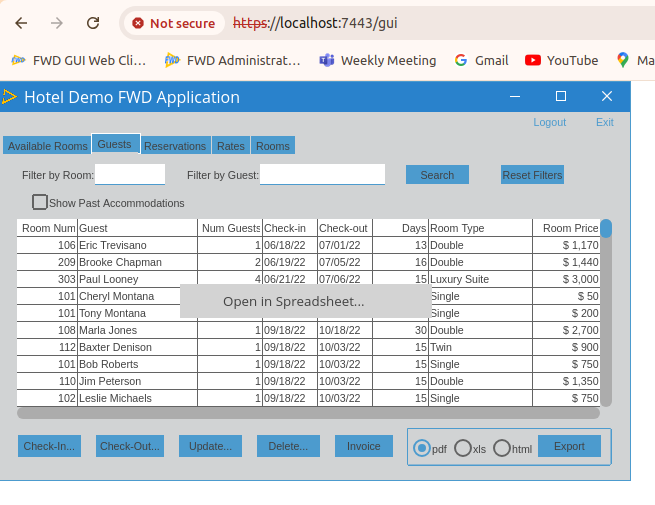
The feature can be accessed in the Guests screen. Right clicking in the browse brings up a popup menu with the option "Open in Spreadsheet...". Choosing the item will open a new window with the guests data filled in the spreadsheet. The spreadsheet screen also includes a main menu with the option to open an arbitrary spreadsheet file.
Note there is an issue with the guests data not initially displayed, the sheet must be manually invalidated by creating new sheet and switching to it and back.
Please review the changes.
#2 Updated by Greg Shah about 2 years ago
Code Review hotel_gui_spreadsheet.20240719a.diff
Everything looks fine. Next steps:
- Check in the changes to the Hotel GUI project.
- Please provide instructions on how to setup/run the new code. At a minimum, we must build FWD differently. The documentation for the Guided Tour is a simplified doc. See Setup FWD and Setup Hotel GUI.
Roger: Once posted, please test out these instructions and make sure they work in Docker. I want to offer an public image that can be used to run this latest code.
#3 Updated by Hynek Cihlar about 2 years ago
The diff checked in the repository revision 340.
#4 Updated by Hynek Cihlar about 2 years ago
I updated FWD build instructions in Guided_Tour. This should be enough to make SPREADSHEET widget work in the project.
#5 Updated by Hynek Cihlar about 2 years ago
- Status changed from Review to Test
#6 Updated by Roger Borrello about 2 years ago
- File hotel_gui_avail_rooms.png added
So there are no other things to do besides make sure FWD includes the sheet:war? Will use of the spreadsheet control be obvious?
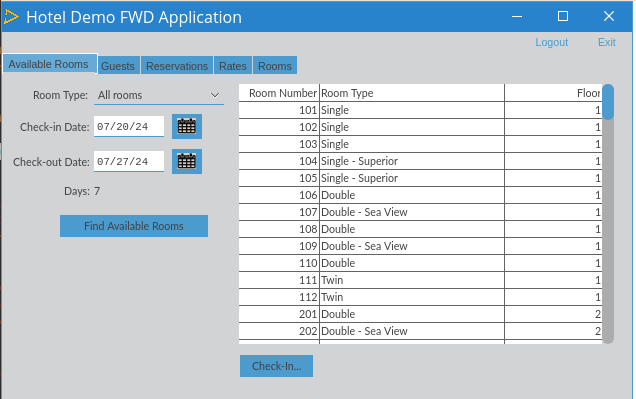
The images for H2 JDK8 are pushed:
REPOSITORY                                                    TAG                                IMAGE ID       CREATED          SIZE
goldencode/hotel_gui                                          340_trunk-15347_20240720a_client   4d0861518831   22 minutes ago   5.44GB
goldencode/hotel_gui                                          latest_client                      4d0861518831   22 minutes ago   5.44GB
goldencode/hotel_gui                                          340_trunk-15347_20240720a_server   d71d6df09bea   22 minutes ago   5.45GB
goldencode/hotel_gui                                          latest_server                      d71d6df09bea   22 minutes ago   5.45GB
#7 Updated by Hynek Cihlar about 2 years ago
Roger Borrello wrote:
So there are no other things to do besides make sure FWD includes the
sheet:war?
Yes, including the build task sheet:war is enough.
Will use of the spreadsheet control be obvious?
It should be obvious if the end-user knows it is there and how to display it.
#8 Updated by Greg Shah about 2 years ago
Roger doesn't see any changes in the UI. It is not obvious how to get to it.
#9 Updated by Hynek Cihlar about 2 years ago
Please see #8991-1: "The feature can be accessed in the Guests screen. Right clicking in the browse brings up a popup menu with the option "Open in Spreadsheet...". Choosing the item will open a new window with the guests data filled in the spreadsheet. The spreadsheet screen also includes a main menu with the option to open an arbitrary spreadsheet file."
#10 Updated by Roger Borrello about 2 years ago
- File 8991_spreadsheet_hotel_gui_demo.png added
- File 8991_spreadsheet_hotel_gui_demo_fail.png added
It is looked correct at first...
But I got this when I tried to open it. Is there a missing step?
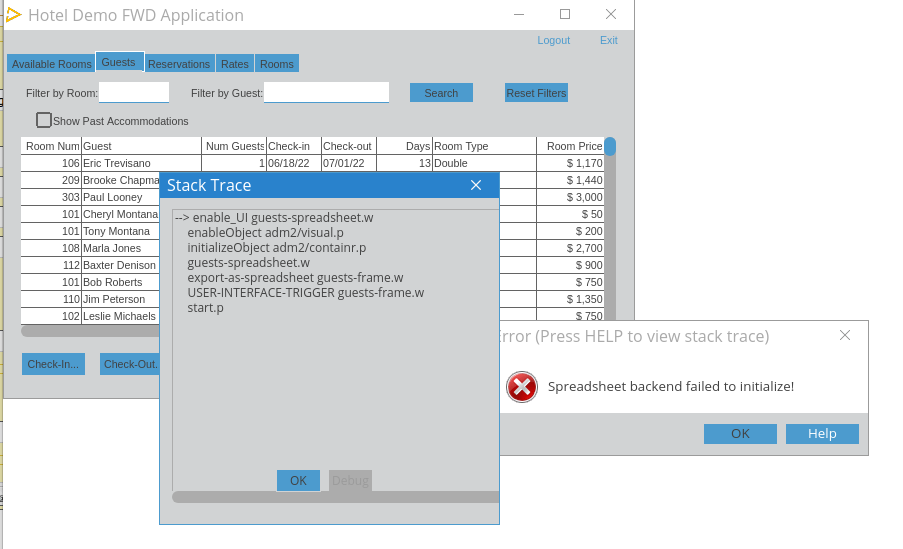
#11 Updated by Hynek Cihlar about 2 years ago
Roger Borrello wrote:
But I got this when I tried to open it. Is there a missing step?
Did you build the spreadsheet backend war file with ./gradlew sheet:war in the <p2j> dir? After the war is built, it must be deployed to <project>/deploy/lib with ant deploy.prepare.
Did you follow the instructions on the Hotel GUI wiki page?
#12 Updated by Roger Borrello about 2 years ago
Hynek Cihlar wrote:
After the war is built, it must be deployed to <project>/deploy/lib with
ant deploy.prepare.
My libraries are in FWD_LIB=/opt/fwd, and /opt/fwd is a symlink to ~/projects/fwd/trunk and the .war file is in /opt/fwd/build/lib/fwd_sheet.war. I had to modify my helper, which was not include .war files, but that is working now.
So my classpath is very long, but does includes all the FWD jars and the fwd_sheet.war file. Does the .war file need to be next to the <project>/deploy/lib/hotel.jar file, or just in the classpath?
#13 Updated by Roger Borrello about 2 years ago
I also tried ant prepare.deploy and all the jars are in the deploy/lib, but I still get the same issue.
#14 Updated by Hynek Cihlar about 2 years ago
Roger Borrello wrote:
I also tried
ant prepare.deployand all the jars are in thedeploy/lib, but I still get the same issue.
fwd_sheet.war doesn't need to be on the classpath, but must be in the same directory as p2j.jar.
#15 Updated by Roger Borrello about 2 years ago
Hynek Cihlar wrote:
fwd_sheet.wardoesn't need to be on the classpath, but must be in the same directory asp2j.jar.
That is definitely the case. Should I debug the loading? If so, any tips where to break?
#16 Updated by Hynek Cihlar about 2 years ago
Roger Borrello wrote:
Hynek Cihlar wrote:
fwd_sheet.wardoesn't need to be on the classpath, but must be in the same directory asp2j.jar.That is definitely the case. Should I debug the loading? If so, any tips where to break?
First, please check the server log.
#17 Updated by Roger Borrello about 2 years ago
- File fwd_server_20240801_153610_0_0.log added
Hynek Cihlar wrote:
First, please check the server log.
See attached
#18 Updated by Hynek Cihlar about 2 years ago
Roger Borrello wrote:
Hynek Cihlar wrote:
First, please check the server log.
See attached
directory.xml must contain the following to enable SPREADSHEET widget backend. Sorry I didn't check this directory change in the repository.
          <node class="container" name="spreadsheet">
            <node class="boolean" name="enabled">
              <node-attribute name="value" value="TRUE"/>
            </node>
          </node>
#19 Updated by Hynek Cihlar about 2 years ago
Hynek Cihlar wrote:
directory.xmlmust contain the following to enable SPREADSHEET widget backend. Sorry I didn't check this directory change in the repository.
I checked in the directory change in the Hotel GUI project.
#20 Updated by Roger Borrello about 2 years ago
Thanks... I'll update. Do you think this should be a flag stored in the JSON and configured with the tool that creates the directory?
#21 Updated by Greg Shah about 2 years ago
Roger Borrello wrote:
Thanks... I'll update. Do you think this should be a flag stored in the JSON and configured with the tool that creates the directory?
No. It should always be on.
#22 Updated by Roger Borrello about 2 years ago
Greg Shah wrote:
Roger Borrello wrote:
Thanks... I'll update. Do you think this should be a flag stored in the JSON and configured with the tool that creates the directory?
No. It should always be on.
I was just typing in the same thing... Also, after the error there are a lot of exceptions in the log. Is that caused by the lack of configuration? Is so maybe that should be cleaned up.
24/08/01 15:38:06.657-0400 |  SEVERE | com.goldencode.p2j.ui.SpreadsheetWidget | ThreadName:Conversation [00000004:bogus], Session:00000004, Thread:00000003, User:bogus | Failed to process widget command! Spreadsheet backend has not initialized.
24/08/01 15:38:06.658-0400 | WARNING | com.goldencode.p2j.ui.SpreadsheetWidget | ThreadName:Conversation [00000004:bogus], Session:00000004, Thread:00000003, User:bogus | Cannot process command SET_SHOW_TABS. Spreadsheet backend failed to initialize.
24/08/01 15:38:15.797-0400 |  SEVERE | com.goldencode.p2j.net.HighLevelObject | ThreadName:Conversation [00000004:bogus], Session:00000004, Thread:00000003, User:bogus | Failed to obtain routing key
java.lang.IllegalStateException: The queue is not running!
    at com.goldencode.p2j.net.Queue.checkState(Queue.java:1366)
    at com.goldencode.p2j.net.Queue.transact(Queue.java:677)
    at com.goldencode.p2j.net.BaseSession.transact(BaseSession.java:273)
    at com.goldencode.p2j.net.HighLevelObject.transact(HighLevelObject.java:221)
    at com.goldencode.p2j.net.HighLevelObject.getKey(HighLevelObject.java:173)
    at com.goldencode.p2j.net.RemoteObject$RemoteAccess.obtainRoutingKey(RemoteObject.java:1547)
    at com.goldencode.p2j.net.RemoteObject$RemoteAccess.invokeCore(RemoteObject.java:1458)
    at com.goldencode.p2j.net.InvocationStub.invoke(InvocationStub.java:144)
    at com.sun.proxy.$Proxy21.removeWindow(Unknown Source)
    at com.goldencode.p2j.ui.LogicalTerminal.deregisterWindow(LogicalTerminal.java:17711)
    at com.goldencode.p2j.ui.WindowWidget.resourceDelete(WindowWidget.java:1063)
    at com.goldencode.p2j.ui.GenericWidget.delete(GenericWidget.java:6029)
    at com.goldencode.p2j.ui.WindowWidget.delete(WindowWidget.java:1080)
    at com.goldencode.p2j.util.HandleOps.delete(HandleOps.java:491)
    at com.goldencode.p2j.util.WidgetPool$WidgetPoolData.deleteResources(WidgetPool.java:1360)
    at com.goldencode.p2j.util.WidgetPool.deletePool(WidgetPool.java:796)
    at com.goldencode.p2j.util.WidgetPool.deleteNonPersistentPools(WidgetPool.java:741)
    at com.goldencode.p2j.util.WidgetPool.access$1700(WidgetPool.java:285)
    at com.goldencode.p2j.util.WidgetPool$WorkArea.scopeFinished(WidgetPool.java:1175)
    at com.goldencode.p2j.util.WidgetPool$WidgetPoolHelper.scopeFinished(WidgetPool.java:981)
    at com.goldencode.p2j.util.ProcedureManager$WorkArea.scopeFinished(ProcedureManager.java:5556)
    at com.goldencode.p2j.util.TransactionManager.processScopeNotifications(TransactionManager.java:7854)
    at com.goldencode.p2j.util.TransactionManager.popScope(TransactionManager.java:4784)
    at com.goldencode.p2j.util.TransactionManager.access$7300(TransactionManager.java:731)
...
#23 Updated by Roger Borrello about 2 years ago
- File 8991_post_config_change.png added
- File fwd_server_20240805_085337_0_0.log added
With the proper configuration, I get the spreadsheet, but no data. Perhaps there is some pre-req issue?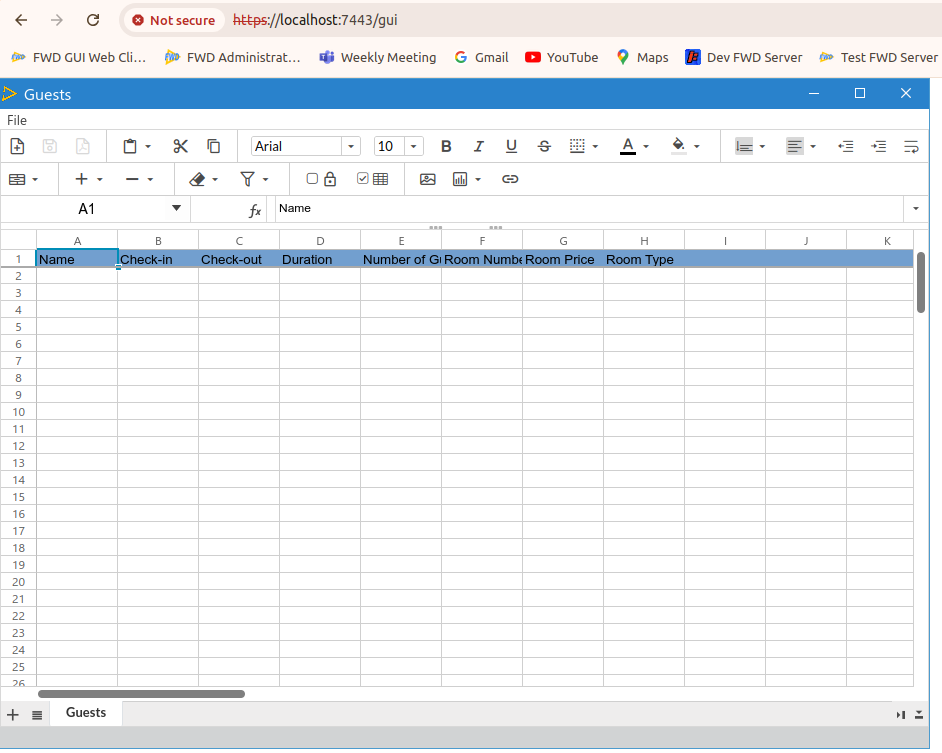
There are other exceptions logged, which is attached.
#24 Updated by Hynek Cihlar about 2 years ago
"Note there is an issue with the guests data not initially displayed, the sheet must be manually invalidated by creating new sheet and switching to it and back.", refs #8991-1.
#25 Updated by Roger Borrello about 2 years ago
- File 8991_second_sheet.png added
Hynek Cihlar wrote:
"Note there is an issue with the guests data not initially displayed, the sheet must be manually invalidated by creating new sheet and switching to it and back.", refs #8991-1.
I see... that looks better. 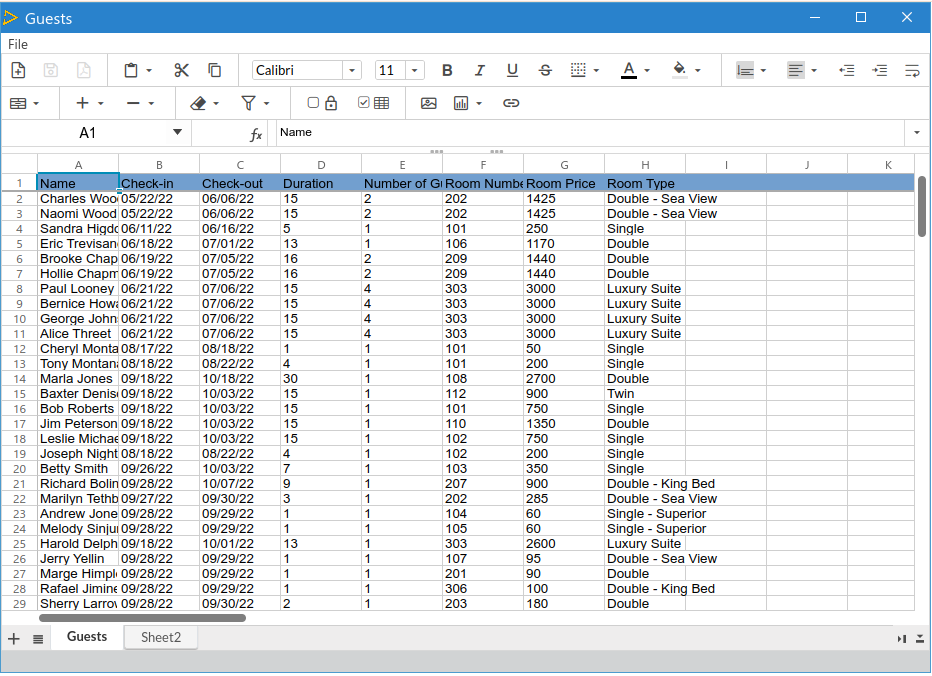
Are the exceptions something to look at?
#26 Updated by Hynek Cihlar about 2 years ago
- Related to Feature #9033: Give a meaningful error message when SPREADSHEET widget backend is not enabled in the directory added
#27 Updated by Hynek Cihlar about 2 years ago
#28 Updated by Roger Borrello about 2 years ago
- File fwd_server_20240808_135836_0_0.log added
Is this something that should work in Swing? I tried client.sh, and it was very backlevel. I utilized a more up-to-date version, and was able to choose "Open in Spreadsheet..." but there were a lot of errors logged, and I was returned back to the Hotel login page.
#29 Updated by Hynek Cihlar about 2 years ago
Roger Borrello wrote:
Is this something that should work in Swing? I tried
client.sh, and it was very backlevel. I utilized a more up-to-date version, and was able to choose "Open in Spreadsheet..." but there were a lot of errors logged, and I was returned back to the Hotel login page.
SPREADSHEET widget is not supported in Swing GUI, but also FWD should not abend. I added a task to solve this in #9033.
#31 Updated by Hynek Cihlar almost 2 years ago
Hynek Cihlar wrote:
Note there is an issue with the guests data not initially displayed, the sheet must be manually invalidated by creating new sheet and switching to it and back.
This is resolved with 9046a.