Phase 1 IDE Support
Introduction
This documents the proposed features for the 1st Phase IDE Support. It is based on the core feature set of PDSOE which is the starting point for most OE developers.
TODO: evaluate the newer VSCode support to see if there is any critical feature it has which should be part of this list.
See also Phase 2 IDE Support.
Target Files
Defining the set of target files - For now, we can consider .w, .i, .p, .cls files as source code files for the custom language IDE features.
Keymaps
Aligning the keymaps: - Progress OpenEdge Studio Developer comes with some specific key bindings. A lot of them would need extra features to be implemented for them to be used. However there usual bindings too, which have corresponding key combinations in modern IDEs. Those are in the following groups (see the bindings.csv which stores the keymap from OE):
- Edit
- File
- Navigate
- Project
- Quick Search
- Run/Debug
- Search
- Source
- Text Editing
- Uncategorized (e.g. Rename, Find refs)
- Window
In the first phase, we can identify these overlaps and start configuring the new IDE keymap accordingly. The IDE defaults should be available too, and the user should be able to edit them and create a custom configuration.
Syntax Highlighting
Implementing syntax highlighting - as reference, the following table from OE settings can be used:
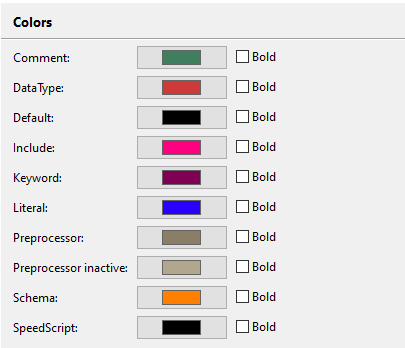
Additionally, we can also implement the option of customizing these colors.
Error Reporting
Signaling syntax errors comprehensively - this refers to unfinished statemets, undeclared variables, unexpected keywords, unfinished statements, etc. For more details see Syntax Assistance & Checking in OpenEdge IDE Features.
Navigating to a Declaration
Navigating to a Structure Declaration - For an object, a variable or a subprogram, with the use of clicks or key bindings go to the definition. For more details see Navigation Features in OpenEdge IDE Features.
Auto-Bracketing
Auto-Bracketing/Quoting/Bracing/Parenthesizing - for ', ", [, {, (. The highlighting of pairs is already implemented in IntelliJ for all file types, unlike in Eclipse.
Autocompletion
Implementing Autocompletion - In OE, the user is presented with the possible auto-completions when ":" or "." are typed after a handle, a db table or an object. It can also happen on demand by pressing CTRL + Enter. The suggestions are accompanied by snippets from the docs/db schema. In the 1st phase, we can implement this approach too, or we can make the suggestions appear more oftern, whenever relevant ones are detected (as it happens in modern IDEs), for different sorts of tokens (variables, objects, subprograms, etc).
File Outline
Implementing the Outline of a file - An overview of the project structure. For details see Project Views subsection in OpenEdge IDE Features. This is the same concept as IntelliJ's Structure (Alt + 7).
Conversion and Runtime Execution
Implementing Conversion and Running the Progress programs - The user should be able to compile the progress sources to FWD code, analyze it and run it. Configuring some run options should be possible, such as:- choosing the startup program
- enabling ChUI(TTY) mode
- enabling Batch mode
- enabling Background mode
- adding session startup parameters
- Selecting the FWD/Progress versions
- choosing the working directory
Java View
Provide a side-by-side preview of the Java-converted code.
Debugging
Add support for debugging - these should include:
- placing breakpoints
- add a boolean condition for a breakpoint
- once a breakpoint is hit:
- have step in, out and over capabilites
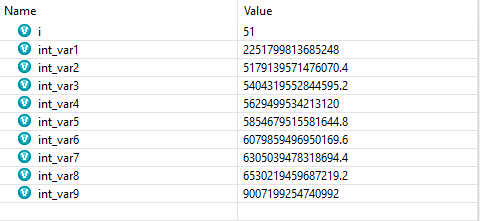
- have an overview on variable values
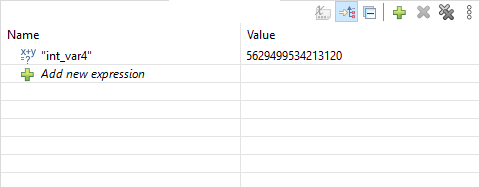
- support expression evaluation
Schema Editor
Implementing DB Schema features - This includes features that let the user interact with the DB schema. A list of specific features needed:
- creating a DB/connect to an existing DB
- for tables
- creating new tables, choosing the name, dump file name, adding description
- editing the options mentioned above
- triggers: providing a textbox for adding new triggers or editing triggers. Importing a procedure file as trigger content. The trigger procedure signature should be pre-generated according to the selected event.
- validation expressions and message for disallowed deletions
- deleting a table
- for sequences
- creating new sequences (name, initial value, increment, upper limit, cycle?)
- editing the properties mentioned above
- deleting a sequence
- for table fields:
- creating a new field - choosing a name, a datatype, [format, label, initial value, etc]
- editing the options mentioned above
- adding field validation and a field validation message
- triggers: providing a textbox for adding new triggers or editing triggers. Importing a procedure file as trigger content. The trigger procedures can only be for
assignevent - adding a
view-as <widget>phrase - deleting fields
- for indexes:
- choosing an Index Name[,a description], a type (primary, active, unique, word index, abbreviated), the field(s) for the index.
- editing the options mentioned above
- delete the index (should not be allowed if it is the primary index)
© 2025-2026 Golden Code Development Corporation. ALL RIGHTS RESERVED.
