Reverse Proxy
Introduction
The original work to support this feature can be found in #2683.
FWD supports reverse proxy usage with its web clients. At this time it does not support this usage with appserver clients.
The need for a reverse proxy follows from customers who need a dedicated port for FWD (normally the standard https port 443). The FWD server spawns a JVM process per client session, each JVM has an embedded web server which listens on a TCP/IP socket. That means each client session has a dedicated unique port on the system on which the clients run.
Side note: A FWD watchdog cleans up client sessions which are no longer valid (for example: a browser is closed without logging out).
This documentation shows setting up a reverse proxy using Apache. FWD already supports both unproxied and reverse-proxied connections. Setting it up in a different proxy technology (for example NGINX) should be analogous, and can be done by the customer without additional FWD support being written. Those other technologies are not in the scope of this document.
Installation
Install Apache and whatever modules are needed for reverse proxy.
sudo apt-get install apache2
Some useful references:
How to use Apache HTTP Server as Reverse Proxy
How to install Apache on Ubuntu 20.04
Configuration
Apache Modules and High Level Configuration
Start from the default configuration /etc/apache2/sites-available/default-ssl.conf.
<IfModule mod_ssl.c>
<VirtualHost _default_:443>
....................
# the reverse proxy settings
#place here configuration of the reverse proxy
</VirtualHost>
</IfModule>
Enable mod_proxy and mod_proxy_wstunnel modules
sudo a2enmod proxy
sudo a2enmod proxy_http
sudo a2enmod proxy_ajp
sudo a2enmod rewrite
sudo a2enmod deflate
sudo a2enmod headers
sudo a2enmod proxy_balancer
sudo a2enmod proxy_connect
sudo a2enmod proxy_html
sudo a2enmod proxy_wstunnel
and then add the following changes to this file
ProxyRequests Off
SSLProxyEngine On
ProxyReceiveBufferSize 4096
SSLProxyVerify none
SSLProxyCheckPeerCN off
SSLProxyCheckPeerName off
RewriteEngine On

RewriteMap  clients-to-backends   "txt:/etc/apache2/map.clients-to-backends"

RewriteCond %{HTTP:Connection} Upgrade [NC]
RewriteCond %{HTTP:Upgrade} websocket [NC]
RewriteRule /server/([^/]+)/(.*)  wss://${clients-to-backends:$1}/$2 [P,L]
RewriteRule /server/([^/]+)/(.*) https://${clients-to-backends:$1}/$2 [P,L]

ProxyPreserveHost On
ProxyAddHeaders On

ProxyPass /gui  https://localhost:7443/gui
ProxyPassReverse /gui https://localhost:7443/gui
Please find the attached configuration example in this task #3236.
FWD Reverse Proxy Configuration
Client process config:
The embedded web server in the FWD server process handles web login requests and spawns client OS processes locally or remotely. The client OS process starts its own embedded web server on an allocated port. The browser client opens the index page served by the web driver (the client embedded server). This web driver index page url should incorporate the reversed proxy configuration that specify the proxy host forwardedHost, proxy protocol forwardedProto, available ports from-to, context path namePrefix.
Prepare a hosts.txt file that lists internal IP4 addresses of FWD backends and assigns a unique number for each one of them. For an example, in the Hotel GUI project let the hotel_gui/deploy/server/hosts.txt have this content
#hosts.txt:
127.0.0.1    100
Add these settings namePrefix, forwardedHost, forwardedProto, from and to are set under portsRange of webClient node in the directory.xml:
        <node class="container" name="webClient">
          <node class="boolean" name="virtualDesktop">
            <node-attribute name="value" value="TRUE"/>
          </node>
          <node class="boolean" name="embedded">
            <node-attribute name="value" value="FALSE"/>
          </node>
          <node class="boolean" name="enabled">
            <node-attribute name="value" value="TRUE"/>
          </node>
          <node class="string" name="host">
            <node-attribute name="value" value="127.0.0.1"/>
          </node>
          <node class="container" name="portsRange">
            <node class="string" name="namePrefix">
              <node-attribute name="value" value="client"/>
            </node>
            <node class="string" name="forwardedHost">
              <node-attribute name="value" value="192.168.1.37"/>
            </node>
            <node class="string" name="forwardedProto">
              <node-attribute name="value" value="https"/>
            </node>
            <node class="integer" name="from">
              <node-attribute name="value" value="7449"/>
            </node>
            <node class="integer" name="to">
              <node-attribute name="value" value="7459"/>
            </node>
          </node>
................................................
Note: the portsRange + from / to : This can be used whenever needed to specify a port range for web clients to connect to. It is not dependent on a reverse proxy.
Change the working directory to hotel_gui/deploy/server and run this simple command:
java -classpath ../lib/p2j.jar:. com.goldencode.p2j.main.ClientsToPortsGenerator directory.xml hosts.txt
This will generate the reverse proxy mappings by port.
Accept the default name map.clients-to-backends and finally this command generates this content for that map.clients-to-backends file
client1001    127.0.0.1:7449
client1002    127.0.0.1:7450
client1003    127.0.0.1:7451
client1004    127.0.0.1:7452
client1005    127.0.0.1:7453
client1006    127.0.0.1:7454
client1007    127.0.0.1:7455
client1008    127.0.0.1:7456
client1009    127.0.0.1:7457
client10010    127.0.0.1:7458
client10011    127.0.0.1:7459
Server process configs:
There are some server resources that need to be allowed through the proxy:- The login / logout page. Logout pages are available with SSO. Paths to the pages depend on the web driver. Default context for gui is
/gui, for chui is/chui, for embedded is/embedded. The default path for login on gui is/gui, for logout page is/gui/logout; - The webres resources (.js, .css files, images). The context is
/webresand doesn't change with the type of driver, but the proxy contextwebClient/serverProxyPathwill be added to links using the resources like/path/webres;
When a single instance of FWD is running behind the reverse proxy, there is no need of server specific configs in directory.xml.
If multiple instances of FWD are behind the same proxy, AND the default contexts for the web drivers need to be hidden, there is a combinations of configs that can achieve it:
- Change the relevant web driver context using
webClient/guiIdentifier(this changes/guito a new path),webClient/chuiIdentifier,webClient/embeddedIdentifier; - Add the path used by the proxy to map the driver pages with
webClient/serverProxyPath. It's used to build the login / logout page urls and paths to webres files; - Add
webClient/removeProxyPathInWebPagesasTRUEto indicate that external links built by the system (like the login and logout pages) should not include the proxy path. The proxy path is not affected by the config and is still added to the/webrespath.
This will basically mask the web driver login page context as a reverse proxy path segment. An example config:
On merge the necessary config to hide /gui will be:
        <node class="container" name="webClient">
          <node class="string" name="serverProxyPath">
            <node-attribute name="value" value="instanceName"/>
          </node>
          <node class="string" name="guiIdentifier">
            <node-attribute name="value" value="instanceName"/>
          </node>
          <node class="boolean" name="removeProxyPathInWebPages">
            <node-attribute name="value" value="TRUE"/>
          </node>
        </node>
Proxy configs:
    ProxyPass /instanceName/webres  https://server:port/webres
    ProxyPassReverse /instanceName/webres https://server:port/webres

    ProxyPass /instanceName https://server:port/instanceName
    ProxyPassReverse /instanceName https://server:port/instanceName
The above configurations can also be used individually (except obviously removeProxyPathInWebPages that will do nothing on its own).
Apache Reverse Proxy Server Configuration
Use this configuration for default-ssl.conf and place required ssl certificates according to this configuration:
<IfModule mod_ssl.c>
    <VirtualHost _default_:443>
        ServerAdmin webmaster@localhost
                ServerName acme
                ServerAlias acme
        DocumentRoot /var/www/html

        # Available loglevels: trace8, ..., trace1, debug, info, notice, warn,
        # error, crit, alert, emerg.
        # It is also possible to configure the loglevel for particular
        # modules, e.g.
        #LogLevel info ssl:warn

        ErrorLog ${APACHE_LOG_DIR}/error.log
        CustomLog ${APACHE_LOG_DIR}/access.log combined

        # For most configuration files from conf-available/, which are
        # enabled or disabled at a global level, it is possible to
        # include a line for only one particular virtual host. For example the
        # following line enables the CGI configuration for this host only
        # after it has been globally disabled with "a2disconf".
        #Include conf-available/serve-cgi-bin.conf

        #   SSL Engine Switch:
        #   Enable/Disable SSL for this virtual host.
        SSLEngine on
        SSLProxyEngine On
        #   A self-signed (snakeoil) certificate can be created by installing
        #   the ssl-cert package. See
        #   /usr/share/doc/apache2/README.Debian.gz for more info.
        #   If both key and certificate are stored in the same file, only the
        #   SSLCertificateFile directive is needed.
        SSLCertificateFile    /etc/apache2/ssl/certs/apache.crt
        SSLCertificateKeyFile /etc/apache2/ssl/private/apache.key

        #   Server Certificate Chain:
        #   Point SSLCertificateChainFile at a file containing the
        #   concatenation of PEM encoded CA certificates which form the
        #   certificate chain for the server certificate. Alternatively
        #   the referenced file can be the same as SSLCertificateFile
        #   when the CA certificates are directly appended to the server
        #   certificate for convinience.
        #SSLCertificateChainFile /etc/apache2/ssl.crt/server-ca.crt

        #   Certificate Authority (CA):
        #   Set the CA certificate verification path where to find CA
        #   certificates for client authentication or alternatively one
        #   huge file containing all of them (file must be PEM encoded)
        #   Note: Inside SSLCACertificatePath you need hash symlinks
        #         to point to the certificate files. Use the provided
        #         Makefile to update the hash symlinks after changes.
        #SSLCACertificatePath /etc/ssl/certs/
        #SSLCACertificateFile /etc/apache2/ssl.crt/ca-bundle.crt

        #   Certificate Revocation Lists (CRL):
        #   Set the CA revocation path where to find CA CRLs for client
        #   authentication or alternatively one huge file containing all
        #   of them (file must be PEM encoded)
        #   Note: Inside SSLCARevocationPath you need hash symlinks
        #         to point to the certificate files. Use the provided
        #         Makefile to update the hash symlinks after changes.
        #SSLCARevocationPath /etc/apache2/ssl.crl/
        #SSLCARevocationFile /etc/apache2/ssl.crl/ca-bundle.crl

        #   Client Authentication (Type):
        #   Client certificate verification type and depth.  Types are
        #   none, optional, require and optional_no_ca.  Depth is a
        #   number which specifies how deeply to verify the certificate
        #   issuer chain before deciding the certificate is not valid.
        #SSLVerifyClient require
        #SSLVerifyDepth  10

        #   SSL Engine Options:
        #   Set various options for the SSL engine.
        #   o FakeBasicAuth:
        #     Translate the client X.509 into a Basic Authorisation.  This means that
        #     the standard Auth/DBMAuth methods can be used for access control.  The
        #     user name is the `one line' version of the client's X.509 certificate.
        #     Note that no password is obtained from the user. Every entry in the user
        #     file needs this password: `xxj31ZMTZzkVA'.
        #   o ExportCertData:
        #     This exports two additional environment variables: SSL_CLIENT_CERT and
        #     SSL_SERVER_CERT. These contain the PEM-encoded certificates of the
        #     server (always existing) and the client (only existing when client
        #     authentication is used). This can be used to import the certificates
        #     into CGI scripts.
        #   o StdEnvVars:
        #     This exports the standard SSL/TLS related `SSL_*' environment variables.
        #     Per default this exportation is switched off for performance reasons,
        #     because the extraction step is an expensive operation and is usually
        #     useless for serving static content. So one usually enables the
        #     exportation for CGI and SSI requests only.
        #   o OptRenegotiate:
        #     This enables optimized SSL connection renegotiation handling when SSL
        #     directives are used in per-directory context.
        #SSLOptions +FakeBasicAuth +ExportCertData +StrictRequire
        <FilesMatch "\.(cgi|shtml|phtml|php)$">
                SSLOptions +StdEnvVars
        </FilesMatch>
        <Directory /usr/lib/cgi-bin>
                SSLOptions +StdEnvVars
        </Directory>

        #   SSL Protocol Adjustments:
        #   The safe and default but still SSL/TLS standard compliant shutdown
        #   approach is that mod_ssl sends the close notify alert but doesn't wait for
        #   the close notify alert from client. When you need a different shutdown
        #   approach you can use one of the following variables:
        #   o ssl-unclean-shutdown:
        #     This forces an unclean shutdown when the connection is closed, i.e. no
        #     SSL close notify alert is send or allowed to received.  This violates
        #     the SSL/TLS standard but is needed for some brain-dead browsers. Use
        #     this when you receive I/O errors because of the standard approach where
        #     mod_ssl sends the close notify alert.
        #   o ssl-accurate-shutdown:
        #     This forces an accurate shutdown when the connection is closed, i.e. a
        #     SSL close notify alert is send and mod_ssl waits for the close notify
        #     alert of the client. This is 100% SSL/TLS standard compliant, but in
        #     practice often causes hanging connections with brain-dead browsers. Use
        #     this only for browsers where you know that their SSL implementation
        #     works correctly.
        #   Notice: Most problems of broken clients are also related to the HTTP
        #   keep-alive facility, so you usually additionally want to disable
        #   keep-alive for those clients, too. Use variable "nokeepalive" for this.
        #   Similarly, one has to force some clients to use HTTP/1.0 to workaround
        #   their broken HTTP/1.1 implementation. Use variables "downgrade-1.0" and
        #   "force-response-1.0" for this.
        # BrowserMatch "MSIE [2-6]" \
        #        nokeepalive ssl-unclean-shutdown \
        #        downgrade-1.0 force-response-1.0

ProxyRequests Off
SSLProxyEngine On
ProxyReceiveBufferSize 4096
SSLProxyVerify none
SSLProxyCheckPeerCN off
SSLProxyCheckPeerName off
RewriteEngine On

RewriteMap  clients-to-backends   "txt:/etc/apache2/map.clients-to-backends"

RewriteCond %{HTTP:Connection} Upgrade [NC]
RewriteCond %{HTTP:Upgrade} websocket [NC]
RewriteRule /server/([^/]+)/(.*)  wss://${clients-to-backends:$1}/$2 [P,L]
RewriteRule /server/([^/]+)/(.*) https://${clients-to-backends:$1}/$2 [P,L]

ProxyPreserveHost On
ProxyAddHeaders On

ProxyPass /gui  https://localhost:7443/gui
ProxyPassReverse /gui https://localhost:7443/gui

ProxyPass /  https://localhost:8443/
ProxyPassReverse / https://localhost:8443/

    </VirtualHost>
</IfModule>
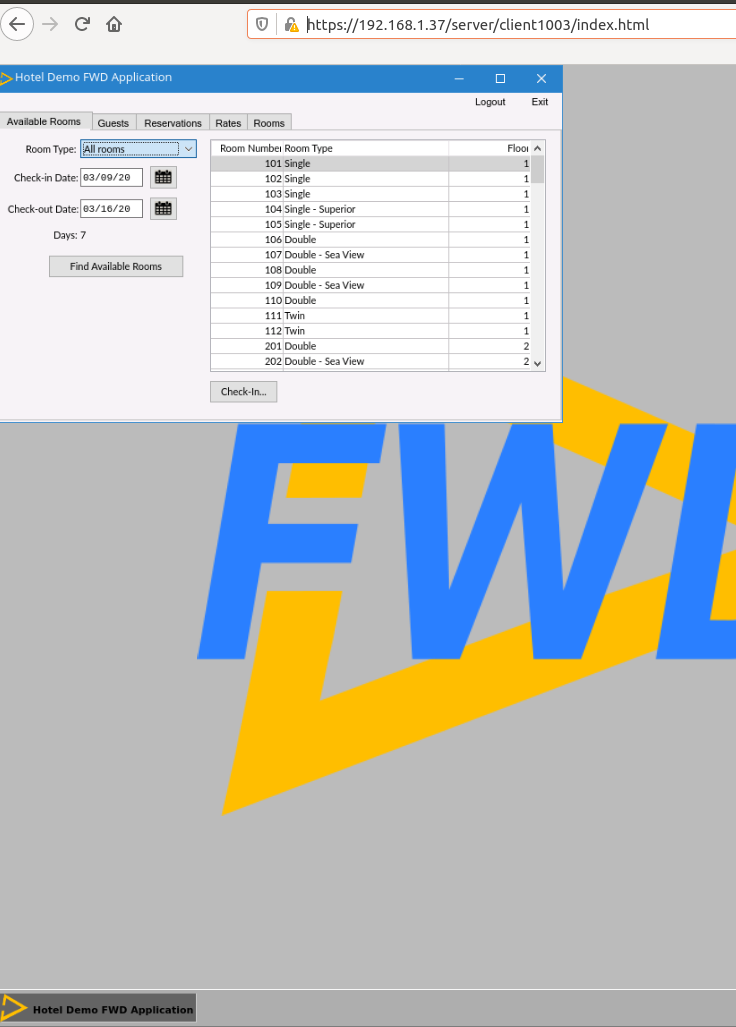
The Hotel GUI web client under Apacher Reverse Proxy can be found on this screen shot:
Implementation Details
TBD: Explain the changes in FWD that support this approach.
© 2004-2024 Golden Code Development Corporation. ALL RIGHTS RESERVED.