Bug #10913
multiple tabs draw labels highlighted at the same time
100%
hotel_gui_swing_client_multiple_tab_labels_draw_highlighted.png (10.6 KB)
hotel_gui_virtual_desktop_multiple_tab_labels_draw_highlighted.png (18.8 KB)
big_buttons_tooltip.jpg - Bug button tooltip (150 KB)
flicker.webm (67.9 KB)
pixels-based-scenario.png (33.1 KB)
scenario.webm (309 KB)
hotel_gui_btn_size.jpg - Hotel GUI button size (95.6 KB)
p.patch  (7.87 KB)
Related issues
History
#1 Updated by Greg Shah 12 months ago
- version_reported set to trunk 16287
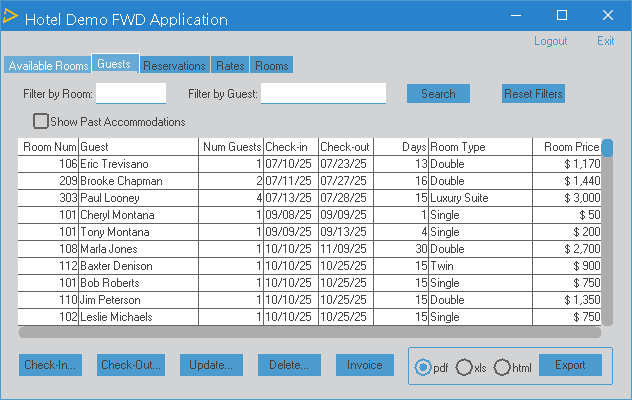
In Hotel GUI, both virtual desktop mode and Swing, you can cause multiple tab labels to simultaneously draw in a highlighted state.
Swing:
Virtual Desktop mode:
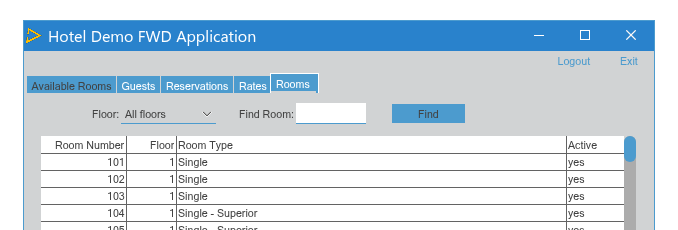
The recreate is easy. Select any tab. Move your mouse over a different (unselected) tab's label. It will turn white. Do NOT click. Just slowly move your mouse down (below) from the label. The label will stay highlighted. Now you can repeat that process with any of the tabs, leaving all the non-selected tabs with highlighted labels.
#3 Updated by Eugenie Lyzenko 12 months ago
The fix is to remove bound check in GuiButton.mouseExited():
   @Override
   public void mouseExited(MouseEvent e)
   {
      // do not test for disabled. If the button was programatically disabled while pressed
      // (so [mouseOver] was true), the [mouseOver] flag will remain set even the mouse leaves
      // the button area
      this.mouseOver = false;
      NativePoint p = this.displayPhysicalLocation();
      CoordinatesConversion cc = screen().coordinates();
      NativeRectangle rect = cc.rectangleToNative(this.bounds());
      boolean inSourceBounds = e.getXOnScreen() >= p.x                              &&
                               e.getXOnScreen() <= p.x + rect.right() - rect.left() &&
                               e.getYOnScreen() >= p.y                              &&
                               e.getYOnScreen() <= p.y + rect.bottom() - rect.top();

      // If the event occurs within the button bounds, the hover state should be maintained.
      if (ThemeManager.getCurrentTheme().isMouseHoverSensitive() /* EVL*** && !inSourceBounds*/)
      {
         repaint();
      }
   }
The inSourceBounds is true when you move mouse down from button. And I think it is not stable check, sometimes providing negative false or true. We can safely drop this check because mouseExited certainly means we are leaving the button.
#4 Updated by Alexandru Lungu 11 months ago
- Related to Support #10849: improve documentation on implementation of custom themes added
#5 Updated by Alexandru Lungu 11 months ago
- Related to Feature #10848: custom theme improvements added
#6 Updated by Eugenie Lyzenko 10 months ago
Greg,
Do we need the fix noted in #10913-3 be applied to new branch and then in trunk?
#8 Updated by Eugenie Lyzenko 10 months ago
- Status changed from New to WIP
- Assignee set to Eugenie Lyzenko
Greg Shah wrote:
Yes
OK. I'm creating the 10913a branch to commit the fix.
#9 Updated by Eugenie Lyzenko 10 months ago
Created task branch 10913a from trunk revision 16330.
#10 Updated by Eugenie Lyzenko 10 months ago
Hi Paula,
I'm going to remove boundary check for GuiButton.mouseExited() handler. Because this event should always mean the mouse is leaving the button.
Can you please clarify your fix for GuiButton:
...
** 008 PMP 20240826 Added bounds check when mouseExited is honored to ensure hover state
**                  is maintained correctly.
...
What was the issue you solved with this fix? What test should I run to ensure there will be no regressions?
#11 Updated by Eugenie Lyzenko 10 months ago
- % Done changed from 0 to 100
- Status changed from WIP to Review
The branch 10913a has been updated for review to revision 16331.
This is the fix for original issue. Can be merged into trunk if no objections.
#12 Updated by Eugenie Lyzenko 10 months ago
The branch 10913a has been updated for review to revision 16332.
This is reworked fix for original issue. I have investigated the root cause of the fix removed with 16331 change and some background starting with #8019-171 that clarify the bounds check idea and think to avoid the regressions we can keep the original code but slightly improved. The idea is the bound checking for mouseExited() is consistent when button is big enough to have tooltip overlapped the button itself. But it the button is smaller than regular mouse pointer size (used to compute initial tooltip window position) we can ignore this additional bounds checking. This version works fine to resolve the original branch issue and should not cause the regressions.
So if no objection I would consider the branch is ready to be merged into trunk.
#13 Updated by Hynek Cihlar 10 months ago
- reviewer Hynek Cihlar added
#14 Updated by Eugenie Lyzenko 10 months ago
Hynek,
Have you had a chance to review this branch. I guess we could merge to trunk if no objections.
#15 Updated by Hynek Cihlar 10 months ago
Code review 10913a.
Why do we need to check the mouse cursor is inside a button in mouseExited? Shouldn't mouseExited be executed only when the mouse actually leaves the button and inSourceBounds removed completely?
#16 Updated by Eugenie Lyzenko 10 months ago
- File big_buttons_tooltip.jpg added
Hynek Cihlar wrote:
Code review 10913a.
Why do we need to check the mouse cursor is inside a button in
mouseExited? Shouldn'tmouseExitedbe executed only when the mouse actually leaves the button andinSourceBoundsremoved completely?
As far as I understood the problem illustrated the modified hotel applicaation below:
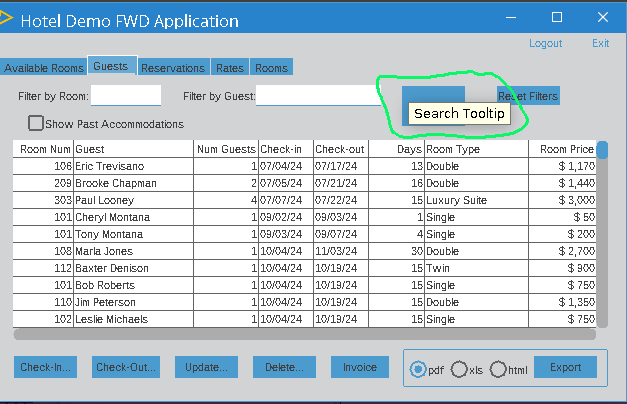
As you can see the tooltip is over the button and when we move the mouse over this tooltip the mouseExited event is generating. While we certainly do not leave the button.
Paula, can you confirm or decline this theory.
This change can cause some false checking results, I've just noted sometimes the button is still not repainting properly.
As to me I would prefer to completely remove button bounds check here if possible.
#17 Updated by Eugenie Lyzenko 10 months ago
The branch 10913a has been updated for review to revision 16333.
This is small fix for bounds check, need to exclude 1 pixel from inSourceBounds evaluation.
#18 Updated by Hynek Cihlar 10 months ago
Eugenie Lyzenko wrote:
Hynek Cihlar wrote:
Code review 10913a.
Why do we need to check the mouse cursor is inside a button in
mouseExited? Shouldn'tmouseExitedbe executed only when the mouse actually leaves the button andinSourceBoundsremoved completely?As far as I understood the problem illustrated the modified hotel applicaation below:
Thanks for the explanation, it makes sense now. The issue should be addressed at the framework level and not in the individual widgets. I believe (and please correct me if I'm wrong) in this case the exit event handler should not be fired. The tooltip should not steal focus or the highlight state.
#19 Updated by Eugenie Lyzenko 10 months ago
Hynek,
Today I tried to understand how we could disable mouse hovering feature for tooltip window. This is the changes for pretty low level with mouse handling. And for Swing and Web client we should change the different source files. For Swing for example the handler is installing in SwingEmulatedWindow() constructor. However for this call I do not see a way to detect if we are making OverlayWindow for tooltip. For web client the change can be more complex.
On the other hand I tested the FWD runtime when the inSourceBounds flag is not used in GuiButton. And the result is I do not see any difference from the tooltip show/hide behavior with FWD runtime where the inSourceBounds flag is used. So no difference whether we use bound checking in GuiButton or not.
In these conditions I would suggest to completely remove bound checking code. And merge the change into trunk after final review.
Do you agree?
#20 Updated by Eugenie Lyzenko 10 months ago
The branch 10913a has been rebased with trunk 16331, new version is 16334.
Hynek,
Sorry I still need your feedback for #10913-19.
#21 Updated by Hynek Cihlar 10 months ago
Eugenie Lyzenko wrote:
In these conditions I would suggest to completely remove bound checking code. And merge the change into trunk after final review.
Do you agree?
I have no problem with that unless it causes regressions. Please check who/why was the code added and if you find a related test case, please make sure it still works.
#22 Updated by Hynek Cihlar 10 months ago
Paula, please review 10913a.
#23 Updated by Paula Păstrăguș 10 months ago
Eugenie Lyzenko wrote:
Hi Paula,
I'm going to remove boundary check for
GuiButton.mouseExited()handler. Because this event should always mean the mouse is leaving the button.Can you please clarify your fix for
GuiButton:
[...]What was the issue you solved with this fix? What test should I run to ensure there will be no regressions?
Sorry I missed this message, but I believe you already identified the reasoning behind the change. The fix was originally introduced to address a button flicker issue: when a tooltip overlaps the button, a mouse-exit event is triggered, but the hover state should be preserved, meaning the button should not be repainted. I tested your changes and, even without that additional check, the scenario still behaves correctly, with no visible regression. I’m not entirely sure where this behavior is now being handled, but I’ll look further into this area to see what might have changed.
#24 Updated by Paula Păstrăguș 10 months ago
I initially thought I had tested the scenario without the changes as well, but it looks like I didn’t save the file, so that test never actually ran. Let me clarify. The testcase is :
DEFINE BUTTON btnTest
    LABEL "Hover me" TOOLTIP "tooltip"
    SIZE 20 BY 2.2.

DEFINE FRAME fr
    btnTest.

ENABLE btnTest WITH FRAME fr.
WAIT-FOR CLOSE OF THIS-PROCEDURE.
My proposal is to keep the original boundary check, but apply it only when the button has a tooltip (since that’s the trigger for the mouse-exit behavior). Do we have buttons with tooltips in the Hotel GUI scenario? If yes, I’m still slightly concerned about the change in this branch: why is the value 24 used for the boundary? What happens if the font is smaller? The issue will be back, right?
#25 Updated by Paula Păstrăguș 10 months ago
If we remove the check, you can see the flicker using the testcase from above.
#26 Updated by Paula Păstrăguș 10 months ago
TLDR, my suggestion is to also check if the button has a tooltip or not.
#27 Updated by Hynek Cihlar 10 months ago
Paula, will preventing the exit handler execution resolve your test case? If so this should be the preferred solution.
#28 Updated by Paula Păstrăguș 10 months ago
If you’re referring to my suggestion, then yes, by checking whether the widget has a tooltip in addition, both my testcase and the Hotel GUI scenario are resolved.
#29 Updated by Hynek Cihlar 10 months ago
Paula Păstrăguș wrote:
If you’re referring to my suggestion, then yes, by checking whether the widget has a tooltip in addition, both my testcase and the Hotel GUI scenario are resolved.
Please post a diff.
#30 Updated by Paula Păstrăguș 10 months ago
=== modified file 'src/com/goldencode/p2j/ui/client/gui/GuiButton.java'
--- old/src/com/goldencode/p2j/ui/client/gui/GuiButton.java    2025-07-04 12:49:42 +0000
+++ new/src/com/goldencode/p2j/ui/client/gui/GuiButton.java    2026-01-09 12:34:25 +0000
@@ -183,10 +183,13 @@
       NativePoint p = this.displayPhysicalLocation();
       CoordinatesConversion cc = screen().coordinates();
       NativeRectangle rect = cc.rectangleToNative(this.bounds());
+
+      // only for buttons with tooltips
       boolean inSourceBounds = e.getXOnScreen() >= p.x                              &&
                                e.getXOnScreen() <= p.x + rect.right() - rect.left() &&
                                e.getYOnScreen() >= p.y                              &&
-                               e.getYOnScreen() <= p.y + rect.bottom() - rect.top();
+                               e.getYOnScreen() <= p.y + rect.bottom() - rect.top() &&
+                               hasTooltip();

       // If the event occurs within the button bounds, the hover state should be maintained.
       if (ThemeManager.getCurrentTheme().isMouseHoverSensitive() && !inSourceBounds)
#31 Updated by Eugenie Lyzenko 10 months ago
Paula Păstrăguș wrote:
[...]
What if the button (in Hotel GUI) has tooltip? The issue will come back?
#32 Updated by Eugenie Lyzenko 10 months ago
Paula Păstrăguș wrote:
If we remove the check, you can see the flicker using the testcase from above.
Can you please clarify what "flicker" means here. I see no difference with and without bounds check. Do you mean the tooltip hiding and showing in other location?
#33 Updated by Paula Păstrăguș 10 months ago
Eugenie Lyzenko wrote:
Paula Păstrăguș wrote:
[...]
What if the button (in Hotel GUI) has tooltip? The issue will come back?
I'm not sure about this, it should be tested. However, this is entirely another scenario, the tooltip logic will come into place in that case.
#34 Updated by Paula Păstrăguș 10 months ago
Eugenie Lyzenko wrote:
Paula Păstrăguș wrote:
If we remove the check, you can see the flicker using the testcase from above.
Can you please clarify what
"flicker"means here. I see no difference with and without bounds check. Do you mean the tooltip hiding and showing in other location?
Let me capture a video for you.
#35 Updated by Eugenie Lyzenko 10 months ago
Paula Păstrăguș wrote:
Eugenie Lyzenko wrote:
Paula Păstrăguș wrote:
If we remove the check, you can see the flicker using the testcase from above.
Can you please clarify what
"flicker"means here. I see no difference with and without bounds check. Do you mean the tooltip hiding and showing in other location?Let me capture a video for you.
It would be great, thanks!
#37 Updated by Paula Păstrăguș 10 months ago
The video was captured without the boundary check.
#38 Updated by Paula Păstrăguș 10 months ago
In our issue scenario, I think it's not possible to add a tooltip to a folder label. Here's how they are constructed:
       RUN constructObject (
             INPUT  'afoldfr0.w':U ,
             INPUT  FRAME fMain:HANDLE ,
             INPUT  'FolderLabels':U + 'Available Rooms|Guests|Reservations|Rates|Rooms' + 'HideOnInitnoDisableOnInitnoObjectLayout':U ,
             OUTPUT h_folder ).
#39 Updated by Eugenie Lyzenko 10 months ago
Paula Păstrăguș wrote:
In our issue scenario, I think it's not possible to add a tooltip to a folder label. Here's how they are constructed:
[...]
The tooltip is adding in common/afoldml0.i:
PROCEDURE PCreateTabs :
...
             CREATE BUTTON LhTab[iTotalCount]
               ASSIGN LABEL = cLabel
                      PRIVATE-DATA = STRING(iTotalCount)
                      WIDTH-PIXELS = FONT-TABLE:GET-TEXT-WIDTH-PIXELS(cLabel,10) + 12 + iButtonPadding
                      HEIGHT-PIXELS = ({&button-frame-height} - 1)
                      FRAME = LhTabFrame[iTabFrame]
                      X = iTabFramePositionPixels
                      Y = 0
                      VISIBLE = TRUE
                      SENSITIVE = TRUE
                      TOOLTIP = cLabel /* EVL*** Tooltip regression test */
                      TAB-STOP = FALSE /* Whilst using overlay button */
                TRIGGERS:
                    ON MOUSE-SELECT-DOWN PERSISTENT RUN PBtnEventMouseSelectDown IN THIS-PROCEDURE.
                    ON RETURN PERSISTENT RUN PBtnEventMouseSelectDown IN THIS-PROCEDURE.
                    ON CURSOR-LEFT PERSISTENT RUN PBtnEventCursorLeft IN THIS-PROCEDURE.
                    ON CURSOR-RIGHT PERSISTENT RUN PBtnEventCursorRight IN THIS-PROCEDURE.
...
#40 Updated by Paula Păstrăguș 10 months ago
Oh, you dug a bit into the Hotel GUI code, good catch! In that case, we can proceed with testing to see whether the issue still occurs when tooltips are present on the folder tabs.
#41 Updated by Eugenie Lyzenko 10 months ago
Paula Păstrăguș wrote:
Oh, you dug a bit into the Hotel GUI code, good catch! In that case, we can proceed with testing to see whether the issue still occurs when tooltips are present on the folder tabs.
Yes, the tabs label highlight issue is coming back when we turn on the tooltip usage in Hotel GUI.
What theme do you use for client session when recording flicker video? Is it Windows8Theme?
#42 Updated by Paula Păstrăguș 10 months ago
Windows10Theme
#43 Updated by Paula Păstrăguș 10 months ago
Eugenie Lyzenko wrote:
Yes, the tabs label highlight issue is coming back when we turn on the tooltip usage in Hotel GUI.
Hmm, I can’t reproduce it when tooltips are added to the folder labels (using the posted fix). Did you only add the tooltips, or did you change anything else as well?
#44 Updated by Eugenie Lyzenko 10 months ago
Paula Păstrăguș wrote:
Eugenie Lyzenko wrote:
Yes, the tabs label highlight issue is coming back when we turn on the tooltip usage in Hotel GUI.
Hmm, I can’t reproduce it when tooltips are added to the folder labels (using the posted fix). Did you only add the tooltips, or did you change anything else as well?
I've also changes the Search button on Guests frame (guests-frame.w):
...
DEFINE BUTTON searchButton
     LABEL "Search"
/* EVL***     SIZE 13 BY 1.*/
     TOOLTIP "Search Tooltip"
     SIZE 13 BY 2.
...
Nothing more. But this change is not related.
Try move mouse down outside tab label, you should see the highlight is not changing (while it should).
#45 Updated by Eugenie Lyzenko 10 months ago
The branch 10913a has been rebased with trunk 16334, new version is 16337.
Today I have worked on and tested the opportunity to change at least the Swing client code to exclude tooltip overlay window from mouse hovering processing code. The idea was to check the theory if we name the tooltip window mouse moving transparent the mouse exited event will not be delivered to JPanel that is the AWT base for GuiButton. To make this happen I passed additional boolean option to OverlayWindow constructor marking this class as to be used to present tooltip. This is a big set of changes but if it would worked we can use it and implement the same feature in Web client too. But I have no success, ignoring setting mouse events listener does not work. We have mouseExited event when we hover tooltip that is over the GUI button. I think it is core AWT feature for Java and I do not know how to turn it off. As soon as we use JPanel/JDialog to represent tooltip inside OverlayWindow or any other FWD widget (all of them have JPanel as background container) we let the Java AWT code to control mouse hovering. If someone has another idea how to implement this please share. Note we need same behavior for both Swing and Web clients.
So for now I'm inclining to suggest pretty radical solution. We will not use any widget to represent tooltip. Actually we do not need it. All we need is to display/draw rectangle with text inside and at required coordinates when it is time to show tooltip. We can do this with direct painting code. No additional widget is necessary. This certainly should solve the issues we currently working on here.
Please let me know what you think.
#46 Updated by Hynek Cihlar 10 months ago
Eugenie Lyzenko wrote:
So for now I'm inclining to suggest pretty radical solution. We will not use any widget to represent tooltip. Actually we do not need it. All we need is to display/draw rectangle with text inside and at required coordinates when it is time to show tooltip. We can do this with direct painting code. No additional widget is necessary. This certainly should solve the issues we currently working on here.
Please let me know what you think.
Actually widget is needed for the tooltip. To be more precise, the tooltip requires its own overlay window so that it can be displayed outside of the boundaries of the target widget.
#47 Updated by Paula Păstrăguș 10 months ago
What if we also check whether the pointer is inside the tooltip’s own bounds? The original flickering occurred because once the tooltip appeared, the user could hover over it, and a second tooltip would still trigger as long as the pointer remained within the button’s area. We need a reliable way to detect that the tooltip is currently visible (maybe checking the visibility of the overlay window, or if the clock is active..) when the mouse‑exit handler fires, and that the mouse coordinates fall within the tooltip’s rectangle, even if it’s just along the border.
#48 Updated by Eugenie Lyzenko 10 months ago
Paula Păstrăguș wrote:
What if we also check whether the pointer is inside the tooltip’s own bounds? The original flickering occurred because once the tooltip appeared, the user could hover over it, and a second tooltip would still trigger as long as the pointer remained within the button’s area. We need a reliable way to detect that the tooltip is currently visible (maybe checking the visibility of the overlay window, or if the clock is active..) when the mouse‑exit handler fires, and that the mouse coordinates fall within the tooltip’s rectangle, even if it’s just along the border.
Thanks, I do agree with this idea. We need to check if we hover the tooltip overlay when we got mouseExited() for button. This should solve remaining issues. I need to test this approach.
#49 Updated by Eugenie Lyzenko 10 months ago
The branch 10913a has been updated for review to revision 16338. Rebased with recent trunk 16337, new revision is 16341.
Implemented additional check for active tooltip and if the mouse is inside tooltip overlay. Fixed original issue and buttom flickering.
If no objections we can merge this into trunk.
#50 Updated by Hynek Cihlar 10 months ago
- Status changed from Review to Internal Test
Code review 10913a.
The change looks good. Please go ahead with regression testing.
#51 Updated by Eugenie Lyzenko 10 months ago
Hynek Cihlar wrote:
Code review 10913a.
The change looks good. Please go ahead with regression testing.
OK. Unfortunately the physical location of the overlay window is always (0,0). Investigating.
#52 Updated by Eugenie Lyzenko 10 months ago
The branch 10913a has been updated for review to revision 16342.
Fixed issue with overlay position check. We can use cached mouse coordinates in ToolTip object used to show recent tooltip. Just need to consider Y position shift.
Tested with Hotel GUI and large customer application. Everything is OK now for me. I guess it is ready for merging.
#53 Updated by Hynek Cihlar 10 months ago
- Status changed from Internal Test to Review
Paula, please review.
#54 Updated by Paula Păstrăguș 10 months ago
- File pixels-based-scenario.png added
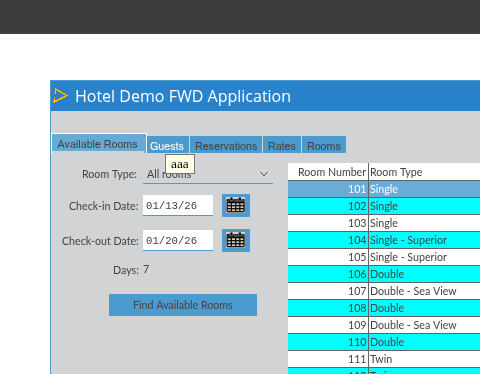
I'm okay with the changes. It might be worth adding a null check for the tooltip instance to avoid a potential NPE.
However, as I mentioned earlier, there’s a scenario where we may need to account for an extra 1–2 pixels when checking the button boundaries. The Guest button in the hotel GUI can remain in a hovered state even after the cursor moves outside its area. This happens because rect.bottom() - rect.top() reports a height of 20 pixels, while the actual button height is 17 pixels.
It’s a minor issue caused by the button’s dimensions rather than the logic itself. We could defer addressing it, or perhaps find a more accurate way to retrieve the real dimensions so we can avoid these pixel‑based edge cases.
#56 Updated by Hynek Cihlar 10 months ago
- % Done changed from 100 to 90
- Status changed from Review to WIP
Let's also address the edge case Paula identified. Eugenie, please find out why are the button dimensions incorrect.
#57 Updated by Eugenie Lyzenko 10 months ago
The branch 10913a has been rebased with recent trunk 16340. Updated to revision 16346.
This small change adds NPE protection for tooltip usage in GuiButton class.
As to other button size mismatch issue I think this is not a bug. Just Hotel GUI application specific. The button size is really as it is expected. But we simulate TAB widget with buttons and some part of the button is overlapping with other button or event other frame. So we see the button in smaller size than it actually has. The problem is the mouseExited emitted when mouse is moving from button body to other widget and if new widget overlaps button the leave event will be emitted even if the mouse is over the hidden part of the button. I do not think it is a good idea to check all widgets for every mouseExited(). It will cost too much for the case we have many widgets active. I think we need to store currently visible part of the button somewhere.
#58 Updated by Eugenie Lyzenko 10 months ago
- Status changed from WIP to Review
- % Done changed from 90 to 100
The branch 10913a has been updated for review to revision 16347.
This is reworked approach to handle mouseExited() for GUI button.
1. The coordinates used to check the tooltip hover is changed to consider absolute position from desktop start.
2. The handler for mouseExited() has changed. The idea for new approach is to defer the mouse exit event till the moment the mouse position will be outside of the button and tooltip area. We will post the OS event for same code to be executed later. Sooner or later to mouse position changed to be outside button (or tooltip is dismissing). The code execution frequency is 250 ms, often enough to ensure button refresh without delay and not too frequent to be heavy load for event loop. It looks dangerous (recursive calls) but I think it is safe because we know the moment it will stop.
This should solve original issue without regressions.
#59 Updated by Eugenie Lyzenko 10 months ago
The branch 10913a has been rebased with recent trunk 16346. Updated to revision 16353.
Any notes/objections for new approach used recently? I'm testing and thinking about possible improvements for event collisions in GUI button.
#60 Updated by Eugenie Lyzenko 10 months ago
The branch 10913a has been updated for review to revision 16354.
This is small improvement for the case when the mouse cursor immediately goes back to button after hovering tooltip.
Made GUI testing, found no issues or regressions so ready to be merged into trunk I guess.
#61 Updated by Hynek Cihlar 10 months ago
Eugenie Lyzenko wrote:
The branch
10913ahas been rebased with recent trunk16346. Updated to revision16353.Any notes/objections for new approach used recently? I'm testing and thinking about possible improvements for event collisions in GUI button.
Sorry for the delay, I'd like to test some ideas yet.
#62 Updated by Eugenie Lyzenko 10 months ago
The branch 10913a has been rebased with recent trunk 16348. New revision is 16356.
#63 Updated by Eugenie Lyzenko 10 months ago
The branch 10913a has been rebased with recent trunk 16349. New revision is 16357.
#64 Updated by Eugenie Lyzenko 10 months ago
The branch 10913a has been rebased with recent trunk 16350. New revision is 16358.
#65 Updated by Hynek Cihlar 10 months ago
- % Done changed from 100 to 80
- Status changed from Review to WIP
- Assignee changed from Eugenie Lyzenko to Paula Păstrăguș
Code review 10913a.
The solution with the hard-coded timeout will mostly work, but I can see edge cases where it will fail (for example, when the mouse crosses the boundaries of other widgets during the timeout period). While I am sure this approach could be made to work eventually, covering all edge cases will likely take more time than implementing a more robust solution.
To summarize the problem we are trying to solve:
When a tooltip is shown for a widget with a visual highlight (a button in this case) and the mouse moves from the button onto the tooltip while still being within the button’s area, the button receives a mouse-exit event. As a result, its hover state changes to non-hovered in favor of the tooltip. The tooltip then receives a mouse-enter event and is hidden, which in turn causes the mouse to re-enter the button and reapply the highlight. This sequence happens very quickly and results in visible flickering as the button’s highlight briefly toggles. The logic in the GuiButton mouse-exit handler attempts to mitigate this problem, but this is what causes the tab buttons highlights from being turned off.
A potential solution would be to delay the mouse-exit event for the tooltip’s host widget. When the mouse enters the tooltip from the host widget, the mouse-exit event for the host would be intercepted and held until the tooltip is hidden. Once the tooltip is hidden, the held mouse-exit event would be dispatched to the host widget and only delivered if the mouse has actually left the host widget’s area. If the mouse never leaves the host widget area, the subsequent mouse-enter event for the host would also be suppressed. This approach should work for any tooltip-supporting widget with a highlight state.
If the above doesn't work, we will need to put some tooltip support in JS driver.
By the way, tooltips currently do not show up in Firefox. This should also be addressed as part of the issue.
Since the core issue is fundamentally related to tooltip behavior, I think it makes sense for Paula to take over the issue.
#66 Updated by Eugenie Lyzenko 10 months ago
Hynek Cihlar wrote:
Code review 10913a.
The solution with the hard-coded timeout will mostly work, but I can see edge cases where it will fail (for example, when the mouse crosses the boundaries of other widgets during the timeout period). While I am sure this approach could be made to work eventually, covering all edge cases will likely take more time than implementing a more robust solution.
To summarize the problem we are trying to solve:
When a tooltip is shown for a widget with a visual highlight (a button in this case) and the mouse moves from the button onto the tooltip while still being within the button’s area, the button receives a mouse-exit event. As a result, its hover state changes to non-hovered in favor of the tooltip. The tooltip then receives a mouse-enter event and is hidden, which in turn causes the mouse to re-enter the button and reapply the highlight. This sequence happens very quickly and results in visible flickering as the button’s highlight briefly toggles. The logic in the
GuiButtonmouse-exit handler attempts to mitigate this problem, but this is what causes the tab buttons highlights from being turned off.A potential solution would be to delay the mouse-exit event for the tooltip’s host widget. When the mouse enters the tooltip from the host widget, the mouse-exit event for the host would be intercepted and held until the tooltip is hidden. Once the tooltip is hidden, the held mouse-exit event would be dispatched to the host widget and only delivered if the mouse has actually left the host widget’s area. If the mouse never leaves the host widget area, the subsequent mouse-enter event for the host would also be suppressed. This approach should work for any tooltip-supporting widget with a highlight state.
However this idea will not work when button widget is overlapped with other non-tooltip widget. In this case we will get mouseExited() inside the button area even if there is no tooltip active or even assigned. This is the case in Hotel GUI.
Since the core issue is fundamentally related to tooltip behavior, I think it makes sense for Paula to take over the issue.
OK.
The branch 10913a has been rebased with recent trunk 16351. New revision is 16359.
#67 Updated by Hynek Cihlar 10 months ago
Eugenie Lyzenko wrote:
However this idea will not work when button widget is overlapped with other non-tooltip widget. In this case we will get
mouseExited()inside the button area even if there is no tooltip active or even assigned. This is the case in Hotel GUI.
Please provide more details about the case.
#68 Updated by Eugenie Lyzenko 10 months ago
- File hotel_gui_btn_size.jpg added
Hynek Cihlar wrote:
Eugenie Lyzenko wrote:
However this idea will not work when button widget is overlapped with other non-tooltip widget. In this case we will get
mouseExited()inside the button area even if there is no tooltip active or even assigned. This is the case in Hotel GUI.Please provide more details about the case.
The sample:
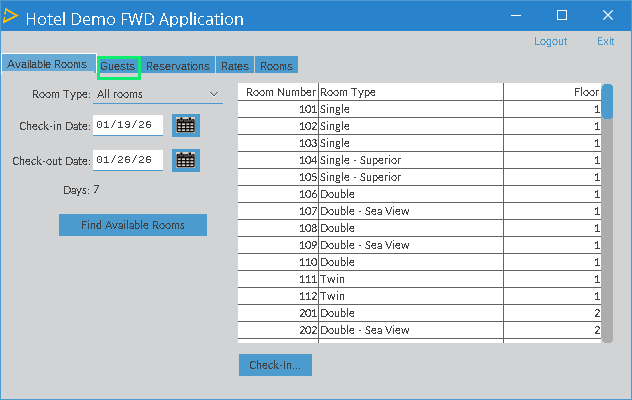
The real button size is in green frame. As you can see it is overlapped with other frame and we have mouse exit when the mouse is still inside original button area.
#69 Updated by Hynek Cihlar 10 months ago
Eugenie Lyzenko wrote:
The real button size is in green frame. As you can see it is overlapped with other frame and we have mouse exit when the mouse is still inside original button area.
Are you saying the mouse exit comes when the blue portion of the button is just left? If so then I would say this is correct as the overlapped frame is entered.
#70 Updated by Eugenie Lyzenko 10 months ago
Hynek Cihlar wrote:
Eugenie Lyzenko wrote:
The real button size is in green frame. As you can see it is overlapped with other frame and we have mouse exit when the mouse is still inside original button area.
Are you saying the mouse exit comes when the blue portion of the button is just left?
Yes, exactly.
If so then I would say this is correct as the overlapped frame is entered.
But technically we still inside button (bounds check will return TRUE) and the button refresh is not happening. And because we do not have the tooltip here originally your approach will not work as well.
#71 Updated by Hynek Cihlar 10 months ago
Eugenie Lyzenko wrote:
But technically we still inside button (bounds check will return
TRUE) and the button refresh is not happening. And because we do not have the tooltip here originally your approach will not work as well.
If the button is overlapped by other widget then the mouse exit for button and mouse enter for the other widget should arrive just when the mouse crosses the boundary at the overlap. So this behavior is expected. If the bounds check returns true then it doesn't behave correctly.
#72 Updated by Eugenie Lyzenko 10 months ago
Hynek Cihlar wrote:
Eugenie Lyzenko wrote:
But technically we still inside button (bounds check will return
TRUE) and the button refresh is not happening. And because we do not have the tooltip here originally your approach will not work as well.If the button is overlapped by other widget then the mouse exit for button and mouse enter for the other widget should arrive just when the mouse crosses the boundary at the overlap. So this behavior is expected. If the bounds check returns true then it doesn't behave correctly.
Yes, it behaves correctly but the bound check and button refresh dependency on the bound check result causes the regression in Hotel GUI that is the description of the original issue here. Removing bounds check solves the issue but conflicts with tooltip code. That's why I used deferred mouseExited() approach.
#73 Updated by Hynek Cihlar 10 months ago
Eugenie Lyzenko wrote:
Yes, it behaves correctly but the bound check and button refresh dependency on the bound check result causes the regression in Hotel GUI that is the description of the original issue here. Removing bounds check solves the issue but conflicts with tooltip code. That's why I used deferred
mouseExited()approach.
Agree, the bounds check doesn't always work correctly. And yes, the condition from the GuiButton should be removed and repaint executed unconditionally together with the proposed mouse event changes.
#74 Updated by Paula Păstrăguș 10 months ago
Hynek Cihlar wrote:
By the way, tooltips currently do not show up in Firefox. This should also be addressed as part of the issue.
Firefox is incorrectly populating the AWT MouseEvent for MOUSE_ENTERED with button=1 and Button1 modifiers. That makes the tooltip logic think a "left click or exit" happened, so it calls: tooltip.deactivate(), right when the mouse enters. The tooltip worker is created but gets cancelled/deactivated.
Firefox MOUSE ENTERED event:
java.awt.event.MouseEvent[MOUSE_ENTERED,(539,30),absolute(539,30),button=1,modifiers=Button1,extModifiers=Button1,clickCount=0] on com.goldencode.p2j.ui.client.gui.driver.web.GuiWebDriver$1[,0,0,0x0,invalid]
Chrome MOUSE ENTERED event:
java.awt.event.MouseEvent[MOUSE_ENTERED,(532,29),absolute(532,29),button=0,clickCount=0] on com.goldencode.p2j.ui.client.gui.driver.web.GuiWebDriver$1[,0,0,0x0,invalid]
#75 Updated by Paula Păstrăguș 9 months ago
Hynek Cihlar wrote:
Agree, the bounds check doesn't always work correctly. And yes, the condition from the
GuiButtonshould be removed andrepaintexecuted unconditionally together with the proposed mouse event changes.
Hynek, what mouse event changes are being proposed? Do you mean the ones you suggested in the #10913-65 note?
#76 Updated by Hynek Cihlar 9 months ago
Paula Păstrăguș wrote:
Hynek, what mouse event changes are being proposed? Do you mean the ones you suggested in the #10913-65 note?
Yes.
#77 Updated by Paula Păstrăguș 9 months ago
- File p.patch added
Hynek, I’ve attached a patch (based on the latest version of 10913a) implementing your suggested approach. Please take a look and let me know what you think. With this approach, the hotel GUI scenario is still not resolved, and there are also some flickers remaining in a few specific cases..
We can’t just avoid sending the MOUSE_EXIT and MOUSE_ENTER events from the JS driver itself in the problematic case..?
#78 Updated by Paula Păstrăguș 9 months ago
- % Done changed from 80 to 90
Committed as rev 16360.
Hynek, please take a look when you have a moment. I initially tried addressing this directly in the JS layer, but that quickly became more complicated. If we suppress the mouse-exit event, tooltip activation and deactivation handled by MouseHandler are no longer respected. Moreover, I don’t think it’s safe to do that, as there may be scenarios that legitimately rely on receiving a MOUSE_EXIT event...
The committed solution still needs some pixel-level refinements, but I’d appreciate your feedback when you have some time. Thanks!
#79 Updated by Hynek Cihlar 9 months ago
Code review 10913a. It looks good.
Just please don't introduce yet another method for keeping widget location. For top-level windows we already have physicalLocation() for the location on display. In ToolTip get the top-level window and from there get the location on display.
Do the changes resolve all the cases?
#80 Updated by Eugenie Lyzenko 9 months ago
I think the current changes doe not resolve the original issue in Hotel GUI. Am I right?
#81 Updated by Paula Păstrăguș 9 months ago
Based on my testing, the Hotel GUI issue appears to be resolved. However, the committed solution still needs some adjustment. There are a few cases where the reported absolute cursor position is offset by roughly 10 pixels from the actual value. This needs further investigation, as it can cause the bounds check to fail and trigger a repaint, resulting in a flicker in those specific scenarios.
#82 Updated by Eugenie Lyzenko 9 months ago
Paula Păstrăguș wrote:
Based on my testing, the Hotel GUI issue appears to be resolved. However, the committed solution still needs some adjustment.
It is true if Hotel GUI does not have tooltip for tab buttons. But if it has ones for tab buttons - the problem coming back. My point is this incorrect behaviour can happen for every GUI application with same tooltip capable buttons with partially overlapped button body with other widget. We will have no ability to repaint button because mouseExited() is happening only once for button and bounds check refuses repaint if mouse is over tooltip.
I think we need to resolve it here. But final decision is up to you.
#83 Updated by Paula Păstrăguș 9 months ago
Eugenie, you’re right.
I propose the following approach:
- Keep the
inSourceBoundscheck, but also add ahasTooltipcheck. This should resolve the Hotel GUI scenario where buttons don’t have tooltips, while also ensuring weavoidregressions such as flickering. - Keep the Firefox-specific fix in place.
- Defer the scenario where buttons do have tooltips for now.
- If we do so, the changes will be minimal, BUT we defer the problematic scenario.
Hynek, what’s your opinion on this?
#84 Updated by Hynek Cihlar 9 months ago
Paula Păstrăguș wrote:
Eugenie, you’re right.
I propose the following approach:
- Keep the
inSourceBoundscheck, but also add ahasTooltipcheck. This should resolve the Hotel GUI scenario where buttons don’t have tooltips, while also ensuring weavoidregressions such as flickering.- Keep the Firefox-specific fix in place.
- Defer the scenario where buttons do have tooltips for now.
- If we do so, the changes will be minimal, BUT we defer the problematic scenario.
Hynek, what’s your opinion on this?
Sounds good. But please add a big TODO mentioning the limitations of the solution with the failing use cases.
#85 Updated by Paula Păstrăguș 9 months ago
- Status changed from WIP to Review
- % Done changed from 90 to 100
Committed as rev 16361.
Hynek, please review.
I also tested the Hotel GUI scenario and smoke tested a large GUI app, no regression found.
#86 Updated by Hynek Cihlar 9 months ago
- Status changed from Review to Internal Test
Code review 10913a. The changes look good. Please go ahead with regression testing.
#87 Updated by Paula Păstrăguș 9 months ago
Smoke tested the customer app and Hotel GUI, no regressions found. I’m currently waiting for another large app to complete smoke testing.
#88 Updated by Șerban Bursuc 9 months ago
Smoke tests passed using GUI apps.
#89 Updated by Paula Păstrăguș 9 months ago
If there's nothing left to be tested, I think we can proceed with the merge, Hynek?
#90 Updated by Hynek Cihlar 9 months ago
- Status changed from Internal Test to Merge Pending
Please merge 10913a to trunk.
#91 Updated by Paula Păstrăguș 9 months ago
- Status changed from Merge Pending to Test
Branch 10913a was merged into trunk as rev. 16416 and archived.