Support #10727
implement a docker image that supports the full range of development processes without being a PITA
0%
10727_visualvm_processes.png (26.9 KB)
10727_jmx_connection.png (24.8 KB)
install_pdf_php.sh  (3 KB)
set_spawners.sh
(5.02 KB)
set_spawner.sh
(4.1 KB)
server.sh
(12.7 KB)
Related issues
History
#3 Updated by Greg Shah about 1 year ago
- Related to Support #9708: rationalize and optimize the standard FWD images added
#4 Updated by Greg Shah about 1 year ago
This task is meant to discuss and implement the type 3 image described (only at a high level) in #9708-1. We discuss some of the problems to be fixed in #10149. The result is intended to be used at many of our customers including the case of both #10109 and #10149.
Let's start by defining a complete list of the processes which need to be easily possible. That means the image should support execution of the process with little to no effort. If it is fragile (easily breaks), time consuming or confusing then it is not OK and we need to find a better way.
In the following descriptions:
- references to the
containerare things that are executed inside the running Docker container - references to the
hostare things that execute on the Docker host (which is expected to be a developer's workstation, most likely with a GUI desktop environment and a running IDE)
In all of this, persistence is key. We will maximize what is on the host and the container will only have the parts that involve running FWD (for conversion, analytics or runtime) and the dependencies of FWD (clients, databases...). So, to some degree this is very much about being smart about how to best split the implementation between the host and container.
Here is my starting list:
- Setup
- bzr/git usage, including from remote sources like xfer
- scp/sftp usage from remote sources like xfer
- ssh and sshfs usage from remote sources like xfer
- build FWD including native parts but FWD lives on the host
- conversion project setup (lives on the host, uses FWD installation on the host)
- Conversion Project Processing
- execution of any
antbuild target in the project - including:
- running conversion
- analytics/callgraph
- conversion regression testing
- build (javac, jar...) the converted result
- all of the processing/results are on the host filesystem (where the project resides
- execution of any
- FWD Development (FWD source code is present, helps with source debugging of converted 4GL code AND allows changes to FWD source code on the fly which should be buildable)
- 4GL Development
- application source code and schemata is on the host and is edited via IDE/editor on the host
- easy execution of the converted result
- import of a persistent database (lives on the host) from dump files (that are on the host)
- run
- PostgreSQL or MariaDB database server (with database persisted on the host)
- FWD server
- FWD clients
- in-container native ChUI (accessible via ssh)
- spawned web ChUI (accessible via browser running on the host)
- spawned web GUI (accessible via browser running on the host)
- unit testing (e.g. ABLUnit) and the harness
- optional debugging enabled in FWD server or clients with IDE access on the host
- JMX fully enabled, VisualVM access from host
- heap dumps enabled with output to host
- all logs stored on the host
- Java or Web Development
- Customers write new parts of their application using Java or Web development.
- This code will integrate with and call/be called from the converted code.
- It might run in the FWD server JVM.
- It might run on the host or as a separate process in the container.
- The development would be on the host.
- Examples
- Embedded mode web development where one would reload the FWD client in the container from a browser on the host and expect to see changes that live on the host.
- Java extension code that is called via Direct Java Access from converted 4GL code. The Java classes or jars would reside on the host.
- Java open client code that calls into the FWD server's appserver agents. The Java code might run on a JVM in either the host or in the container.
Constantin: What am I missing here?
Open questions:
- Do we create separate images for different database types (PostgreSQL, MariaDB) or do we have one image that handles all?
- A single image is preferred unless the separation makes enough of a difference in size to be worth it.
- We won't worry about SQLServer for now, except we need to be able to connect easily to a remote SQLServer instance.
- Some users will have a version of FWD that changes rarely while others may need constant change in FWD. Do we implement 2 "levels" of images?
- The idea here is that the base dev image would have everything about FWD externalized so that it takes FWD from the host.
- The layer above that is an image that has FWD built in but otherwise everything else comes from the host.
- I suspect this makes sense to reduce the effort for users that aren't doing development or changes on FWD itself.
- But users in the middle of a conversion project (and devs from GCD and partners) would be better off with the base dev image where the version of FWD can be modified and controlled on the host.
#5 Updated by Roger Borrello about 1 year ago
Another question is whether or not to "map" the user into the running container. If not, the container's fwd user can be utilized.
Ownership of files when the primary user is not 1000 is a challenge, but can be overcome with docker run parameters. The dbash.sh script that is in the container project is a good test, but does not have "Swiss Army" capabilities with ports exposure. This task should help flush out additional requirements.
#6 Updated by Roger Borrello 12 months ago
Greg Shah wrote:
This task is meant to discuss and implement the type 3 image described (only at a high level) in #9708-1. We discuss some of the problems to be fixed in #10149. The result is intended to be used at many of our customers including the case of both #10109 and #10149.
Let's start by defining a complete list of the processes which need to be easily possible. That means the image should support execution of the process with little to no effort. If it is fragile (easily breaks), time consuming or confusing then it is not OK and we need to find a better way.
In the following descriptions:
- references to the
containerare things that are executed inside the running Docker container- references to the
hostare things that execute on the Docker host (which is expected to be a developer's workstation, most likely with a GUI desktop environment and a running IDE)In all of this, persistence is key. We will maximize what is on the host and the container will only have the parts that involve running FWD (for conversion, analytics or runtime) and the dependencies of FWD (clients, databases...). So, to some degree this is very much about being smart about how to best split the implementation between the host and container.
This is a little bit of a conflict. What parts would involve running FWD if we want to be able to change the FWD source code on the fly that wouldn't reside on the host? From my view it would be on the host and built in the container for running and debugging. So what would be "in the container"? We could place the jar files in there when building them, but to what end?
Here is my starting list:
Everything below is attainable with the current dbash.sh. Some of the complexities come in trying to determine which ports need to be made available into the container based upon what the developer's requirements are.
- Setup
- bzr/git usage, including from remote sources like xfer
- scp/sftp usage from remote sources like xfer
- ssh and sshfs usage from remote sources like xfer
- build FWD including native parts but FWD lives on the host
- conversion project setup (lives on the host, uses FWD installation on the host)
- Conversion Project Processing
- execution of any
antbuild target in the project- including:
- running conversion
- analytics/callgraph
- conversion regression testing
- build (javac, jar...) the converted result
- all of the processing/results are on the host filesystem (where the project resides
- FWD Development (FWD source code is present, helps with source debugging of converted 4GL code AND allows changes to FWD source code on the fly which should be buildable)
- 4GL Development
- application source code and schemata is on the host and is edited via IDE/editor on the host
- easy execution of the converted result
- import of a persistent database (lives on the host) from dump files (that are on the host)
- run
- PostgreSQL or MariaDB database server (with database persisted on the host)
- FWD server
- FWD clients
- in-container native ChUI (accessible via ssh)
- spawned web ChUI (accessible via browser running on the host)
- spawned web GUI (accessible via browser running on the host)
- unit testing (e.g. ABLUnit) and the harness
- optional debugging enabled in FWD server or clients with IDE access on the host
- JMX fully enabled, VisualVM access from host
- heap dumps enabled with output to host
- all logs stored on the host
Constantin: What am I missing here?
Open questions:
- Do we create separate images for different database types (PostgreSQL, MariaDB) or do we have one image that handles all?
- A single image is preferred unless the separation makes enough of a difference in size to be worth it.
- We won't worry about SQLServer for now, except we need to be able to connect easily to a remote SQLServer instance.
- Some users will have a version of FWD that changes rarely while others may need constant change in FWD. Do we implement 2 "levels" of images?
- The idea here is that the base dev image would have everything about FWD externalized so that it takes FWD from the host.
- The layer above that is an image that has FWD built in but otherwise everything else comes from the host.
- I suspect this makes sense to reduce the effort for users that aren't doing development or changes on FWD itself.
- But users in the middle of a conversion project (and devs from GCD and partners) would be better off with the base dev image where the version of FWD can be modified and controlled on the host.
Many of these could be more easily addressed with a flexible "container" project that would build customizable Docker images, more so that trying to build a variety of images that would do all that we could imagine developers would want to do.
Take the usage of the ./build_base_ubuntu_24.04.sh script below. You can pass your own list of base tools, encoding, timezone, JDK, language info, etc. Anything we build off-the-shelf will have deficiencies. (Note that I am currently only addressing PostgreSQL development image. I need more requirements).
Usage: ./build_base_ubuntu_24.04.sh [-qpt] [-i <image>] [-c<context_dir>] [-f<fwd_dir>] [-n<ncurses_path>] [-t<image_tag>][--target_repo=<target_repo>] [--from_repo=<from_repo>] [--jdk_version_def=<jdk_default>] [--pg_version=<postgres_version>] [--language=<language>] [--encoding=<encoding>] [--tzdata_area=<area>] [--tzdata_zone=<zone>] [--base_tools=<base_tools>] [--dev_tools=<dev_tools>] [--fwd_uid=<fwd_uid>] [--fwd_gid=<fwd_gid>] [--pg_uid=<pg_uid>] [--pg_gid=<pg_gid>] [--runtime] [--progress_plain] [--no_cache]

Build the base 24.04 Ubuntu images with/without given PostgreSQL support, JDK17, and JDK21 support, and PostgreSQL and MariaDB docker images and optionally push.

Where:
        -q suppress image builds
        -p push images to repository
        -d just display commands (dry-run)
        -i Ubuntu image to use (default=24.04)
        -c<context_dir> Use <context_dir> as the context directory (default=/home/rfb/projects/fwd/container_20250909/base_ubuntu/context)
        -f<fwd_dir> Directory to root of FWD for pulling over custom locales and setup_ncurses6x.sh (default=/opt/fwd)
        -n<ncurses_path> Path to "setup_ncurses6x.sh" which will override FWD version
        -t<image_tag> use specified image_tag (default=latest)
        --target_repo=<target_repo> if pushing, push built images to specified repository (default=goldencode)
        --from_repo=<from_repo> specify a repo to pull base images from ('.' indicates local) (default=.)
        --jdk_version_def=<jdk_default> use specified JDK as the default Java for the image(s) (default=17)
        --pg_version=<postgres_version> use specified PostgreSQL version, instead of the default pg17 (valid values=14, 15, 16, and 17)
        --language=<language> use specified language (default=en_US)
        --encoding=<encoding> use specified encoding (default=UTF-8)
        --tzdata_area=<area> use specified tzdata/areas (default=America)
        --tzdata_zone=<zone> use specified tzdata/areas/America zones (default=New_York)
        --base_tools=<base_tools> install specified base os tools (default=openssh-server gosu locales jq sed curl sudo wget unzip zip 7zip rsync less ca-certificates gnupg screen dos2unix vim ncurses-term sysstat iptables lsb-release sshfs redir lynx)
        --dev_tools=<dev_tools> install specified development tools (default=build-essential gcc brz python3-paramiko apt-utils libc-bin ant dpkg-dev libffi-dev libpam0g-dev iproute2 iputils-ping bind9-dnsutils software-properties-common libncurses5-dev)
        --fwd_uid=<fwd_uid> UID of fwd user ID (default=1000)
        --fwd_gid=<fwd_gid> GID of fwd user ID (default=1000)
        --pg_uid=<pg_uid> UID of postgres user ID (default=999)
        --pg_uid=<pg_gid> GID of postgres user ID (default=999)
        --runtime = Build runtime images only, not development images.
        --progress_plain Don't use buildkit so docker build has more details.
        --no_cache Don't use any cached layers.

 -? or -h or --help = show usage.
The build_fwd_24.04.sh isn't as useful for development as it is for runtime use.
Usage: ./build_fwd_24.04.sh [-b<branch>] [-r<revision>] [-dpqwit] [-x<user>] [-l<build_location>] [-c<context_dir>] [--build_image=<build_image>] [--target_repo=<target_repo>] [--from_repo=<from_repo>] [--from_tag=<from_tag>] [--jdk_version=<17|21>] [--pg_version=<14|15|16|17>] [--build_db] [--latest] [--progress_plain] [--no_cache]

Build the FWD Docker docker images. Tag appropriately, and optionally push.

Where:
        -b<branch> = use this specific <branch> (default=trunk)
        -r<revision> = use this specific <revision> of the given branch (default=latest)
        -d delete any existing project directory. (default=/home/rfb/projects/fwd/container_20250909/projects/p2j)
        -p push image to repository
        -q suppress FWD checkout
        -w suppress FWD build
        -i suppress image build
        -t just display commands (test)
        -x use xfer.goldencode.com repository for FWD, with username <user>
        -l<build_location> Directory where FWD is (or will be) checked out to. (default=/home/rfb/projects/fwd/container_20250909/projects/p2j)
        -c<context_dir> Use <context_dir> as the context directory (default=/home/rfb/projects/fwd/container_20250909/fwd_bld/context)
        --build_image=<build_image> use specified docker image for building FWD (default=basedev_ubuntu_24.04)
        --target_repo=<target_repo> if pushing, push built images to specified repository (default=goldencode)
        --from_repo=<from_repo> specify a repo to pull base images from (including build) ('.' indicates local) (default=.)
        --from_tag=<from_tag> specify a tagged base images to use (default=latest)
        --jdk_version=<17|21> indicates which JDK to use for FWD build. (default=17)
        --pg_version=<14|15|16|17> indicates which PG version use for FWD PG image. (default=17)
        --latest tag as 'latest' as well
        --progress_plain Don't use buildkit so docker build has more details.
        --no_cache Don't use any cached layers.

 -? or -h or --help = show usage.
#7 Updated by Roger Borrello 12 months ago
Doing all those things is almost entirely possible with the dbash.sh that I have in the updated container project. I had to make some minor modifications to the container environment. I used the --pg 14 option so PostgreSQL 14 would be available for development.
- Allow postgres in the container access to the volume -
sudo chown -R postgres:postgres /opt/db - Allow the Postgres semaphore to be created - on the host:
sudo mkdir -p /var/run/postgresql-container, then add-v /var/run/postgresql-container:/var/run/postgresqlto the docker run command line, and execute a one-timesudo chown -R postgres:postgres /var/run/postgresql. Note that there are alternatives to this, such as container-local socket, and avoiding Unix sockets. - Allow additional port access per requirement - This is a potpourri, depending upon what is going on. First I added
-p 7443:7443 -p 7449-7459:7449-7459so that I could gain web client access. Then I added-p 2080:2080so I could debug the server. I would next add-p 5000:5000for client access.-p 5432:5432for direct access to PostgreSQL, and so on.
Perhaps a lot of the above could be added as with parameters to dbash.sh, or perhaps additional scripts. But for the most part, I just took the docker run command, and modified it for my needs, and entered necessary commands within it.
I built Hotel GUI application. I configured it for PostgreSQL. I created the cluster:
fwd_create_pg_cluster.sh --pgdata /opt/db/fwdcluster --max-connections 110 --force
Much of the setup activity has to be done by hand. For example, the Docker container doesn't start PostgreSQL for you. You have to control the cluster manually. Of course we could add as many helpers into the Docker image as we want.
sudo su - postgres -c "/usr/lib/postgresql/14/bin/pg_ctl start -D /opt/db/fwdcluster"
sudo su - postgres -c "/usr/lib/postgresql/14/bin/pg_ctl stop -D /opt/db/fwdcluster"
I imported data, started the server, and connected the web client. I also attached to the server with Eclipse.
So it really is all about how we want to start the container. Need to access it via ssh? We'd need to make sure sshd is configured, and the port is open. I would just add startssh to the image for that, and the port opening would need to take into account the fact that the host typically has port 22 open. Almost everything we do would need to have a variety of options for customer usage.
#8 Updated by Constantin Asofiei 12 months ago
dbash.sh, which uses a standard dev docker image, and can expose various ports, start psql in the container and many more, but the caveat is: do not rely on the user to set all these ports and arguments. We must have scripts which allow to start the dev container and:
- all ports opened (GUI, psql, jmx, debug, etc)
- omit GUI ports (maybe via --no-gui)
- etc
Something I found at some point: the dbash container image had a p2j.jar somewhere 'backed in' and this had priority in the classpath, thus updating p2j.jar in the container was not easily possible. So, this dev image must not have FWD builtin, just the tools to build it.
As more dedicated scripts the better IMO. Remember, this will be for dev and not production, testing or others - where you 'fire and forget' a script. The easier a developer can run this, the
After these, for a dev environment, consider that (as Greg noted) everything is on the host - the container is just an image which has all the tools in there, and:- psql server will start automatically
- FWD server will be started manually from inside container
- conversion/build will be done via ant
- data import will be done via ant
A part I don't like and it must be improved is this: for the runtime docker images we currently build, you need a checkout of the project plus the deploy zip archive. But: the deploy zip archive may have been built on an older project, and scripts (like in deploy/ folder) may be obsolete. The 'deploy' archive (either for dev container or for building the runtime docker image) needs to have only files/artifacts which are not in bzr. We need to keep the bzr project as the 'source of truth' for the project, and the distribution archive needs to be only with application files (conversion, jars, source code, etc).
Now, for another part which we need to add for the dev container. This mostly requires changes in build.xml and maybe server.sh (see #10810-8), but I think we need to standardize this across projects.
Testing and making fast changes to converted .java code
A developer may find it easier and faster to write direct-java code in the converted .java file, avoiding the churn of reconverting the 4GL file and rebuilding. Consider that thesrc/ folder may be huge, with 10k's of files. Some IDEs like Eclipse can't handle this volume of files (but others like Visual Studio Code might), so you can't add to the IDE the entire src/ folder. An approach is to:
- create a project where you add all
deploy/lib/jars in the classpath - have a
srcnew/folder where you manually copy .java files which you want to change - when done, use i.e.
ant jar deploy.prepareto recompile the project - butbuild.xmlmust know to automatically copy the files fromsrcnew/over the ones insrc/ - the developer can test these changes and after that work on porting them to the 4GL files
Automated setup of the the application project on the host
You have the container with the dev image started, and how do you setup the FWD and application project? The image should have a separate script which can be executed to setup (in a certain location) the project, considering:- where FWD bzr project is located (xfer, devsrv01, locally)
- where the application bzr project is located (xfer, devsrv01, locally)
- get the distribution archives and apply them (for runtime, conversion or both), from xfer, devsrv01 or locally
A part which I'm not sure to do automatically are the build/classes and build/classes.aop folders - the application jar has all the content which should be there, and extracting it in these two folders may make sense. This will speed up the first ant compile as all the .class files are already there, and only the .java files changed since the .class file was created will be recompiled.
#9 Updated by Constantin Asofiei 12 months ago
Constantin Asofiei wrote:
A part I don't like and it must be improved is this: for the runtime docker images we currently build, you need a checkout of the project plus the deploy zip archive. But: the deploy zip archive may have been built on an older project, and scripts (like in
deploy/folder) may be obsolete. The 'deploy' archive (either for dev container or for building the runtime docker image) needs to have only files/artifacts which are not in bzr. We need to keep the bzr project as the 'source of truth' for the project, and the distribution archive needs to be only with application files (conversion, jars, source code, etc).
If we use xfer application bzr project as the 'source of truth', this would mean that GCD is responsible for maintaining it. A customer may want to have its own 'source of truth', and I'm not sure how this can map to the approach above - the point is how the bzr project can be distributed easily to other systems.
But, what I'm pretty sure is this: the application distribution archives (with the artifacts) should never have files from bzr. Maybe a separate archive can be used for that.
On short, why this bugs me: if you want to make changes to i.e. server.sh, and rebuild a runtime application docker image, then you must have both the bzr application project and the deploy archive, and the deploy archive must have the server.sh you changed. But someone who makes changes to these scripts may not need or even require to have the project set up to be able to create a deploy distribution archive, and creating a runtime docker image is mandatory to have this deploy archive updated - when the application has not changed, just this script. It needs to be as easy as:- make the change to any deploy/, build.xml, etc scripts
- create the runtime docker image with existing deploy archive and distribute that
- commit the change to some in-house repository and let others update the application project, so docker images can be re-built just as easy as updating the project from the repo
#10 Updated by Roger Borrello 12 months ago
I am having some difficulty following. I know that the development aspect of Docker can be as "thin" as just the OS+tools, and all everything else stored locally on the host by normal project retrieval. That means FWD branch checkout and project checkout. Building using the Docker container for FWD first, then converting the application using that FWD. That can all be done now. If we want to move into runtime and debugging, then the Docker container will need to allow for more integration with the host, such as database support, debugging support, etc. This can still be done with a "thin" Docker image, just started with database support and port access. Why would it be necessary to introduce FWD into the Docker image at all? Just leave it on the host, and mapped into the container... same with the converted application.
#11 Updated by Constantin Asofiei 12 months ago
Roger Borrello wrote:
I am having some difficulty following. I know that the development aspect of Docker can be as "thin" as just the OS+tools, and all everything else stored locally on the host by normal project retrieval. That means FWD branch checkout and project checkout. Building using the Docker container for FWD first, then converting the application using that FWD. That can all be done now. If we want to move into runtime and debugging, then the Docker container will need to allow for more integration with the host, such as database support, debugging support, etc. This can still be done with a "thin" Docker image, just started with database support and port access.
Agreed.
I'm not saying to introduce FWD into the dev docker image. My points are about what happens with the changes made in a dev env - once the dev completes the changes, how can these be distributed?Why would it be necessary to introduce FWD into the Docker image at all? Just leave it on the host, and mapped into the container... same with the converted application.
- changes to application code requires the deploy archive be rebuilt and also a docker image, as needed
- changes to application scripts - should not require the deploy archive to be rebuilt, just a docker image or a simple commit to repository. I'm trying to decouple the deploy/devops code so it does not overlap with the application's bzr project.
#12 Updated by Roger Borrello 12 months ago
Constantin Asofiei wrote:
I'm not saying to introduce FWD into the dev docker image. My points are about what happens with the changes made in a dev env - once the dev completes the changes, how can these be distributed?
- changes to application code requires the deploy archive be rebuilt and also a docker image, as needed
The ant archive target can build everything required to recreate the Docker image. However, we cannot build the Docker image from within the running Docker container without some tricks that we might not want to do, like Docker-in-Docker. At the point you have the archives, you can run the "docker build" from the host, and create the application's Docker images.
- changes to application scripts - should not require the deploy archive to be rebuilt, just a docker image or a simple commit to repository. I'm trying to decouple the deploy/devops code so it does not overlap with the application's bzr project.
Right now the Docker build takes advantage of the fact that all that needs to be done is an unzip of the deploy zip file to the proper location that is used in the Docker image, such as /opt/<appname>/server. Take a look at the basic Dockerfiles, and the magic unfolds... for example, the Hotel server Dockerfile
# Step 3/23
COPY *.zip /tmp/

# Step 4/23
RUN unzip -oq /tmp/deploy.zip deploy/* -d /tmp/${PROJECT}/

# Step 5/23
RUN mkdir -p /opt/${PROJECT}/ && \
    cp -r /tmp/${PROJECT}/deploy/client /opt/${PROJECT}/ && \
    cp -r /tmp/${PROJECT}/deploy/server /opt/${PROJECT}/ && \
    cp /tmp/${PROJECT}/deploy/*.sh /opt/${PROJECT}/

# Step 6/23
RUN unzip -oj /tmp/deploy.zip build/lib/* -d /opt/${PROJECT}/lib/

# Step 7/23
RUN [ $JDK_VERSION -eq 8 ] && mkdir -p /opt/${PROJECT}/lib/spi || echo "nop"
# Step 8/23
RUN [ $JDK_VERSION -eq 8 ] && cp ${FWD_LIB}/build/lib/fwdspi.jar /opt/${PROJECT}/lib/spi || cp ${FWD_LIB}/build/lib/fwdspi.jar /opt/${PROJECT}/lib

# Step 9/23
RUN ${SPAWNER_DEPLOY}/postbuild.sh /opt/spawner ${SPAWNER_DEPLOY}/spawn /tmp/${PROJECT}/deploy/server/srv-certs.store /opt/fwd/build/lib/p2j.jar

# Step 10/23
RUN chown -R fwd:fwd /opt/${PROJECT}
When step 3 executes, the *.zip files in the context directory (specified in the docker build command) are copied into the /tmp directory of the image. You could very well place the application scripts there, but the fact is, you have to still get the scripts into that location one way or another. In the current method, we use the archive.deploy task to gather them into the zip file that is then unzipped into the location required in the image. In another way, we could get them some other way. But in either case, that gathering step is required. We can just pull them from wherever they reside on the build machine.
#13 Updated by Constantin Asofiei 12 months ago
Roger Borrello wrote:
The
ant archivetarget can build everything required to recreate the Docker image. However, we cannot build the Docker image from within the running Docker container without some tricks that we might not want to do, like Docker-in-Docker. At the point you have the archives, you can run the "docker build" from the host, and create the application's Docker images.
I'm not saying to build the docker image from within a docker container - WSL is enough, if configured properly.
Well, I understand where you are going, but ... trust me, testing the runtime docker image when making changes to deploy/ scripts is a PITA. What I went through just now:
- changes to application scripts - should not require the deploy archive to be rebuilt, just a docker image or a simple commit to repository. I'm trying to decouple the deploy/devops code so it does not overlap with the application's bzr project.
Right now the Docker build takes advantage of the fact that all that needs to be done is an unzip of the deploy zip file to the proper location that is used in the Docker image.
- on my machine, I make changes to i.e. server.sh in a runtime project where I test the change
- go back to the conversion project and:
- make the change also there
- create the deploy archive (and make sure the +x flag is not lost, happened a few times)
- copy the deploy archive to the system where I need to test the docker image
- create the docker image (and don't forget to copy the deploy archive to distribution folder)
- and only after this I can run the container for this image to test the change
- any error in these steps it gets you to the beginning
- make the change directly in the project from where I build the docker image
- build the image and test it
#14 Updated by Roger Borrello 12 months ago
Constantin Asofiei wrote:
Well, I understand where you are going, but ... trust me, testing the runtime docker image when making changes to deploy/ scripts is a PITA. What I went through just now:This should have been as easy as:
- on my machine, I make changes to i.e. server.sh in a runtime project where I test the change
- go back to the conversion project and:
- make the change also there
- create the deploy archive (and make sure the +x flag is not lost, happened a few times)
- copy the deploy archive to the system where I need to test the docker image
- create the docker image (and don't forget to copy the deploy archive to distribution folder)
- and only after this I can run the container for this image to test the change
- any error in these steps it gets you to the beginning
- make the change directly in the project from where I build the docker image
- build the image and test it
You have the Docker image locally on your machine where you are testing? Do you also have all the parts, like the existing ./distribution/ deploy zip and all the scripts? If you change ./deploy/server/server.sh on your development area, why not run ant archive.deploy, which will create a new ./distribution/ deploy zip file, then recreate the Docker image with the ./docker/build_docker.sh with the -d option? It will do all that in-place for testing. Maybe I'm missing something. You should really just be able to recreate the deploy zip file if all that is changing is something like server.sh.
#15 Updated by Constantin Asofiei 12 months ago
Roger Borrello wrote:
You have the Docker image locally on your machine where you are testing? Do you also have all the parts, like the existing
./distribution/deploy zip and all the scripts? If you change./deploy/server/server.shon your development area, why not runant archive.deploy, which will create a new./distribution/deploy zip file, then recreate the Docker image with the./docker/build_docker.shwith the-doption? It will do all that in-place for testing. Maybe I'm missing something. You should really just be able to recreate the deploy zip file if all that is changing is something likeserver.sh.
Consider also that this responsibility can be split to multiple teams - and is not done on just one machine. Maybe the dev doesn't have the permissions to push the docker image to the repo - ok, it can be built locally, but what next?
Lets figure out something that:- doesn't have files in multiple places (file exists in both project and deploy archive, this is confusing on its own - what is the 'right' version - I need to always check 'is this script in the deploy archive' if I change something)
- as few steps as possible for simple changes
#16 Updated by Constantin Asofiei 12 months ago
What about this: as I understand the main issue with the deploy/ folder is that is application-specific (like certificates, batch scripts, etc) and can't be easily standardized. Having the archive just lets the docker script unzip everything, right?
- in
build.xml, add a task which just creates an archive with these files - this task is ran when the docker script is ran and used by it
#17 Updated by Roger Borrello 12 months ago
Constantin Asofiei wrote:
Roger Borrello wrote:
You have the Docker image locally on your machine where you are testing? Do you also have all the parts, like the existing
./distribution/deploy zip and all the scripts? If you change./deploy/server/server.shon your development area, why not runant archive.deploy, which will create a new./distribution/deploy zip file, then recreate the Docker image with the./docker/build_docker.shwith the-doption? It will do all that in-place for testing. Maybe I'm missing something. You should really just be able to recreate the deploy zip file if all that is changing is something likeserver.sh.Consider also that this responsibility can be split to multiple teams - and is not done on just one machine. Maybe the dev doesn't have the permissions to push the docker image to the repo - ok, it can be built locally, but what next?
Can we level-set on the above? Does that work on an individual basis? I know I've done this myself, although truthfully I don't spend much time in dbash.sh unless I am on a custxxx server.
Lets figure out something that:
- doesn't have files in multiple places (file exists in both project and deploy archive, this is confusing on its own - what is the 'right' version - I need to always check 'is this script in the deploy archive' if I change something)
- as few steps as possible for simple changes
From my perspective, the "project" is always the one. I drive my changes into the archive, and from there into a Docker image to test. If it tests out, I check it in from the deploy/server (or wherever it's home is). Are trying to break apart the collection of ./deploy/server/* and ./deploy/client/* and ./deploy/etc/* from the application's *.jar files?
Regarding the multiple developers, one of them would be responsible for pushing the updated script into the project. If the cfg project has an updated script, the dev responsible for the build would checkout the latest updates on the machine where the build is to be done. In this case, it would just be the ant archive and then the creation of the Docker image with the -d option. That is a pipeline that the proper requirements would need to be mapped out. Maybe they just do a full build once a week, or maybe something like this would create the need for a incremental.
#18 Updated by Roger Borrello 12 months ago
- the FWD from the host
- the converted application from the host
Considering the developer would probably build using traditional homespace location for the build, like /home/rfb/project/fwd/trunk and /home/rfb/projects/hotel_gui with /home/rfb/projects/hotel_gui/p2j a symlink to the previously mentioned fwd/trunk location, we probably wouldn't want to deal with homespace in the Docker image itself, and copy those locations to where we have them now when we build Docker images, /opt/fwd and /opt/hotel_gui. This way the Docker image would then be portable, and those files could be forced to be owned by 1000:1000, which would be fwd:fwd in the running Docker container.
This isn't really addressing the previous discussion related to trying to separate the deploy files... I'm still thinking on that. It does prevent us from having to create FWD runtime Docker images. They would come along with the application.
#19 Updated by Roger Borrello 12 months ago
Constantin Asofiei wrote:
What about this: as I understand the main issue with the
If so, why not do this:deploy/folder is that is application-specific (like certificates, batch scripts, etc) and can't be easily standardized. Having the archive just lets the docker script unzip everything, right?
- in
build.xml, add a task which just creates an archive with these files- this task is ran when the docker script is ran and used by it
Is this kind of like breaking out archive.deploy into archive.deploy and archive.runtime?
#20 Updated by Greg Shah 12 months ago
I agree with Constantin that the cfg project must be the single source of truth. From inside the container, we should be able to "point to" the source location of that project and check it out onto the persistent storage of the host. From there, it should just be a bootstrap process that either:
- Uses the individual source archives etc... to initialize a fresh project that can be used to convert or whatever.
- Uses an archive of pre-created results to give a starting point. That archive would NOT have anything from the cfg project in it.
#21 Updated by Roger Borrello 12 months ago
Greg Shah wrote:
I agree with Constantin that the cfg project must be the single source of truth. From inside the container, we should be able to "point to" the source location of that project and check it out onto the persistent storage of the host. From there, it should just be a bootstrap process that either:
1. Uses the individual source archives etc... to initialize a fresh project that can be used to convert or whatever.
This is really what we have today in the project's ./bootstrap_conversion.sh process, correct?
2. Uses an archive of pre-created results to give a starting point. That archive would NOT have anything from the cfg project in it.
Does that consist of a converted project? Is that for runtime or development? Would a Docker image be created from that setup?
#22 Updated by Greg Shah 12 months ago
- Uses the individual source archives etc... to initialize a fresh project that can be used to convert or whatever.
This is really what we have today in the project's
./bootstrap_conversion.shprocess, correct?
Yes, though I suspect it needs some improvements. The current process can be a bit flaky. Perhaps it needs to be more flexible in pointing to resources on the host.
- Uses an archive of pre-created results to give a starting point. That archive would NOT have anything from the cfg project in it.
Does that consist of a converted project? Is that for runtime or development?
Pre-created means the artifacts created during conversion. It would be used for both runtime and development.
Would a Docker image be created from that setup?
No. As Constantin notes, we don't want to force the customer to build a special image for development. The results would be placed into a project on the host and dev image should use it instead of requiring a conversion run.
#23 Updated by Roger Borrello 12 months ago
Greg Shah wrote:
1. Uses the individual source archives etc... to initialize a fresh project that can be used to convert or whatever.
This is really what we have today in the project's
./bootstrap_conversion.shprocess, correct?Yes, though I suspect it needs some improvements. The current process can be a bit flaky. Perhaps it needs to be more flexible in pointing to resources on the host.
Most of the flakiness comes from trying to adapt to a customer's environment to match up to our resources where things are stored. 1) where GCD things are, and 2) where their source is. Sometimes 2) is on our servers, sometimes it could be theirs. So we have to allow for that, but we check this configuration into the project's bootstrap directory, so something has to give.
So if I read this correctly, what we have in the deploy (minus what is already in the project) would be this set? That would basically be (using Hotel GUI as a sample):2. Uses an archive of pre-created results to give a starting point. That archive would NOT have anything from the cfg project in it.
Does that consist of a converted project? Is that for runtime or development?
Pre-created means the artifacts created during conversion. It would be used for both runtime and development.
Would a Docker image be created from that setup?
No. As Constantin notes, we don't want to force the customer to build a special image for development. The results would be placed into a project on the host and dev image should use it instead of requiring a conversion run.
build/lib/app jarscfg/registry.xmlddl/*.sqlfile_sys.xmlname_map.xml
Something like that? Or are we looking for more of the development environment, which would be more from the debug and incremental archives, as well?
#24 Updated by Roger Borrello 12 months ago
Is this as simple as running unzip -nq <deploy.zip> over your checkout project? Because then you'd never overwrite any of the project's files if they exist in the <deploy.zip> file. Then you could run the application from your container, and the integrity of the deployment zip (as a self-contained application, except configuration and data) would be maintained.
If I create an archive.runtime task in the build.xml, it would be very particular per application in what would be included and excluded. This would be my entry for hotel GUI:
   <!-- gather the artifacts for runtime -->
   <target name="archive.runtime" depends="archive.prepare"
           description="Create an archive with the application jars and other files required for deployment on other systems, but not project files.">
      <echo message="Creating runtime archives"/>
      <mkdir dir="${dist.home}/"/>
      <property name="archive.runtime_destfile"
                value="${dist.home}/${projname}_runtime_${app_rev}_${fwd_branch}-${fwd_rev}_${app_date}.zip" />
      <zip destfile="${archive.runtime_destfile}" >
         <zipfileset dir="${basedir}"
                     excludes="**/*.sh **/*.zip **/*.so **/*.log"
                     includes="build/lib/**
                               ddl/**
                               cfg/*.xml
                               version.properties" />
      </zip>
      <chmod file="${archive.runtime_destfile}" perm="755"/>
   </target>
which would result in:
Archive:  distribution/hotel_gui_runtime_414_trunk-16259_20251106a.zip
  Length      Date    Time    Name
---------  ---------- -----   ----
        0  2025-11-05 17:26   build/
        0  2025-11-05 17:27   build/lib/
        0  2025-11-05 17:22   ddl/
 10928748  2025-11-05 17:27   build/lib/hotel.jar
        0  2025-11-05 17:26   cfg/
     1976  2025-09-26 12:08   cfg/ehcache.xml
      371  2025-09-26 12:08   cfg/matchlist.xml
     3332  2025-10-13 17:29   cfg/p2j.cfg.xml
    32421  2025-11-05 17:26   cfg/registry.xml
      298  2025-09-26 12:08   cfg/rootlist.xml
     1726  2025-11-05 17:22   ddl/schema_index_hotel_h2.sql
     1610  2025-11-05 17:22   ddl/schema_index_hotel_mariadb.sql
     1718  2025-11-05 17:22   ddl/schema_index_hotel_postgresql.sql
     3246  2025-11-05 17:22   ddl/schema_index_hotel_sqlserver2012.sql
     4202  2025-11-05 17:22   ddl/schema_index_standard_h2.sql
    47861  2025-11-05 17:22   ddl/schema_table_hotel_h2.sql
     4584  2025-11-05 17:22   ddl/schema_table_hotel_mariadb.sql
     3040  2025-11-05 17:22   ddl/schema_table_hotel_postgresql.sql
     4724  2025-11-05 17:22   ddl/schema_table_hotel_sqlserver2012.sql
    80927  2025-11-05 17:22   ddl/schema_table_standard_h2.sql
     1392  2025-11-05 17:22   ddl/schema_word_tables_hotel_postgresql.sql
     1616  2025-11-05 17:22   ddl/schema_word_tables_hotel_sqlserver2012.sql
      641  2025-11-06 11:15   version.properties
---------                     -------
 11124433                     23 files
So you'd unzip and install_spawner. But it would be very application specific.
#25 Updated by Constantin Asofiei 12 months ago
Roger Borrello wrote:
So you'd unzip and install_spawner. But it would be very application specific.
I'm OK with archive.runtime being application specific.
#26 Updated by Constantin Asofiei 12 months ago
Regarding -n -q for unzip: how do you know which files to overwrite and which not? For example, you already have the build/lib/hotel.jar file and the src/ folder - you want to refresh it from another archive, how do you know to overwrite these files? For this to work, you would need to go 'from scratch' each time, and I'd like to avoid this.
#27 Updated by Roger Borrello 12 months ago
Constantin Asofiei wrote:
Regarding
-n -qfor unzip: how do you know which files to overwrite and which not? For example, you already have thebuild/lib/hotel.jarfile and thesrc/folder - you want to refresh it from another archive, how do you know to overwrite these files? For this to work, you would need to go 'from scratch' each time, and I'd like to avoid this.
Are you driving change from a build machine to development users? So archive.runtime would always replace what is there? You just don't want to touch the project files?
#28 Updated by Roger Borrello 12 months ago
Constantin Asofiei wrote:
Roger, both Greg's and your notes are relevant. I'm OK with having a versatiledbash.sh, which uses a standard dev docker image, and can expose various ports, start psql in the container and many more, but the caveat is: do not rely on the user to set all these ports and arguments. We must have scripts which allow to start the dev container and:
- all ports opened (GUI, psql, jmx, debug, etc)
- omit GUI ports (maybe via --no-gui)
- etc
Revision 96 of the container project contains dbash.sh with more usable runtime developer modes:
Usage: ./dbash.sh [-dlw] [-i <image>] [--pg<14|15|16|17>] [-v <volume>] [--jdk21] [-c <cmd_line>] [-f [tag]]

Create a container from the or fwd_4.0_ubuntu_24.04 Docker image

Where:
        -d = dryrun (just display commands)
        -l = local image. Don't use goldencode/ repository.
        -w = Use fwd account instead of mapping in rfb account.
        -v = Volume for database to mount to /opt/db.
        --no-gui = Omit typical GUI ports (7443 and 7449-7459)
        --pg<14|15|16|17> = Include given PostgreSQL in the image. The default is no PostgreSQL.
        --pg-port1 = Use this as the PostgreSQL port for container port 5432. The default is 5432.
        --pg-port2 = Use this as the PostgreSQL port for container port 5433 (optional). The default is 5433.
        --host = Use host's network.
        --jdk21 = Include JDK21 in the container. The default is JDK17.
        -c <cmd_line> = Pass a command line to the Docker container.
        -f [tag] = Include FWD in the container. Specify a tag, if desired. (default=latest). *MUST be last parameter*
It handles the ports, as you mention. Note that there is no FWD in the image, unless you specify
-f. But as we know, this means GCD is constantly building Docker images. With this development image, FWD can be built easily.
Something I found at some point: the dbash container image had a p2j.jar somewhere 'backed in' and this had priority in the classpath, thus updating p2j.jar in the container was not easily possible. So, this dev image must not have FWD builtin, just the tools to build it.
This could have been because of the -f option, as before.
As more dedicated scripts the better IMO. Remember, this will be for dev and not production, testing or others - where you 'fire and forget' a script. The easier a developer can run this, the better
There are scripts in the PG images to create the cluster:
Usage: ./fwd_create_pg_cluster.sh [options]

Creates a PostgreSQL cluster with upstream initdb, compatible with the official
postgres Docker image. Safe to run on Ubuntu (host) or in an Ubuntu-based container.

Options:
  --pgdata DIR                 Data directory (default: /var/lib/postgresql/data)
  --pgport PORT                Conection port (default: 5432)
  --locale LOCALE              Cluster locale (default: en_US.UTF-8)
  --encoding ENC               Cluster encoding (default: UTF8)
  --auth METHOD                pg_hba auth method: scram-sha-256 | md5 | password | trust
                               (default: scram-sha-256)

  --max-connections VALUE      Maximum connections (default: 100)

  --postgres-password PASS     Initial password for postgres superuser
  --admin-user NAME            Admin role name (default: fwd_admin)
  --admin-pass PASS            Admin role password
  --user-user NAME             Standard role name (default: fwd_user)
  --user-pass PASS             Standard role password

  --temp-port PORT             Temporary port for bootstrap (default: 55432)
  --socket-dir DIR             Unix socket dir for bootstrap (default: /tmp)
  --rolefile-path FILE         Path to create_roles.sql file (default: .)

  --force                      Remove the cluster if it already exists.
  --start                      Start the cluster after creating it.

Examples:
  ./fwd_create_pg_cluster.sh --pgdata /data/pg17 --locale en_US.UTF-8 --encoding UTF8 \
     --pgport 5433 \
     --max-connections 200 \
     --auth scram-sha-256 \
     --postgres-password adminpw \
     --admin-user app_admin --admin-pass S3cret! \
     --user-user app_user --user-pass userpw
Then there are scripts to start the cluster and stop it. These depend upon the
PGDATA being exported:export PGDATA=/opt/db/fwdcluster sudo startup-db.sh sudo shutdown-db.sh
After these, for a dev environment, consider that (as Greg noted) everything is on the host - the container is just an image which has all the tools in there, and:
- psql server will start automatically
Automation of startup really is a challenge, as you are asking to make modifications to the initialization of the entrypoint. To do this, the Docker image required modification, and we just can do that easily. We need to go back to the container project for that, and rebuild. Or we need to go back to the host, and build a special Docker image. The current entrypoint is very generic, so that it lets the developer run bash, or pass specific commands. For example, we could have them leave the container, then run dbash.sh -c "ant deployapp archive" to run a build. This would afford them some level of automation. You could also try to run a server process, such as "start_server.sh && hold_session.sh" so that things could be tested. But we'd need to add in command in that string of commands to start the database.
- FWD server will be started manually from inside container
- conversion/build will be done via ant
- data import will be done via ant
This should be fine, although I would urge the use of import.sh for importing.
A part I don't like and it must be improved is this: for the runtime docker images we currently build, you need a checkout of the project plus the deploy zip archive. But: the deploy zip archive may have been built on an older project, and scripts (like in
deploy/folder) may be obsolete. The 'deploy' archive (either for dev container or for building the runtime docker image) needs to have only files/artifacts which are not in bzr. We need to keep the bzr project as the 'source of truth' for the project, and the distribution archive needs to be only with application files (conversion, jars, source code, etc).Now, for another part which we need to add for the dev container. This mostly requires changes in
build.xmland maybeserver.sh(see #10810-8), but I think we need to standardize this across projects.
I have checked in build.xml updates in hotel projects for a new target archive.runtime. This can be modeled for other projects for this purpose.
Testing and making fast changes to converted .java code
A developer may find it easier and faster to write direct-java code in the converted .java file, avoiding the churn of reconverting the 4GL file and rebuilding. Consider that thesrc/folder may be huge, with 10k's of files. Some IDEs like Eclipse can't handle this volume of files (but others like Visual Studio Code might), so you can't add to the IDE the entiresrc/folder. An approach is to:
- create a project where you add all
deploy/lib/jars in the classpath- have a
srcnew/folder where you manually copy .java files which you want to change- when done, use i.e.
ant jar deploy.prepareto recompile the project - butbuild.xmlmust know to automatically copy the files fromsrcnew/over the ones insrc/- the developer can test these changes and after that work on porting them to the 4GL files
Can this be modeled in the Hotel GUI, or is that just too small of a project to even consider?
Automated setup of the the application project on the host
You have the container with the dev image started, and how do you setup the FWD and application project? The image should have a separate script which can be executed to setup (in a certain location) the project, considering:
- where FWD bzr project is located (xfer, devsrv01, locally)
- where the application bzr project is located (xfer, devsrv01, locally)
- get the distribution archives and apply them (for runtime, conversion or both), from xfer, devsrv01 or locally
A part which I'm not sure to do automatically are the
build/classesandbuild/classes.aopfolders - the application jar has all the content which should be there, and extracting it in these two folders may make sense. This will speed up the firstant compileas all the .class files are already there, and only the .java files changed since the .class file was created will be recompiled.
If you have access to repositories, you can checkout FWD and applications. From the dbash.sh, you have bzr, so you can bootstrap a checkout and build. This definitely has to be outside of the project so you can bootstrap. You could start with:
dbash.sh -c "bzr co sftp://ca@xfer.goldencode.com/opt/fwd" trunk
dbash.sh -c "(cd trunk; ./gradlew all sheet:war archive)"
#29 Updated by Greg Shah 12 months ago
So if I read this correctly, what we have in the deploy (minus what is already in the project) would be this set? That would basically be (using Hotel GUI as a sample):
build/lib/app jarscfg/registry.xmlddl/*.sqlfile_sys.xmlname_map.xmlSomething like that?
Anything that is an output (a.k.a. an artifact of the conversion) would be included (without adding anything from the cfg project itself).
Or are we looking for more of the development environment,
Yes, this too because we are indeed trying to achieve a complete and functional development environment.
which would be more from the debug and incremental archives, as well?
I'm not exactly sure what is in those.
#30 Updated by Greg Shah 12 months ago
Roger Borrello wrote:
Constantin Asofiei wrote:
Regarding
-n -qfor unzip: how do you know which files to overwrite and which not? For example, you already have thebuild/lib/hotel.jarfile and thesrc/folder - you want to refresh it from another archive, how do you know to overwrite these files? For this to work, you would need to go 'from scratch' each time, and I'd like to avoid this.Are you driving change from a build machine to development users? So
archive.runtimewould always replace what is there? You just don't want to touch the project files?
No, the cfg project is the single source of truth. We should never have anything from the cfg project in the archives. It is not safe to overlap those files.
#32 Updated by Roger Borrello 12 months ago
Give the addition of a carefully constructed archive.runtime target to the build.xml, it would be fairly straightforward for a project to utilize dbash.sh to update the testbed project.
I assume you would have the initial cfg project checkout, unzip the deploy zip, then unzip the runtime zip. Now to create a new Docker image, the distribution/deploy.zip would need to be refreshed, and the Docker image rebuilt:
zip -rf distribution/<name of deploy zipfile>
./docker/build_docker.sh --jdk_version=jdk17 -d
Does that make sense?
(BTW, somehow I tagged my previous post with "Private notes" and I don't know how to remove it)
#33 Updated by Greg Shah 12 months ago
Give the addition of a carefully constructed
archive.runtimetarget to thebuild.xml, it would be fairly straightforward for a project to utilizedbash.shto update the testbed project.I assume you would have the initial cfg project checkout, unzip the deploy zip, then unzip the runtime zip. Now to create a new Docker image, the
distribution/deploy.zipwould need to be refreshed, and the Docker image rebuilt:
[...]
Does that make sense?
What is the purpose of this suggested process? Recall that the core of this task is to be able to run a generic docker image as a developer-friendly environment. We don't want customers creating a special image for development.
#34 Updated by Roger Borrello 12 months ago
Greg Shah wrote:
What is the purpose of this suggested process? Recall that the core of this task is to be able to run a generic docker image as a developer-friendly environment. We don't want customers creating a special image for development.
I only mentioned the process to address Constantin's specific PITA concern.
Most certainly dbash.sh is already able to handle development without building a special image.
#35 Updated by Roger Borrello 12 months ago
Embedded mode development would be about making changes to the web application (HTML, CSS, javascript, image/icon/other static resources) and being able to immediately test those changes without some PITA process. In other words, all those resources must come from the host.
Let me rephrase what I wrote in an email.
When you convert your application for development, I assume you are doing this via ant convert jar deploy.prepare, then start the server, and attach with your web client... Nothing would change from the container's perspective, provided you didn't need any special port access, which would require additional "-p <host_port>:<container_port>" specifications. If there are additional port specifications required, I would include those either by default in dbash.sh and provide options to disable, or options to enable.
#36 Updated by Greg Shah 12 months ago
Documentation should be written in Development Using a Docker Container
#37 Updated by Roger Borrello 12 months ago
Greg Shah wrote:
Documentation should be written in Development Using a Docker Container
Central to the process is dbash.sh, which is part of the container project. How should the documentation approach the retrieval of dbash.sh? Should it delve into pulling the whole project, and background of the project? dbash.sh, by default, utilized goldencode/basedev_ubuntu_24.04:latest as the development image. But the project lets you build your own version of image and use it.
#38 Updated by Roger Borrello 12 months ago
- File 10727_visualvm_processes.png added
- File 10727_jmx_connection.png added
Some of the requests are really beyond the scope of this task. For example, if you want to attach VisualVM to the WebClient, there isn't any automation to add the jmx configuration to the jvmargs in the directory. Because the java process is local, VisualVM lets you attach to it, but because it is protected by the container shim there are many things you cannot do like look at thread info.
You would need to add all the appropriate options to the java process to have full access. The server.sh script does this already with the --gc option. This isn't really a container task, it's a developer task. But the environment a developer would see is a little different.
As an example, you can see 2 FwdLauncher processes, 1058 and 161528. They both refer to the same java process, but 1058 is found within the container. Initially there was only the external one at the host level, 161528.
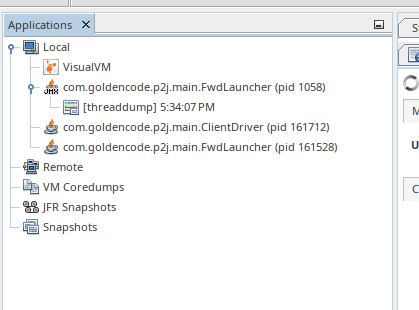
By adding localhost:22100 as a jmx connection, you can then attach to the container's 1058 java process:
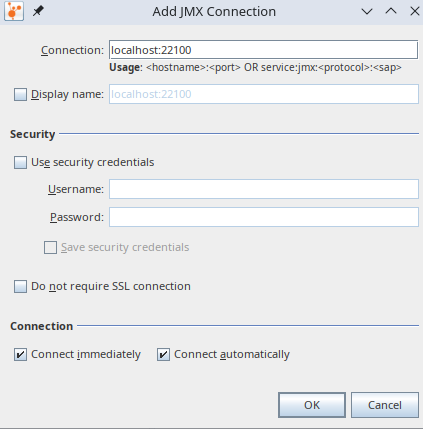
There may be other things that are similar, and require consistent configuration to work, including opening of ports. I will have to add -p 22100:22100 to dbash.sh to cover the default, but that won't prevent a developer from passing --jmx_port=9010 or some other value and breaking that setup.
#39 Updated by Greg Shah 12 months ago
Central to the process is
dbash.sh, which is part of the container project. How should the documentation approach the retrieval ofdbash.sh?
It should be pulled directly from a public location on xfer as part of the environment setup.
Should it delve into pulling the whole project, and background of the project?
dbash.sh, by default, utilized goldencode/basedev_ubuntu_24.04:latest as the development image. But the project lets you build your own version of image and use it.
No, very few customers will want this. Later, we will worry about how customers can implement their own layers. I don't want to focus on this now.
#40 Updated by Greg Shah 12 months ago
Some of the requests are really beyond the scope of this task. For example, if you want to attach VisualVM to the WebClient, there isn't any automation to add the jmx configuration to the jvmargs in the directory.
I disagree. This is something we must plan for. The image should have all the support needed to enable the scenarios listed in #10727-4.
Because the java process is local, VisualVM lets you attach to it, but because it is protected by the container shim there are many things you cannot do like look at thread info.
This is not the correct approach. We've discussed this before. Never connect to the process that is visible on the host. The use of VisualVM or similar JMX console on the host must connect to the in-container process. I would expect that we should have the support built into the image to enable this use case.
#41 Updated by Roger Borrello 12 months ago
Greg Shah wrote:
Central to the process is
dbash.sh, which is part of the container project. How should the documentation approach the retrieval ofdbash.sh?It should be pulled directly from a public location on xfer as part of the environment setup.
Should it delve into pulling the whole project, and background of the project?
dbash.sh, by default, utilized goldencode/basedev_ubuntu_24.04:latest as the development image. But the project lets you build your own version of image and use it.No, very few customers will want this. Later, we will worry about how customers can implement their own layers. I don't want to focus on this now.
For now I know there was an older version available that I've leveraged for getting the newer version out of the container project, without really delving into the container project. Review this section
#42 Updated by Roger Borrello 12 months ago
Greg Shah wrote:
Some of the requests are really beyond the scope of this task. For example, if you want to attach VisualVM to the WebClient, there isn't any automation to add the jmx configuration to the jvmargs in the directory.
I disagree. This is something we must plan for. The image should have all the support needed to enable the scenarios listed in #10727-4.
How is that? This is not in the image. It's in the directory, which is not in the image.
Because the java process is local, VisualVM lets you attach to it, but because it is protected by the container shim there are many things you cannot do like look at thread info.
This is not the correct approach. We've discussed this before. Never connect to the process that is visible on the host. The use of VisualVM or similar JMX console on the host must connect to the in-container process. I would expect that we should have the support built into the image to enable this use case.
I was just stating a fact. When you start VisualVM, it is going to show you all the local JVMs. You have to add the JVM you want to attach to if it is not local. (It is local, but you need to specify to connect via the port).
You keep saying "built into the image". When we run the container, we have to specify ports so that the container allows access to the image. This is not built in. It is a parameter you pass to docker run, which is what dbash.sh is doing.
#44 Updated by Greg Shah 12 months ago
When you start VisualVM, it is going to show you all the local JVMs. You have to add the JVM you want to attach to if it is not local. (It is local, but you need to specify to connect via the port).
You are responsible for designing the process to make it simple and foolproof.
You keep saying "built into the image". When we run the container, we have to specify ports so that the container allows access to the image. This is not built in. It is a parameter you pass to docker run, which is what dbash.sh is doing.
Consider this a shorthand for "do whatever is needed to create the process", in the image, in our cfg, in our scripts... whatever is needed.
#45 Updated by Roger Borrello 12 months ago
Greg Shah wrote:
You are not just building the image, you are building processes and needed cfg/scripting to implement all of these processes.
But even for something not built into the image, the image will still need changes to enable the access.
We have to draw the line somewhere with this task intended to make sure we have a Docker image that can support all types of development tasks. Configuring jvmargs in the directory for the webclient is a configuration tool that would be for general development, and really has nothing to do with Docker.
I know you are going after processes for performing development using Docker images. I think we've moved the big rocks.- general repository management with bzr
- building with gradle/ant
- debugging
- data handling
- cluster
- import
- ad-hoc
- analysis
- dumps
- VisualVM
- We don't really have high-level management of MariaDB for user creation. Are there clusters like in PG?
- Do we want the harness to always be in a Docker image or never in an image? Is it best to always have it next to the baseline?
What are the details that make Java/Web development things special? Not being of that development persuasion, that's why I thought it made more sense to see if others could try it.
Also, I made a complete pass through The Development Using a Docker Container from the perspective of Hotel GUI. Can that be reviewed?
#46 Updated by Greg Shah 12 months ago
We have to draw the line somewhere with this task intended to make sure we have a Docker image that can support all types of development tasks.
I've drawn the line at the list of processes in #10727-4. This task is not just about the Docker image. I expect you to design simple processes that include things needed on the host to make the process simple. Yes, this means some general development stuff. It is in scope.
I do expect there to be a documented process for each of these items in Development Using a Docker Container. This may mean we add top level sections, or where it makes sense we add to existing sections. It must be easy to understand and easy to execute for something that has NO experience with FWD.
What are the details that make Java/Web development things special? Not being of that development persuasion, that's why I thought it made more sense to see if others could try it.
You are a Java developer, you have the capabilities needed here. As you know, when you build Java classes (and jars) on the host, they must be able to be referenced easily in the runtime loading of the FWD server inside the container. These Java artifacts might be part of the converted application jar or they might be part of an "extension" jar. Likewise, there will be classpath additions and other dependencies that live on the host but need to be honored in the container. On top of that, you must be able to debug the FWD client or FWD server. And so forth...
You can talk to Paula, Sergey and Hynek about the web development requirements. I've already summarized the key point which is the development process is on the host and the artifacts must be usable from the embedded mode runtime executing in the container. Of course, one must also be able to access the embedded mode client from a browser on the host.
#47 Updated by Roger Borrello 12 months ago
Fortunately everything I have touched has worked without any need for intervention, with the exception of anything that needs access to the root filesystem (as I had been noting in #10109, and you could use symlinks to overcome that). Is it possible to just narrow down the documentation to what is different about running in the environment? Because specifying all the -Dcom.sun.management.jmxremote -Dcom.sun.management.jmxremote.ssl=false -Dcom.sun.management.jmxremote.authenticate=false -Dcom.sun.management.jmxremote.port=21100 -Dcom.sun.management.jmxremote.rmi.port=21100 yada, yada options to add for doing this or that really isn't particularly special for Docker container. But... if you had to choose a specific value for an option that you didn't normally have to set, or had to make it different... that would be something to document. Like avoiding the PIDs for the processes inside the container from the perspective of the host. Do's/don'ts and differences.
#48 Updated by Greg Shah 12 months ago
Is it possible to just narrow down the documentation to what is different about running in the environment?
No. I don't want to have every process require the reader to link hither and yon across tens of wiki pages to figure out what we should just tell them up front.
If the command line has to be super complicated, then the process is NOT SIMPLE ENOUGH. That is an indication that we need some scripting to hide the complexity.
#49 Updated by Roger Borrello 11 months ago
- File install_pdf_php.sh added
There is an additional option to dbash.sh added in revision 99 of the container project, --install_hook=<hook_file>. It allows you to drive an installation for something like PHP into your development session. Usage for this would be something like:
dbash.sh --install_hook=install_pdf_php.sh
for a example script that would install PHP and a PDF maker.
#51 Updated by Roger Borrello 11 months ago
Greg Shah wrote:
It would be simpler (which is the point of all this) if we standardized the name of the script and automatically run it if it is present in a well known relative path. Requiring the user to specify parameters increases complexity and fragility.
How about if there is ./docker/install_hook.sh present, we can automatically run that?
#52 Updated by Greg Shah 11 months ago
Roger Borrello wrote:
Greg Shah wrote:
It would be simpler (which is the point of all this) if we standardized the name of the script and automatically run it if it is present in a well known relative path. Requiring the user to specify parameters increases complexity and fragility.
How about if there is
./docker/install_hook.shpresent, we can automatically run that?
Please use ./docker/startup_hook.sh.
#53 Updated by Roger Borrello 11 months ago
Greg Shah wrote:
Please use
./docker/startup_hook.sh.
Sure thing. Would it be fair to still include an option, should you wish to override the default?
#55 Updated by Roger Borrello 11 months ago
code_url will be one of the below:
- Internal
- Mount point:
/home/$USER/secure/code - Tunnel:
bzr+ssh://$USER@localhost:2224/opt/secure/code
- Mount point:
- External
sftp://${xfer_user}@xfer.goldencode.com/opt/fwd
To avoid the complexity of making a runtime determination, we'll just take a parameter indicating the code_url to use. It is a little messy, but makes the downstream just a passing to the Dockerfile via build-arg which follows the same pattern we do in the bootstrap_conversion.sh script:
[[ "$net_mode" == "internal" ]] && repo="ade_tools_repo/ade_tools_12_8_4" || repo="ade_tools_12_8_4"
echo "INFO: Pulling ADE from ${code_url}/${repo}"
(cd abl/; bzr co "${code_url}/${repo}" ade)

[[ "$net_mode" == "internal" ]] && repo="possenet/repo" || repo="possenet"
echo "INFO: Pulling possenet from ${code_url}/${repo}"
(cd abl/; bzr co "${code_url}/${repo}" possenet)

[[ "$net_mode" == "internal" ]] && repo="p2j_repo/skeleton" || repo="skeleton"
echo "INFO: Pulling Skeletons from ${code_url}/${repo}"
bzr co "${code_url}/${repo}" skeleton
We'll put these in /opt/repos. When it comes time to grab one of them as, what would be the syntax? Just bzr co /opt/repos/skeleton? Does the repo need to be made special first?
#56 Updated by Roger Borrello 11 months ago
There are some challenges that I didn't consider... we are trying to pull from within a Docker image... the obvious first attempt with /home/rfb/secure/code couldn't work because there isn't a mount in the Docker image:
 => ERROR [12/12] RUN set -e;     pull_repo() { echo "INFO: Pulling $2 from /home/rfb/secure/code/$1"; bzr co "/home/rfb/secure/code/$1" "$2"; };     if [ "internal" = "internal" ]; then         rep  0.8s
------
 > [12/12] RUN set -e;     pull_repo() { echo "INFO: Pulling $2 from /home/rfb/secure/code/$1"; bzr co "/home/rfb/secure/code/$1" "$2"; };     if [ "internal" = "internal" ]; then         repo_ade="ade_tools_repo/ade_tools_12_8_4";         repo_possenet="possenet/repo";         repo_skeleton="p2j_repo/skeleton";     else         repo_ade="ade_tools_12_8_4";         repo_possenet="possenet";         repo_skeleton="skeleton";     fi;     mkdir -p /opt/repos && cd /opt/repos;     pull_repo "$repo_ade" ade;     pull_repo "$repo_possenet" possenet;     pull_repo "$repo_skeleton" skeleton:
0.243 INFO: Pulling ade from /home/rfb/secure/code/ade_tools_repo/ade_tools_12_8_4
0.708 brz: ERROR: Not a branch: "/home/rfb/secure/code/ade_tools_repo/ade_tools_12_8_4/".
------
basedev_ubuntu_24.04_Dockerfile:129
--------------------
 128 |     ARG CODE_URL_TYPE
 129 | >>> RUN set -e; \
 130 | >>>     pull_repo() { echo "INFO: Pulling $2 from ${CODE_URL}/$1"; bzr co "${CODE_URL}/$1" "$2"; }; \
 131 | >>>     if [ "$CODE_URL_TYPE" = "internal" ]; then \
 132 | >>>         repo_ade="ade_tools_repo/ade_tools_12_8_4"; \
 133 | >>>         repo_possenet="possenet/repo"; \
 134 | >>>         repo_skeleton="p2j_repo/skeleton"; \
 135 | >>>     else \
 136 | >>>         repo_ade="ade_tools_12_8_4"; \
 137 | >>>         repo_possenet="possenet"; \
 138 | >>>         repo_skeleton="skeleton"; \
 139 | >>>     fi; \
 140 | >>>     mkdir -p /opt/repos && cd /opt/repos; \
 141 | >>>     pull_repo "$repo_ade" ade; \
 142 | >>>     pull_repo "$repo_possenet" possenet; \
 143 | >>>     pull_repo "$repo_skeleton" skeleton
 144 |
--------------------
Then I passed --code_url=sftp://rfb@xfer.goldencode.com/opt/fwd, but that failed with a host key problem...
=> ERROR [12/12] RUN set -e;     pull_repo() { echo "INFO: Pulling $2 from sftp://rfb@xfer.goldencode.com/opt/fwd/$1"; bzr co "sftp://rfb@xfer.goldencode.com/opt/fwd/$1" "$2"; };     if [ "external  1.0s
------
 > [12/12] RUN set -e;     pull_repo() { echo "INFO: Pulling $2 from sftp://rfb@xfer.goldencode.com/opt/fwd/$1"; bzr co "sftp://rfb@xfer.goldencode.com/opt/fwd/$1" "$2"; };     if [ "external" = "internal" ]; then         repo_ade="ade_tools_repo/ade_tools_12_8_4";         repo_possenet="possenet/repo";         repo_skeleton="p2j_repo/skeleton";     else         repo_ade="ade_tools_12_8_4";         repo_possenet="possenet";         repo_skeleton="skeleton";     fi;     mkdir -p /opt/repos && cd /opt/repos;     pull_repo "$repo_ade" ade;     pull_repo "$repo_possenet" possenet;     pull_repo "$repo_skeleton" skeleton:
0.246 INFO: Pulling ade from sftp://rfb@xfer.goldencode.com/opt/fwd/ade_tools_12_8_4
0.878 Host key verification failed.
0.898 brz: ERROR: Unable to connect to SSH host xfer.goldencode.com; EOF during negotiation
That would need to be alleviated without any user intervention. Obviously setting up a tunnel from within the Docker image would be a challenge, as well. I'll have to investigate how to perform the pull from xfer without any user intervention.
#57 Updated by Roger Borrello 11 months ago
Roger Borrello wrote:
This can be accomplished by:That would need to be alleviated without any user intervention. Obviously setting up a tunnel from within the Docker image would be a challenge, as well. I'll have to investigate how to perform the pull from xfer without any user intervention.
- Making sure to use buildkit (we do)
- Exclusively using
bzr+sftp://${USER}@xfer.goldencode.com/opt/fwdas the access to the repository - Adding
--ssh defaultto thedocker buildcommand - Running
ssh-add ~/.ssh/id_rsaifssh-add -loutput shows: "The agent has no identities" - Include
RUN --mount=type=ssh mkdir -p ~/.ssh && chmod 700 ~/.ssh && ssh-keyscan -t rsa xfer.goldencode.com >> ~/.ssh/known_hostsin the Dockerfile
The actual step where we are pulling the repositories is in the basedev Dockerfile:
# Pull standard skeleton, possenet, and ade projects into image
# Step 12/12
ARG CODE_URL
RUN --mount=type=ssh \
    set -e; \
    pull_repo() { \
        local repo="$1"; \
        local target="$2"; \
        echo "INFO: Pulling $target from ${CODE_URL}/${repo}"; \
        bzr co "${CODE_URL}/${repo}" "$target"; \
    }; \
    mkdir -p ~/.ssh && \
    chmod 700 ~/.ssh && \
    ssh-keyscan -t rsa xfer.goldencode.com >> ~/.ssh/known_hosts; \
    mkdir -p /opt/repos; \
    cd /opt/repos; \
    pull_repo ade_tools_12_8_4 ade; \
    pull_repo possenet possenet; \
    pull_repo skeleton skeleton
#58 Updated by Roger Borrello 11 months ago
I was able to pull /opt/repos/possenet easily in my new dbash.sh:
rfb@basedev_ubuntu_2404_latest_container:~/projects$ mkdir test
rfb@basedev_ubuntu_2404_latest_container:~/projects$ cd test
rfb@basedev_ubuntu_2404_latest_container:~/projects/test$ bzr co /opt/repos/possenet/
rfb@basedev_ubuntu_2404_latest_container:~/projects/test$ cd possenet/
rfb@basedev_ubuntu_2404_latest_container:~/projects/test/possenet$ bzr info
Checkout (format: 2a)
Location:
       checkout root: .
  checkout of branch: /opt/repos/possenet
Should the repository be kept unbound in the Docker image, or is it fine to be bound to my rfb xfer account?
#59 Updated by Roger Borrello 11 months ago
Here is ./tools/fwd_checkout.sh and sample execution dry runs:
Usage: ./tools/fwd_checkout.sh [-ds] [-b <branch>] [-u <user>] [-t <targetdir>]

Perform a new checkout of fwd

Where:
       -d = dryrun (just display commands)
       -b = specify a branch other than trunk.
       -u = Use this user, instead of rfb when checking code out.
       -s = Use ~/secure/code mount point for code location. Default is xfer.goldencode.com
       -t = Checkout location (def=trunk or branch name)

 -? or -h or --help = show usage.
rfb@rfb:~/projects/fwd/container_20250909$ ./tools/fwd_checkout.sh -d
bzr co bzr+sftp://rfb@xfer.goldencode.com/opt/fwd/trunk
rfb@rfb:~/projects/fwd/container_20250909$ ./tools/fwd_checkout.sh -ds
bzr co /home/rfb/secure/code/p2j_repo/p2j/trunk
rfb@rfb:~/projects/fwd/container_20250909$ ./tools/fwd_checkout.sh -dst trunk_dev
bzr co /home/rfb/secure/code/p2j_repo/p2j/trunk trunk_dev
rfb@rfb:~/projects/fwd/container_20250909$ ./tools/fwd_checkout.sh -dst trunk_dev -u ges
bzr co /home/ges/secure/code/p2j_repo/p2j/trunk trunk_dev
rfb@rfb:~/projects/fwd/container_20250909$ ./tools/fwd_checkout.sh -dst trunk_dev -u ges -b 9866b
bzr co /home/ges/secure/code/p2j_repo/p2j/active/9866b trunk_d
It will abort if the checkout location already exists.
There is also fwd_update.sh which performs: bzr update
and fwd_reset.sh: which performs:
bzr revert
bzr clean-tree --force
Let me know if these need to perform other things, as well.
#60 Updated by Roger Borrello 11 months ago
Roger Borrello wrote:
Let me know if these need to perform other things, as well.
Should each of them perform an immediate build of FWD after the checkout or update? Should that be based on a flag passed in?
#61 Updated by Greg Shah 11 months ago
Roger Borrello wrote:
I was able to pull
/opt/repos/posseneteasily in my newdbash.sh:
[...]
Should the repository be kept unbound in the Docker image,
Please use bzr branch instead of bzr co. We don't want to have a bound branch in the image.
or is it fine to be bound to my rfb xfer account?
Nope.
#63 Updated by Roger Borrello 11 months ago
Greg Shah wrote:
We should also have Hotel GUI and Hotel ChUI there, just like Possenet or Skels.
Should we "externalize" the revisions of these projects at the level they are "baked" into the Docker image somehow? There could be some confusion or problems if a repository isn't properly tagged, or if there isn't any easy way to know what is internal to it. I say "somehow" because as of this writing, I have no idea how I'd be able to get that information ahead of the creation of the Docker image so that the initial tag could include the revision information. Not only that, but now we will be including 5 projects in the image.
It is possible we don't tag the image as such, and if someone wants to know the revisions they can perform (cd /opt/repos/<project>; bzr revno)
#64 Updated by Roger Borrello 11 months ago
Greg Shah wrote:
Roger Borrello wrote:
I was able to pull
/opt/repos/posseneteasily in my newdbash.sh:
[...]
Should the repository be kept unbound in the Docker image,Please use
bzr branchinstead ofbzr co. We don't want to have a bound branch in the image.or is it fine to be bound to my rfb xfer account?
Nope.
I changed to bzr branch, but the /opt/repos/hotel/.bzr/branch/branch.conf still points to me:
parent_location = bzr+ssh://rfb@xfer.goldencode.com/opt/fwd/hotel_chui/
#66 Updated by Greg Shah 11 months ago
I changed to
bzr branch, but the/opt/repos/hotel/.bzr/branch/branch.confstill points to me:
I think that is only used if you bzr bind without a specific location. They would have to have your password or ssh key, which (presumeably) you will never include in the image.
#67 Updated by Roger Borrello 11 months ago
Greg Shah wrote:
I changed to
bzr branch, but the/opt/repos/hotel/.bzr/branch/branch.confstill points to me:I think that is only used if you
bzr bindwithout a specific location. They would have to have your password or ssh key, which (presumeably) you will never include in the image.
I have a cleanup step I am now performing to leave everything pretty clean. I also am updating the bootstrap_conversion.sh so that it can determine (when -e is passed) that you can actually pull possenet or skeleton or ade from /opt/repos when you are running the development image. So in the development image, I can checkout hotel_gui, then run /usr/local/bin/fwd_checkout.sh (even pass --build option to run the build immediately), then run the ./bootstrap_conversion.sh and the only time we've left the ranch is to get the trunk branch.
#68 Updated by Roger Borrello 11 months ago
I worked with Radu having him attempt to use dbash.sh. We had a real difficult time getting it to work. It turns out Radu had Docker Desktop installed, which seems to conflict with the command line. We had to uninstall, utilize gcd_systems to re-install Docker, but he had a lot of gorp in his /etc/apt/sources and /etc/apt/sources.d setup. We manually cleaned it up, and finally got Docker installed. But then there were also some remnants of Docker Desktop configured in ~/.docker/config.json that needed manual cleanup so he could pull images from the repository. Radu, you might want to test pushing a bogus tag to make sure you can write to the Docker Hub.
After all that, we had a lot of success setting him up with pulling FWD and building the special branch on xfer in /opt/fwd/ using fwd_checkout.sh. We also prepped the conversion by pulling the config project and tweaking the bootstrap_conversion.sh so it would utilize the repos that are in the development Docker image. All those updates are checked into his apppro_sample project.
I then showed him how to create a docker volume for the database, then start the development Docker image with PG14 in it, so that he could create a cluster and import, although we had to break up the party before we got to the actual import. There is work to do in the area of directory configuration, but the development Docker image is not related to that effort.
#69 Updated by Greg Shah 11 months ago
Radu has tested the current approach and had some success. That is good. He also made some notes in #10109-331 that tell me there are still be things to smooth out. Item 3 in particular suggests that we need a better way to point to the already built FWD that exists on the host. There was too much finagling.
#70 Updated by Roger Borrello 11 months ago
Greg Shah wrote:
Radu has tested the current approach and had some success. That is good. He also made some notes in #10109-331 that tell me there are still be things to smooth out. Item 3 in particular suggests that we need a better way to point to the already built FWD that exists on the host. There was too much finagling.
If item 3 is referring to the spawner, he can confirm, but I believe he was trying to use a relative path to the spawner in the directory, which is no bueno, correct? Putting the spawner in the homespace is probably the best practice for development. It means a longer path in the directory, which is ugly, but too bad.
#71 Updated by Radu Apetrii 11 months ago
Roger Borrello wrote:
Greg Shah wrote:
Radu has tested the current approach and had some success. That is good. He also made some notes in #10109-331 that tell me there are still be things to smooth out. Item 3 in particular suggests that we need a better way to point to the already built FWD that exists on the host. There was too much finagling.
If item 3 is referring to the spawner, he can confirm, but I believe he was trying to use a relative path to the spawner in the directory, which is no bueno, correct? Putting the spawner in the homespace is probably the best practice for development. It means a longer path in the directory, which is ugly, but too bad.
Yes, basically I was trying to replace the default /opt/spawner/spawn with a path that would reflect the current setup in the Docker image. So I first tried a relative path, then had another go with the full path. Good to know for the future.
#72 Updated by Greg Shah 11 months ago
Putting the spawner in the homespace is probably the best practice for development. It means a longer path in the directory, which is ugly, but too bad.
Can we point /opt/spawner/spawn in the container to something local to the project directory that is on the host?
We do not want to run install_spawner.sh in the container.
#73 Updated by Roger Borrello 11 months ago
Greg Shah wrote:
Putting the spawner in the homespace is probably the best practice for development. It means a longer path in the directory, which is ugly, but too bad.
Can we point
/opt/spawner/spawnin the container to something local to the project directory that is on the host?We do not want to run
install_spawner.shin the container.
How would we know where to locate the critical items like srv-certs.store and aspectjrt.jar? I'm all for making things simple, but we don't know what is being developed.
It might make sense to allow dbash.sh an --app=<appdir> option that would direct /opt/app to the specified directory, which would ease runtime configuration. Most likely you would pass the deploy path, and this would create a bind map -v <appdir>:/opt/app. For example, if you were trying to run Hotel GUI, you could pass --app=./deploy and then the /opt/app/server directory would be where your directory would be. The application configuration would be simplified since everything inside the container would be rooted at /opt/app. You could put the spawner in ./deploy/spawner, and that would map to /opt/app/spawner/spawn. Of course you would still need to run install_spawner.sh to place the items in that location. How else would they get copied?
#75 Updated by Roger Borrello 11 months ago
Greg Shah wrote:
You try to make it simple, but there is complexity introduced in another location. For instance, by making this change to simplify the runtime configuration, we now have lost the relative reference toScript things as needed. Make it simple. Reduce the steps and manual jiggery-pokery.
How else would they get copied?
Luckily, you're here to figure it out.
p2j from the ./deploy/server location. Now we also have to position FWD in an absolute location from our homespace development area (precisely why we position FWD in the runtime Docker image in /opt/fwd). We now need the user to specify to use:
- Where the application can be found (so we can make
/opt/appavailable) - Where FWD can be found (so we can make
/opt/fwdavailable) - Possibly where the spawner can be found (so we can make
/opt/spawneravailable)
So we move the complexity from the running container to how to start the running container. OR we enforce some sort of standard where all of the above are assumed or read from somewhere. But I'd like some specs for that.
#77 Updated by Roger Borrello 11 months ago
Greg Shah wrote:
we enforce some sort of standard where all of the above are assumed or read from somewhere
This seems the better option.
But I'd like some specs for that.
Make a proposal.
I need to add --fwd_lib=<fwd_path> to setup dbash.sh environment with the FWD_LIB environment for runtime usage. We don't need to map anything to /opt/fwd in the image as this is really for development. We just set that environment variable and we accomplish our runtime config. It can point to the development FWD such as --fwd_lib=~/projects/fwd/trunk
p2j.jar next to it, and any necessary certificate store and aspectjrt.jar as well. I rely on the src/native/postbuild.sh tool to find and position the files correctly, and set permissions on them. That is why there is a specific spawner archive:
Archive:  projects/p2j/dist/fwd_deploy-spawner_4.0.0_p2j_trunk_16295_20251201.zip
  Length      Date    Time    Name
---------  ---------- -----   ----
    30856  2025-12-01 10:55   spawn
     6678  2025-03-31 11:35   postbuild.sh
   126627  2025-12-01 10:52   aspectjrt-1.9.23.jar
 25437462  2025-12-01 10:54   p2j.jar
---------                     -------
 25601623                     4
This way we can position everything needed, with the exception of the application's certificate store, just from that archive. Of course in our development mode, we should have access to those files already. We can either:
- setup the spawner directory every time we try to start the server. We can see where things go by looking at the configured directory.
- setup the spawner directory when the directory is configured. We can work off the configuration files in this mode.
We can certainly utilize the FWD_LIB location to find everything related to FWD, since we are in development mode, but I'm not sure if the certificate store would be the server directory, or where the server.xml file is located. We can certainly add an option off prepare_dir.sh to configure the spawner, too. Is that a good option? Or would it be better as part of starting the server?
#78 Updated by Greg Shah 11 months ago
setup the spawner directory every time we try to start the server. We can see where things go by looking at the configured directory.
This is the best option. Only do the setup if it is needed.
We don't want to tie the spawner setup to the directory setup. The directory may only be setup once while FWD will be built many times. Every time FWD is built, the spawner needs to be reinstalled. That isn't suitable for the directory cfg process.
#79 Updated by Roger Borrello 11 months ago
Greg Shah wrote:
setup the spawner directory every time we try to start the server. We can see where things go by looking at the configured directory.
This is the best option. Only do the setup if it is needed.
We don't want to tie the spawner setup to the directory setup. The directory may only be setup once while FWD will be built many times. Every time FWD is built, the spawner needs to be reinstalled. That isn't suitable for the directory cfg process.
Would you prefer this in a wrapper-wrapper like start_server.sh, or in a wrapper like server.sh? I don't think every application would care about having a spawner, so there should be an option like --spawner to drive the configuration.
#81 Updated by Roger Borrello 11 months ago
Greg Shah wrote:
This is a script that would only be present in the dev image.
The fwd_checkout.sh and fwd_update.sh scripts (which checkout FWD and update FWD branches) have an optional --build option to kick off the build. As an aside, I should probably add a fwd_build.sh which would just do a build.
But for the runtime side of things to perform the positioning of the spawner (and only if needed), it's looking much more complicated, especially if we need to read in the configured directory. The spawners can be configured in multiple layers in the XML... like (this is only one example I know of with App Servers):
<?xml version="1.0" encoding="UTF-8" standalone="no"?>
<!--XmlRemapper storage-->
<remapper-storage>
  <node class="container" name="">
    <node class="container" name="server">
      <node class="container" name="default">
        <node class="container" name="runtime">
          <node class="container" name="this_can_be_any_value">
            <node class="container" name="clientConfig">
              <node class="string" name="spawner">
                <node-attribute name="value" value="/opt/spawner/spawn"/>
              </node>
            </node>
          </node>
        </node>
        <node class="container" name="clientConfig">
          <node class="string" name="spawner">
            <node-attribute name="value" value="/opt/spawner/spawn"/>
          </node>
        </node>
      </node>
    </node>
  </node>
</remapper-storage>
Would I need to use something like "xmlstarlet" to be robust?
And just to be clear, isn't this just duplicating a script that is in the sample application (Hotel GUI), enhancing it, and adding it to the dev image? Why is that any better than just updating the script itself? If that's not what you mean, then aren't we just creating a swizzle of install_spawner.sh?
#82 Updated by Roger Borrello 11 months ago
- File set_spawners.sh added
I have a tool named set_spawner.sh attached, which has usage:
Usage: /home/rfb/projects/fwd/container_20251201/base_ubuntu/repo/tools/set_spawners.sh [-d] [-x <bootstrap xml>] [-p<path to FWD libraries>] [-f<slf4j-impl.jar file>] [-n<path to native spawner>] [-c<srv-certs.store file>] [-t<postbuild.sh tool>]

Position spawner as needed by current configuration

Where:
       -d = dryrun (just display commands)
       -x <bootstrap xml> = use <bootstrap xml> as the bootstrap file (def=server.xml)
       -p = Location of FWD libraries p2j.jar and fwd-slf4j.jar (if no -f specified). \"FWD_LIB\" will be used as a fallback if default is not valid. (def=/home/rfb/counteract/p2j/build/lib)
       -f = Location of file to be placed in slf4j-impl.jar destination (def=fwd-slf4j.jar in -p location or FWD_LIB)
       -n = Location of built native spawner (def=/home/rfb/counteract/p2j/build/native/spawn, unless -p specified, which will change the default location)
       -c = Location of srv-certs.store file (def=/home/rfb/counteract/deploy/server/srv-certs.store)
       -t = Location of postbuild.sh tool (def=/home/rfb/counteract/p2j/src/native/postbuild.sh, unless -p specified, which will change the default location)

 -? or -h or --help = show usage.
It can read the XML... it starts with the bootstrap xml, so it can find the correct directory.xml to use. It has some work in the area of parameters, and where it is called from.
#84 Updated by Roger Borrello 11 months ago
Greg Shah wrote:
If you are reading the XML just to determine the location of the spawner install, then we can "solve" this by creating a standard location in
/opt/spawner/spawn.Keep it simple.
Is is true that an instance of an application would only need one spawner location? And that we'd only need a second if we were running 2 different apps (like Hotel ChUI and GUI)? If so, great! (although I kind of like the power that xmlstarlet gives you)
#86 Updated by Roger Borrello 11 months ago
The simple iteration is in the latest dev docker image. I removed the xmlstarlet, since I couldn't come up with a reason to really keep it at this point.
There a couple of requirements making this a little pesky... We need to "hook"set_spawner.sh into the server startup.
- It requires sudo to run. OK to add it to
sudoers.d/? - I know it can run everytime, but how best to determine if an update is required? If it needs to be so thorough, it might as well just replace them everytime.
#88 Updated by Roger Borrello 11 months ago
- File server.sh added
- File set_spawner.sh added
set_spawner.sh that is in the dev Docker image. You invoke it with sudo set_spawner.sh --classpath <classpath> and it will:
- use the classpath to find the appropriate jar files that are to be placed in the
/opt/spawnerdirectory - derive the
spawnnative from the location of thep2j.jarfile - assume the current directory for the
srv-certs.store
In my testing I added it to server.sh, which seems to be the best place, since this is where the classpath is definitively known. The result was:
** Starting server...
** Waiting for server to start...
Matched p2j.jar: ../../p2j/build/lib/p2j.jar
Derived spawn path: ../../p2j/build/native/spawn
Matched aspectjrt: ../../p2j/build/lib/aspectjrt-1.9.23.jar
Matched slf4j-api: ../../p2j/build/lib/slf4j-api-2.0.17.jar
Installing...
 spawn tool: ../../p2j/build/native/spawn to /opt/spawner/spawn
 p2j.jar: ../../p2j/build/lib/p2j.jar to /opt/spawner/p2j.jar
 aspectj_rt: ../../p2j/build/lib/aspectjrt-1.9.23.jar to /opt/spawner/aspectjrt.jar
 slf4j_api: ../../p2j/build/lib/slf4j-api-2.0.17.jar to /opt/spawner/slf4j-api.jar
 certificate file: srv-certs.store to /opt/spawner/srv-certs.store
** Server started successfully!
I modeled the copying after the postbuild.sh to make sure the ownership was set properly. I have not checked in server.sh, as I wasn't sure when it was appropriate to remove all the JDK8 items. I've attached it for review. I had to modify how the cpath was setup so that the actual value can be passed as an option to set_spawner.sh. The call looks like:
# run the FWD server
if [ $test -eq 1 ] ; then
   echo $prog $dump $perf $hprof $maxheap $srvr $jmx $dtxt $agent $spi $open_api $cp $cdsparams $entrypoint $mode $batch $cfg $port $profile "$@"
elif [ $statcode = "y" ]; then
   $prog $dump $perf $hprof $maxheap $srvr $jmx $dtxt $agent $spi $open_api $cp $cdsparams $entrypoint $mode $batch $cfg $port $profile "$@" 2> /dev/null
else
   [ -f "/usr/local/bin/set_spawner.sh" ] && sudo set_spawner.sh --classpath=${cpath}
   eval $prog $dump $perf $hprof $maxheap $srvr $jmx $dtxt $agent $spi $open_api $cp $cdsparams $entrypoint $mode $batch $cfg $port $profile "$@" $output_redir
fi
#90 Updated by Roger Borrello 10 months ago
- On the build machine, utilize
dbash.shto create appropriate FWD using combinations offwd_checkout.sh/fwd_update.sh/fwd_build.sh. This puts control of the environment in the customer's hands. Isn't this what most customers want, rather than us creating all branches and revisions in a goldencode Docker hub? - On the build machine, link up the just built FWD (
p2jsymlink), and utilizedbash.shto convert the application. Note that this may or may not be desired, because the Docker container doesn't perform as well as the bare metal build. Regardless, a bare metal build could be used for step 1 and this step with the same results. - The previous 2 steps would leave archives in place that would be used to create the FWD Docker image. We have 2 options here, even though the varieties of applications are endless. It has to do with the process of building the application Docker images.
- 2 Stage Method: First stage actually creates local FWD Docker images, much like we had been doing with our container project, but these would be specific to the customer requirements in terms of FWD branch and required database (PG/MariaDB/H2/SQL Server). The server image would need a database component, but the client image would not. The second stage would build the customer application Docker images based off the specific FWD Docker images as the FROM image (server or client).
- 1 Stage Method: This would just build the customer application Docker images in one step, and not try to break it up into 2 stages. The script that builds the
docker buildcommands would just combine things.
I kind of lean towards the 2 stage method, only because 1/2 the work is really done already. In reality, we could try to pipeline things for the 1 stage method, and the FWD images would be a "side effect" of the build.
The docker_build.sh tool would be executed from the application's main directory, so that the ./p2j/dist and the ./distribution directories would be available to script for pushing the ZIP files into the Dockerfile context. The Dockerfile could then put the FWD files in place (/opt/fwd) and the application files in place (/opt/<application>) in the image that is built.
Feedback on this design proposal is welcome.
#91 Updated by Greg Shah 10 months ago
I am looking at building the runtime images, specifically I'd like to have this process for development.
On the build machine, utilizedbash.shto create appropriate FWD using combinations offwd_checkout.sh/fwd_update.sh/fwd_build.sh. This puts control of the environment in the customer's hands.
I asked for exactly this in #9708-1 (type 1 image) and in the Setup section of #10727-4. So, yes this is good.
Isn't this what most customers want, rather than us creating all branches and revisions in a goldencode Docker hub?
I don't think there is just one answer here, but this is certainly a key tool in our toolkit.
We will use this. Customers will use this. Sometimes customers will have their own FWD images. Sometimes we will publish FWD images for the public. There is no one answer.
On the build machine, link up the just built FWD (
p2jsymlink), and utilizedbash.shto convert the application. Note that this may or may not be desired, because the Docker container doesn't perform as well as the bare metal build. Regardless, a bare metal build could be used for step 1 and this step with the same results.
Good. Again, this maps direct to my requests in #9708-1 and #10727-4.
The previous 2 steps would leave archives in place that would be used to create the FWD Docker image. We have 2 options here, even though the varieties of applications are endless. It has to do with the process of building the application Docker images.
- 2 Stage Method: First stage actually creates local FWD Docker images, much like we had been doing with our container project, but these would be specific to the customer requirements in terms of FWD branch and required database (PG/MariaDB/H2/SQL Server). The server image would need a database component, but the client image would not. The second stage would build the customer application Docker images based off the specific FWD Docker images as the FROM image (server or client).
- 1 Stage Method: This would just build the customer application Docker images in one step, and not try to break it up into 2 stages. The script that builds the
docker buildcommands would just combine things.
1 Stage is what I would call monolithic design which is a hard no for us. We can always script multiple separate stages into a larger coordinated script but once something is built as a single monolith, the opposite is not true.
The 2 stage approach is fine, but make sure that it handles both the multi-container design and the single container design. We WILL NOT implement all customer situations with the multi-container design. It is way more complicated, it is more fragile and requires more knowledge to change and support. So many customers will want and use the single container approach. You may already be planning for both but that is not how your proposal read to me, so apologies if this clarification is unnecessary.
The
docker_build.shtool would be executed from the application's main directory, so that the./p2j/distand the./distributiondirectories would be available to script for pushing the ZIP files into the Dockerfile context. The Dockerfile could then put the FWD files in place (/opt/fwd) and the application files in place (/opt/<application>) in the image that is built.
Yes
#92 Updated by Roger Borrello 10 months ago
I wanted to acknowledge your feedback. I have not had a chance to absorb it today due to other priorities.
One thing that comes to mind is just utilizing the script that I use to build the FWD Docker image to create the stage 1 images. Note that we'd not really create the variety that GCD would create for off-the-shelf (JDK17 and 21, PG14-PG17, etc) since the customer's application would have specific requirements. So we may want a configuration file instead of parameters that a wrapper script can read, and call the FWD Docker image building script. They would generate their FWD runtime Docker images with the script.
At that point, they would have FWD runtime images ready to put into the application's Docker images (server and client). It could be that they don't need to re-create the runtime if FWD hasn't changed, so they would then use their application Docker image building script only.
Is that OK, and not too cumbersome?
#93 Updated by Greg Shah 10 months ago
At that point, they would have FWD runtime images ready to put into the application's Docker images (server and client).
Separate server and client images are only for the complex container case, there must also be the all-in-one single container case.
Is that OK, and not too cumbersome?
If I understand correctly, you are just saying that we would use an existing process with some modifications to implement stage 1. That seems fine.
#94 Updated by Roger Borrello 10 months ago
While I was working on the scripting, I thought it might not be a bad idea to include the docker_build.sh script directly in the tools/docker area of FWD. This way creating the FWD images can be inline with building FWD itself. If you want to build Docker, use Docker to build FWD, then create your Docker image with FWD in it for your application's use. This has the advantage of collecting the FWD runtime build within FWD itself. So you could use dbash.sh for development to build FWD, and then after building FWD and converting the application, you can build out the Docker images without needing another project.
#95 Updated by Roger Borrello 10 months ago
I have created tools/docker/docker_build.sh script which will build Docker runtime images for the current branch revision build. The usage is:
Usage: ./docker/docker_build.sh [-d <dist>] [-pt] [--latest] [--target_repo=<target_repo>] [--from_repo=<from_repo>] [--from_tag=<from_tag>] [--progress_plain] [--no_cache]

Build the FWD Docker runtime images from the dist images. Tag appropriately, and optionally push.

Where:
        -d <dist> = location of distribution images (default=/home/rfb/projects/fwd/9709b/dist)
        -p push image to repository
        -t just display commands (test)
        --latest tag as 'latest' as well
        --target_repo=<target_repo> if pushing, push built images to specified repository (default=goldencode)
        --from_repo=<from_repo> specify a repo to pull base images from (including build) ('.' indicates local) (default=.)
        --from_tag=<from_tag> specify a tagged base images to use (default=latest)
        --progress_plain Don't use buildkit so docker build has more details.
        --no_cache Don't use any cached layers.

 -? or -h or --help = show usage.
By default is uses the distribution images in the dist directory for the current FWD project (../dist relative to the ./tools directory) but you can specify a different location. It will interrogate the jar file to find out how which JDK was used to build the project, so you don't have to specify that.
In my test, I was working with the 9709b branch, so I ended up building this set of images:
REPOSITORY                                   TAG                                                IMAGE ID       CREATED          SIZE
fwd_4.0_ubuntu_24.04_pg17_jdk17              9709b_16336                                        9474f6428d90   35 minutes ago   3.23GB
fwd_4.0_ubuntu_24.04_pg17_jdk17              9709b_latest                                       9474f6428d90   35 minutes ago   3.23GB
fwd_4.0_ubuntu_24.04_pg16_jdk17              9709b_16336                                        72202a2c1f4b   35 minutes ago   3.23GB
fwd_4.0_ubuntu_24.04_pg16_jdk17              9709b_latest                                       72202a2c1f4b   35 minutes ago   3.23GB
fwd_4.0_ubuntu_24.04_pg15_jdk17              9709b_16336                                        b91eed6736ec   36 minutes ago   3.23GB
fwd_4.0_ubuntu_24.04_pg15_jdk17              9709b_latest                                       b91eed6736ec   36 minutes ago   3.23GB
fwd_4.0_ubuntu_24.04_pg14_jdk17              9709b_16336                                        70bf52c4d43c   37 minutes ago   3.23GB
fwd_4.0_ubuntu_24.04_pg14_jdk17              9709b_latest                                       70bf52c4d43c   37 minutes ago   3.23GB
fwd_4.0_ubuntu_24.04_jdk17                   9709b_16336                                        18edae31fd1a   38 minutes ago   2.96GB
fwd_4.0_ubuntu_24.04_jdk17                   9709b_latest                                       18edae31fd1a   38 minutes ago   2.96GB
There are pretty tight. I tagged them as latest, so that's why there are 2 for each, but they are really the same images.
I would anticipate this would be a natural extension of building FWD, when you are going to build an application using Docker images. Perhaps it could be a gradle target, as well. It does require the dbash.sh script to be available, because on a totally non-Java system, you would utilized the Docker Dev environment to determine the JDK used to build FWD. One enhancement would be a check for javap, and bypass that utilization of dbash.sh.
I'd like to check this into a branch. Should I create a 10727 branch? Or is there more discussion about whether or not this should be a FWD tool?
#96 Updated by Greg Shah 10 months ago
I'd like to check this into a branch. Should I create a 10727 branch?
Yes
It does require the
dbash.shscript to be available
Then dbash.sh needs to be in FWD as well.
Or is there more discussion about whether or not this should be a FWD tool?
I assume you are suggesting that customers would use this to create local images. Is that right?
#97 Updated by Roger Borrello 10 months ago
Greg Shah wrote:
I'd like to check this into a branch. Should I create a 10727 branch?
Yes
Created and checked in parts to revision 16347 for review, although I haven't checked dbash.sh based upon my location question below.
It does require the
dbash.shscript to be availableThen
dbash.shneeds to be in FWD as well.
Great idea, although we don't want to remove it from the container project because that project builds base images without requiring FWD. So we'll have 2 versions to maintain. Would this be better in tools/scripts or in tools/docker?
Or is there more discussion about whether or not this should be a FWD tool?
I assume you are suggesting that customers would use this to create local images. Is that right?
Exactly. They also can push to a repository if their choice with --target_repo=<target_repo>.
#99 Updated by Roger Borrello 10 months ago
Greg Shah wrote:
Put
dbash.shintools/docker.
Done at revision 16350 (and rebased).
#100 Updated by Roger Borrello 9 months ago
Everytime I try to push my copy of the rebased 10727a branch, I get:
rfb@rfb:~/projects/fwd/10727a_master$ bzr push ~/secure/code/p2j_repo/p2j/active/10727a/
brz: ERROR: These branches have diverged.  See "brz help diverged-branches" for more information.
I've tried a fresh checkout, and then update and rebase... and happened again. Should I abandon it on devsrv01 and create 10727b, or is there an easy fix?
#101 Updated by Tomasz Domin 9 months ago
Roger Borrello wrote:
Everytime I try to push my copy of the rebased 10727a branch, I get:
[...]
I've tried a fresh checkout, and then update and rebase... and happened again. Should I abandon it on devsrv01 and create 10727b, or is there an easy fix?
You will get that message after every rebase, as rebase is causing branches to diverge.
From my experience after rebasing you need to do bzr push --overwrite <url> -( if you are sure you are the only one working on the branch.)
#102 Updated by Roger Borrello 9 months ago
Tomasz Domin wrote:
Roger Borrello wrote:
Everytime I try to push my copy of the rebased 10727a branch, I get:
[...]
I've tried a fresh checkout, and then update and rebase... and happened again. Should I abandon it on devsrv01 and create 10727b, or is there an easy fix?You will get that message after every rebase, as rebase is causing branches to diverge.
From my experience after rebasing you need to dobzr push --overwrite <url>-( if you are sure you are the only one working on the branch.)
Thank you, Tomasz... I missed the --overwrite option.
#104 Updated by Roger Borrello 9 months ago
Greg Shah wrote:
Why is
tools/docker/fwd_4.0_ubuntu_24.04_Dockerfilein 10727a?
We need a Dockerfile to build Docker images. I should remove the "24.04" from the filename.
I don't want to include our dockerfiles or other image building support in FWD at this time.
The directory is there so that you can build a runtime image for the current branch. It has a script (docker_build.sh) and a Dockerfile.
Also: Ubuntu 22.04 should not be used AT ALL but it is the base image for that Dockerfile.
It isn't... even though the Dockerfile defaults BASE_UBUNTU to that value,
# Step 1/11
ARG BASE_UBUNTU=base_ubuntu_22.04
FROM ${BASE_UBUNTU}
The script passes the base_ubuntu_24.04 value when it calls
docker build. I'll update it so it's not misleading.
Thanks for the review.
#105 Updated by Greg Shah 9 months ago
Roger Borrello wrote:
Greg Shah wrote:
Why is
tools/docker/fwd_4.0_ubuntu_24.04_Dockerfilein 10727a?We need a Dockerfile to build Docker images. I should remove the "24.04" from the filename.
We don't need to build docker images in FWD directly. Leave that stuff in the container project for now.
I don't want to include our dockerfiles or other image building support in FWD at this time.
The directory is there so that you can build a runtime image for the current branch. It has a script (
docker_build.sh) and a Dockerfile.
Why does this need to be in FWD?
#106 Updated by Roger Borrello 9 months ago
Greg Shah wrote:
Why does this need to be in FWD?
It makes sense to extend your FWD build into a Docker image (if required). I know we discussed this as the best way to provide runtime images, rather than trying to provide all flavors of FWD (all branches) in all varieties of runtime (all DB varieties, all JDKs) "off-the-shelf".
#108 Updated by Constantin Asofiei 9 months ago
- embedded-private-key.store is broken - is no longer for 'localhost'. Also report.sh is broken - the passwords were not updated after re-generating all certificates in directory.xml.
- Build_FWD_Using_Docker requires an xfer.goldencode.com user. This shouldn't be mandatory. I see that
/opt/reposin the image already has skeleton and possenet. At the least, we need to include the trunk FWD project in the image.I plan to include in the wiki that the FWD project can be obtained either from xfer.goldencode.com or use it directly from the image from /opt/repos/fwd/I've edited some docs to copy the pre-built FWD fromdbash.sh -f, from/opt/fwd-deployfolders. Otherwise, we need to specify in the docs to usedbash.sh -f(i.e. use the docker image with FWD pre-built and built-in as source for FWD), as an alternative, because we can't make this dependent on access to xfer.goldencode.com. I don't think there are many concerns (except the FWD source code will not be available in this 'development mode'), but some wikis require updates. - I'm running in a fresh Ubuntu VM and I'm stuck - I can't create the cluster: Database_Import_Using_Docker
fwd@radius-fwd:~/projects/hotel_gui$ dbash.sh -v hotel_db_postgres --pg14

fwd@basedev_ubuntu_2404_pg14_latest_container:~/projects/hotel_gui$ pg_lsclusters
Ver Cluster Port Status Owner                       Data directory Log file
Missing argument in printf at /usr/bin/pg_lsclusters line 131.
14  main    5432 down   /var/lib/postgresql/14/main /var/log/postgresql/postgresql-14-main.log

fwd@basedev_ubuntu_2404_pg14_latest_container:~/projects/hotel_gui$ sudo service postgresql start
[sudo] password for fwd:
Missing argument in printf at /usr/bin/pg_lsclusters line 135.
 * Starting PostgreSQL 14 database server
 * Error: The cluster is owned by user id 999 which does not exist [fail]

sudo fwd_create_pg_cluster.sh --pgdata /opt/db/fwdcluster --rolefile-path /docker-entrypoint-initdb.d
error: failed switching to "postgres": unable to find user postgres: no matching entries in passwd file
INFO: Initializing cluster in /opt/db/fwdcluster (locale=en_US.UTF-8, encoding=UTF8)...
error: failed switching to "postgres": unable to find user postgres: no matching entries in passwd file
#109 Updated by Roger Borrello 9 months ago
Constantin Asofiei wrote:
I'm following the docs at Development_Using_a_Docker_Container with Hotel GUI and I found these issues:
- embedded-private-key.store is broken - is no longer for 'localhost'. Also report.sh is broken - the passwords were not updated after re-generating all certificates in directory.xml.
The revision in the Docker dev image is 427, and that was fixed in 430. I am rebuilding the basedev image. That will always be a possibility (repos in image out of date)
- Build_FWD_Using_Docker requires an xfer.goldencode.com user. This shouldn't be mandatory. I see that
/opt/reposin the image already has skeleton and possenet. At the least, we need to include the trunk FWD project in the image.I plan to include in the wiki that the FWD project can be obtained either from xfer.goldencode.com or use it directly from the image from /opt/repos/fwd/I've edited some docs to copy the pre-built FWD fromdbash.sh -f, from/opt/fwd-deployfolders. Otherwise, we need to specify in the docs to usedbash.sh -f(i.e. use the docker image with FWD pre-built and built-in as source for FWD), as an alternative, because we can't make this dependent on access to xfer.goldencode.com. I don't think there are many concerns (except the FWD source code will not be available in this 'development mode'), but some wikis require updates.
When 10727a gets merged to trunk, with each branch will be the tool to build the Docker FWD image. It's will then be in the hands of the process by which that branch is retrieved, and it will be part of the natural process to create a Docker FWD image for your application.
BTW, it was just rebased at revision 16445. Ready to merge to trunk.
- I'm running in a fresh Ubuntu VM and I'm stuck - I can't create the cluster: Database_Import_Using_Docker
[...]
Try including the -w option when you start dbash.sh so you are not using your own account. You don't have postgres account in your system.
#110 Updated by Roger Borrello 9 months ago
Roger Borrello wrote:
Constantin Asofiei wrote:
I'm following the docs at Development_Using_a_Docker_Container with Hotel GUI and I found these issues:
- embedded-private-key.store is broken - is no longer for 'localhost'. Also report.sh is broken - the passwords were not updated after re-generating all certificates in directory.xml.
The revision in the Docker dev image is 427, and that was fixed in 430. I am rebuilding the basedev image. That will always be a possibility (repos in image out of date)
It's at revision 435 now:
Running:  docker run -e DBASH=true  --name basedev_ubuntu_2404_latest_container -h basedev_ubuntu_2404_latest_container --rm -it  -v /home/rfb:/home/rfb -v /etc/passwd:/etc/passwd:ro -v /etc/group:/etc/group:ro -v /etc/shadow:/etc/shadow:ro -v /etc/sudoers:/etc/sudoers --pull always   -p 7443:7443 -p 7449-7459:7449-7459 -p 2080:2080 -p 5000:5000 -p 22100:22100  -e JDK_VERSION=17    -e HOST_UID=1000 -e HOST_GID=1000 -e HOME=/home/rfb -e USER=rfb -w /home/rfb/projects/fwd/container_20251201 goldencode/basedev_ubuntu_24.04:latest rfb -- bash
latest: Pulling from goldencode/basedev_ubuntu_24.04
Digest: sha256:526ee3ca663cc2c52e4b4cbccdff342ea4839d17df6552db9831dbc54fea6bd6
Status: Image is up to date for goldencode/basedev_ubuntu_24.04:latest
Setting up sudo permissions for rfb
Warning: Running as root. This will affect all users.
Switched to JDK 17
rfb@basedev_ubuntu_2404_latest_container:~/projects/fwd/container_20251201$ cd /opt/repos/hotel_gui/
rfb@basedev_ubuntu_2404_latest_container:/opt/repos/hotel_gui$ bzr revno
435
#111 Updated by Constantin Asofiei 9 months ago
Roger Borrello wrote:
Try including the
-woption when you startdbash.shso you are not using your own account. You don't have postgres account in your system.
I get, from the container started via dbash.sh -v hotel_db_postgres --pg14 -w:
$ /usr/lib/postgresql/14/bin/pg_ctl -D "/opt/db/fwdcluster" -w start
pg_ctl: could not open PID file "/opt/db/fwdcluster/postmaster.pid": Permission denied
#112 Updated by Roger Borrello 9 months ago
Constantin Asofiei wrote:
Roger Borrello wrote:
Try including the
-woption when you startdbash.shso you are not using your own account. You don't have postgres account in your system.I get, from the container started via
dbash.sh -v hotel_db_postgres --pg14 -w:
[...]
The permissions of the /opt/db directory are probably out of whack since you originally created things with 999 permissions. Can you remove the cluster and start over using sudo fwd_create_pg_cluster.sh --pgdata /opt/db/fwdcluster --rolefile-path /docker-entrypoint-initdb.d --force or delete the volume and recreate it? (Unless you want to chown it to postgres:postgres by hand).
Is your system completely without a PostgreSQL installation when you started this test? The PG Docker Dev environment has PG installed, but when you map your user information in, you will lose the user permissions setup, so that's why I mentioned to stick with -w so it leaves the /etc/passwd in the image.
Why aren't you using startup_pg.sh and shutdown_pg.sh?
#113 Updated by Constantin Asofiei 9 months ago
Roger, new issue: prepare_dir.sh needs this:
brokers=$(getval "brokers" $defbroker $infile)
[ "null" == "$brokers" ] && brokers=""
otherwise
brokers remains set to the "null" string#114 Updated by Roger Borrello 9 months ago
Constantin Asofiei wrote:
Roger, new issue: prepare_dir.sh needs this:
[...]
otherwisebrokersremains set to the"null"string
Yes, that is fixed in revision 436, but needs to make it into the basedev Docker image yet.
#115 Updated by Constantin Asofiei 9 months ago
Greg - is making difficult to get the dev setup working without a full FWD project checkout. I've tried to use the libs from the image with FWD already built, but it gets pretty complicated. I think we need to 'bake in' FWD trunk in the dev image.
#116 Updated by Greg Shah 9 months ago
I like the idea of having a version that can be used which has trunk built in. I expect we need the sources there too.
We can layer a FWD trunk dev image on top of the existing dev image. It seems better to split this into its own layer so that it is easy to implement with any branch.
#117 Updated by Constantin Asofiei 9 months ago
Greg Shah wrote:
I like the idea of having a version that can be used which has trunk built in. I expect we need the sources there too.
Yes, the full FWD project as is in bzr, this is what I would expect (how we have currently possenet, skeleton, ade, plus the hotel projects). BTW, is OK for ADE to be there?
We can layer a FWD trunk dev image on top of the existing dev image. It seems better to split this into its own layer so that it is easy to implement with any branch.
I don't think this is needed. Just the FWD repo being there should be enough - if someone requires to use custom branch from xfer, then that is also an option.
#119 Updated by Constantin Asofiei 8 months ago
Roger, 10727a is placed on the merge queue - please merge now.
#120 Updated by Roger Borrello 8 months ago
Constantin Asofiei wrote:
Roger, 10727a is placed on the merge queue - please merge now.
On it...
#121 Updated by Roger Borrello 8 months ago
Branch 10727a was merged to trunk at revision 16439 and archived.
#122 Updated by Roger Borrello 8 months ago
I'll create a 10727b branch as I've just thought of a nice enhancement to dbash.sh. The --detach option, so that you can run the docker run command in the background.
#123 Updated by Roger Borrello 8 months ago
Greg Shah wrote:
Pre-building a dev image with FWD trunk would save some steps for a common case. But I agree that it would be faster, for now to just include the repos. Yes it is also OK for the 12.8.x ADE to be included.
The goldencode/basedev_ubuntu_24.04:latest image contains trunk revision 16445 in /opt/repos/trunk
Running:  docker run  -e DBASH=true  --name basedev_ubuntu_2404_latest_container -h basedev_ubuntu_2404_latest_container --rm -it  -v /home/rfb:/home/rfb -v /etc/passwd:/etc/passwd:ro -v /etc/group:/etc/group:ro -v /etc/shadow:/etc/shadow:ro -v /etc/sudoers:/etc/sudoers --pull always   -p 7443:7443 -p 7449-7459:7449-7459 -p 2080:2080 -p 5000:5000 -p 22100:22100  -e JDK_VERSION=17    -e HOST_UID=1000 -e HOST_GID=1000 -e HOME=/home/rfb -e USER=rfb -w /home/rfb/projects/fwd/container_20251201 goldencode/basedev_ubuntu_24.04:latest rfb -- bash
latest: Pulling from goldencode/basedev_ubuntu_24.04
Digest: sha256:106e6093b348b4ded7d42994ba0121bbd4e2accf7b18bef4f3f6d433a56562a8
Status: Image is up to date for goldencode/basedev_ubuntu_24.04:latest
Setting up sudo permissions for rfb
Warning: Running as root. This will affect all users.
Switched to JDK 17
rfb@basedev_ubuntu_2404_latest_container:~/projects/fwd/container_20251201$ cd /opt/repos/trunk/
rfb@basedev_ubuntu_2404_latest_container:/opt/repos/trunk$ bzr revno
16445
rfb@basedev_ubuntu_2404_latest_container:/opt/repos/trunk$
#124 Updated by Roger Borrello 8 months ago
Roger Borrello wrote:
I'll create a 10727b branch as I've just thought of a nice enhancement to
dbash.sh. The--detachoption, so that you can run thedocker runcommand in the background.
This was added to the 9709d branch, as well as the container project, if you'd like to use the new enhancement. I can get away with not using my local postgres at all easily with:
dbash.sh -v <docker volume> --pgdata=fwdcluster --pg14 --no-gui --no-debug --no-jmx --detach
If you need to attach to a detached container, use: docker attach <container_name> for example:
docker attach basedev_ubuntu_2404_pg14_latest_container
While you are in the container, if you want to detach from it, use CTRL-p CTRL-q sequence.
#125 Updated by Radu Apetrii 8 months ago
Greg, I think you already looked at IDE Setup. Please take a look at Debugging the Converted Application in Docker as well. I'm adding the Worksheet section right now. If it's alright, I'll have the Worksheet as section 0, sort of a prerequisite for the process.
#126 Updated by Greg Shah 8 months ago
Greg, I think you already looked at IDE Setup.
The page should be primarily about how a 4GL developer would setup the IDE for development and debugging of the converted application. This is not about FWD project development per se.
There is good content here but I'm trying to figure out what we need to do about the installation part.
Constantin: When you worked with that customer recently to help the devs setup their IDE, what level of instructions was needed? That is what we need to provide here.
Can we assume they already have an IDE installed? PDS? If so, we should separate out the IDE installation into an independent page and link to it. My thought here is that the content is useful but not part of our core docs.
How do they create a project for their converted application? How do they build from the IDE?
Please take a look at Debugging the Converted Application in Docker as well.
We should have some example screen shots to help explain. Also: we need to give some guidance on setting an initial breakpoint and some discussion to explain how to execute the code from some client to cause the converted code to run.
I'm adding the Worksheet section right now. If it's alright, I'll have the Worksheet as section 0, sort of a prerequisite for the process.
Yes, this makes sense.
#127 Updated by Radu Apetrii 8 months ago
Greg Shah wrote:
I'm adding the Worksheet section right now. If it's alright, I'll have the Worksheet as section 0, sort of a prerequisite for the process.
Yes, this makes sense.
Can you also take a look at the Worksheet, please? I'm interested if this layout matches what you were thinking. Apart from that, I believe we need to go through some of the sections and replace some of the values with placeholders. One of the sections that I think will benefit from this is Conversion Project Setup.
#128 Updated by Greg Shah 8 months ago
Radu Apetrii wrote:
Greg Shah wrote:
I'm adding the Worksheet section right now. If it's alright, I'll have the Worksheet as section 0, sort of a prerequisite for the process.
Yes, this makes sense.
Can you also take a look at the Worksheet, please? I'm interested if this layout matches what you were thinking.
Yes, this is exactly what I was envisioning.
Apart from that, I believe we need to go through some of the sections and replace some of the values with placeholders. One of the sections that I think will benefit from this is Conversion Project Setup.
Agreed! Please do that.
#129 Updated by Radu Apetrii 8 months ago
Is there a way to make a form in Redmine? Like something that the customer can actually fill in with their values. That would be nice for the "Your Value" column, i.e. have one tab open with the filled in Worksheet, and another tab for navigating through the other sections of the wiki.
The only thing I saw referencing a form was a plugin, but I can't remember the name.
#131 Updated by Radu Apetrii 7 months ago
Greg, please also take a look at this: SSH error. I don't really know why that happened, but I think it's good to have a fix in the wiki in case someone else encounters it.
#132 Updated by Roger Borrello 7 months ago
Radu Apetrii wrote:
Greg, please also take a look at this: SSH error. I don't really know why that happened, but I think it's good to have a fix in the wiki in case someone else encounters it.
Anything notable happen surrounding this event? Did you switch from plugged in to wifi or vice-versa? Sometimes network changes do not get followed by the Docker subsystem cleanly.
#133 Updated by Radu Apetrii 7 months ago
Roger Borrello wrote:
Radu Apetrii wrote:
Greg, please also take a look at this: SSH error. I don't really know why that happened, but I think it's good to have a fix in the wiki in case someone else encounters it.
Anything notable happen surrounding this event? Did you switch from plugged in to wifi or vice-versa? Sometimes network changes do not get followed by the Docker subsystem cleanly.
There might have been a really short power cut. I didn't kick me out of devsrv for instance (i.e. I didn't have to gcd_remote.sh), but I saw the network icon reloading.
#134 Updated by Constantin Asofiei 6 months ago
- Verify Docker installation
- what is
docker buildx ls? this is not available in docker version 29.1.3
- what is
- place somewhere in the cheat-sheet that
--no-gui --no-debug --no-jmxis usually done for conversion or other non-runtime usage - Create a FWD Docker Image
- this requires a JDK to be installed on the host, for
./scripts/fwd_jdk_query.shto worksudo apt install openjdk-17-jdk-headless
- this requires a JDK to be installed on the host, for
- Database_Import_Using_Docker Here things get tricky.
- the
fwd_useris specified inp2j/tools/scripts/import.shfor PSQL in some places - by default
fwd_userdoes not have rights to create tables (denied access to schema public) fwd_adminmust be used byimport.shforcreatedb_postgresScriptRunnercalls; also forimport_usermust be thedbadmin- cluster creation, import must be done from the same container - you can't start another container as a 'sql client' to use
psql(unless you have this installed on the host) fwd_adminmust be used for runtime - thefwd_userrole doesn't have the right permissions after usingfwd_adminfor import. I don't know how to fix this, the issue is somewhere in the docker image creation for--pg17- use
psql -U fwd_admin -p 5432 -h localhost hotelto connect to the database (the host must be specified!)
- the
- Starting_the_Runtime_Environment_in_Docker
- firefox does not allow you to show the iframe if you don't load the self-signed root cer
- chrome works fine
- recommended free disk space for the docker images and docker containers
- rebuild the default docker images with latest FWD, hotel, hotel_gui, possenet, skeleton bzr projects
#135 Updated by Constantin Asofiei 6 months ago
I'm working through the Eclipse IDE steps plus I'll enhance this on how to debug/work with it.
#136 Updated by Constantin Asofiei 6 months ago
In hotel_gui rev 453 I've added support for srcnew/ folder.
I've also made edits to Eclipse_Setup and Debugging_the_Converted_Application_in_Docker.
Ovidiu: in the FWD wiki, where can I find the exact roles and permissions to create the fwd_admin and fwd_user, so that the import can be done with fwd_admin and the runtime can after that work with fwd_user? Now I had to use these changes in import.sh in FWD, so that import works:
=== modified file 'tools/scripts/import.sh'
--- old/tools/scripts/import.sh    2025-08-28 07:07:13 +0000
+++ new/tools/scripts/import.sh    2026-05-15 14:59:23 +0000
@@ -122,7 +122,7 @@
    # Build the schema, use user account
    db_table_schema="table_${item}"
    echo "Creating schema for $item from $db_table_schema ..."
-   cmd="java -Xmx${max_heap} -Dfile.encoding=UTF-8 -cp ${fwd_cpath}:${app_jar} com.goldencode.p2j.persist.deploy.ScriptRunner '$db_url' $dbuser $dbuser_pw create.tables $db_table_schema"
+   cmd="java -Xmx${max_heap} -Dfile.encoding=UTF-8 -cp ${fwd_cpath}:${app_jar} com.goldencode.p2j.persist.deploy.ScriptRunner '$db_url' $dbadmin $dbadmin_pw create.tables $db_table_schema"
    echo "Performing cmd=$cmd"
    eval $cmd

@@ -485,8 +485,8 @@
          [[ "$dbtype" == "postgres" ]] && targetDb="postgresql" || targetDb="$dbtype"
          # Setup some DB-specific items. MariaDB and SQLServer need to import with admin ID
          [[ "$dbtype" == "mariadb" || "$dbtype" == "sqlserver" ]] && targetDb="${dbtype}${dbvariant}"
-         [[ "$dbtype" == "mariadb" || "$dbtype" == "sqlserver" ]] && import_user=$dbadmin || import_user=$dbuser
-         [[ "$dbtype" == "mariadb" || "$dbtype" == "sqlserver" ]] && import_user_pw=$dbadmin_pw || import_user_pw=$dbuser_pw
+         [[ "$dbtype" == "mariadb" || "$dbtype" == "sqlserver" ]] && import_user=$dbadmin || import_user=$dbadmin
+         [[ "$dbtype" == "mariadb" || "$dbtype" == "sqlserver" ]] && import_user_pw=$dbadmin_pw || import_user_pw=$dbadmin_pw
          echo "Import dump from ${dump_dir_name}/${item} into $item using ID $import_user ..."
          cmd="java -Xmx${max_heap} -Djava.system.class.loader=com.goldencode.asm.AsmClassLoader -Dfile.encoding=UTF-8 $spi \
              -cp ${fwd_cpath}:${app_jar} com.goldencode.p2j.pattern.PatternEngine \
@@ -504,7 +504,7 @@
              schema/import \
              ${reldata_dir_name}/ \
              ${item}.p2o"
-
+echo $cmd
          func=importdb_${dbtype}
          $func $cmd
       fi
but the runtime can't use
fwd_user. So something is wrong when granting permissions, when the cluster is created.#137 Updated by Constantin Asofiei 6 months ago
Doing a grant pg_read_all_data to fwd_user; seems to have solved the problem.
#138 Updated by Ovidiu Maxiniuc 6 months ago
The script (taken from a customer wiki) has this:
echo "> Grant necessary privileges..."
psql -p $CLUSTER_PORT -d $DB_NAME -c "GRANT USAGE, CREATE ON SCHEMA public TO $PG_USER;"
psql -p $CLUSTER_PORT -d $DB_NAME -c "GRANT ALL ON ALL TABLES IN SCHEMA public TO $PG_USER;"
psql -p $CLUSTER_PORT -d $DB_NAME -c "GRANT ALL ON ALL SEQUENCES IN SCHEMA public TO $PG_USER;"
psql -p $CLUSTER_PORT -d $DB_NAME -c "ALTER DEFAULT PRIVILEGES IN SCHEMA public GRANT ALL ON TABLES TO $PG_USER;"
psql -p $CLUSTER_PORT -d $DB_NAME -c "ALTER DEFAULT PRIVILEGES IN SCHEMA public GRANT ALL ON SEQUENCES TO $PG_USER;"
I never used pg_read_all_data before. Indeed, it limits the privileges only to read all data (tables, views, sequences). TBH, I do not recall why the script above allows extra permissions. I know that there is a requirement for setting values on sequences, but that was only limited to MariaDB dialect.
I will keep an eye on this privileges and possibly update the wiki at some time.
#139 Updated by Roger Borrello 6 months ago
Constantin Asofiei wrote:
Ovidiu: in the FWD wiki, where can I find the exact roles and permissions to create the
fwd_adminandfwd_user, so that the import can be done withfwd_adminand the runtime can after that work withfwd_user? Now I had to use these changes inimport.shin FWD, so that import works:
[...]
but the runtime can't usefwd_user. So something is wrong when granting permissions, when the cluster is created.
Please work from the current tools/scripts/import.sh that is in 10241a, latest revision 16572. There are numerous updates related to PG15+ and some code refactoring that should be leveraged.
#140 Updated by Constantin Asofiei 6 months ago
Roger Borrello wrote:
Constantin Asofiei wrote:
Ovidiu: in the FWD wiki, where can I find the exact roles and permissions to create the
fwd_adminandfwd_user, so that the import can be done withfwd_adminand the runtime can after that work withfwd_user? Now I had to use these changes inimport.shin FWD, so that import works:
[...]
but the runtime can't usefwd_user. So something is wrong when granting permissions, when the cluster is created.Please work from the current
tools/scripts/import.shthat is in 10241a, latest revision 16572. There are numerous updates related to PG15+ and some code refactoring that should be leveraged.
Thanks, no issues with the import.sh from this branch.
#141 Updated by Roger Borrello 6 months ago
Constantin Asofiei wrote:
I've looked through the docs at Development_Using_a_Docker_Container. These are the issues I found:
- Verify Docker installation
- what is
docker buildx ls? this is not available in docker version 29.1.3
This is part of BuildKit. I updated the "Ubuntu OS Setup" to include instructions for enabling it.
- place somewhere in the cheat-sheet that
--no-gui --no-debug --no-jmxis usually done for conversion or other non-runtime usage
I updated several sections that reference this with more details.
- Create a FWD Docker Image
- this requires a JDK to be installed on the host, for
./scripts/fwd_jdk_query.shto work
That is not the case. There was a bug in docker_build.sh which I have corrected in 9709e. It should proceed without any JDK on the host.
- Database_Import_Using_Docker Here things get tricky.
- the
fwd_useris specified inp2j/tools/scripts/import.shfor PSQL in some places- by default
fwd_userdoes not have rights to create tables (denied access to schema public)fwd_adminmust be used byimport.shforcreatedb_postgresScriptRunnercalls; also forimport_usermust be thedbadmin- cluster creation, import must be done from the same container - you can't start another container as a 'sql client' to use
psql(unless you have this installed on the host)fwd_adminmust be used for runtime - thefwd_userrole doesn't have the right permissions after usingfwd_adminfor import. I don't know how to fix this, the issue is somewhere in the docker image creation for--pg17- use
psql -U fwd_admin -p 5432 -h localhost hotelto connect to the database (the host must be specified!)
Are these for discussion in #10241?
- Starting_the_Runtime_Environment_in_Docker
- firefox does not allow you to show the iframe if you don't load the self-signed root cer
- chrome works fine
I made a note, but this doesn't have anything to do with Docker, exclusively.
- recommended free disk space for the docker images and docker containers
I added some info in "Ubuntu OS Setup". Let me know your review.
- rebuild the default docker images with latest FWD, hotel, hotel_gui, possenet, skeleton bzr projects
This is part of the container project's task. There isn't any process for pipelining checked in updates to those projects and updating the basedev images.
#142 Updated by Constantin Asofiei 4 months ago
Greg, in our standard docker setups where we create and manage the database via our container scripts, I think we need to randomize the password for the created users (fwd_admin, fwd_user) and maybe also disallow outside localhost login (in pg_hba.conf) unless specified via a flag maybe (or the inverse, allow it and let it disable via a flag).
If the password for these users can already be configured via json, then that is almost good - as we shouldn't rely on users to set something there; the defaults will be used most of the time.
Otherwise, from the discussion, we need an option to omit certain ports from being exposed to the host, when starting the container. Or the inverse, only the allowed ports.
#144 Updated by Roger Borrello 4 months ago
Greg Shah wrote:
I agree that the postgres port by default should be not exposed. I think this should also be true for debugging ports. Flags should be needed to explicitly expose these.
I would propose to flip-flop most of the port-related options (remove --omit-ports, and not opening PG port unless specified):
       --port-gui = Open typical GUI ports (7443 and 7449-7459)
       --port-debug = Open typical debug ports (2080 and 5000)
       --port-jmx = Open JMX 22100 port
       --pg_port=<port> Open the given port for PostGreSQL.
       --manual_port=<hport:cport>[,<hport:cport>...] include one or more port openings with "-p hport:cport".
What is the priority of this update?
#146 Updated by Roger Borrello 4 months ago
Greg Shah wrote:
I assume you can make and test the changes in a very short amount of time. So why not just do it immediately?
Just trying to avoid thrashing until I have a solid chunk of time, since that change brings on a bunch of documentation place to change, and I don't want to do one without the other.
#147 Updated by Roger Borrello 4 months ago
Here's the new usage:
Usage: /home/rfb/usrbin/dbash.sh [-dlwf] [-v <volume>] [--port-gui] [--port-debug] [--port-jmx] [--port-pg=<port>] [--tag=<tag>] [--pg<14|15|16|17>] [--pgport=<port>] [--host] [--manual_port=<hport:cport>[,<hport:cport>...]] [--manual_mount=<ext_vol:int_vol>[,<ext_vol:int_vol>...]] [--startup_hook=<startup_file>] [--jdk<21|25>] [--detach] [--app=<appdir>] [--fwd_lib=<fwd_lib>] [-c <cmd_line>]

Create a container based off the "basedev_ubuntu_24.04" Docker image

Where:
       -d = dryrun (just display commands)
       -l = local image. Don't use goldencode/ repository.
       -w = Use fwd account instead of mapping in rfb account.
       -f = Include FWD in the container. Specify a tag with --tag=<tag>, if desired. (default=latest).
       -v = Volume for database to mount to /opt/db (if PostgreSQL included).
       --port-gui = Open typical GUI ports (7443 and 7449-7459)
       --port-debug = Open typical debug ports (2080 and 5000)
       --port-jmx = Open JMX 22100 port
       --port-pg=<port> = Open <port> (usually 5432) to the PGPORT (override container port 5432 with --pgport=<port>)
       --tag=<tag> = Use given tag for FWD included in the image (default=latest).
       --pg<14|15|16|17> = Include given PostgreSQL in the container. The default is no PostgreSQL.
       --pgport=<port> Use this port for PostgreSQL. The default is 5432. It will export PGPORT=<port>.
       --pgdata=<pgdata> Startup PostgreSQL using this cluster. It will export PGDATA=/opt/db/<pgdata>
       --host = Use host's network.
       --manual_port=<hport:cport>[,<hport:cport>...] include one or more port openings with "-p hport:cport".
       --manual_mount=<ext_vol:int_vol>[,<ext_vol:int_vol>...] include one or more mountpoints with "-v ext_vol:int_vol"
       --startup_hook=<startup_file> the base_entrypoint.sh will hook <startup_file> for an installation instead of the default \"./docker/startup_hook.sh\""
       --jdk<21|25> = Use given JDK as the default for the container. The default is JDK17.
       --app=<appdir> = Set /opt/app directory in container to give <appdir> directory on host, typically the deploy directory.
       --fwd_lib=<fwd_lib> = Set FWD_LIB environment variable to <fwd_lib> path. This allows scripts to find FWD.
       --detach = Run the container detached. Use "docker attach ..." to attach and "CTRL-p CTRL-q" to detach again.
       -c <cmd_line> = Pass a command line to the Docker container.

 -? or -h or --help = show usage.
I had been fighting with the base image where the PostgreSQL port could only be 5432. When I was testing after rebooting, my laptop runs PG17 on that port, so I have to move it to a free one. Well, I couldn't because the startup_pg.sh script that is there to run PG would not honor anything but the default. So I added --pgport to it, as well as honoring the PGPORT environment variable. Well in order to honor that, when the invocation is via sudo, the ENVKEEP in the sudoers.d file has to include that. The unfortunate situation of the layering on top of the base image. A change in that image necessitates a rebuild of all the layers that use it.
I've updated dbash.sh in 9709e, container, mgmt, and gcd_systems.
Docs next.
#148 Updated by Roger Borrello 4 months ago
Roger Borrello wrote:
Docs next.
I update all the generic documentation.
#149 Updated by Roger Borrello about 2 months ago
Branch 10727b was archived as dead. There changes all found their way to other branches.