Support #9703
explore and document the existing OE IDE feature set
100%
History
#1 Updated by Greg Shah over 1 year ago
From creating/importing projects to editing code and schemata to compiling/building and debugging, please explore the latest OE IDE support and document its list of features/capabilities. Please include screenshots of all screens. Compare this support to standard Java development tooling in a modern IDE. All of these details should be documented in OpenEdge IDE Features.
#2 Updated by Greg Shah over 1 year ago
- Assignee set to Florin Eugen Rotaru
#3 Updated by Florin Eugen Rotaru over 1 year ago
- File oe_version.png added
- Status changed from New to WIP
This is the Dev Studio and OE versions I have access to:
Progress Developer Studio 4.3
OpenEdge Release: 11.6.3
Greg, I will start the analysis with these but please let me know if you think they might be outdated.
#4 Updated by Alexandru Lungu over 1 year ago
- File deleted (
oe_version.png)
#5 Updated by Alexandru Lungu over 1 year ago
Florin, please avoid using snapshots from OE IDEs. Please refer to the version textually.
#6 Updated by Greg Shah over 1 year ago
I think we need to target the most recent version in 12.x.
#7 Updated by Florin Eugen Rotaru over 1 year ago
I have finished a first draft. Greg, can you take a look and tell me what you think? I think I should also add some comparisons to Eclipse IDE DBMS features, as I've done with IntelliJ. If there are any other aspects I should insist on, please let me know.
#9 Updated by Greg Shah over 1 year ago
1st Pass Review
Overall, it is a good first step. Some more specific thoughts:
1. From the screenshots, it seems like the version used is PDS 4.3 (OE 11.6.3). Is that right? We can and should finish the documentation using this version. But we really need to test and document the details on the latest version. Since 4.3 is old now (7 years at least), we could miss important improvements that were made in the later versions. For example, there is a class browser in the latest version. On the other hand, they don't deliver much improvement from version to version so any updates needed should be limited. We can discuss this via email since it involves specific customer details.
2. I appreciate the early comparison info to IntelliJ and some Eclipse, but I think that needs to be done in a separate document. The OpenEdge IDE Features should only be about the OE PDS. Otherwise it is confusing to read.
3. Project types that we will not support in our IDE support:
- Dynamics - This is an application framework that is not heavily used and it is not actively developed in OE. We should document whatever features are part of this project type, but I don't plan to add support unless a customer asks for it. I do wonder what the support really entails.
- GUI for .NET - This is the usage of Windows Forms to implement a slightly newer old Windows desktop UI using .NET components. It is a dead technology which we are not going to support.
- Web UI - If I understand correctly, this is just normal web UI development. I don't see why we would need to implement this. Please check to confirm my assumption.
For each of the above, just list out the features available and any critical UI/screenshots to help us understand the configuration or features. We won't support them but we need to know what they mean from a feature perspective.
4. For each of the other project types, we will provide support or we at least will consider it depending on what it entails. For each one, please dig into what creating a project entails and what developer tools are provided. Some specific questions:
- When the project is created, what files get created for you?
- What configuration is needed? Is there a UI or wizard to help with that configuration?
- What kinds of source code is managed by this project type? For example, 4GL code or XML artifacts would be things that might be editable in a project.
- What development tools are provided?
- What deployment tools are provided?
- Is there some build tooling or integration available?
- For server-hosted projects, does this support PASOE and classic appserver?
5. FYI, we will probably not implement Appbuilder support in our first pass. 4GL UI code is something most customers are moving away from and not all customers use the appbuilder. We may add it later based on customer demand. The original appbuilder code (as seen even in Possenet) was largely written in 4GL but also had some non-trivial native code involved. We did some early work in #3227 to explore how this code would work in FWD. In OE PDS they now have an Eclipse perspective that implements the appbuilder UI but I think it can only run on Windows. I'm guessing it may actually be running the 4GL GUI code and somehow drawing inside the Eclipse window. We probably should have a better idea what is being done there. For example, is there an OE session running as a background process that only exists while the appbuilder is running?
6. Please dig deeper into the 4GL code editor support:
- Your example for "Syntax reference help" shows something interesting. You typed
define functionand got some help for theFUNCTIONstatement. Note that there is no such thing as theDEFINE FUNCTIONstatement. The syntaxDEFINE FUNCTIONis invalid but the editor is ignoring the syntax issue here. Can you describe a bit more what is happening there from a user perspective? - Folding (collapse/expand)
- Is there support for folding top level blocks (external procedures, internal procedures, triggers, user defined functions, classes, methods, constructors, destructors...)?
- What about "inner blocks" (DO, REPEAT, FOR, EDITING)?
- Please show how preprocessor content works and any help the editor provides in writing/managing that code.
- Editing include files directly, especially if there are any syntax capabilities. Based on the wierdness with
DEFINE FUNCTION, I wonder if they are very loose with their syntax checking. Do they try to match syntax in an include file even though there is no guarantee that the contents are syntactically correct 4GL code? - Referencing include files. What does it look like? What features does it provide?
- Preprocessor name and argument refererences.
- Conditional preprocessing.
- Editing include files directly, especially if there are any syntax capabilities. Based on the wierdness with
- Navigation
- Please show how one can easily click through to called code.
- On a RUN statement can you click through to a procedure?
- An explicitly defined string with the procedure name inside?
- A raw filename? ,
- Same question for each type of callable code (class, method, function, trigger include file...). Is there a mechanism to jump to the referenced code (and back to where you were before)?
7. Please show details about the other tabs on the @Run Configurations" screen for OE applications (e.g. the Startup, PROPATH, Databases, ABL... tabs).
8. In the data dictionary, please show screens for the detailed editing of the schemata.
#11 Updated by Florin Eugen Rotaru over 1 year ago
- File broker_error.png added
Thanks for the suggestions. I've updated the wiki to cover all of your remarks from the previous note besides the project types one, on which I am still working.
I will need some guidance to document the deployment, build & integration for the server-based projects, as there are some areas I haven't really dealt with before. Firstly, in order to establish if they are supported by PASOE and AppServers, I think I should create one of each on my VM OE IDE. I am getting an error when trying to select a broker:
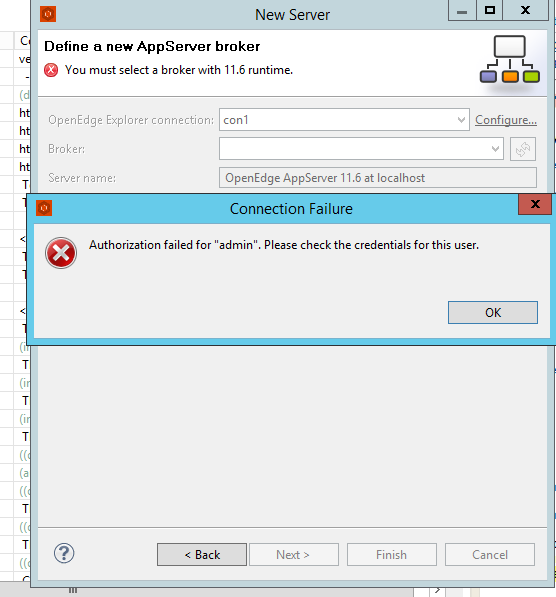
#12 Updated by Florin Eugen Rotaru over 1 year ago
Constantin, I am trying to fill-in the gaps in this table regarding the AppServer and PASOE support for projects of the following types:
- ABLWebApps
- DataObject
- REST
- AppServer
If you happen to know which of them are supported by PASOE or AppServers (or any other details I may use), please let me know.
#13 Updated by Florin Eugen Rotaru over 1 year ago
- Status changed from WIP to Review
- % Done changed from 0 to 100
- reviewer Greg Shah added
Greg Shah wrote:
- Web UI - If I understand correctly, this is just normal web UI development. I don't see why we would need to implement this. Please check to confirm my assumption.
Yes, I think so.
I have talked to Radu and Constantin and they provided insights regarding the appservers, PASOE and WebSpeed, so I have managed to finish the Projects Overview.
I have also compared the documented featured with OE IDE 12.8 and made some minor adjustments, but overall, there are no fundamental differences.
The wiki is ready to be reviewed.
#14 Updated by Alexandru Lungu over 1 year ago
DB Structureand other DB related toolsABL Unitto run unit tests- etc.
#15 Updated by Florin Eugen Rotaru over 1 year ago
Alexandru Lungu wrote:
Florin, please check Show View > Other section the IDE. It presents several views that can be enabled in the application and may not be present in the Wiki. For example:
DB Structureand other DB related toolsABL Unitto run unit tests- etc.
OK, I've added a Project Views subsection. Let me know if I missed anything.
#16 Updated by Greg Shah over 1 year ago
I've reviewed the latest documentation. This is really good.
Next steps:
- For each project type, please create a "hello world" project and gather all the artifacts including any configuration. Document each of those artifacts. If you need to create a separate wiki page for each one, do so. That might keep it more manageable.
- The syntax hightlighting in include files needs to be explored more.
- Are preprocessor directives like global/scoped defs and conditionals always unhighlighted?
- How do references of preproc args/definitions appear when they are outside of a string literal?
- What happens when you define preproc definitions that include snippets (incomplete statements) of 4GL code?
- What happens when you code something that can't possibly parse as 4GL code? For example, what if you have the opening of a string literal in an include file but it doesn't close in that include file?
- What bracket types are supported for auto-bracketing? Parenthesis is shown in the example.
- Curly braces?
- Square brackets?
- What about the structure of a inner block (e.g. DO block) or top level block (e.g. an internal procedure)? When you start such a construct, does the overall structure get inserted (with an END.)?
- In the Outline View, what is the full list of resource types that can appear there?
- Will it show any resource that can be created in a
DEFINE(streams, variables, images, buttons...)? - Do
CREATE <resource_type>statements affect this view? - Will it show all top level block types?
- Does it show inner blocks?
- Will it show any resource that can be created in a
- In the navigation section:
- You state "For internal/external procedures, the name may be passed as a string.". What do you mean by this? Is this only required when the program name cannot be determined by static code analysis (e.g.
RUN VALUE(expression).)? - Please make a list of all resources/code that can be navigated to by Open Declaration or back-traversed via Show References.
- You state "For internal/external procedures, the name may be passed as a string.". What do you mean by this? Is this only required when the program name cannot be determined by static code analysis (e.g.
- In Run Configurations, what about Profiler, Culture and the other 4 hidden tabs?
- What is the format for Generate Doc? Is there a separate utility that can be run for this (from the command line)?
- Can you create/remove a breakpoint by clicking on a line of code in the editor?
#17 Updated by Florin Eugen Rotaru over 1 year ago
Thanks for the review.
Greg Shah wrote:
- For each project type, please create a "hello world" project and gather all the artifacts including any configuration. Document each of those artifacts. If you need to create a separate wiki page for each one, do so. That might keep it more manageable.
Do you mean that I should create several project types and actually run (deploy) them in order to print something basic like hello world and document the whole process? (probably, for server-hosted projects this would involve accessing some endpoints).
#18 Updated by Greg Shah over 1 year ago
- For each project type, please create a "hello world" project and gather all the artifacts including any configuration. Document each of those artifacts. If you need to create a separate wiki page for each one, do so. That might keep it more manageable.
Do you mean that I should create several project types and actually run (deploy) them in order to print something basic like
hello worldand document the whole process? (probably, for server-hosted projects this would involve accessing some endpoints).
Yes, exactly this. It will provide a much clearer understanding of the specific things that they have implemented.
#19 Updated by Florin Eugen Rotaru over 1 year ago
I will update my progress here.
✅ - done
❌ - not done
- For each project type, please create a "hello world" project and gather all the artifacts including any configuration. Document each of those artifacts. If you need to create a separate wiki page for each one, do so. That might keep it more manageable. ✅
(Will do this in the Configuring OpenEdge Projects wiki.
- Unit ✅
- AppServer ✅
- OpenEdge/ChUI ✅
- REST ✅
- WebSpeed ✅)
- The syntax hightlighting in include files needs to be explored more.
- Are preprocessor directives like global/scoped defs and conditionals always unhighlighted? ✅
- How do references of preproc args/definitions appear when they are outside of a string literal? ✅
- What happens when you define preproc definitions that include snippets (incomplete statements) of 4GL code? ✅ (added under the Syntax Checking subsection)
- What happens when you code something that can't possibly parse as 4GL code? For example, what if you have the opening of a string literal in an include file but it doesn't close in that include file? ✅ (added details under the Syntax Checking subsection)
- What bracket types are supported for auto-bracketing? Parenthesis is shown in the example. ✅
- Curly braces? ✅ (re:yes)
- Square brackets? ✅ (re: yes)
- What about the structure of a inner block (e.g. DO block) or top level block (e.g. an internal procedure)? When you start such a construct, does the overall structure get inserted (with an END.)? ✅ (re: no)
- In the Outline View, what is the full list of resource types that can appear there? ✅
- Will it show any resource that can be created in a
DEFINE(streams, variables, images, buttons...)? ✅- Do
CREATE <resource_type>statements affect this view? ✅ (re: yes, some)- Will it show all top level block types? ✅
- Does it show inner blocks? ✅
- In the navigation section:
- You state "For internal/external procedures, the name may be passed as a string.". What do you mean by this? Is this only required when the program name cannot be determined by static code analysis (e.g.
RUN VALUE(expression).)? ✅ (re: no, I meant the name being enclosed in" ". See the GIF which has bothrun extpandrun "extp".- Please make a list of all resources/code that can be navigated to by Open Declaration or back-traversed via Show References. ✅
- In Run Configurations, what about Profiler, Culture and the other 4 hidden tabs? ✅
- What is the format for Generate Doc? ✅ Is there a separate utility that can be run for this (from the command line)? ✅ (re:yes, with ABLDoc ant, managed to run the Ant Task and generate the docs)
- Can you create/remove a breakpoint by clicking on a line of code in the editor? ✅
#20 Updated by Florin Eugen Rotaru over 1 year ago
- Status changed from Review to WIP
#21 Updated by Florin Eugen Rotaru over 1 year ago
- Status changed from WIP to Review
I finished writing Configuring OpenEdge Projects and adding missing details for OpenEdge IDE Features.
#22 Updated by Greg Shah over 1 year ago
I've read the changes. They are quite good. Some followup questions/comments:
1. In the "A Simple GUI/TTY Project - OpenEdge/ChUI" section, are there any items inserted by default into the "Procedure Libraries" container?
2. This statement "Similarly, when preprocessor definitions consist of an ill-written piece of code, the error is signaled only then the definition is" seems incomplete.
Everything else seems pretty clear. Well done!
#23 Updated by Florin Eugen Rotaru over 1 year ago
Greg Shah wrote:
I've read the changes. They are quite good. Some followup questions/comments:
1. In the "A Simple GUI/TTY Project - OpenEdge/ChUI" section, are there any items inserted by default into the "Procedure Libraries" container?
2. This statement "Similarly, when preprocessor definitions consist of an ill-written piece of code, the error is signaled only then the definition is" seems incomplete.
Everything else seems pretty clear. Well done!
Fixed them too - added some details about the procedure libraries and finished the sentence.