Support #9854
Discussion on how to leverage Harness to test certain drivers of FWD
0%
849LEqNkxb4vT0ds.png (32.7 KB)
aJLH4JFx4zaMhGWj.png (16.3 KB)
cross_session_test.xml  - The modified Cross_session_test to add my new test
(2.03 KB)
- The modified Cross_session_test to add my new test
(2.03 KB)
mkdirTest.xml
- The newly created test
(233 Bytes)
script.p
(62 Bytes)
mkdirTest-plan.xml
(359 Bytes)
mkdirTest.xml
(382 Bytes)
harness_test_plan.xml
(581 Bytes)
lex_comments.xml
(278 Bytes)
comments_test.xml
(209 Bytes)
mock_attempt.zip (1.2 KB)
9854_fail_screen_buffer_terminal.png (16.9 KB)
issue.zip (2.94 MB)
Related issues
History
#1 Updated by Alexandru Lungu over 1 year ago
- File aJLH4JFx4zaMhGWj.png added
- File 849LEqNkxb4vT0ds.png added
From email:
Hi guys,
We (me and Stefan Vieru) are trying to use Harness on Windows. More specifically, we need to run some .p files (lexer/parser 4GL test sources) and analyze the input. This implies running the script from the command line (e.g. pro or _progres.exe).
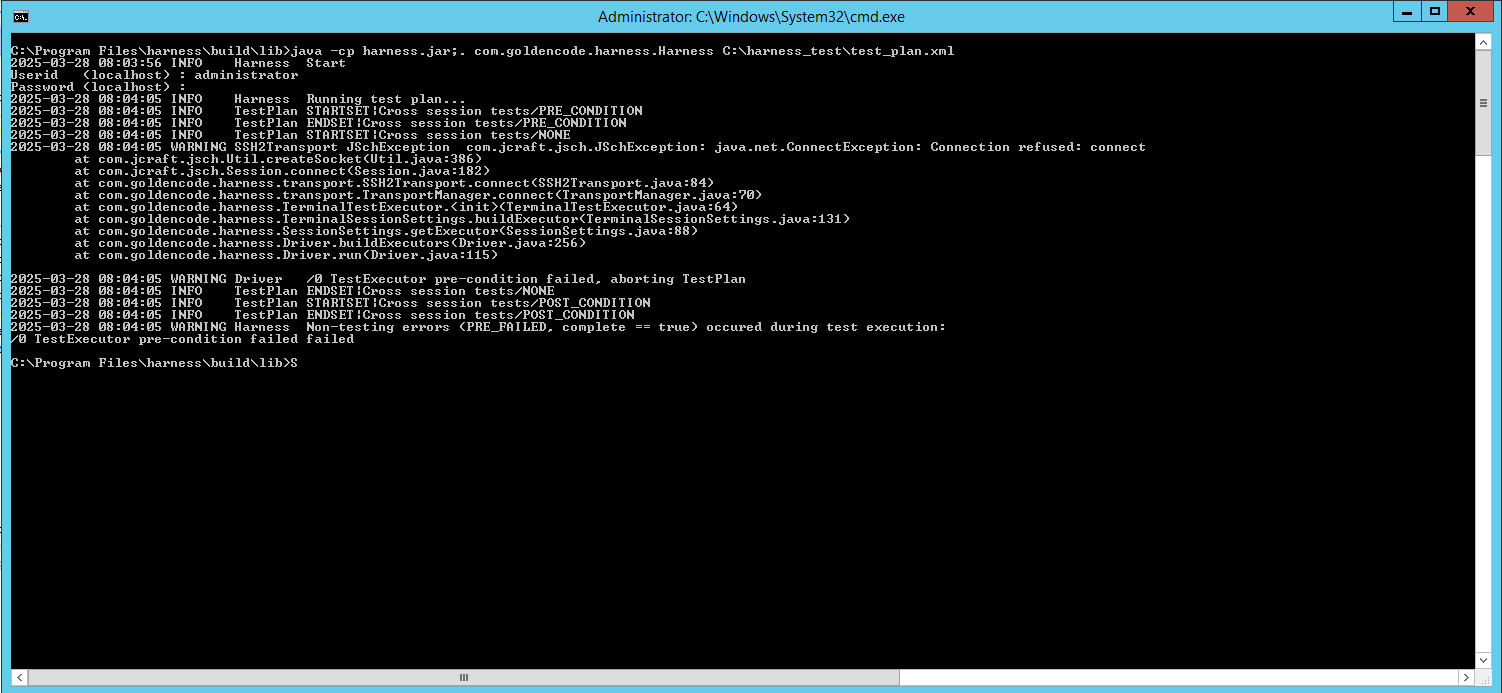
We need some guidance on how to use Harness, the main issue we're facing is that we can't run the reports on Win CMD. With a valid rule or even with an empty rule-list, I am getting this error:
Another issue is that the <run-code> fails on Windows with this:
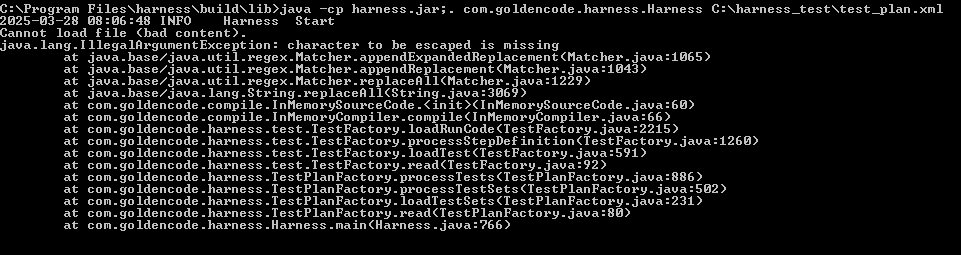
Here is the test.xml:
<test name="test" description="asdasda" >
<run-code >
<import value="java.util.*" />
<![CDATA[
System.out.println("Hello World");
]]>
</run-code>
</test>
And it seems it's the case for any Java code.
Could we please get some guidance? Should we consider a different approach?
Thanks,
Florin
#2 Updated by Greg Shah over 1 year ago
- Tracker changed from Bug to Support
- Assignee set to Tomasz Domin
#3 Updated by Greg Shah over 1 year ago
- Related to Support #9270: design and implement an approach for executing multi-session 4GL testcases added
#4 Updated by Alexandru Lungu over 1 year ago
Me, Stefan and Florin had multiple chats about using harness to cover the lexer and preprocessor tests. I suspect Greg was also hinting towards using it for quite some time already :)
Anyway, I recall having harness overhauled and extended to cover way more cases especially meant for multi-session testing (but this is another story). The point that we were trying to figure today is how should the architecture of the harness look like in regard to OE and FWD testing. I recall you were mentioning that the same harness definition can be used to test both OE and FWD (but I may have been wrong with that).
I have some specific ideas of Harness API for OE and Harness as Server/Client + the possibility to run OE with Harness and use the same plan more or less with FWD + the possibility to control the testing from the server especially relevant for multi-session tests. All these are just ideas that I could catch-up, but I reckon I didn't got into details.
Marian, is there any documentation on writing some OE driver for harness to do single-user tests? I was thinking of some OE specific task in Harness like "run this procedure" and then use file-comparison (or whatever) to check the output, but things may be different in practice. Maybe is only a "PRO" bash routine, so nothing necessarily native in Harness.
Also, can you provide more insight on how to configure the server/client of Harness? Are they both on Windows in OE? Or is the server converted in FWD and the client on OE? Are there any specific patterns towards the usage of Harness API - like initialization, etc.
#5 Updated by Greg Shah over 1 year ago
Marian, is there any documentation on writing some OE driver for harness to do single-user tests? I was thinking of some OE specific task in Harness like "run this procedure" and then use file-comparison (or whatever) to check the output, but things may be different in practice. Maybe is only a "PRO" bash routine, so nothing necessarily native in Harness.
Also, can you provide more insight on how to configure the server/client of Harness? Are they both on Windows in OE? Or is the server converted in FWD and the client on OE? Are there any specific patterns towards the usage of Harness API - like initialization, etc.
I think this needs to come from Tomasz.
#6 Updated by Greg Shah over 1 year ago
The reason we need to run in OE:
- Confirm that the tests do in fact work there.
- Test on different OE versions to understand version differences if they exist.
Of course, the tests should have been written using output from manual testing on OE. So we expect them to pass in OE but we have certainly found that edits to tests over time sometimes "drift" away from a working state. This has mostly been seen across different OE versions, especially with the rapidly shifting and sometimes buggy 4GL OO built-in classes. Still, I think it makes sense to plan for this.
We would normally use ABLUnit for such things BUT for preprocessor testing, lexer testing, some parser testing, multi-session testing... we will need to use the Harness because ABLUnit does not have the suitable ability to run the test scenarios.
#7 Updated by Tomasz Domin over 1 year ago
Alexandru Lungu wrote:
From email:
Hi guys,
We (me and Stefan Vieru) are trying to use Harness on Windows. More specifically, we need to run some .p files (lexer/parser 4GL test sources) and analyze the input. This implies running the script from the command line (e.g. pro or _progres.exe).
You need ssh server running on Windows localhost to allow starting a new testing session in trunk revision of Harness.
There is a feature in development branch #9270 that allows starting session in a local sub-shell, I guess it can be used before its merged to harness trunk.
#8 Updated by Tomasz Domin over 1 year ago
Alexandru Lungu wrote:
Marian, is there any documentation on writing some OE driver for harness to do single-user tests? I was thinking of some OE specific task in Harness like "run this procedure" and then use file-comparison (or whatever) to check the output, but things may be different in practice. Maybe is only a "PRO" bash routine, so nothing necessarily native in Harness.
Also, can you provide more insight on how to configure the server/client of Harness? Are they both on Windows in OE? Or is the server converted in FWD and the client on OE? Are there any specific patterns towards the usage of Harness API - like initialization, etc.
Alexandru
Its possible to spin-off a single test in harness #9270 with ant subshell in both - OE/Windows and Linux/FWD.
Not much documentation yet, as its in review (soon).
#9 Updated by Alexandru Lungu over 1 year ago
Its possible to spin-off a single test in harness #9270 with ant subshell in both - OE/Windows and Linux/FWD.
Not much documentation yet, as its in review (soon).
I think this is a blocker ATM for #6860 and #6859.
I don't want to duplicate effort on writing some ABLUnit tests / JUnit tests / custom bash script now so we end up rewriting that in Harness.
My point is that without a clear example or documentation for Harness that works in OE and FWD, it is quite hard to understand and design tests for #6860 / #6859.
- run a OE driver that mostly does
COMPILEstatements or something similar to generate some artifacts. These artifacts should be the same as a baseline. - run a FWD driver that uses the Java code to generate the artifacts. The artifacts should again be similar to the baseline.
Considering #9270 as still in Review, what is your recommendation as next steps for now without having to revamp the Harness tests later to accommodate the new pattern. Is there anything we can implement without risking to rewrite later now?
#10 Updated by Tomasz Domin over 1 year ago
Alexandru Lungu wrote:
Its possible to spin-off a single test in harness #9270 with ant subshell in both - OE/Windows and Linux/FWD.
Not much documentation yet, as its in review (soon).
#9270 probably going to be merged into harness_trunk this week.
I don't want to duplicate effort on writing some ABLUnit tests / JUnit tests / custom bash script now so we end up rewriting that in Harness.
My point is that without a clear example or documentation for Harness that works in OE and FWD, it is quite hard to understand and design tests for #6860 / #6859.
Despite #9270 is in the review, there are already working examples in testcases project (obviously they require 9270a branch) - they are for multi-session, but without using HarnessAPI they could be adopted for single session easily.
Please see testcases/support/harness/test/cross_locking_session_1.xml or other examples (*.xml) in testcases/support/harness/test/.
They mostly just start ant in a subshell and wait for its results.
We can use Harness File comparison features later on if we need to compare generated files.
I guess the next logical move currently for #6860 and #6859 is to skip the OE driver and attempt to write the Harness test-suite for FWD. However, I wonder if there is any pattern to adopt so we can use the same test-suite or part of it for the future driver in OE? My point is that the Harness should:
- run a OE driver that mostly does
COMPILEstatements or something similar to generate some artifacts. These artifacts should be the same as a baseline.
Yes, call OE driver on a command line inside harness subshell. Or use ant with PCT
- run a FWD driver that uses the Java code to generate the artifacts. The artifacts should again be similar to the baseline.
Here we call FWD ant to generate artifacts. Or conversion directly.
Using ant has an advantage of providing OS independent layer.
Considering #9270 as still in Review, what is your recommendation as next steps for now without having to revamp the Harness tests later to accommodate the new pattern. Is there anything we can implement without risking to rewrite later now?
The problem we have is different tooling on OE/Windows and FWD/Linux. I tried to mitigate it by using ant and PCT, as it is probably not possible to write script which can run in both CMD and bash.
#11 Updated by Alexandru Lungu over 1 year ago
The problem we have is different tooling on OE/Windows and FWD/Linux. I tried to mitigate it by using ant and PCT, as it is probably not possible to write script which can run in both CMD and bash.
Oh, here is where ANT comes into play ... this is nice :)
I would like to defer this to Stefan and Florin. More precisely to cover #9854-1. Also, are there any prerequisites for OE/ANT/Java versions to run with 9270a branch?
#12 Updated by Tomasz Domin over 1 year ago
Alexandru Lungu wrote:
We need some guidance on how to use Harness, the main issue we're facing is that we can't run the reports on Win CMD. With a valid rule or even with an empty rule-list, I am getting this error:
Here is the test.xml:
<test name="test" description="asdasda" >
<run-code >
<import value="java.util.*" />
<![CDATA[
System.out.println("Hello World");
]]>
</run-code>
</test>And it seems it's the case for any Java code.
Its a bug in Harness when running in Windows (where File.separator is '\')
Created #9859
#13 Updated by Tomasz Domin over 1 year ago
Alexandru Lungu wrote:
The problem we have is different tooling on OE/Windows and FWD/Linux. I tried to mitigate it by using ant and PCT, as it is probably not possible to write script which can run in both CMD and bash.
Oh, here is where ANT comes into play ... this is nice :)
Well, if Greg agrees to use it :) as we had some discussion about it earlier on.
I would like to defer this to Stefan and Florin. More precisely to cover #9854-1. Also, are there any prerequisites for OE/ANT/Java versions to run with 9270a branch?
Java 8. On windows you need to set DLC to directory where PCT is installed, usually its installed in OE_HOME/pct directory.
Please check testcases/build_ablunit.xml on how you can use PCT for code compilation under Windows. Note not all tasks from it are visible in master testcases/build.xml
#14 Updated by Alexandru Lungu over 1 year ago
Well, if Greg agrees to use it :) as we had some discussion about it earlier on.
Yeah, I heard/saw ant several times, but my brain did not fit it in the right place, so I quite ignored it :)
#15 Updated by Greg Shah over 1 year ago
The problem we have is different tooling on OE/Windows and FWD/Linux. I tried to mitigate it by using ant and PCT, as it is probably not possible to write script which can run in both CMD and bash.
Oh, here is where ANT comes into play ... this is nice :)
Well, if Greg agrees to use it :) as we had some discussion about it earlier on.
I'm OK with it.
#16 Updated by Stefan Vieru over 1 year ago
I installed on VM java 8 and ant 10.
I executed cross_session_test.xml with harness and had no errors. The tests were failing but a report was able to be produced.
I tested with Florin the following methods on trying to run a procedure:
<send-text value="C:\Progress\OE116_64\bin\_progres.exe -p Z:\script.p -b" special="VK_ENTER" />
But with no success. We get the following error:
1. procTest: failure in step 1: 'java.lang.NullPointerException
        at com.goldencode.harness.Driver.execute(Driver.java:105)
        at com.goldencode.harness.test.Test.execute(Test.java:304)
        at com.goldencode.harness.Driver.run(Driver.java:154)
'
We've tried this method:
<stream-write value="C:\Progress\OE116_64\bin\_progres.exe -p Z:\script.p -b" new_line=true />
Again, no success. Harness didn't throw any errors, it said passed, but the proc wasn't executed.
We tried with a basic
mkdir command aswell, same results.
This would be the output of dirty_share_unique_session1 if it's of interest
NOT_RUN PASSED FAILED FAILED_DEPENDENCY IN_PROGRESS Steps 0 4 1 0 0 Step Results Number Name Description Status Cumulative Time (Seconds) Failure Reason(s) 1 STREAM-WRITE cd Z:\testcases PASSED 0.001 2 STREAM-WRITE ant -Dtests.pattern=**/TestUniqueDirtyShareSession1.* -Dtests.dbdir=. -Dtests.db=testcases.db -Dtests.out=Z:\testcases/build/dirty_share_unique_session1 -Dtests.dir=support/harness/test -Dtests.tempDir=build/dirty_share_unique_session1 ablunit-tests-pattern PASSED 0.002 3 STREAM-WAIT-FOR build PASSED 0.085 4 STREAM-WAIT-FOR Total time PASSED 2.598 5 JUNIT-IMPORT <br> FAILED 0.002 INVALID_FILENAME:Z:\testcases\build\dirty_share_unique_session1\results.xml
#17 Updated by Tomasz Domin over 1 year ago
Stefan Vieru wrote:
I installed on VM java 8 and ant 10.
I executedcross_session_test.xmlwith harness and had no errors. The tests were failing but a report was able to be produced.
I tested with Florin the following methods on trying to run a procedure:
[...]
But with no success. We get the following error:
[...]We've tried this method:
[...]
Again, no success. Harness didn't throw any errors, it said passed, but the proc wasn't executed.
We tried with a basicmkdircommand aswell, same results.This would be the output of dirty_share_unique_session1 if it's of interest
[...]
Stefan
Please attach complete test scenarios that are failing.
#18 Updated by Stefan Vieru over 1 year ago
- File mkdirTest.xml added
- File cross_session_test.xml added
These are the files i modified/added in testcases/support/harness/test
Let me know if you need anything else.
#19 Updated by Stefan Vieru over 1 year ago
- File script.p added
#20 Updated by Tomasz Domin over 1 year ago
- File mkdirTest-plan.xml added
- File mkdirTest.xml added
Stefan, thank you
Attached updated test plan and test.
You cant use send-text for target type="stream", you need stream-write instead
When running under windows override shell with Harness command line option -shell cmd.exe - unless you have working bash under windows.
Please replace stream-wait-for value with text expected as _progres.exe call successful result.
#21 Updated by Stefan Vieru over 1 year ago
Z:\testcases> java -jar ..\harness_9270a\build\lib\harness.jar -shell cmd.exe .\support\harness\test\mkdirTest-plan.xml
This is the command we've used. And i have the test files you provided but the test reaches the timeout.
script.p
MESSAGE "Hello".
testplan:
<?xml version="1.0"?>
<test-plan name="Mkdir test plan" description="Mkdir test plan" >
   <output-directory path="results" unique="true" />
   <target type="stream" shell="bash" />
   <resources>
   </resources>

   <test-set name="mkdir_test_1" description="Mkdir test plan" threads="1" >
      <test filename="Z:\testcases\support\harness\test\mkdirTest.xml" />
   </test-set>
</test-plan>
test:
<?xml version="1.0"?>
<test name="mkdirTest" description="Mkdir test plan" >

   <stream-write value="C:\Progress\OE116_64\bin\_progres.exe -p Z:\script.p -b" special="VK_ENTER" />
<!--
    Wait 120 seconds for tests to finish
-->
    <stream-wait-for value="Hello"  millis="10000" newline="false"/>
</test>
This is the result file
Step Results
Number    Name            Description                                                  Status    Cumulative Time (Seconds)    Failure Reason(s)
1    STREAM-WRITE         C:\Progress\OE116_64\bin\_progres.exe -p Z:\script.p -b      PASSED    0.000
2    STREAM-WAIT-FOR      Timeout waiting for matching text                            FAILED    10.001                            Timeout
#22 Updated by Tomasz Domin over 1 year ago
Stefan Vieru wrote:
Z:\testcases> java -jar ..\harness_9270a\build\lib\harness.jar -shell cmd.exe .\support\harness\test\mkdirTest-plan.xml
This is the command we've used. And i have the test files you provided but the test reaches the timeout.script.p
[...]testplan:
[...]test:
[...]
This is the result file
[...]
You dont need Total time part, it was given as an example :)
#23 Updated by Tomasz Domin over 1 year ago
Stefan Vieru wrote:
Z:\testcases> java -jar ..\harness_9270a\build\lib\harness.jar -shell cmd.exe .\support\harness\test\mkdirTest-plan.xml
This is the command we've used. And i have the test files you provided but the test reaches the timeout.
What is in report ?
You can use "-d" Harness option for a bit more information.
#24 Updated by Stefan Vieru over 1 year ago
PS Z:\testcases> java -jar ..\harness_9270a\build\lib\harness.jar -d -shell cmd.exe .\support\harness\test\mkdirTest-plan.xml
2025-04-01 09:07:30 INFO    Harness  Enable debug mode
2025-04-01 09:07:30 INFO    Harness  Start
2025-04-01 09:07:30 INFO    Harness  Running test plan...
2025-04-01 09:07:30 INFO    TestPlan STARTSET|Mkdir test plan/PRE_CONDITION
2025-04-01 09:07:30 INFO    TestPlan ENDSET|Mkdir test plan/PRE_CONDITION
2025-04-01 09:07:30 FINER   TestPlan TESTPLANREPORT|Mkdir test plan/PRE_CONDITION Total: 0 left: 0 in progress: 0 failed: 0 passed: 0 successful: 0.00% progress: 0.00%
2025-04-01 09:07:30 FINER   TestPlan TESTPLANREPORT|Mkdir test plan/PRE_CONDITION Tests in progress: []
2025-04-01 09:07:30 INFO    TestPlan STARTSET|Mkdir test plan/NONE
2025-04-01 09:07:30 FINER   TestSet  TESTSETSTART|mkdir_test_1| Starting testset
2025-04-01 09:07:30 FINER   Driver   DRIVERSTART|mkdir_test_1/0
2025-04-01 09:07:30 FINER   Driver   DRIVER|mkdir_test_1/0|mkdirTest/NONE| execute
2025-04-01 09:07:30 FINER   Test     START|mkdir_test_1/0|mkdirTest
2025-04-01 09:07:30 FINER   Test     STEPSTART|mkdir_test_1/0|mkdirTest|1|Step 1: STREAM-WRITE:C:\Progress\OE116_64\bin\_progres.exe -p Z:\script.p -b newline:false
2025-04-01 09:07:30 FINER   Test     TIME|mkdir_test_1/0|mkdirTest|1|1|-1|Step 1: STREAM-WRITE step time -> 1 ms, max time:-1 ms
2025-04-01 09:07:30 FINER   Test     END|mkdir_test_1/0|mkdirTest| Ended in (ms) |1
2025-04-01 09:07:30 FINER   Driver   RESULT|mkdir_test_1/0|mkdirTest|PASSED|
2025-04-01 09:07:30 FINER   Driver   mkdir_test_1/0 Queue is empty, exiting
2025-04-01 09:07:30 FINER   Driver   DRIVEREND|mkdir_test_1/0| End
2025-04-01 09:07:30 FINER   TestSet  TESTSETEND|mkdir_test_1|13| Ending testset
2025-04-01 09:07:30 INFO    TestPlan ENDSET|Mkdir test plan/NONE
2025-04-01 09:07:30 FINER   TestPlan TESTPLANREPORT|Mkdir test plan/NONE Total: 1 left: 0 in progress: 0 failed: 0 passed: 1 successful: 100.00% progress: 100.00%
2025-04-01 09:07:30 FINER   TestPlan TESTPLANREPORT|Mkdir test plan/NONE Tests in progress: []
2025-04-01 09:07:30 INFO    TestPlan STARTSET|Mkdir test plan/POST_CONDITION
2025-04-01 09:07:30 INFO    TestPlan ENDSET|Mkdir test plan/POST_CONDITION
2025-04-01 09:07:30 FINER   TestPlan TESTPLANREPORT|Mkdir test plan/POST_CONDITION Total: 0 left: 0 in progress: 0 failed: 0 passed: 0 successful: 0.00% progress: 0.00%
2025-04-01 09:07:30 FINER   TestPlan TESTPLANREPORT|Mkdir test plan/POST_CONDITION Tests in progress: []
2025-04-01 09:07:30 INFO    Harness  Completed in 0.027 seconds. Status = PASSED.
Generating HTML reports...
2025-04-01 09:07:31 INFO    Harness  Reports generation Completed in 0.081 seconds.
2025-04-01 09:07:31 INFO    Harness  End
This is the output with
-d
Updated script:
<?xml version="1.0"?>
<test name="mkdirTest" description="Mkdir test plan" >
   <stream-write value="C:\Progress\OE116_64\bin\_progres.exe -p Z:\script.p -b" special="VK_ENTER" />
<test/>
#25 Updated by Stefan Vieru over 1 year ago
Tomasz Domin wrote:
Stefan Vieru wrote:
Z:\testcases> java -jar ..\harness_9270a\build\lib\harness.jar -shell cmd.exe .\support\harness\test\mkdirTest-plan.xml
This is the command we've used. And i have the test files you provided but the test reaches the timeout.What is in report ?
You can use "-d" Harness option for a bit more information.
In the report is exactly that table that I've provided.
It says it's passed but the script wasn't executed.
#26 Updated by Tomasz Domin over 1 year ago
Stefan Vieru wrote:
[...]
This is the output with-dUpdated script:
[...]
This script does not wait for anything to happen and just quits after starting _progres.exe
#27 Updated by Stefan Vieru over 1 year ago
Shouldn't I run the following test?
<?xml version="1.0"?>
<test name="mkdirTest" description="Mkdir test plan" >

   <stream-write value="C:\Progress\OE116_64\bin\_progres.exe -p Z:\script.p -b" special="VK_ENTER" />
    <stream-wait-for value="Hello"  millis="10000" newline="false"/>
</test>
The idea is that the script doesn't execute, so the stream doesn't get the
Hello string that it's waiting for, thus reaching the timeout.Because in note 22 you mentioned I don't need
Total time and I'm not sure what you're referring to.#28 Updated by Tomasz Domin over 1 year ago
Stefan Vieru wrote:
Shouldn't I run the following test?
[...]
The idea is that the script doesn't execute, so the stream doesn't get theHellostring that it's waiting for, thus reaching the timeout.
Because in note 22 you mentioned I don't needTotal timeand I'm not sure what you're referring to.
Please change stream-write to:<stream-write value="C:\Progress\OE116_64\bin\_progres.exe -p Z:\script.p -b" newline="true">
#29 Updated by Stefan Vieru over 1 year ago
Tomasz Domin wrote:
Please change
stream-writeto:<stream-write value="C:\Progress\OE116_64\bin\_progres.exe -p Z:\script.p -b" newline="true">
I tried this already but no success.
#30 Updated by Stefan Vieru over 1 year ago
Correction, i didn't see you removed the VK_ENTER
It does work now!
It seems like replacing VK_ENTER with new_line=true fixed it. Thanks!
#31 Updated by Stefan Vieru over 1 year ago
Is there a way yet to substitute the text-file-comparison parameters?
 <?xml version="1.0"?>
 <test name="test_cache" description="" >
    <stream-write value="ant %s -Dpreproc_input=%s/missing_equals_in_named_args.p -Dpreproc_output=%s -Dpreproc_postfix=%s" newline="true">
       <substitution variable="antTarget" />
       <substitution variable="preprocInput" />
       <substitution variable="preprocOutput" />
       <substitution variable="preprocPostfix" />
    </stream-write>
    <stream-wait-for value="BUILD SUCCESSFUL" millis="10000" newline="false" />
    <text-file-comparison baseline="missing_equals_in_named_args.p.preproc" actual="cvt/%s/missing_equals_in_named_args.p.preproc" >
        <substitution variable="preprocInput" />
    </text-file-comparison>
 </test>
I saw in the Documentation that it's TODO but I'm wondering if in 9270 is available and, if so, what am I doing wrong here?
#32 Updated by Tomasz Domin over 1 year ago
Stefan Vieru wrote:
Is there a way yet to substitute the
text-file-comparisonparameters?
[...]I saw in the Documentation that it's TODO but I'm wondering if in 9270 is available and, if so, what am I doing wrong here?
No, its not supported.
#33 Updated by Stefan Vieru over 1 year ago
#34 Updated by Stefan Vieru over 1 year ago
I was thinking to use as suggested earlier ant as an abstraction layer, so I would have different ant commands based on OS family. Is this a good approach?
#35 Updated by Tomasz Domin over 1 year ago
Stefan Vieru wrote:
I was thinking to use as suggested earlier
antas an abstraction layer, so I would have different ant commands based on OS family. Is this a good approach?
In my tests I was calling different ant targets depending on harness input parameters which were depended on OS family see #9270-54
I guess ant is able to detect OS family itself, but I didn't use that as I standarized ant scripts (I took them from testcases project)
You need to detect OS family in ant anyway as a toolset differs by platform, so its also possible to have different ant targets internally in ant scripts.
#36 Updated by Greg Shah over 1 year ago
The FWD build.xml does this OS detection and changes things based on the result. You can look at that as an example.
#37 Updated by Stefan Vieru over 1 year ago
Tomasz Domin wrote:
Stefan Vieru wrote:
I was thinking to use as suggested earlier
antas an abstraction layer, so I would have different ant commands based on OS family. Is this a good approach?In my tests I was calling different
anttargets depending onharnessinput parameters which were depended on OS family see #9270-54
I guess ant is able to detect OS family itself, but I didn't use that as I standarized ant scripts (I took them fromtestcasesproject)You need to detect OS family in
antanyway as a toolset differs by platform, so its also possible to have different ant targets internally in ant scripts.
Thanks, I adapted the build.xml based on isUnix and isWindows variables.
#38 Updated by Șerban Bursuc over 1 year ago
I'd like to ask some questions regarding Harness too, if this is not the correct task then please let me know.
I'm looking at the testcases project, more specifically testcases/flushing_and_triggers/cross_session/screens/combo_box and I see a lot of combo_box_x.txt type files that have ChUI output written in text format. How was this done? What is needed in the business logic to create such files? These are essential for running harness tests because they are used in coordination for check-screen-buffer, and I don't think those were written manually :D
#39 Updated by Tomasz Domin over 1 year ago
Șerban Bursuc wrote:
I'm looking at the testcases project, more specifically
testcases/flushing_and_triggers/cross_session/screens/combo_boxand I see a lot ofcombo_box_x.txttype files that have ChUI output written in text format. How was this done? What is needed in the business logic to create such files? These are essential for running harness tests because they are used in coordination forcheck-screen-buffer, and I don't think those were written manually :D
It was done manually :)
Just note that check-screen-buffer requires terminal, thus it requires connection to ssh server.
#40 Updated by Șerban Bursuc over 1 year ago
Tomasz Domin wrote:
Șerban Bursuc wrote:
I'm looking at the testcases project, more specifically
testcases/flushing_and_triggers/cross_session/screens/combo_boxand I see a lot ofcombo_box_x.txttype files that have ChUI output written in text format. How was this done? What is needed in the business logic to create such files? These are essential for running harness tests because they are used in coordination forcheck-screen-buffer, and I don't think those were written manually :DIt was done manually :)
Just note thatcheck-screen-bufferrequires terminal, thus it requires connection to ssh server.
Well...
Then what determines the correct spacing in the file? Or yet a better question, how does Harness do the screen buffer matching? Maybe I didn't read the documentation well enough and I missed it, but if the ground truth is in txt format that must mean Harness uses some form of OCR? If it does, then couldn't that be used to make a relatively accurate ground truth thus avoiding the manual creation?
#41 Updated by Tomasz Domin over 1 year ago
Șerban Bursuc wrote:
Tomasz Domin wrote:
Șerban Bursuc wrote:
I'm looking at the testcases project, more specifically
testcases/flushing_and_triggers/cross_session/screens/combo_boxand I see a lot ofcombo_box_x.txttype files that have ChUI output written in text format. How was this done? What is needed in the business logic to create such files? These are essential for running harness tests because they are used in coordination forcheck-screen-buffer, and I don't think those were written manually :DIt was done manually :)
Just note thatcheck-screen-bufferrequires terminal, thus it requires connection to ssh server.Well...
Then what determines the correct spacing in the file? Or yet a better question, how does Harness do the screen buffer matching? Maybe I didn't read the documentation well enough and I missed it, but if the ground truth is in txt format that must mean Harness uses some form of OCR? If it does, then couldn't that be used to make a relatively accurate ground truth thus avoiding the manual creation?
No, its ChUI output from terminal, you can just copy that into comparison file.
Its complex :), basically it does position-by-position comparison for visible characters with exclusions of some regions. See: Documentation
#42 Updated by Șerban Bursuc over 1 year ago
OK I just saw that in FWD you can copy the screen buffer to a text file, I thought this was possible in OE. Now it makes more sense how the ground truth could be written faster and how the comparison is done. Thanks for the help.
#43 Updated by Florin Eugen Rotaru over 1 year ago
Tomasz, I am trying to use the dependency attribute for <test> tags in order to make a test execute only after the first one has finished:
<test-set name="Comments_test_plan" description="Comments test plan" threads="1">
    <test filename="lex_comments.xml"/>
    <test filename="comments_test.xml" dependency="SPECIFIC" referent="lex_comments.xml"/>
</test-set>
What I'm trying to achieve is generate a bunch of output files in the first test and then compare them with the baseline in the second test. Here is the lex_comments.xml:
<test name="lex_comments" description="lex comments">
   <stream-write value="%s -Dinput=tests/conversion/lexer/comments -Doutput=tests/conversion/lexer/comments_output"
                 newline="true">

      <substitution variable="run_java_lex"/>
   </stream-write>
</test>
I have tried using de PRE_CONDITION, CRITICAL_PATH and also SPECIFIC values but the tests still fail due to missing files, even though the files are generated in the end. This can only mean the second test doesn't wait for the first test. Could you advise, please?
#44 Updated by Tomasz Domin over 1 year ago
Florin Eugen Rotaru wrote:
Tomasz, I am trying to use the
dependencyattribute for <test> tags in order to make a test execute only after the first one has finished:[...]
What I'm trying to achieve is generate a bunch of output files in the first test and then compare them with the baseline in the second test. Here is the
lex_comments.xml:[...]
I have tried using de
PRE_CONDITION,CRITICAL_PATHand alsoSPECIFICvalues but the tests still fail due to missing files, even though the files are generated in the end. This can only mean the second test doesn't wait for the first test. Could you advise, please?
Please try <test filename="comments_test.xml" dependency="specific" referent="lex_comments"/> - I think its possible to refer to a test name, IMO referring to a path would work if file is on test search path.
You can also try something like this:
    <test filename="lex_comments.xml" dependency="sequential" group="comments_test_1"/>
    <test filename="comments_test.xml" dependency="sequential" group="comments_test_1"/>
#45 Updated by Florin Eugen Rotaru over 1 year ago
- File mock_attempt.zip added
- File lex_comments.xml added
- File harness_test_plan.xml added
- File comments_test.xml added
Thanks. Unfortunately these don't work either...
I attached the files. I tried making a mock for the custom ant task I'm using in the lex_comments.xml with the sleep command but for some reason sleep exits instantly and anything after doesn't execute.
#46 Updated by Tomasz Domin over 1 year ago
Florin Eugen Rotaru wrote:
Thanks. Unfortunately these don't work either...
I attached the files. I tried making a mock for the custom ant task I'm using in the
lex_comments.xmlwith thesleepcommand but for some reasonsleepexits instantly and anything after doesn't execute.
But you dont wait for lex_commands to finish, so both tests are executing almost immediately.
You need to add stream-wait-for into lex_commands for scenario to wait for results.
And why did you split executing the test from file comparison ?
#47 Updated by Florin Eugen Rotaru over 1 year ago
Tomasz Domin wrote:
You need to add
stream-wait-forintolex_commandsfor scenario to wait for results.
Ok, I see now. I just wanted to get rid of the millis timeout and to wait however much is necessary for the task to finish.
And why did you split executing the test from file comparison ?
My idea was to have a test which prepares the actual files AND some tests that make the comparisons. These should depend on the first one.
#48 Updated by Greg Shah over 1 year ago
My idea was to have a test which prepares the actual files AND some tests that make the comparisons. These should depend on the first one.
I think it is better to have both parts in a single test definition. Otherwise you can fail one without the other and the result is much more complicated than needed. Ultimately, the comparison is checking if the generated output is correct or not, that is like an "assert" and it should be part of the same test that generated the output.
#49 Updated by Florin Eugen Rotaru over 1 year ago
I have this test set:
   <test-set name="Comments_tests" description="Comments test plan">
      <test filename="comments_harness_xml/unopen_test.xml"/>
      <test filename="comments_harness_xml/nested_reversed_separate_lines_test.xml"/>
      <test filename="comments_harness_xml/nested_reversed_test.xml"/>
      <test filename="comments_harness_xml/two_closed_test.xml"/>
      <test filename="comments_harness_xml/reversed_test.xml"/>
      <test filename="comments_harness_xml/two_open_test.xml"/>
      <test filename="comments_harness_xml/uncloded_test.xml"/>
      <test filename="comments_harness_xml/nested_test.xml"/>
      <test filename="comments_harness_xml/simple_test.xml"/>
      <test filename="comments_harness_xml/multiple_lines_symbols_test.xml"/>
      <test filename="comments_harness_xml/multiple_lines_text_test.xml"/>
      <test filename="comments_harness_xml/inline_test.xml"/>
      <test filename="comments_harness_xml/one_line_symbols_test.xml"/>
      <test filename="comments_harness_xml/multiple_lines_test.xml"/>
   </test-set>
Each of these tests passes when run individually. However, when run together (sequentially), every second test fails due to timeout. This is what a test looks like:
   <test name="multiple_lines"
         description="Testing file comments/valid/multiple_lines.p">
   <stream-write value="%s -Dinput=tests/conversion/lexer/comments/valid/multiple_lines.p"
                 newline="true">
      <substitution variable="run_java_lex"/>
   </stream-write>

   <stream-wait-for value=" Successfully finished task for input tests/conversion/lexer/comments/valid/multiple_lines.p" newline="false" millis="10000" />
   <text-file-comparison baseline="comments/valid/multiple_lines.lexer"
                         actual="comments/valid/multiple_lines.lexer" />
   </test>
As you can see, each of them waits for its custom ending message instead of waiting for "BUILD SUCCESSFUL". This is to exclude any race conditions (I would like to use several threads for a test-suite, and it kept failing and I presume that was the cause). Please advise :)
#50 Updated by Tomasz Domin over 1 year ago
Florin Eugen Rotaru wrote:
I have this test set:
Florin
I need those specific tests as I cant replicate the issue, tried with a sequence of tests under linux and it works fine.
Are there more test-sets running in parallel ? Does the issue happen for windows and/or Linux ?
Send me tests via email or via devsrv
#51 Updated by Florin Eugen Rotaru over 1 year ago
Tomasz, this happens only on Linux. Please take a look in the testcases/tests/conversion/lexer folder. The tests are in fwd_*_harness_xml and the test plan is fwd_test_plan.xml. More details in #6860-33.
#52 Updated by Tomasz Domin over 1 year ago
Florin Eugen Rotaru wrote:
Tomasz, this happens only on Linux. Please take a look in the
testcases/tests/conversion/lexerfolder. The tests are infwd_*_harness_xmland the test plan isfwd_test_plan.xml. More details in #6860-33.
Are you sure you can run several com.goldencode.p2j.uast.test.LexerTestDriver instances in parallel (I guess on the same working dir) ?
Can you please try adding -q 1 option to harness command line?
#53 Updated by Florin Eugen Rotaru over 1 year ago
Yes, the tests did run OK with -q 1 added, I will re-test the LexerTestDriver, thanks!
#54 Updated by Tomasz Domin over 1 year ago
Florin Eugen Rotaru wrote:
Yes, the tests did run OK with
-q 1added, I will re-test the LexerTestDriver, thanks!
To explain what happened. Note that test-sets are executed in parallel by default. As there are as many shell session as test-set-s there were several LexerTestDriver running in parallel, probably causing a dead-lock. -q 1 option forces harness to run at most 1 test-set in parallel, causing actually executing test-sets in a sequence.
#55 Updated by Greg Shah over 1 year ago
Let's fix the threading issue(s) in the LexerTestDriver (wherever they are, the problem may be in the lexer, symbol resolver or elsewhere).
#56 Updated by Tomasz Domin over 1 year ago
Greg Shah wrote:
Let's fix the threading issue(s) in the
LexerTestDriver(wherever they are, the problem may be in the lexer, symbol resolver or elsewhere).
Another option is to use Mutex in Harness test to protect calls to LexerTestDriver.
#57 Updated by Greg Shah over 1 year ago
Tomasz Domin wrote:
Greg Shah wrote:
Let's fix the threading issue(s) in the
LexerTestDriver(wherever they are, the problem may be in the lexer, symbol resolver or elsewhere).Another option is to use
MutexinHarnesstest to protect calls toLexerTestDriver.
I appreciate it, but the lexer must be thread safe. We need to fix this.
#58 Updated by Șerban Bursuc over 1 year ago
- File 9854_fail_screen_buffer_terminal.png added
Tomasz, I've tried to run a small ChUI Harness test on Windows. I took the script from testcases/flushing_and_triggers/cross_session, converted it to batch trimmed it down. The problem I have is that the WAIT-FOR-SCREEN-BUFFER for the terminal is always failing. The script was expecting a shell prompt text specific to Linux, so I changed it to match that of Windows after SSH-ing into a machine:
set shellPromptText="%USERNAME%@%COMPUTERNAME% C:\Users\%USERNAME%>"
At least this is how it is on my virtual machine.
The problem is that Harness always adds a @ specific to Linux:

The at symbol is being added from Harness I think and the test is failing because the terminal output is not matching the input value, correct?
Is this configurable/can be changed?
#59 Updated by Tomasz Domin over 1 year ago
Șerban Bursuc wrote:
Tomasz, I've tried to run a small ChUI Harness test on Windows. I took the script from
testcases/flushing_and_triggers/cross_session, converted it to batch trimmed it down. The problem I have is that theWAIT-FOR-SCREEN-BUFFERfor the terminal is always failing. The script was expecting a shell prompt text specific to Linux, so I changed it to match that of Windows after SSH-ing into a machine:
[...]At least this is how it is on my virtual machine.
The problem is that Harness always adds a
@specific to Linux:
Thats strange, I dont think thats the case.
Can you please paste part of the test scenario with WAIT-FOR-SCREEN-BUFFER element ?
#60 Updated by Șerban Bursuc over 1 year ago
Sorry you are right, I thought this was an automatic initialization test from Harness but it was a custom test hidden inside the initial testcase folder. It looked like this:
<test name="Selection List" description="Selection List scrolling test" >
   <include filename="wait_for_prompt.xml" />
<?xml version="1.0"?>
<test name="wait_for_prompt" description="Wait for shell prompt." >
   <wait-for-screen-buffer>
      <substitution name="value" spec="@%s" >
         <parameter variable="shellPromptText" />
      </substitution>
   </wait-for-screen-buffer>
</test>
I removed the "@" and the test passes.
#61 Updated by Florin Eugen Rotaru over 1 year ago
- File issue.zip added
I am encountering an issue when running a test-plan that contains a large number of tests.
I need to run around 3200 harness tests in Windows 10 VM. Each of this tests take a 4gl testcase from 4gl_testcases/... and passes it as parameter to a procedure driver.p. When running the tests, the execution seems to freeze and not finish (not even after the timeout should forcefully end the tests). I have attached a zip which contains everything necessary to reproduce the issue. I have left only 500 tests uncommented (even with 500 tests the execUtion doesn't finish, it should finish after 8 min or so because each test has a 1 sec timeout, but it doesn't)
Tomasz, could you please take a look?
#62 Updated by Tomasz Domin over 1 year ago
Florin Eugen Rotaru wrote:
I am encountering an issue when running a test-plan that contains a large number of tests.
I need to run around 3200 harness tests in Windows 10 VM. Each of this tests take a 4gl testcase from
4gl_testcases/...and passes it as parameter to a proceduredriver.p. When running the tests, the execution seems to freeze and not finish (not even after the timeout should forcefully end the tests). I have attached a zip which contains everything necessary to reproduce the issue. I have left only 500 tests uncommented (even with 500 tests the execUtion doesn't finish, it should finish after 8 min or so because each test has a 1 sec timeout, but it doesn't)Tomasz, could you please take a look?
I will check it.
#63 Updated by Tomasz Domin over 1 year ago
Florin Eugen Rotaru wrote:
I am encountering an issue when running a test-plan that contains a large number of tests.
I need to run around 3200 harness tests in Windows 10 VM. Each of this tests take a 4gl testcase from
4gl_testcases/...and passes it as parameter to a proceduredriver.p. When running the tests, the execution seems to freeze and not finish (not even after the timeout should forcefully end the tests). I have attached a zip which contains everything necessary to reproduce the issue. I have left only 500 tests uncommented (even with 500 tests the execUtion doesn't finish, it should finish after 8 min or so because each test has a 1 sec timeout, but it doesn't)Tomasz, could you please take a look?
Florin
I cant do this kind of testing as I dont have 4GL VM on my machine.
I guess that might be related with spawing CMD shell subprocess too many times. Or OE licensing issue ? Is there any output out of _progress.exe command ?
Is there anything in logs with -d -d option ?
#64 Updated by Florin Eugen Rotaru over 1 year ago
Tomasz Domin wrote:
Is there anything in logs with
-d -doption ?
Yes, after a certain amount of tests run (from what I see it's 100 per thread), no other test executes and the log looks like this
4gl_testcases/keywords/ignorelist.txt newline:true
2025-05-21 03:17:59 FINER   Test     TIME|Reserved keywords tests - VALID/0|printer-name_as_variable_test|1|0|-1|Step 1: STREAM-WRITE step time -> 0 ms, max time:-1 ms
2025-05-21 03:17:59 FINER   Test     STEPSTART|Reserved keywords tests - VALID/0|printer-name_as_variable_test|2|Step 2: STREAM-WAIT-FOR:no newline:false ignoreCase:false
2025-05-21 03:17:59 FINER   Test     TIME|Reserved keywords tests - VALID/0|printer-name_as_variable_test|2|0|-1|Step 2: STREAM-WAIT-FOR step time -> 0 ms, max time:-1 ms
2025-05-21 03:17:59 FINER   Test     STEPSTART|Reserved keywords tests - VALID/0|printer-name_as_variable_test|3|Step 3: PAUSE:millis = '500';
2025-05-21 03:18:00 FINER   Test     TIME|Reserved keywords tests - VALID/0|printer-name_as_variable_test|3|514|500|Step 3: PAUSE step time -> 514 ms, max time:500 ms
2025-05-21 03:18:00 FINER   Test     END|Reserved keywords tests - VALID/0|printer-name_as_variable_test| Ended in (ms) |514
2025-05-21 03:18:00 FINER   Driver   RESULT|Reserved keywords tests - VALID/0|printer-name_as_variable_test|PASSED|
2025-05-21 03:18:00 FINER   Driver   DRIVER|Reserved keywords tests - VALID/0|last-proce_as_variable_test/NONE| execute
2025-05-21 03:18:00 FINER   Test     START|Reserved keywords tests - VALID/0|last-proce_as_variable_test
2025-05-21 03:18:00 FINER   Test     STEPSTART|Reserved keywords tests - VALID/0|last-proce_as_variable_test|1|Step 1: STREAM-WRITE:%s -p driver.p -param  .\4gl_testcases\keywords\reserved\valid\last-proce_as_variable_test.p -b -k
4gl_testcases/keywords/ignorelist.txt newline:true
2025-05-21 03:18:00 FINER   Test     TIME|Reserved keywords tests - VALID/0|last-proce_as_variable_test|1|0|-1|Step 1: STREAM-WRITE step time -> 0 ms, max time:-1 ms
2025-05-21 03:18:00 FINER   Test     STEPSTART|Reserved keywords tests - VALID/0|last-proce_as_variable_test|2|Step 2: STREAM-WAIT-FOR:no newline:false ignoreCase:false
2025-05-21 03:18:00 FINER   Test     TIME|Reserved keywords tests - VALID/0|last-proce_as_variable_test|2|0|-1|Step 2: STREAM-WAIT-FOR step time -> 0 ms, max time:-1 ms
2025-05-21 03:18:00 FINER   Test     STEPSTART|Reserved keywords tests - VALID/0|last-proce_as_variable_test|3|Step 3: PAUSE:millis = '500';
2025-05-21 03:18:00 FINER   Test     TIME|Reserved keywords tests - VALID/0|last-proce_as_variable_test|3|509|500|Step 3: PAUSE step time -> 509 ms, max time:500 ms
2025-05-21 03:18:00 FINER   Test     END|Reserved keywords tests - VALID/0|last-proce_as_variable_test| Ended in (ms) |510
2025-05-21 03:18:00 FINER   Driver   RESULT|Reserved keywords tests - VALID/0|last-proce_as_variable_test|PASSED|
2025-05-21 03:18:00 FINER   Driver   DRIVER|Reserved keywords tests - VALID/0|get-next_as_variable_test/NONE| execute
2025-05-21 03:18:00 FINER   Test     START|Reserved keywords tests - VALID/0|get-next_as_variable_test
2025-05-21 03:18:00 FINER   Test     STEPSTART|Reserved keywords tests - VALID/0|get-next_as_variable_test|1|Step 1: STREAM-WRITE:%s -p driver.p -param  .\4gl_testcases\keywords\reserved\valid\get-next_as_variable_test.p -b -k
4gl_testcases/keywords/ignorelist.txt newline:true
2025-05-21 03:18:10 FINER   TestPlan TESTPLANREPORT|Lexer Test Plan/NONE Total: 2608 left: 2508 in progress: 1 failed: 0 passed: 99 successful: 100.00% progress: 3.80%
2025-05-21 03:18:10 FINER   TestPlan TESTPLANREPORT|Lexer Test Plan/NONE Tests in progress: [get-next_as_variable_test]
I have managed to get the tests working by passing threads=32, but this is a workaround as I'm not sure what exactly causes the stop.
#65 Updated by Stefan Vieru over 1 year ago
I looked at a testcase with Florin and we came to the conclusion that:
When looking in the stream for no is not a good choice, since no is also present inside the command we are writing to the buffer:
STREAM-WRITE:%s -p driver.p -param  .\4gl_testcases\keywords\reserved\valid\last-proce_as_variable_test.p -b -k 4gl_testcases/keywords/ignorelist.txt newline:true
                                                                                                                                         ^^
We tested with waiting in the buffer for
Microsoft, which is coming from the _progress.exe, and with that the procedure is not even ran.#66 Updated by Tomasz Domin over 1 year ago
Stefan Vieru wrote:
I looked at a testcase with Florin and we came to the conclusion that:
When looking in the stream fornois not a good choice, sincenois also present inside the command we are writing to the buffer:
[...]
We tested with waiting in the buffer forMicrosoft, which is coming from the _progress.exe, and with that the procedure is not even ran.
So it means that _progress.exe command line is not executed and "tests" stopped being executed due to console input buffer being filled up (actually they were never executed).
Can you wrap up in script _progress.exe call to check it further ?
Do you have a full command line for invoking harness ? I can see you are on "bash" shell and not on "CMD.EXE" ?