Support #9844
finalize approach/techniques/standards for automating ABLUnit interactive UI tests
0%
Related issues
History
#1 Updated by Greg Shah over 1 year ago
Introduction
We've done quite a bit of work on automating UI testing. When you consider our work on the Harness and the fairly extensive ChUI Regression tests, we've quite literally been working on this problem for over 20 years. 🤨
Although we have done quite a lot, if you ask anyone working on the FWD UI code if they know how to automate testing for their changes, I think they would say "I don't really know" or "I'm not sure".
I think this is an natural outgrowth of where we are. There is a lot of good foundational work but we are not done.
In this task, we will cross the finish line. This does not mean that we will be finished writing all automated UI tests. Instead we will have:
- A clear and well documented approach for UI test automation.
- This includes tooling, techniques and standards for usage.
- The resulting automated testing must provide 100% repeatable results with 0 false positives and 0 false negatives.
- Handle ChUI (NCURSES and WIN32 console are required) and GUI (web clients required and Swing is nice to have), though they can use different tooling as needed.
- Testing must work on both Linux and Windows.
- A range of well documented example UI tests demonstrating our standard way to automate the full range of user input.
- The documentation and standards will cover:
- the automation techniques
- the tools used
- the details on how to write the 4GL code to best enable/integrate with automation
- how to avoid common pitfalls
- how to name and structure that code
- where to place that code in Testcases
- how to organize that code into test suites
- how to run those tests individually or in sets
- a process for reviewing testcases
- how to document tests
- Comprehensive approaches for both ChUI and GUI, which will most likely have significant differences in automation techniques.
- Completed training classes for all UI developers ensuring they all have a full understanding of how to automate UI tests. I think we probably need slides to help us run these classes.
I expect us to complete this work within the next 3 months: July 1, 2025 is our deadline.
Assessment of Current Status
ChUI
The work so far:
- The Harness provides strong capabilities for automating ChUI user interface code.
- There was been a significant investment of effort in stabilizing the terminal processing such that we can get consistent, repeatable results with the tooling. To be clear: until recently there were stability issues in the core Harness terminal support. Those stability issues have been resolved.
- A fairly extensive set of application-specific ChUI regression tests (using a customer application).
What needs to be done:
- The current approach does not include ABLUnit, which is otherwise our standard approach for writing automated tests. I think we should consider how the Harness and ABLUnit can work together. The results from #9270 and #6265 will help.
- We rely too heavily on the customer application and have no base of "standalone" automated testcases for ChUI. We need to develop reliable techniques for these less complex testcases. By standalone, I still expect them to be written in ABLUnit if possible, but the idea is that it is not a complex customer application business process that is being tested.
- While the Harness has decent documentation, we have no documentation, standards or examples for things outside of the low level automation tooling.
- Writing 4GL Testcases provides little guidance on writing ChUI tests.
GUI
The work so far:
- In #3704 (enable automated testing for GUI (Swing and web clients)) we considered tooling choices, our core requirements and we selected Sikuli.
- We have worked with customers on automating complex business scenarios in their legacy applications. From that work, we have created Automating GUI Testing. This is a decent starting point on documenting techniques. There are customer examples of using these techniques.
- In #6920 (Ins and outs of Sikuli for GUI testing) we have some discussion and work on how to improve our Sikuli techniques.
- Using Sikuli to Automate Interactive ABLUnit Tests provides a practical approach to using Sikuli in a limited way to handle user input into ABLUnit interactive UI tests. There are examples of this usage in the Testcases.
- In #9760 (FILL-IN testing framework, Sikuli-based) Vladimir has created a different approach for intensive
FILL-INtesting using Sikuli. This is documented in Sikuli FILL-IN Editing Tests. This is a Java-heavy approach that does use Sikuli to do checking of the visual output but it very heavily pushes the logic outside of the 4GL.
What needs to be done:
- Checking layout, text output, labels and other text sizing/position and overall drawing of controls as rendered on the screen is not done, except for the #9760 work. The current usage of ABLUnit with Sikuli is just to provide user input. I think we need to go past there but we do need to do so in a way that is not fragile.
- In #9760, the innovative thing done is an implementation of doing output checking using a glyph by glyph approach. I'd like to see if that could be used as an enhancement to our ABLUnit + Sikuli input approach. I think this could be used well for per-control testing (e.g. at the
FILL-INlevel) but I doubt it can work to check things like a browse. And it won't work for general layout or drawing. - We need to make the more complex business process GUI testing less fragile. Currently it is either unreliable or if it was once reliable, it quickly breaks with code changes and the test suite then becomes useless.
Next Steps
We will assign someone to spearhead this effort. In addition to resolving the technical issues noted above, we must develop example code, documentation and training materials.
In the 2nd half of this year, we will not work on a UI bug or task without also developing automated tests that will be used for both compatibility testing and regression testing. We will also go back and "mine" testcases out of fixed bugs and turn them into tests so that eventually we don't have to manually test all of our old tasks to ensure that new work is safe and correct.
#2 Updated by Greg Shah over 1 year ago
- Related to Support #6856: user interface tests added
#3 Updated by Hynek Cihlar over 1 year ago
There are many uncertainties regarding the tools and methodologies that will ensure reliable and efficient GUI testing. The approach we select will significantly influence our testing workflow in the long run. If we choose a suboptimal solution, it may lead to ongoing inefficiencies and technical debt that will be difficult to mitigate later.
To make an informed decision, we should prioritize proof-of-concept (POC) evaluations early on. These POCs should rigorously explore different testing strategies, allowing us to gain a deep understanding of the required steps, effort involved, limitations, strengths, and weaknesses of each approach. Additionally, they should assess the potential impact on customers, integration with existing workflows, and long-term maintainability. By thoroughly validating our options before committing, we can ensure that our final choice aligns with both our technical requirements and business goals.
#4 Updated by Hynek Cihlar over 1 year ago
There is an interesting open source project called OpenCV.
Its interesting part in particular is the capability to structurally match two images. It allows to mask out certain areas and so could perhaps be considered for layout matching.
It surely offers more features worth to explore.
#5 Updated by Alexandru Lungu over 1 year ago
- Assignee set to Șerban Bursuc
#6 Updated by Greg Shah over 1 year ago
Please look at the wiki pages I linked above. I think we are past the POC stage. We have implemented non-trivial testing using these tools. Now we are at the stage of solving the last issues, which will be heavily weighted toward reliability and making these easier to maintain/run.
Of course, if there is a specific tool or technique which we need to explore, we can do another POC.
There is an interesting open source project called OpenCV.
Sikuli uses OpenCV for image matching.
#7 Updated by Șerban Bursuc over 1 year ago
Greg, there are quite a lot of requirements listed. Can you list the requirements in the order of their priority? What would you like me to focus on first?
#8 Updated by Greg Shah over 1 year ago
Șerban Bursuc wrote:
Greg, there are quite a lot of requirements listed. Can you list the requirements in the order of their priority? What would you like me to focus on first?
That's fair. The first priority is finalizing the techniques used.
- GUI
- Review the existing documentation and examples.
- Based on this and discussions with Roger, Marian, Vladimir, make a list of the issues to be resolved. For example, how to ensure that a window (browser or Swing) is located at a specific coordinate on the screen.
- Come up with approaches/techniques to resolve the issues. We can discuss alternatives/options/problems here as needed. There can be no manual intervention required in the solution. Everything must be 100% automated and 100% reliable.
- Test the solutions on Windows and Linux.
- ChUI
- Review the existing documentation and examples.
- Based on this and discussions with Tomasz and Eugenie, make a list of the issues to be resolved. My sense is that there are not many issues to resolve but it may be more about ensuring that processing is less sensitive to the environment (i.e. more portable).
- Come up with approaches/techniques to resolve the issues. We can discuss alternatives/options/problems here as needed. There can be no manual intervention required in the solution. Everything must be 100% automated and 100% reliable.
- Test the solutions on Windows and Linux.
Once these are completed, then the work on documentation, examples and training materials can move ahead (in that order).
#9 Updated by Șerban Bursuc over 1 year ago
- File 9844_masking_showcase.flv added
- File 9844_diff_showcase.flv added
- File 9844_create_captures.flv added
I have looked at Automating GUI Testing. This wiki page is very good in my opinion. It correctly shows the core features of Sikuli and what it can be used for.
What I think it's lacking is how it can be used to create an automation pipeline, although maybe that wasn't the purpose of it in the first place and requires a separate wiki page.
Masking
The first thing that worried me was how masking is instructed to be done:
You see that the image has an area filled with black. This was accomplished by using GIMP, and adding a new layer to the PNG file (I call it "mask"), then making a selection of the area we "don't care" about, and fill it with the color black. Then save it as a new image file (such as add "_mask" to the filename).
Going manually into GIMP and manually adding black rectangles as a mask is extremely bothersome, this needs to be automated and it is possible with a bit of testing. I attached a video showing how I think masking can be automated.
Masking is extremely important if the capture contains dynamic data. For example, the test hotel_gui_hotel_logon.sikuli is failing because the date is different from the expected outcome, as it is always set based on today's date. For cases like these masks need to be used unless business logic is used for the regression testing setup, like how ChUI tests do.
In the video, with the masked image the test passes.
Automating tests
An automation that should exist is extracting captures easily so that they can be used in the Sikuli script. Even this idea is not good because the user can have imperfections when selecting the boundaries with the mouse, ideally getting the boundaries programmatically is the best, I was thinking maybe using the widget browser for this or something related. Regardless such script looks mandatory at least for pattern matching. Attached video showcasing.
Seeing differences and running bash scripts
ChUI tests include pixel-level differences, every failing test includes the failing pattern where as in Sikuli a generic error is thrown that the matching simply failed but doesn't mention where. The more complicated screens become the harder it will be to spot those differences. With this mind I recalled opencv having features for pixel differences and I thought that incorporating this into standard tests would be helpful. It turns out that Sikuli runs in Jython, and while it doesn't allow opencv to be directly imported (AFAIK) any processing task can be delegated through bash scripts. For example in the test hotel_gui_hotel_logon.sikuli I added a try catch blocks if the matching failed according to Sikuli and used opencv to spot the differences. I added a false expected outcome to test it. The code looks like this:
# Wait for the main menu
try:
    wait("chrome_hotel_main_menu.png",1)
except FindFailed as e:
    print("Match failed! Running visual diff...")

    # this is screenshotting the entire window, not ideal!
    # screen = Screen()
    # screen_img = screen.capture(screen.getBounds())
    # temp_path = screen_img.getFile()
    # print(temp_path)

    # get the active window's geometry
    geometry = os.popen("xdotool getactivewindow getwindowgeometry --shell").read()
    geom = {}
    for line in geometry.strip().split("\n"):
        if "=" in line:
            key, val = line.strip().split("=")
            geom[key] = int(val)

    print(win_region)
    win_region = Region(geom["X"], geom["Y"], geom["WIDTH"], geom["HEIGHT"])

    # capture the screenshot of the active window
    screen = Screen()
    screenshot_path = screen.capture(win_region).getFile()
    print("Captured focused window at:", screenshot_path)

    # os.path.abspath doesn't seem to work properly, it gives /home/sb/gcd/hotel_gui/testing/expected.png
    expected_abs_path = "/home/sb/gcd/hotel_gui/testing/hotel_gui_hotel_logon.sikuli/expected.png"

    terminal_cmd = [
        "gnome-terminal",
        "--",
        "bash",
        "-c",
        "cd /home/sb/gcd/hotel_gui/testing/hotel_gui_hotel_logon.sikuli && bash visual_diff.sh '{}' '{}'; exec bash".format(screenshot_path, expected_abs_path)
    ]

    try:
        ProcessBuilder(terminal_cmd).start()
    except Exception as ex:
        print("Failed to open new terminal:", ex)
The core of the opencv script is:
diff = cv2.absdiff(expected, actual)
gray = cv2.cvtColor(diff, cv2.COLOR_BGR2GRAY)

_, thresh = cv2.threshold(gray, THRESHOLD, 255, cv2.THRESH_BINARY)
This can be used at least for running individual tests to see differences, but considering that we are unlikely to test complicated screens this might not be that useful. I do think the Wiki should mention this feature of being able to run bash scripts if the output of the tests is ever needed. I attached a video showcasing the bash script output from above.
Conclusion
I think the page is good but should probably be renamed to SikuliX Showcase. The name Automating GUI Testing should include the Sikuli showcase as a prerequisite as it shows the necessary tools (minus the bash part) that Sikuli provides, and it should showcase to-be-made GCD scripts that can be used to efficiently automate Sikuli tests. I would also like to mention Sikuli itself and all scripts in the videos are not dependent on FWD, those tests would work on any application, the only dependency is choosing the correct window for the scripts, Sikuli doesn't even search the FWD window, it searches an image matching the pattern in the test.
#10 Updated by Greg Shah over 1 year ago
It turns out that Sikuli runs in Jython, and while it doesn't allow
opencvto be directly imported (AFAIK) any processing task can be delegated through bash scripts.
My understanding is that the core of Sikuli can also be programmed directly in Java.
Dropping down to bash scripts seems messy and fragile. I'd prefer direct Java usage of OpenCV.
I will also point out that we can edit any of these projects to fix bugs or add features. If that is needed to get the right result, we should do that.
#11 Updated by Șerban Bursuc over 1 year ago
My understanding is that the core of Sikuli can also be programmed directly in Java.
Yes in the sense that both Python and Java syntax work in the .py Jython file and most Java classes can be imported. I guess the benefit in our case is importing the Sikuli library directly into our Java code, initiating the test and waiting for the exit code to asses the result.
Dropping down to bash scripts seems messy and fragile. I'd prefer direct Java usage of OpenCV.
This is not possible, Jython doesn't support libraries that use JNI, OpenCV uses C++ libraries for the implementation and relies heavily on native Java bindings. So for the case mentioned there is no alternative to see the differences or any other benefit image processing libraries can provide. The best case scenario will be to extract the screen buffer from FWD save it as an image (from Swing API, on web it has to be an external tool) and compare it with a Sikuli capture letting the user compare it manually.
I will also point out that we can edit any of these projects to fix bugs or add features. If that is needed to get the right result, we should do that.
I think the Wiki is good if its purpose is to show the features of SikuliX. I would only add an example of using ProcessBuilder to run bash scripts in a new terminal for a much better experience rather than relying on subprocess. But if dropping down to bash scripts is not wanted then I don't think I should add the change. Other automation scripts are mostly POC and useful for actively developing automated tests, not sure if they should be included in Wiki pages yet.
#12 Updated by Greg Shah over 1 year ago
I thought Sikuli could be used directly from Java, that you don't have to use Jython. Jython is too limiting and if you can't use tools like OpenCV then it defeats the point. Roger may have used Jython because it is easy to get started with, but that doesn't mean we have to stick with it.
#13 Updated by Șerban Bursuc over 1 year ago
Greg Shah wrote:
I thought Sikuli could be used directly from Java, that you don't have to use Jython. Jython is too limiting and if you can't use tools like OpenCV then it defeats the point. Roger may have used Jython because it is easy to get started with, but that doesn't mean we have to stick with it.
The standard way of running Sikuli from an external Java application is only returning an exit code (integer). Returning a string for example is illegal and will result in an error. For example:
package sikuli_test;

import org.sikuli.script.Sikulix;

public class Main
{
   public static void main(String[] args)
   {
      Object result = Sikulix.run("/home/sb/eclipse-workspace/sikuli_test/sikuli_hello_world.sikuli/sikuli_hello_world.py");
      System.out.println(result);
   }

}
Gtk-Message: 15:40:22.910: Failed to load module "canberra-gtk-module"
[info] runcmd: /home/sb/eclipse-workspace/sikuli_test/sikuli_hello_world.sikuli/sikuli_hello_world.py
2
*****error*****
/home/sb/eclipse-workspace/sikuli_test/sikuli_hello_world.sikuli/sikuli_hello_world.py: 1: return: Illegal number: hello world
This makes it extremely inconvenient because a string return would've allowed something similar to #9844-9 from the Java side. If the script included a capture, a return for a failed run could return the path of the capture so it could be picked up by OpenCV for an image comparison.
In order to extract more details we would have to create a new process and execute the Sikuli test from CLI.
package sikuli_test;

import java.io.*;
import java.util.*;
import org.opencv.core.Core;
import org.opencv.core.Mat;
import org.opencv.imgcodecs.Imgcodecs;
import org.opencv.highgui.HighGui;

public class Main
{
   static
   {
      System.load("/home/sb/Vision/opencv/build/lib/libopencv_java4120.so"); // Loads native OpenCV
   }

   public static void main(String[] args)
   {
      try
      {
         Process process = Runtime.getRuntime().exec(
                  "java -jar sikulixide-2.0.5.jar -r /home/sb/eclipse-workspace/sikuli_test/sikuli_hello_world.sikuli/sikuli_hello_world.py");

         process.waitFor();

         BufferedReader reader = new BufferedReader(new InputStreamReader(process.getInputStream()));
         String line;
         Map<String, Object> info = new HashMap<>();
         while ((line = reader.readLine()) != null)
         {
            String parts[] = line.split(":");
            if (parts.length == 2)
            {
               info.put(parts[0], parts[1]);
            }
         }

         String imgPath = ((String) info.get("output_path")).replace("'", "").trim();
         System.out.println(imgPath);

         // check to see if OpenCV works for Java
         Mat img = Imgcodecs.imread(imgPath);
         HighGui.imshow("My Image", img);
         HighGui.waitKey();
         HighGui.destroyAllWindows();
      }
      catch (Exception e)
      {
         e.printStackTrace();
      }
   }
}
import shutil
screen = Screen()
screen_img = screen.capture()
output_path = screen_img.getFile()
default_path = "/home/sb/saved.png"
shutil.copy(output_path, default_path)
print("output_path:'{}'".format(default_path))
In this snippet I am using print statements to pass important data to the Java side through an "API". My point is that Sikuli doesn't seem to have a smooth integration with Java or a verbose response of the executed test scripts. So either way we will have to intercept the terminal output or redirect processing like in #9844-9. But yes OpenCV should be usable in Java which would skip running Python scripts and also overcome the JNI problem with Jython.
#14 Updated by Greg Shah over 1 year ago
All of your discussion assumes that we are using some kind of scripting option. Sikuli is implemented in Java. That is why that no matter if you use Python, Ruby, JavaScript... you must use JPython, JRuby, Javascript hosted in the JVM. But it is all really just calling Java code. From their docs:
… on Java usage: The features in SikuliX at the bottom line are implemented with Java. So you might as well use SikuliX at this Java API level in your Java projects or other Java aware environments (see how to). Though this documentation is targeted at the scripting people, it contains basic information about the Java level API as well at places, where there are major differences between the two API level.
Additionally you might look through the JavaDocs (latest version).
Please investigate this approach. As I noted above, using the scripting may be nice to get started but it just doesn't seem like the right solution for our needs.
#15 Updated by Șerban Bursuc over 1 year ago
I understand the idea. It just seemed counter-intuitive to develop a test script in the IDE with all the graphical feedback available for faster development to then not use the same script for running the test from Java. But I tested the API and it works directly from Java, you are completely right. Here is the same Sikuli script with OpenCV running completely from withing the JVM:
package sikuli_test;

import org.opencv.core.Core;
import org.opencv.core.Mat;
import org.opencv.imgcodecs.Imgcodecs;
import org.opencv.highgui.HighGui;
import org.sikuli.script.Screen;
import org.sikuli.script.ScreenImage;

public class Main
{
   static
   {
      System.load("/home/sb/Vision/opencv/build/lib/libopencv_java4120.so");
   }

   public static void main(String[] args)
   {
      try
      {
         Screen screen = new Screen();
         ScreenImage screenImage = screen.capture();
         String outputPath = screenImage.getFile();

         System.out.println(outputPath);

         Mat img = Imgcodecs.imread(outputPath);
         if (img.empty())
         {
            System.out.println("failed");
            return;
         }

         HighGui.imshow("My Image", img);
         HighGui.waitKey();
         HighGui.destroyAllWindows();

      }
      catch (Exception e)
      {
         e.printStackTrace();
      }
   }
}
To avoid complications like you mentioned, it will probably be better to port the script to use the Java API directly in the Java program itself.
I guess I will look to see how easily ported the script can be made, including typing and image pattern recognition and test if it all works. If so, I have no more observations regarding SikuliX.
#16 Updated by Marian Edu over 1 year ago
Greg Shah wrote:
Please investigate this approach. As I noted above, using the scripting may be nice to get started but it just doesn't seem like the right solution for our needs.
I've already tried to call Sikuli directly from FWD `4GL` (using FWD_VERSION preprocessor) and when adding all the dependencies into the classpath of the FWD runtime the server didn't started anymore, some shared dependencies using different version but I didn't investigate any further :(
Now that I look back it might not be a dependency of Sikuli but the Antlr stuff we've used to parse the 'sikuli script' syntax we've crafted to make it easier to write those scripts... maybe we drop that and extend the Sikuli API in 4GL support class to directly call Sikuli Java API for FWD.
#17 Updated by Șerban Bursuc over 1 year ago
This is how the hotel_gui_hotel_logon test looks like ported to a Java application:
         Screen screen = new Screen();

         ImagePath.add("/home/sb/eclipse-workspace/sikuli_test"); // path to folder containing the PNG
         Pattern loginPattern = new Pattern("chrome_hotel_login_screen.png");

         screen.wait(loginPattern, 10);
         screen.click(loginPattern.targetOffset(-150, 25));
         screen.type("hotel" + Key.TAB);
         screen.type("hotel" + Key.ENTER);

         Pattern postLoginPattern = new Pattern("chrome_hotel_main_menu.png");
         screen.wait(postLoginPattern, 5);
But I agree with Marian we should try to use a method that automatically converts SikuliX scripting syntax to their Java API because otherwise the testing code will be written twice or we will have to spawn a new process to run the script outside the JVM. I personally don't dislike the scripting method but I can see complications if there will ever be a need to debug the test.
#18 Updated by Greg Shah over 1 year ago
Is it really a big difference to write the code in Java in the first place instead of in their scripting environment?
#19 Updated by Greg Shah over 1 year ago
I guess my point here is that the code in #9844-17 is clean, easy to read and seems easy to write.
My only concern with that code is that we should use relative paths so that tests aren't hard coded to a speicifc system setup.
#20 Updated by Șerban Bursuc over 1 year ago
- File sikulix_ide_thumbnails.png added
- File target_offset_cursor.png added
Is it really a big difference to write the code in Java in the first place instead of in their scripting environment?
It depends on the test. For example, if the scenario is testing one image pattern and then uses a simple testing patterns like typing, we don't need the IDE to write tab, text and enter inputs for a log in page for example.
But for click tests the IDE is mandatory IMO. For example, if we want to select a fill-in before typing instead of using tabs, the IDE provides a tool that allows the user to set where the click happens such that there is no guessing of the coordinates, notice the cursor on the fill-in and the automatically computed offsets:

Another point is when using region clicks instead of images. We cannot compute the coordinates of the region without the tool. The other option would be to screenshot every region and use image pattern matching, in that case we would only need to know the file name in Java. But if there are dozens of images, the thumbnail feature while not perfect (too small for some reason, where is the zoom???) at least can give a hint of the image that is present in the script visually:
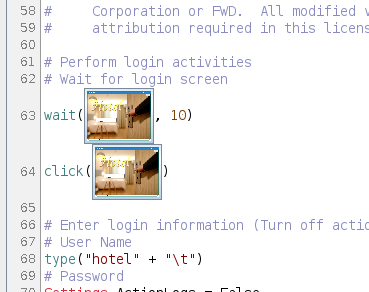
I'd say for more complicated tests we really do need the IDE.
I guess my point here is that the code in #9844-17 is clean, easy to read and seems easy to write.
My only concern with that code is that we should use relative paths so that tests aren't hard coded to a speicifc system setup.
If the ImagePath is standardized or uses an environment setting I think this won't be a problem. For OpenCV if FWD has .so library loading implemented then this also won't be an issue, can probably place both the wrapper jar and the implementation in build/lib .
#21 Updated by Marian Edu over 1 year ago
Șerban Bursuc wrote:
But I agree with Marian we should try to use a method that automatically converts SikuliX scripting syntax to their Java API...
Just to be clear here, I was only referring to a very limited requirements we had when testing UI widgets - Using Sikuli to Automate Interactive ABLUnit Tests (not complete application) and our scripting has nothing to do with SikuliX scripting, it was just a very basic grammar that we've defined that was afterwards read by a wrapper that translated the instructions in those 'scripts' into Sikuli actions. It was only very basic mouse/keyboard events, no funny image/ocr stuff :)
#22 Updated by Șerban Bursuc over 1 year ago
I managed to make a Harness test myself and have some feedback.
The documentation lacks an "Example" header. The Harness test creation is not overly complicated and an example here is better than a hundred words. The only example including UI tests besides a customer application automated tests I could find was obscured in testcases/flushing_and_triggers/cross_session. The example there is decent, given you figure out how the Harness initiates the test. You must run the test once, see it fail, and look and what its doing - for me the way it opened the client made no sense. I set the project to our traditional test project and the first command the emulated terminal was trying to do was:
(cd gcd/dataset; deploy/client/client.sh client:cmd-line-option:startup-procedure=flushing_and_triggers/cross_session/combo-box.p)
Anyway, I quickly understood how the Harness works, the biggest hurdles were ensuring it managed to open a client instance by modifying the run_tests.sh paths and the test's corresponding xml accordingly.
I made a test that resembled that of one I recently regressed and managed to correctly emulate it. There should be a huge PSA for test creators when writing the ground truth and that should be to use the chui_swing capability of copying the screen buffer from FWD. Otherwise some poor soul is going to manually add each and every line and dot. This way you can save a lot of time when creating the ground truth even if the current FWD is not corresponding.
There should be a mention that you need to set client.sh client driver to chui_native first. Also for those accustomed to our existing customer ChUI tests, the server doesn't start on its own with Harness!
One issue I noticed was with the specific test I wrote which included scrolling with arrow keys through a selection list. The screen buffer txt output doesn't highlight the selection of the rows. If for example there was a missing draw instruction from the selection list the Harness would've not picked up the issue. It seems to only be able to deal with text matching, which I assume is OK for ChUI but is not exactly complete.
- There should be a smaller example pinned somewhere in the documentation and present in the testcases project, one that every developer could clone and start writing their own test. In general here I believe the more tests are shown the faster the developer will understand.
- The Harness can't capture errors in drawing unless text primitives are changed. This might be a problem for drawing regressions.
Also very small note, each time I ran the test script I would ssh into my own machine but it would ask for the password. I'm sure this can be disabled since it doesn't happen when testing customer regression tests. Where is this configured?
#23 Updated by Greg Shah over 1 year ago
The example there is decent, given you figure out how the Harness initiates the test. You must run the test once, see it fail, and look and what its doing - for me the way it opened the client made no sense. I set the project to our traditional test project and the first command the emulated terminal was trying to do was:
The tests should not need to be changed in order to run them.
(cd gcd/dataset; deploy/client/client.sh client:cmd-line-option:startup-procedure=flushing_and_triggers/cross_session/combo-box.p)Anyway, I quickly understood how the Harness works, the biggest hurdles were ensuring it managed to open a client instance by modifying the
run_tests.shpaths and the test's corresponding xml accordingly.
All processing should work with the built-in testcases project, using relative pathing and pre-defined scripts/configuration. For example, I don't know what gcd/dataset/ is, so this doesn't seem designed to successfully run in the testcases project.
It is expected that we will have to run conversion and it is expected that we will have to bring up a FWD server. Everything else should just run without any editing needed.
There should be a mention that you need to set
client.shclient driver tochui_nativefirst.
Again, this is not OK. The scripts should handle this already.
One issue I noticed was with the specific test I wrote which included scrolling with arrow keys through a selection list. The screen buffer txt output doesn't highlight the selection of the rows. If for example there was a missing
drawinstruction from the selection list the Harness would've not picked up the issue. It seems to only be able to deal with text matching, which I assume is OK for ChUI but is not exactly complete.
Yes, there are some limits to the terminal processing (at least right now). We don't process any attributes or colors for the text.
Also very small note, each time I ran the test script I would
sshinto my own machine but it would ask for the password. I'm sure this can be disabled since it doesn't happen when testing customer regression tests. Where is this configured?
You have to add your key into the list of authorized users for the local system.
#24 Updated by Șerban Bursuc over 1 year ago
The specific testcase directory was definitely not meant to be ran with the testcases project, without modifying anything the conversion fails as it is trying to import a FWD class and the find fails. This is the reason I placed it in a mock project (at the office everybody has it named dataset) and I removed anything not UI related (which is where we started from). The conversion fails because some procedures try to create database triggers using customer related packages might I mention, nothing UI related. My point is that some tests are simply placed in the new testcases branch but were not tested with the testcases project itself, therefore I am avoiding such issues and focusing only the UI specific component (Harness). Either that or I am missing some documentation that mentions those tests are natively compatible with testcases but it requires some scripts to be ran.
If you wish I could direct some effort right now and add a simple Harness test including a script that should work both at conversion and at runtime without any modifications. As for fixing the already existing failing tests I am not sure how to do this. This specific testcase directory I mentioned needs some work already since some files have customer names in it, I think they need to be removed.
#25 Updated by Greg Shah over 1 year ago
If you wish I could direct some effort right now and add a simple Harness test including a script that should work both at conversion and at runtime without any modifications.
Yes, this should be done as part of this work.
As for fixing the already existing failing tests I am not sure how to do this.
No, this will come later when we clean up all tests and make them work in a standard way. This task is about creating that "standard way".
#26 Updated by Șerban Bursuc over 1 year ago
I'm having issues trying to run FWD on Windows.
There are multiple errors but I think they all stem from the same problem - FWD is detecting that I am using a 32-bit Windows when I'm actually on 64-bit. The first problem was that during ant-native this compile was failing:
gcc -c C:\hotel_gui\p2j/src/native/library.c -o library.o -DWIN_TARGET -DWORD_SIZE_32 -IC:\JDK17/include -IC:\JDK17/include/win32 -IC:\hotel_gui\p2j/src/native -Wall
The makefile from src/native was adding -DWORD_SIZE_32 instead of -DWORD_SIZE_64. I changed the makefile to use 64 forced and I could build FWD. The next problem I have is when opening the client I get this:
java.lang.UnsatisfiedLinkError: C:\hotel_gui\deploy\lib\p2j.dll: %1 is not a valid Win32 application
    at java.base/jdk.internal.loader.NativeLibraries.load(Native Method)
    at java.base/jdk.internal.loader.NativeLibraries$NativeLibraryImpl.open(NativeLibraries.java:388)
    at java.base/jdk.internal.loader.NativeLibraries.loadLibrary(NativeLibraries.java:232)
    at java.base/jdk.internal.loader.NativeLibraries.loadLibrary(NativeLibraries.java:174)
    at java.base/jdk.internal.loader.NativeLibraries.findFromPaths(NativeLibraries.java:315)
    at java.base/jdk.internal.loader.NativeLibraries.loadLibrary(NativeLibraries.java:287)
    at java.base/java.lang.ClassLoader.loadLibrary(ClassLoader.java:2427)
    at java.base/java.lang.Runtime.loadLibrary0(Runtime.java:818)
    at java.base/java.lang.System.loadLibrary(System.java:1993)
    at com.goldencode.p2j.main.ClientCore.loadNativeLibrary(ClientCore.java:576)
    at com.goldencode.p2j.main.ClientCore.start(ClientCore.java:443)
    at com.goldencode.p2j.main.ClientDriver.start(ClientDriver.java:287)
    at com.goldencode.p2j.main.CommonDriver.process(CommonDriver.java:522)
    at com.goldencode.p2j.main.ClientDriver.process(ClientDriver.java:171)
    at com.goldencode.p2j.main.ClientDriver.main(ClientDriver.java:330)
I think there is some incompatibility issue here with 32 bit and 64 bit. My MingW is 64 bit and so is the prebuilt libffi I got from a wiki on our Redmine. I have no clue why FWD still thinks I'm on 32-bit.
The plan is to clone Lorian's VM to unblock the testing plan, but I genuinely have no clue what I did wrong during the Windows setup.
#27 Updated by Alexandru Lungu over 1 year ago
Serban, can you check #9730? Please ensure you set-up a VM with Windows 11 for it to work.
#28 Updated by Șerban Bursuc over 1 year ago
Alexandru Lungu wrote:
Serban, can you check #9730? Please ensure you set-up a VM with Windows 11 for it to work.
I am using Lorian's hotel project and also Windows 11. The problem is with the architecture detection between our systems.
#29 Updated by Șerban Bursuc over 1 year ago
Java version is confirmed to be 64-bit, so most likely my p2j.dll is 32-bit. Where can I change this?
#30 Updated by Hynek Cihlar over 1 year ago
Șerban Bursuc wrote:
Java version is confirmed to be 64-bit, so most likely my
p2j.dllis 32-bit.
https://github.com/lucasg/Dependencies might be handy to confirm this.
#31 Updated by Hynek Cihlar over 1 year ago
Șerban Bursuc wrote:
Java version is confirmed to be 64-bit, so most likely my
p2j.dllis 32-bit. Where can I change this?
Also make sure you are not building from the syswow64 32bit shell.
#32 Updated by Șerban Bursuc over 1 year ago
The dll dependency inspector turned out to be handy, it fixed the link error because it showed that the libffi dependency was missing. In the setup confusion I accidentally put the 32 bit variant of libffi in system32 and it wasn't recognizing the file as existing.
The DWORD error is still not fixed, I don't understand how the makefile works on Lorian's machine, the architecture detection is done with the PROCESS_ARCHITECTURE environment variable and it's not exposed properly to the makefile through Gradle. I changed the way architecture detection works to use gcc instead:
ifndef ARCH
   ARCH := $(shell gcc -dumpmachine)

   ifneq (,$(findstring x86_64,$(ARCH)))
      ARCH := 64bit
   else
      ARCH := 32bit
   endif
endif
and now ant-native builds successfully.
The client finally opens.
#33 Updated by Șerban Bursuc over 1 year ago
- File 9844_win_low_res.png added
Lorian fixed the database import for H2 and I could convert and run testcases in the hotel gui project.
Running SikuliX and OpenCV do work in Windows. I had some strange errors regarding OpenCV and SikuliX clashing with the DLL dependency for OpenCV but after some trying I managed to run a test program like this:
package sikuli_test;

import org.opencv.core.Core;
import org.opencv.core.Mat;
import org.opencv.imgcodecs.Imgcodecs;
import org.sikuli.script.*;
import org.opencv.highgui.HighGui;

public class Main
{
   public static void main(String[] args)
   {
      try
      {
         System.load("C:\\Users\\bursu\\Downloads\\opencv\\build\\java\\x64\\opencv_java4110.dll");

         Screen screen = new Screen();

         ImagePath.add("C:\\Users\\bursu\\eclipse-workspace\\sikuli_test\\my_test.sikuli"); // path to folder containing the PNG

         Pattern loginPattern = new Pattern("main.png");
         screen.wait(loginPattern, 5);

         screen.click(loginPattern.targetOffset(-112, -54));

         Pattern postLoginPattern = new Pattern("clicked.png");
         screen.wait(postLoginPattern, 5);

         ScreenImage screenImage = screen.capture();
         String outputPath = screenImage.getFile();

         System.out.println(outputPath);

         Mat img = Imgcodecs.imread(outputPath);
         if (img.empty())
         {
            System.out.println("failed");
            return;
         }

         HighGui.imshow("My Image", img);
         HighGui.waitKey();
         HighGui.destroyAllWindows();
      }
      catch (Exception e)
      {
         e.printStackTrace();
      }
   }
}
There is an issue with the test execution: the text resolution for Swing (couldn't make web work) is very very low. I didn't change any monitor settings for the VM. This is how it looks like:
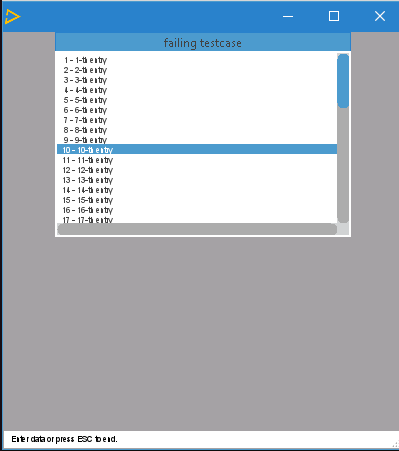
Because of this, Sikuli at the default threshold can't distinguish selection. Any row selected is treated the same. If I increase the similarity threshold the matching fails completely. A lot of detail is lost with this output. This looks like some scaling bug in FWD. The text ironically looks very webscaled in a Swing application.
#34 Updated by Șerban Bursuc over 1 year ago
Any row selected is treated the same
This might happen in Linux too but the text issue still remains, I will test soon if text matching will succeed but visually it looks much worse in Windows for some reason.
#35 Updated by Șerban Bursuc over 1 year ago
Good news, the tests run well and correctly in both Linux and Windows if the similarity threshold is high enough. I set both to 0.99 and the tests succeeded and there were no false positives anymore. I think it's safe to say SikuliX should be able to test FWD properly on both Linux and Windows.
The only problem remains the portability of the tests. It's hard to write them directly in Java, so they have to be written in the IDE first and then rewritten again in Java. Even if the syntax is identical it's an extra step to be considered and will become bothersome if the test is large.
I will move into testing Harness on Windows for ChUI. If all goes well I will commit some basic tests with full script setup on testcases.
#36 Updated by Șerban Bursuc over 1 year ago
I've ran into multiple issues trying to run a Harness ChUI test on Windows but mostly due to FWD related errors. The issues included missing dependencies like wmic.exe and an incomplete client.cmd startup script missing the startup-procedure parameter processing, but the one that I'm currently stuck on right now is:
25/04/17 05:49:40.661-0700 |  SEVERE | com.goldencode.p2j.net.Dispatcher [Dispatcher.processInbound()] | PID:13384, ThreadName:main, Session:00000018, User:bogus | Unexpected throwable.
java.lang.ArrayIndexOutOfBoundsException: Index 0 out of bounds for length 0
    at com.goldencode.p2j.ui.chui.DoubleBufferedTerminal.isSame(DoubleBufferedTerminal.java:574)
    at com.goldencode.p2j.ui.chui.DoubleBufferedTerminal.conditionalLineRefresh(DoubleBufferedTerminal.java:542)
    at com.goldencode.p2j.ui.chui.ThinClient.conditionalLineRefresh(ThinClient.java:14314)
    at com.goldencode.p2j.ui.client.Frame.refreshFrameArea(Frame.java:3315)
    at com.goldencode.p2j.ui.client.Frame.refreshOnVisibilityChange(Frame.java:3185)
    at com.goldencode.p2j.ui.client.Frame.changeVisibility(Frame.java:3081)
    at com.goldencode.p2j.ui.client.Frame.setVisible(Frame.java:2788)
    at com.goldencode.p2j.ui.chui.ThinClient.placeFrameInt(ThinClient.java:14437)
    at com.goldencode.p2j.ui.chui.ThinClient.lambda$viewWorker$69(ThinClient.java:14015)
    at com.goldencode.p2j.ui.chui.ThinClient.eventBracket(ThinClient.java:19673)
    at com.goldencode.p2j.ui.chui.ThinClient.eventDrawingBracket(ThinClient.java:19615)
    at com.goldencode.p2j.ui.chui.ThinClient.eventDrawingBracket(ThinClient.java:19516)
    at com.goldencode.p2j.ui.chui.ThinClient.viewWorker(ThinClient.java:13881)
    at com.goldencode.p2j.ui.chui.ThinClient.enableWorker(ThinClient.java:6571)
    at com.goldencode.p2j.ui.chui.ThinClient.enable(ThinClient.java:6418)
    at com.goldencode.p2j.ui.chui.ThinClient.enable(ThinClient.java:6309)
    at com.goldencode.p2j.ui.ClientExportsMethodAccess.invoke(Unknown Source)
    at com.goldencode.p2j.util.MethodInvoker.invoke(MethodInvoker.java:156)
    at com.goldencode.p2j.net.Dispatcher.processInbound(Dispatcher.java:807)
    at com.goldencode.p2j.net.Conversation.block(Conversation.java:422)
    at com.goldencode.p2j.net.Conversation.waitMessage(Conversation.java:348)
    at com.goldencode.p2j.net.Queue.transactImpl(Queue.java:1230)
    at com.goldencode.p2j.net.Queue.transact(Queue.java:685)
    at com.goldencode.p2j.net.BaseSession.transact(BaseSession.java:276)
    at com.goldencode.p2j.net.HighLevelObject.transact(HighLevelObject.java:221)
    at com.goldencode.p2j.net.RemoteObject$RemoteAccess.invokeCore(RemoteObject.java:1468)
    at com.goldencode.p2j.net.InvocationStub.invoke(InvocationStub.java:144)
    at jdk.proxy2/jdk.proxy2.$Proxy3.standardEntry(Unknown Source)
    at com.goldencode.p2j.main.ClientCore.start(ClientCore.java:472)
    at com.goldencode.p2j.main.ClientDriver.start(ClientDriver.java:287)
    at com.goldencode.p2j.main.CommonDriver.process(CommonDriver.java:522)
    at com.goldencode.p2j.main.ClientDriver.process(ClientDriver.java:171)
    at com.goldencode.p2j.main.ClientDriver.main(ClientDriver.java:330)
This happens on a chui_native client. chui_swing and gui_swing work fine. Can anybody pin-point me what could be wrong? I attached the client log.
#38 Updated by Șerban Bursuc over 1 year ago
I debugged the exception and the failing point is somewhere in the native code, the symptom is that the terminal output buffer is considered to have 0 rows and 0 columns:
   public DirectPrimitives(BasePrimitives direct)
   {
      this.direct = direct;

      buffer = new TerminalBuffer(direct.screenHeight(),
                                  direct.screenWidth());
   }
If I can't spot an obvious configuration issue I will try to find the native code responsible for getting the terminal process data.
#39 Updated by Șerban Bursuc over 1 year ago
Eugenie, I don't know whether I missed some FWD configuration but there was indeed a problem in terminal_win.c.
STD_OUTPUT_HANDLE was pointing to a file in initConsole, not to a terminal screen buffer. I added this log:
      if (!GetConsoleMode(h, &mode)) {
         DWORD err = GetLastError();
         fprintf(log, "GetConsoleMode failed: %lu\n", err);

         DWORD type = GetFileType(h);
         fprintf(log, "Handle type: %lu\n", type);
and got:
GetConsoleMode failed: 6
Handle type: 1
https://learn.microsoft.com/en-us/windows/win32/debug/system-error-codes--0-499- the handle is invalid for GetConsoleMode.
AllocConsole was also failing with error code 5 also because of the same issue, the process (client.sh) is attached to the console where the script was initiated, but this wasn't the fatal issue.
The fix I did was to force the creation of another console and re-fetching the handle again:
FreeConsole();
AllocConsole();
h = GetStdHandle(STD_OUTPUT_HANDLE);
I'm just confused as to why my output handle is not the terminal buffer since AllocConsole is failing, is it possible to have redirected output through a configuration file? I have batch and background mode off.
#40 Updated by Șerban Bursuc over 1 year ago
But this is not a real fix for chui_native, as the Harness needs to use the allocated terminal, so probably will need to debug STD_OUTPUT_HANDLE and see if the output is piped and where.
#41 Updated by Eugenie Lyzenko over 1 year ago
The Windows ChUI mode was tested in Windows console, not in PowerShell. I do not have a experience for using PowserShell with FWD. You have to collect the data by yourself.
Also ensure you did the proper setup of MinGW compiler binaries. Do not use or mix with Visual Studio components. What is the result of gcc -v on your system?
The error 6 means invalid handle but not clear how the standard output can be invalid.
#42 Updated by Șerban Bursuc over 1 year ago
I finally found the problem. The client.cmd output is piped to a log file in the hotel_gui batch script (note: I got this script from Lorian, which is slightly different than the repo in hotel gui, but the base script also contains the same pipe):
if "%test%" equ "y" (
   echo !cmd! > %log%
) else (
   call !cmd! >> %log% 2>&1
)
piping the client process breaks STD_OUTPUT_HANDLE, the handle is the log file and not the terminal. Removing this line fixes chui_native. All client piping needs to be removed for chui_native.
#43 Updated by Șerban Bursuc over 1 year ago
- File 9844_incorrect_screen_buffer.png added
Any idea why Harness doesn't correctly read the terminal screen buffer?
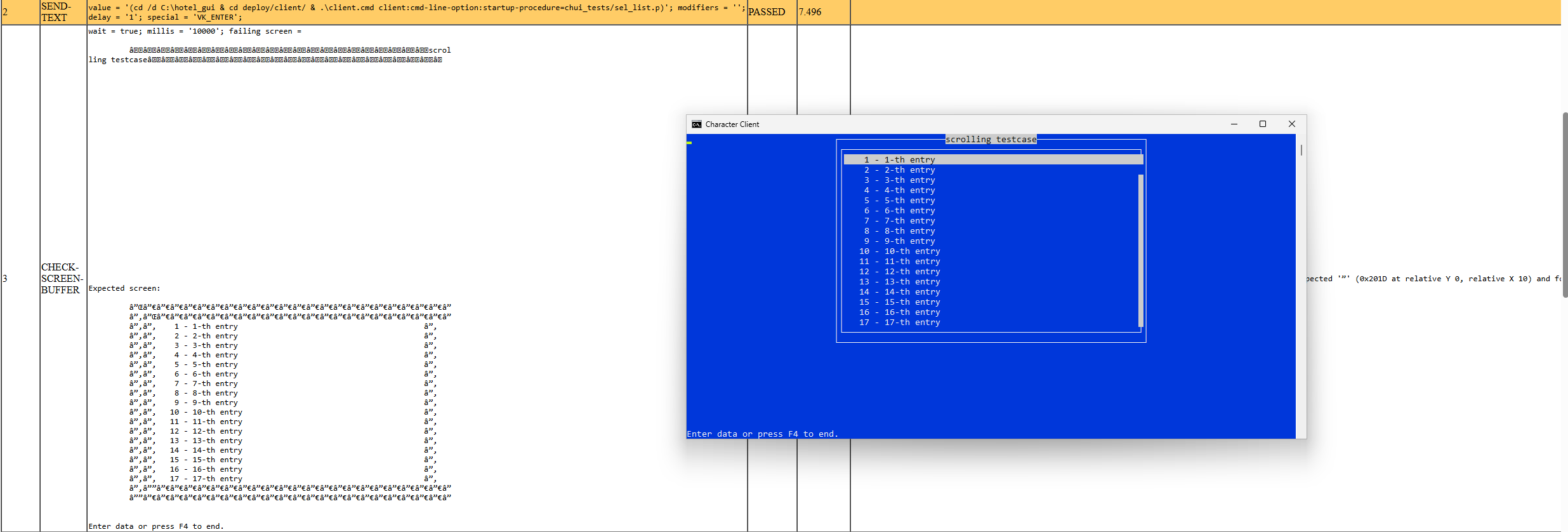
I think there is a problem with file encodings. For example, the expected screen is directly copied from the working ground truth in Linux, but the dashes are seen as garbage characters, despite both files being encoded in UTF-8. I expected that Harness is also wrongly encoding the dashes into garbage characters, although I would've expected to see the rest of the text like in the expected screen.
#44 Updated by Tomasz Domin over 1 year ago
Șerban Bursuc wrote:
Any idea why Harness doesn't correctly read the terminal screen buffer?
I think there is a problem with file encodings. For example, the expected screen is directly copied from the working ground truth in Linux, but the dashes are seen as garbage characters, despite both files being encoded in UTF-8. I expected that Harness is also wrongly encoding the dashes into garbage characters, although I would've expected to see the rest of the text like in the expected screen.
There are two things here:
- file encoding - Harness when checking screen buffers ignores anything below ASCII 0x20 and above 0x7f and it assumes default platform encoding (its based on FileReader), AFAIK you can use ? question mark if you need to match characters beyond the range
- terminal encoding - you can set a proper terminal encoding with -encoding command line option - default is ISO_8859_1
#45 Updated by Șerban Bursuc over 1 year ago
- terminal encoding - you can set a proper terminal encoding with -encoding command line option - default is ISO_8859_1
Yep saw this in the source code and it's also in the documentation, very good.
- file encoding - Harness when checking screen buffers ignores anything below ASCII 0x20 and above 0x7f and it assumes default platform encoding (its based on FileReader)
I see, then can this be changed to use InputStreamReader? Ideally we should use the same result text file across platforms, otherwise we would duplicate the result screens.
#46 Updated by Tomasz Domin over 1 year ago
Șerban Bursuc wrote:
- terminal encoding - you can set a proper terminal encoding with -encoding command line option - default is ISO_8859_1
I see, then can this be changed to use
InputStreamReader? Ideally we should use the same result text file across platforms, otherwise we would duplicate the result screens.
AFAIK you can use ? (question mark) if you need to match characters beyond the range. So that would be platform independent ;)
#47 Updated by Greg Shah over 1 year ago
Shouldn't we allow multibyte characters to be matched in screens? Using ? isn't a proper test.
#48 Updated by Tomasz Domin over 1 year ago
Greg Shah wrote:
Shouldn't we allow multibyte characters to be matched in screens? Using
?isn't a proper test.
Șerban, Greg
Actually its my mistake - we do allow it and full char comparison is performed. Non-ASCII characters are converted to ? only for presentation purposes.
The problem is there is no option to specify expected screen text file encoding.
But there is another way of specifying expected screen text - In a set of one or more sub-elements with the element tag line. In that case encoding of XML scenario file would be in use like (taken out of documentation):
<check-screen-buffer wait="true" millis="5000" column="3" width="30" row="0" height="3">
   <line value="some text on the first line   " />
   <line value="2nd line of stuff ...sdshdkshd" />
   <line value="more more more motext 3rd line" />
</check-screen-buffer>
I have never used that so Șerban you need to check it out.
#49 Updated by Greg Shah over 1 year ago
The problem is there is no option to specify expected screen text file encoding.
We should add this.
#50 Updated by Tomasz Domin over 1 year ago
Greg Shah wrote:
The problem is there is no option to specify expected screen text file encoding.
We should add this.
Created feature #9922
#51 Updated by Șerban Bursuc over 1 year ago
I committed to xfer testcases rev 1751 a simple Harness ChUI testcase that was tested and that works on Linux and Windows. It's in harness/chui_tests/simple_test. It only works on Windows with the patch from #9922-4 on Harness.
Tomasz, please take a look at it, it's a simple testcase that is in our ChUI regression tests suite, it's a list where the down key is pressed several times and the output is compared to see if the scroll is good. The run scripts are stripped and a bit messy possibly, so if you have suggestions let me know (e.g take harness and test project directory from command line), especially with the batch script, but they should be functional.
A good test would be to see if you can run the test successfully just by reading the README inside (to ensure proper prerequisites) on Windows and Linux without any other modification, but if you can't do that right now I can test this with somebody else at the office, let me know.
#52 Updated by Șerban Bursuc over 1 year ago
Greg, I think this concludes #9844-8, besides waiting for other users to test. What I'm looking at doing next from #9844-1 is:
ChUI
- "The current approach does not include ABLUnit, which is otherwise our standard approach for writing automated tests. I think we should consider how the Harness and ABLUnit can work together. The results from #9270 and #6265 will help."
I can start using both ABLUnit and Harness to make some GUI ChUI tests.
- "Writing 4GL Testcases provides little guidance on writing ChUI tests."
I will add a section mentioning what I did in order to set up a small test.
- "While the Harness has decent documentation, we have no documentation, standards or examples for things outside of the low level automation tooling."
This can be fixed by adding some examples in the documentation from the xfer branch, right? Or do we need to add code in the documentation itself?
- "We rely too heavily on the customer application and have no base of "standalone" automated testcases for ChUI. We need to develop reliable techniques for these less complex testcases. By standalone, I still expect them to be written in ABLUnit if possible, but the idea is that it is not a complex customer application business process that is being tested."
Is this related to the testcases branch as a whole? Aren't the testcases tests supposed to fill this dependency for testing customer applications in order to get robust and thorough regression testing?
GUI
I'm not sure I understand the "to be done" points. I think the task number is wrong so maybe that's why. Without any other context, it sounds like the issue is with the Sikuli matching threshold, which if not high enough can yield poor results or be very sensitive to minimal changes which give false positives. But in theory as long as the ground truth image is correct then there should be no problems with Sikuli or ABLUnit. There is the problem of configuration, for example if the result image was captured with a different FWD theme, like Windows 8 and the user environment is on Windows 10 then yes there will be failing tests, but besides containerizing the tests or giving a README for the test prerequisites I don't think there is much to be done.
#53 Updated by Tomasz Domin over 1 year ago
Șerban Bursuc wrote:
I committed to xfer testcases rev 1751 a simple Harness ChUI testcase that was tested and that works on Linux and Windows. It's in
harness/chui_tests/simple_test. It only works on Windows with the patch from #9922-4 on Harness.
I guess that patch could be committed into harness/trunk using standard GCD task workflow if it is confirmed it works :)
Ok, I've readTomasz, please take a look at it, it's a simple testcase that is in our ChUI regression tests suite, it's a list where the down key is pressed several times and the output is compared to see if the scroll is good. The run scripts are stripped and a bit messy possibly, so if you have suggestions let me know (e.g take harness and test project directory from command line), especially with the batch script, but they should be functional.
A good test would be to see if you can run the test successfully just by reading the
READMEinside (to ensure proper prerequisites) on Windows and Linux without any other modification, but if you can't do that right now I can test this with somebody else at the office, let me know.
README, I've executed tests under Linux only (I dont have windows based FWD) and I have few remarks:
- there is no dedicated FWD project, only source 4GL files -
READMEsaysIn the FWD project convert "sel_list.p"., so I should be using existing project. Maybe usingtestcasesproject would be better, or actually it will become pare oftestcasesproject ? FWD projectwith its requirements should be listed in prerequisites- there is already
support/harnessdirectory intestcases - documentation does not say that
sel_list.pmust be put intochui_tests/sel_list.ponABLPATHinFWD project - its possible to override client configuration in
client.shforclient:driver:typefrom command line - I think most ofclient.shscripts should be supporting that, shouldnt it ?
After a bit of work I was able to execute tests with Status = PASSED.
#54 Updated by Greg Shah over 1 year ago
- "While the Harness has decent documentation, we have no documentation, standards or examples for things outside of the low level automation tooling."
This can be fixed by adding some examples in the documentation from the xfer branch, right? Or do we need to add code in the documentation itself?
It depends.
Anything that is more specific to FWD should be outside of the Harness docs. That stuff can be documented in Redmine but examples can indeed be in xfer testcases. It may be that showing some of that code in the wiki pages can help make the documentation more clear.
If something is very generic to the Harness, then we can enhance the Harness docs.
- "We rely too heavily on the customer application and have no base of "standalone" automated testcases for ChUI. We need to develop reliable techniques for these less complex testcases. By standalone, I still expect them to be written in ABLUnit if possible, but the idea is that it is not a complex customer application business process that is being tested."
Is this related to the testcases branch as a whole?
What I mean is that we need our own unit tests for UI code (see #6856 and User Interface Testcases). Although we will continue to run the ChUI Regression test suite, that set of tests is designed to test a specific 4GL application. The tests written for #6856 are meant to be more standalone and more specific to testing individual 4GL UI features.
Aren't the testcases tests supposed to fill this dependency for testing customer applications in order to get robust and thorough regression testing?
Testing customer applications is very useful for:
- Knowing if that specific application is affected by a given set of changes.
- Testing an entire application as an integrated system as opposed to specific 4GL UI features.
The unit tests in #6856 are not meant for this application-level testing. We will use both kinds of testing.
GUI
I'm not sure I understand the "to be done" points. I think the task number is wrong so maybe that's why. Without any other context, it sounds like the issue is with the Sikuli matching threshold, which if not high enough can yield poor results or be very sensitive to minimal changes which give false positives. But in theory as long as the ground truth image is correct then there should be no problems with Sikuli or ABLUnit.
Yes, but which truth is truthiest? In a perfect world, we would capture the baseline images in OE and match them in FWD. I'm not sure we can do that right now.
Also, bugs in FWD or even minor cosmetic differences can make an entire test sequence invalid because the baselines no longer match.
Please setup time to meet with Roger and discuss his experience in encoding Sikuli tests for #6727 and related tasks. Although he got something working there, it rapidly stopped working and has not been brought back to life. My sense is that it was quite fragile as even small changes in FWD quickly broke the tests. We need to consider that outcome and use strategies to avoid that in future work.
There is the problem of configuration, for example if the result image was captured with a different FWD theme, like Windows 8 and the user environment is on Windows 10 then yes there will be failing tests, but besides containerizing the tests or giving a
READMEfor the test prerequisites I don't think there is much to be done.
I think this is beyond just the theme choice. I agree that theme, screen resolution, colors, and other choices like the platform OS have to be controlled. We should have a plan to do that, but I'm more worried about how to capture/write these tests and ensure they are not fragile.
#55 Updated by Șerban Bursuc over 1 year ago
Thanks for testing Tomasz. I made some changes in rev. 1764.
there is no dedicated FWD project, only source 4GL files - README says In the FWD project convert "sel_list.p"., so I should be using existing project. Maybe using testcases project would be better, or actually it will become pare of testcases project ?
Well, given that the testcases project doesn't convert fully, everybody runs Harness in a smaller project with limited ABL source files. I don't feel like this is a requirement.
In general, I am aware that the testcases branch is actually a project, but in practice it really is a repository for storing tests as of now. The README accounts for this. I don't see a reason to change this.
FWD project with its requirements should be listed in prerequisites
I guess that's a requirement if the testcases branch is public... is it? That means I should put the FWD version like v4? Because if we are talking about the revision, besides saying to use the latest revisions for trunk and Harness I don't know any guidelines.
there is already support/harness directory in testcases
Why is it in support? Harness is not a support feature, it's its own thing. I would've never thought to look into support for Harness. Regardless, I moved the test into support/harness to respect the existing convention.
documentation does not say that sel_list.p must be put into chui_tests/sel_list.p on ABL PATH in FWD project
Fixed.
its possible to override client configuration in client.sh for client:driver:type from command line - I think most of client.sh scripts should be supporting that, shouldn't it ?
Yes but it's not standardized yet. The hotel script doesn't have this, the test project from the office doesn't have this, the testcases project doesn't have it, so for now I simply added a remark, because if there is no standard then in the Harness tests we don't know what parameters to pass to execute in the command line. I guess we can open a task dedicated to this.
Windows remains to be tested...
#56 Updated by Greg Shah over 1 year ago
I guess that's a requirement if the testcases branch is public... is it?
No
#57 Updated by Șerban Bursuc over 1 year ago
Greg, what is left of this task/what are the priorities left? From the top of my head:
- update a wiki somewhere to mention the simple Harness testcase
And the question marks/remarks that I still have:
- The main difficulty of writing Sikuli tests is that we want them written in Java but it's difficult to right them from the start in it so we use the Sikuli IDE, but that generates a Jython script. So there is some redundant work involved for this scope.
- It's difficult to test things that require configuration changes (themes, font sizes), we would need some scripts that start/kill the server and change
directory.xmlin-between startups. - Since we do not have a Sikuli "Harness", my guess is that the goal is to write the tests in Java and wrap them around JUnit, so that we get the final results shown. Should we document how to do that, give a simple example of the entire process (Sikuli IDE -> Sikuli Java class -> JUnit test using Sikuli Java class)?
- " we would capture the baseline images in OE and match them in FWD " I think that is very hard to do indeed. Not everything is pixel perfect in FWD for this, as a side note we have a bunch of
-2assignments in the coordinate code, so I'm sure Sikuli would not like some cases like that. I think just like with our ChUI tests we can just capture the known correct FWD output and use it as a baseline.
#58 Updated by Greg Shah over 1 year ago
Have you tried to get Roger's customer-specific GUI tests running on your system? Perhaps that would be a good test of whether we have a automated testing process that is repeatable. My sense is that we don't yet have that, which is a key output we are looking for in this task.
#59 Updated by Greg Shah over 1 year ago
- Related to Bug #6920: Ins and outs of Sikuli for GUI testing added
#60 Updated by Greg Shah over 1 year ago
- Related to Feature #3704: enable automated testing for GUI (Swing and web clients) added
#62 Updated by Șerban Bursuc 2 months ago
- Related to Feature #9922: Allow specifying encoding of external files. added