Support #9919
discuss and define the MVP for the first pass at IDE support
30%
Related issues
History
#1 Updated by Greg Shah over 1 year ago
- Assignee set to Florin Eugen Rotaru
In #6319 and #3883 we are implementing IDE support for two common Java IDE platforms. For the first pass, we need to identify the features that define the MVP. We start with the list of features documented in OpenEdge IDE Features (see #9703).
In my opinion, we must implement the core features, which I think are mostly about reading/navigation/editing of various resources (procedures, classes, includes, schema), navigating between the resources and inside them, project navigation and building/running/debugging the results.
Please start by making a specific proposed list of core features in the Phase 1 IDE Support wiki page and we will discuss and refine it here.
#2 Updated by Marian Edu over 1 year ago
We have used Xtext extensively before for DSL, it's a wrapper on top of ANTLR that comes with a bunch of boiler plate functionality for Eclipse IDE but also have support for LSP - https://eclipse.dev/Xtext/documentation/340_lsp_support.html
The grammar looks quite similar to ANTLR and does provide most of those 'core' features you've mentioned.
#3 Updated by Florin Eugen Rotaru over 1 year ago
- % Done changed from 0 to 30
- reviewer Greg Shah added
I've added some items to the list.
I've also added a new feature in the OpenEdge IDE Features regarding the generation of code (methods, functions, overrides, etc). I didn't add it to the MVP list because I'm not sure whether this is essential at first. I still have to add the running/debugging aspect and also the database integration. I would guess the latter should be a framework which looks like Data Dictionary/Administration but have PostgresSQL under the hood?
#4 Updated by Greg Shah over 1 year ago
In OE, include files do not have to be named .i and procedures do not have to be named .p. In fact, it is common to have other names for includes (e.g. some customers have .f include files for frame definitions) and .w files for GUI code. So the file processing cannot be restricted to a short list of file extensions OR at least it needs to be flexible. How does the PDS handle that?
The compatibility with PDS should be optional. By this I mean the key bindings, colors for syntax and things like how syntax completion work. In cases where there is some value (key bindings, syntax colors) we can provide an option to default to the PDS settings. But we should also allow for a case where we use the IDE defaults or even our own defaults. Why? Because there may be some value in helping PDS users migrate BUT we also want to build a tool that is far better than PDS and doesn't have its flaws. For this to happen, we can't just focus on reimplementing PDS exactly.
Does PDS support EMF Code Generation? (Eclipse Modeling Framework) If so, please provide more details in how this works. Note that we will not hard code ourselves to EMF, so any features related to this must be described generically.
the database integration. I would guess the latter should be a framework which looks like Data Dictionary/Administration but have PostgresSQL under the hood?
It cannot be specific to PostgreSQL, since we support multiple databases.
We need to determine what is critical from their Data Dictionary/Administration tooling. I think for an MVP, we would focus on the editing/management of schemata and not much at all on admin or direct integration with the database.
#5 Updated by Florin Eugen Rotaru over 1 year ago
Greg Shah wrote:
In OE, include files do not have to be named
.iand procedures do not have to be named.p. In fact, it is common to have other names for includes (e.g. some customers have.finclude files for frame definitions) and.wfiles for GUI code. So the file processing cannot be restricted to a short list of file extensions OR at least it needs to be flexible. How does the PDS handle that?
Indeed, PDS accepts any extension for include files, but only the i, w, p, cls are subject to syntax checking, highlighting and auto-complete. Also only the w, p, cls are runnable.
The compatibility with PDS should be optional. By this I mean the key bindings, colors for syntax and things like how syntax completion work. In cases where there is some value (key bindings, syntax colors) we can provide an option to default to the PDS settings. But we should also allow for a case where we use the IDE defaults or even our own defaults.
I added this to the wiki that we should provide both the PDS configuration and the other IDE specific too, and they should be configurable.
Does PDS support
EMF Code Generation? (Eclipse Modeling Framework) If so, please provide more details in how this works. Note that we will not hard code ourselves to EMF, so any features related to this must be described generically.
No, I haven't found any details on EMF for PDS. I deleted it from the list.
We need to determine what is critical from their Data Dictionary/Administration tooling. I think for an MVP, we would focus on the editing/management of schemata and not much at all on admin or direct integration with the database.
I see. Probably you mean that we should offer support for modifying the Progress-side schema (the underlying .df file), and the changes will be transposed to other SQL engines in the backend by FWD. I added a list of Data Dictionary features to the wiki.
#6 Updated by Greg Shah over 1 year ago
Indeed, PDS accepts any extension for include files, but only the
i,w,p,clsare subject to syntax checking, highlighting and auto-complete. Also only thew,p,clsare runnable.
Both of these restrictions will not be things we want to duplicate.
Probably you mean that we should offer support for modifying the Progress-side schema (the underlying
.dffile), and the changes will be transposed to other SQL engines in the backend by FWD.
Correct.
#7 Updated by Marian Edu over 1 year ago
Greg Shah wrote:
In OE, include files do not have to be named
.iand procedures do not have to be named.p. In fact, it is common to have other names for includes (e.g. some customers have.finclude files for frame definitions) and.wfiles for GUI code. So the file processing cannot be restricted to a short list of file extensions OR at least it needs to be flexible. How does the PDS handle that?
PDS is just Eclipse so one can select open with and even associate the file extension(s) with any given editor.
The compatibility with PDS should be optional. By this I mean the key bindings, colors for syntax and things like how syntax completion work.
In cases where there is some value (key bindings, syntax colors) we can provide an option to default to the PDS settings. But we should also allow for a case where we use the IDE defaults or even our own defaults.
As with GC some shops have pretty strict coding standards so code formatting is probably more important than colors used for syntax highlight and developers each have his own view on how the color scheme of the IDE should look anyway, same for key bindings although most of then just keep the defaults so providing the same defaults would help probably.
We need to determine what is critical from their Data Dictionary/Administration tooling. I think for an MVP, we would focus on the editing/management of schemata and not much at all on admin or direct integration with the database.
Although none of those are part of the IDE - are simply tooling written in 4GL with very primitive UI that are doing basically data entry in metadata tables or load/dump data from databases so maybe those can just be converted as well, it should be part of ADE in any case.
#8 Updated by Marian Edu over 1 year ago
Florin Eugen Rotaru wrote:
I see. Probably you mean that we should offer support for modifying the Progress-side schema (the underlying
.dffile), and the changes will be transposed to other SQL engines in the backend by FWD.
Editing the .df file with a custom editor (DSL) is one option maybe, the grammar for the OE DDL is already available in FWD. We've used that for Zamolxis ERD but I don't know of anyone actually editing .df files directly so we provide a graphical diagram editor to do just that. We're moving away from Eclipse only solution and focus more on the Visual Studio Code right now - if you ever decide to go the same route check out GLSP as a possible solution. Speaking of which, VSC also seems to be the favourite editor of OE developers lately considering the interest shown in last PUG events and from what we've been told PSC is looking into moving to that platform (LSP) in the future as well.
#9 Updated by Florin Eugen Rotaru over 1 year ago
- Status changed from New to WIP
#10 Updated by Florin Eugen Rotaru over 1 year ago
I have experimented a bit with LSP4J, which is a framework that offers support for both language server and the client side.
For example, this is how a server prototype could look like:
public class ProgressLangServer
implements LanguageServer, TextDocumentService
{

   @Override
   public CompletableFuture<InitializeResult> initialize(InitializeParams params) {
      System.out.println("Server received initialize request" + params.toString());

      ServerCapabilities capabilities = new ServerCapabilities();
      return CompletableFuture.completedFuture(new InitializeResult(capabilities));
   }

   @Override
   public CompletableFuture<Object> shutdown() {
      System.out.println("server is shutting down");
      exit();
      return null;
   }

   @Override
   public void exit()
   {
      System.exit(0);
   }

   @Override
   public CompletableFuture<Hover> hover(HoverParams params)
   {
      return TextDocumentService.super.hover(params);
   }

   @Override
   public TextDocumentService getTextDocumentService() {
      return this;
   }

   @Override
   public WorkspaceService getWorkspaceService() {
      return null;
   }

   @Override
   public void didOpen(DidOpenTextDocumentParams didOpenTextDocumentParams)
   {
      System.out.println(didOpenTextDocumentParams);
   }

   @Override
   public void didChange(DidChangeTextDocumentParams didChangeTextDocumentParams)
   {
   }

   @Override
   public void didClose(DidCloseTextDocumentParams didCloseTextDocumentParams) {
   }

   @Override
   public void didSave(DidSaveTextDocumentParams didSaveTextDocumentParams) {
   }
}
The server communicates to the client through a socket, pipe, or even stdout. I managed to make it work using a socket:
      LanguageServer languageServer = new ProgressLangServer();

      ServerSocket serverSocket = new ServerSocket(0);
      int port = serverSocket.getLocalPort();
      Socket serverSocketConn = serverSocket.accept();
      Launcher<LanguageClient> serverLauncher = LSPLauncher.createServerLauncher(
              languageServer,
              serverSocketConn.getInputStream(),
              serverSocketConn.getOutputStream()
      );
      serverLauncher.startListening();
And the client:
      LanguageClient languageClient = new MockClient();
      Socket clientSocket = new Socket("localhost", port);
      //starts listening similarly with a client launcher
Then the client can make use of the features using remote proxies:
LanguageServer remoteServer = clientLauncher.getRemoteProxy();
What I would do next is try to combine the IntelliJ API and LSP4J in order to integrate the client (up untill now I have only experimented with them in the same process). In other words, the IntelliJ API would listen to the IDE events and forward them to the server using the LSP4J Client utilities.
Is this the way to go? I will keep investigating for best practices for this process.
#11 Updated by Greg Shah over 1 year ago
Interesting results. I will have to check the licensing of LSP4J, not sure yet if it is safe to use.
I wasn't planning to implement the actual plugins as part of this task. The purpose here was just to get the right list of features that are needed for the MVP. With that said, It is OK to take a quick look at this. Don't spent too much time on it.
#12 Updated by Florin Eugen Rotaru about 1 year ago
- File vscode.png added
- File intellij.png added
An example of a LSP implementation that can be integrated with IntelliJ, VSCode and probably others too:
1. First we need a grammar and a mapping LSP token type -> Grammar token type. I achieved this in a antlr4 lexer:
2. A ProgressLanguageSever class, which registers the needed capabilities. Examples of capabilities are hover, completion, definition, etc.
ProgressLanguageServer
3. Most of the language features are implemented in the endpoints from TextDocumentService. Here, the capabilities are implemented:
As you can see, here I've implemented semanticTokensFull (full lexing), semanticTokensRange (lexing of a given interval), completion and definition (which handles the CTRL+Click navigation. I have a mock implementation which navigates to the first character of the file.
4. The helper object which exposes the lexing features is the
This class has the lexer as dependency and other helper methods.
For vs-code, the client can be configured easily, we need the dependency
  "dependencies": {
    "vscode-languageclient": "^9.0.1"
  }
and a small LanguageClient implementation. The color mapping of the tokens can be configured as seen below.
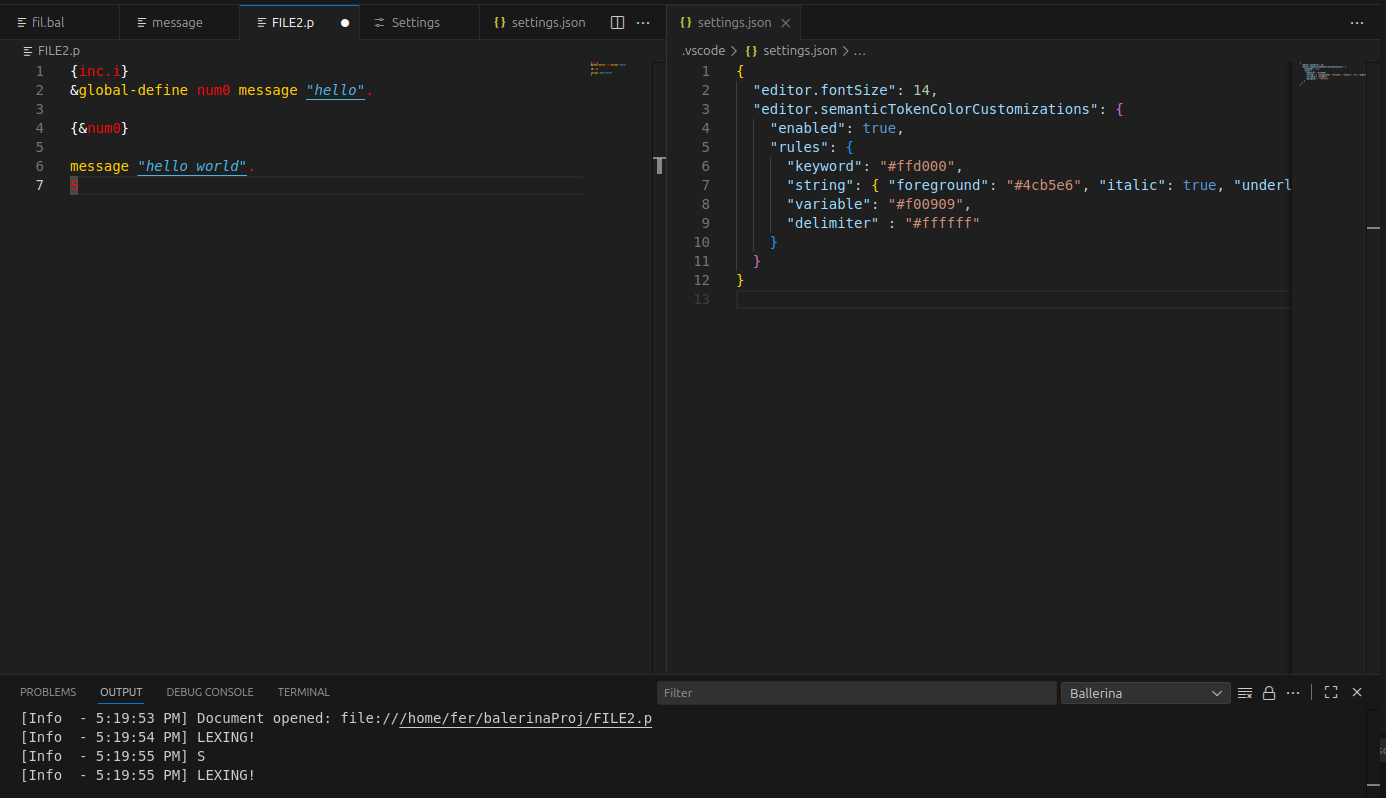
For the IntelliJ client, we use the com.intellij.platform.lsp.api
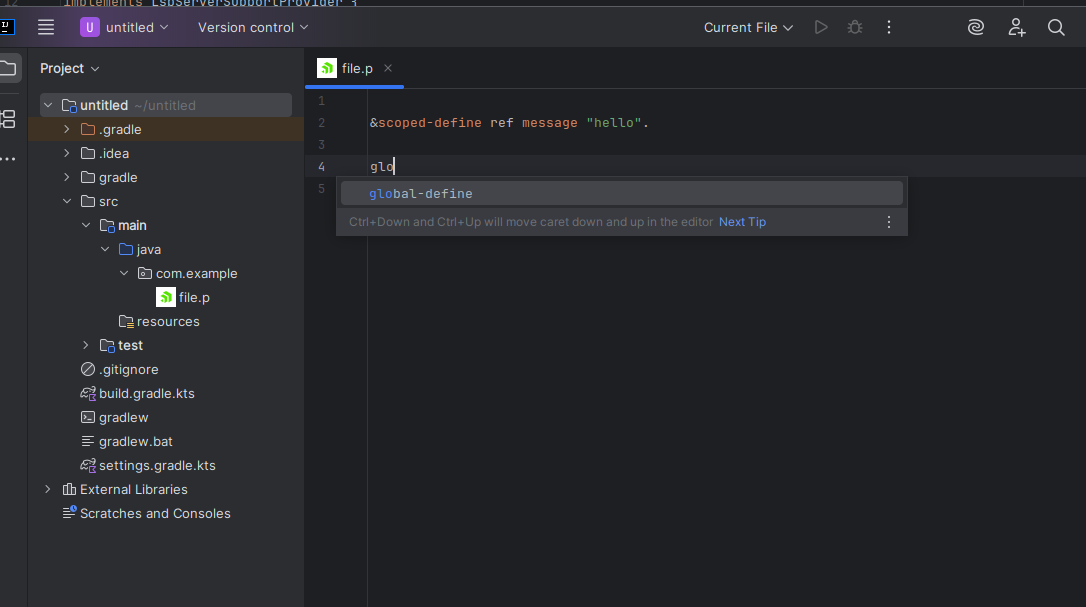
#13 Updated by Florin Eugen Rotaru about 1 year ago
From the LSP POV, the starting requests that should be implemented could be:
- textDocument/definition – Go to the definition of a symbol (Ctrl+Click).
- textDocument/completion – Provide code completions for identifiers, keywords, etc.
- textDocument/documentHighlight – Highlight occurrences of the symbol under the cursor.
- textDocument/references – Find all usages of a symbol in the document or workspace.
- textDocument/hover – Show type information, documentation, or metadata on hover.
- textDocument/semanticTokens/full – Provide syntax and semantic highlighting for the document.
- textDocument/foldingRange - Return all folding ranges found in a given text document.
#14 Updated by Florin Eugen Rotaru about 1 year ago
- File plugin_logging.png added
- File ProgressLangServer.zip added
- File VSCodeClient.zip added
I am attaching the source code for the LSP implementation and the VSCode Client.
The LSP
The archive contains the sources, the pom.xml and the .jar, which runs the server. The jar can be obtained from the sources by running mvn clean package.
Please use a Maven archetype project.
The VSCode Client
In order to use the client, follow the steps:
1. Use Yeoman in order to initialize the project:
node -v
npm -v
npm install -g yo generator-code
yo code
(Select the extension project type)
2. Add the sources and the package.xml contents to your project. MAKE SURE THE VSCode VERSION CORRESPONDS TO THE ONE IN THE package.json.
3. In src/core/extenstion.ts make sure the function getServerOptions() method uses the proper location of the LSP jar.
4. Run npm install vscode-languageclient --save to make your project an actual LSP client.
5. You should be able to run the project, a new VSCode session will start.
6. In the new session, view the Server logs in Output -> Progress. Customizing the style is possible in the settings.json.

#15 Updated by Octavian Adrian Gavril about 1 year ago
I can confirm that the setup works fine.
#16 Updated by Greg Shah about 2 months ago
- Related to Feature #11741: implement a fully featured Language Server Protocol (LSP) server for 4GL code added